Affiliate Disclosure: As an Amazon Associate we earn from qualifying purchases. Some links may earn us a commission at no cost to you.

How Much RAM for Battlefield 6? 16GB Is Enough (2026)
How much RAM you need for Battlefield 6 is a shorter answer than the spec sheet suggests. Sixteen gigabytes clears the game, including 64-player Conquest. If you already own 16 GB, this is not the game that forces an upgrade.
Three conditions move the buy to 32 GB: native 4K without upscaling, a graphics card under 16 GB of VRAM at the Extreme preset, and a browser, Discord and a recorder running alongside the match. Building fresh in 2026 is its own argument for 32 GB, which is where our wider 16 GB versus 32 GB guide lands too.
At a glance
Kit | Capacity | Best for | Buy |
|---|---|---|---|
32 GB (2 x 16 GB) | New builds, native 4K, sub-16 GB VRAM at Extreme | ||
16 GB (2 x 8 GB) | Already on 16 GB, or a tight DDR5 budget | ||
32 GB (2 x 16 GB) | AM4 and LGA 1200 builds staying put |
- Capacity
32 GB (2 x 16 GB)
- Best for
New builds, native 4K, sub-16 GB VRAM at Extreme
- Buy
- Capacity
16 GB (2 x 8 GB)
- Best for
Already on 16 GB, or a tight DDR5 budget
- Buy
- Capacity
32 GB (2 x 16 GB)
- Best for
AM4 and LGA 1200 builds staying put
- Buy
Verdict by scenario: how much RAM Battlefield 6 needs
Scenario | Is 16 GB enough? | What we would run | Buy |
|---|---|---|---|
Campaign at 1080p or 1440p | Yes | 16 GB DDR5-6000 CL30 | |
64-player Conquest at 1440p High | Yes | 16 GB DDR5-6000 CL30 | |
Extreme preset on a GPU under 16 GB VRAM | No | 32 GB DDR5-6000 CL30 | |
Native 4K without upscaling | No | 32 GB DDR5-6000 CL30 | |
Playing with a browser, Discord and a recorder live | No | 32 GB DDR5-6000 CL30 |
Campaign at 1080p or 1440p
- Is 16 GB enough?
Yes
- What we would run
16 GB DDR5-6000 CL30
- Buy
64-player Conquest at 1440p High
- Is 16 GB enough?
Yes
- What we would run
16 GB DDR5-6000 CL30
- Buy
Extreme preset on a GPU under 16 GB VRAM
- Is 16 GB enough?
No
- What we would run
32 GB DDR5-6000 CL30
- Buy
Native 4K without upscaling
- Is 16 GB enough?
No
- What we would run
32 GB DDR5-6000 CL30
- Buy
Playing with a browser, Discord and a recorder live
- Is 16 GB enough?
No
- What we would run
32 GB DDR5-6000 CL30
- Buy
The two rows people argue about are Conquest and the Extreme preset, and they are not the same question. Player count drives CPU and network load rather than memory pressure. Preset drives VRAM, and once a card runs out of it the overflow lands in system memory. On a 16 GB card at Extreme, a 16 GB pool still has room. On an 8 GB card at the same preset it does not, which is why our Battlefield 6 GPU picks and this page answer to each other.
One thing to separate out: not every Battlefield 6 stutter is a capacity problem. Players have reported VRAM use climbing across a Conquest match until frame rates slide from around 100 to 110 fps down into the 70s, which is a VRAM behaviour rather than a system-memory shortfall. Reports also point to a Windows standby-memory pattern on multiplayer, and DICE has shipped a micro-stutter fix of its own. Buying memory resolves neither. Check both first if your frame times fall apart mid-round on a machine that already has 16 GB.
How we picked
The engine allocates to fit the pool it is given rather than needing a fixed figure, which is why a large number in Task Manager is not evidence of a shortfall.
- 16 GB installed11 GB
- 64 GB installed14 GB
The useful part of that data is the shape, not the totals. Give the engine 16 GB and it allocates around 11 GB. Give it 64 GB and it takes about 14 GB. It sizes itself to the pool rather than needing a fixed figure. We took the same approach on Escape from Tarkov, where the answer came out differently because the game behaves differently.
From there the picks follow three rules. Buy the capacity once, because the plan to add a second kit later almost never happens and mixing kits is its own gamble. Run DDR5-6000 CL30 on a current platform, since faster bins cost real money and return nothing a game library can feel. And run two sticks rather than one: the minimum spec names dual channel explicitly, and a single 16 GB module meets the capacity while missing the requirement.
Recommended for most builds: Corsair Vengeance RGB DDR5-6000 (32 GB)

Specs
Capacity | 32 GB (2 x 16 GB) |
Speed | DDR5-6000 |
Timings | CL30-36-36-76 |
Voltage | 1.40 V |
Profiles | AMD EXPO and Intel XMP 3.0 |
Form factor | DIMM, dual-channel kit |
Heatspreader | Aluminium with addressable RGB |
Capacity
32 GB (2 x 16 GB)
Speed
DDR5-6000
Timings
CL30-36-36-76
Voltage
1.40 V
Profiles
AMD EXPO and Intel XMP 3.0
Form factor
DIMM, dual-channel kit
Heatspreader
Aluminium with addressable RGB
What it does well
This is the capacity that covers every condition where Battlefield 6 stops being a 16 GB game. Native 4K without upscaling. An 8 GB or 12 GB card pushed to Extreme. A second monitor full of browser tabs. A 32 GB pool absorbs all three without the page file getting involved.
The speed and timings are the part people overspend on, and this kit already sits at the right stop. DDR5-6000 CL30 is the AM5 sweet spot and it is comfortable on current Intel boards. One EXPO or XMP toggle in BIOS and it runs at rated speed. To see the rest of the field at this capacity, our 32 GB DDR5 kit picks go deeper on platform fit.
What you give up
Money, and more of it than this decision used to cost. DDR5 pricing in 2026 turned a part that used to be an afterthought into a line item you notice. If your build is not urgent, read the timing question before you commit.
The other thing you give up is the clean story. At 1080p or 1440p on a 16 GB card, this kit buys almost nothing in Battlefield 6 specifically. You are paying for headroom in everything else you run. The RGB is a tax too if you were never going to look at it.
Who it's for
New builds first. Then anyone at native 4K, and anyone on a card with less than 16 GB of VRAM who refuses to step off the Extreme preset. If you are pairing this with a 4K panel, our Battlefield 6 monitor picks cover the display side of the same decision.
Enough for Battlefield 6: Kingston Fury Beast RGB DDR5-6000 (16 GB)

Specs
Capacity | 16 GB (2 x 8 GB) |
Speed | DDR5-6000 |
Timings | CL30 |
Profiles | AMD EXPO |
Form factor | DIMM, dual-channel kit |
Heatspreader | Low-profile aluminium with RGB |
Modules | 2, leaving two slots free |
Capacity
16 GB (2 x 8 GB)
Speed
DDR5-6000
Timings
CL30
Profiles
AMD EXPO
Form factor
DIMM, dual-channel kit
Heatspreader
Low-profile aluminium with RGB
Modules
2, leaving two slots free
What it does well
This kit is the floor the measurements support. It meets the spec sheet on both tiers, and allocation in a 16 GB configuration lands around 11 GB, so the game is not scraping the ceiling during a 64-player round.
CL30 at DDR5-6000 matters more here than it does at 32 GB, because a thin pool with slow timings is where frame pacing starts to wobble. Two modules leave two slots open, which keeps a capacity path alive if your workload grows later.
What you give up
Cushion. A browser stack, Discord and a recording overlay on top of the game will push a 16 GB pool, and an 8 GB card at the Extreme preset makes system memory absorb the overflow. Those are the two situations where this kit becomes the wrong answer.
The later-upgrade path is also thinner than it looks. Adding a second 2 x 8 GB kit is a mixed-kit gamble rather than a plan, and at 2026 pricing this kit does not cost anything close to half of the 32 GB one. If you are buying memory today rather than keeping what you have, that argues against it.
Who it's for
The person who already owns 16 GB and wants to know whether Battlefield 6 forces a purchase. It does not. Also a genuinely tight DDR5 budget, where the difference is better spent on the graphics card than on memory this game will not use.
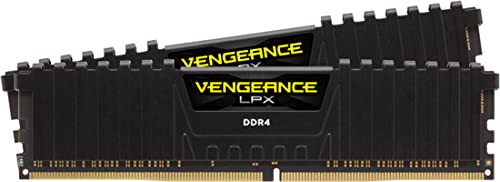
Same verdict on a DDR4 platform: Corsair Vengeance LPX DDR4-3600 (32 GB)
Specs
Capacity | 32 GB (2 x 16 GB) |
Speed | DDR4-3600 |
Timings | CL18-22-22-42 |
Voltage | 1.35 V |
Profiles | Intel XMP 2.0 |
Form factor | DIMM, dual-channel kit |
Heatspreader | Low-profile aluminium, no RGB |
Capacity
32 GB (2 x 16 GB)
Speed
DDR4-3600
Timings
CL18-22-22-42
Voltage
1.35 V
Profiles
Intel XMP 2.0
Form factor
DIMM, dual-channel kit
Heatspreader
Low-profile aluminium, no RGB
What it does well
The capacity answer does not change because your platform is older. On AM4 or LGA 1200, doubling a 16 GB pool costs a fraction of what the same move costs on DDR5, because DDR4 never joined the 2026 price run.
DDR4-3600 is the right stop rather than the fastest one. Ryzen 3000 and 5000 memory controllers land here cleanly, and 10th and 11th generation Intel is happy with it. The low-profile heatspreaders clear tall air coolers, which matters on builds of that age where the cooler was usually the upgrade.
What you give up
This is a terminal spend. DDR4 does not follow you to AM5 or LGA 1851, so if a platform swap is on the table inside a year, put the money there instead.
CL18 is a step behind the sharpest DDR4 bins, and on these machines memory is rarely the limit anyway. A Ryzen 5 5600 or a Core i5-11400F runs out of CPU headroom in a 64-player round before it runs out of memory bandwidth, which is worth knowing before you expect this kit to fix your frame times. Our Battlefield 6 CPU picks cover that half of the problem.
Who it's for
Owners of a DDR4 build that is otherwise fine for Battlefield 6 and staying put another year or two. If you are on 2 x 8 GB today and the game swaps mid-round, this is the cheapest real fix available to you.
Bottom line
If you already own 16 GB, keep it and play. If you are building new, buy 32 GB once and stop thinking about it. If you play at native 4K, or sit on a card with less than 16 GB of VRAM at the Extreme preset, 32 GB is not optional. If you are on DDR4 and staying there, the 32 GB kit is cheap by comparison and worth doing. And if your problem is stutter rather than capacity, look at VRAM and the game's own fixes first. Our RAM and storage guide covers the wider decision.
FAQ
Is 16 GB enough for Battlefield 6?
Yes. DICE lists 16 GB at both the minimum and the recommended tier, and measured allocation in a 16 GB configuration sits around 11 GB. That covers the campaign and 64-player Conquest at 1080p and 1440p. Run it as two sticks in dual channel rather than one, and you are done. The exceptions are native 4K and the Extreme preset on a card with less than 16 GB of VRAM.
Does Battlefield 6 need 32 GB of RAM?
Not to run well. 32 GB is the answer for three specific cases: native 4K without upscaling, a graphics card under 16 GB of VRAM at the Extreme preset, and gaming with a browser stack and a recorder open. If you are buying memory for a new build anyway, buy 32 GB, because the price gap against a 16 GB kit is much narrower than the capacity gap.
Why does Battlefield 6 stutter even when I have enough RAM?
Usually because the stutter is not a memory problem. Players have reported VRAM use climbing across a Conquest match until frame rates fall from around 100 to 110 fps into the 70s, and reports also point to a Windows standby-memory pattern on multiplayer. DICE has shipped a micro-stutter fix of its own. Update the game and your GPU driver, then drop the texture preset one step before you buy memory.
Does RAM speed matter in Battlefield 6?
Enough to matter, not enough to chase. DDR5-6000 CL30 is the target on a current platform, and DDR4-3600 at CL16 to CL18 on an older one. Both are the point where the memory controller is comfortable and the price curve is still sane. Kits above that buy a frame or two in the right benchmark and nothing you can feel in a round.
Do I need dual-channel RAM for Battlefield 6?
Yes, and the official minimum spec names it explicitly. A single 16 GB stick meets the capacity figure and misses the requirement, and single-channel memory costs real frames in a CPU-bound 64-player round. Buy a matched kit of two modules rather than one large stick. If you are already on one stick, adding a second identical module is the cheapest upgrade in this article.
Is 64 GB overkill for Battlefield 6?
Yes, for gaming. Battlefield 6 allocates about 14 GB when 64 GB is available, which tells you the engine expands into a large pool rather than needing one. 64 GB is a workload decision rather than a Battlefield 6 decision. If you edit video or run virtual machines on the same machine, buy it for that reason and enjoy the side effect.
Related Articles

Is 16GB RAM Enough for Gaming in 2026, or Do You Need 32GB?
Is 16GB enough for gaming in 2026? For most 1080p players, yes. Here is where 32GB is worth the upgrade: 1% lows, streaming, mods, and heavy multitasking.
Aug 19, 2026

How Much RAM for Escape from Tarkov? 32GB, Not 64GB (2026)
How much RAM for Escape from Tarkov? 32GB clears Streets without page-file stutter. Battlestate says 64GB, but here is when the step-up is actually real.
Aug 28, 2026

Best 32GB DDR5 RAM for Gaming (2026): 5 AM5 & Intel Picks
The best 32GB DDR5 RAM for gaming: 5 picks, matched to your CPU. AM5 wants EXPO 6000 CL30, LGA 1851 wants XMP 6400 CL32. Pick by platform, not spec sheet.
Sep 7, 2026

Best CPUs for Battlefield 6 (2026): 128-Player Multiplayer Picks
The best CPUs for Battlefield 6 ranked by 128-player Conquest performance. Five picks from budget to premium, with real benchmark data and 32GB RAM pairing advice.
May 25, 2026

Best GPUs for Battlefield 6 (2026): 4 Picks, 1080p to 4K
Best GPU for Battlefield 6 in 2026, matched to your resolution: RTX 5070 Ti and RX 9070 XT for 1080p and 1440p, RTX 5080 and 5090 for native 4K ultra.
Aug 12, 2026