Affiliate Disclosure: As an Amazon Associate we earn from qualifying purchases. Some links may earn us a commission at no cost to you.

How to Read a RAM Spec Sheet (2026): Speed, Timings, Rank
A DDR5 listing hands you eight numbers and two acronyms, and almost none of them are labeled in a way that helps you decide. DDR5-6000. CL30-38-38-96. 2x16GB. 1.35V. EXPO. Somewhere in there is the answer to whether this kit is right for your build.
This guide decodes every field on a modern RAM spec sheet, then gives you the one calculation that makes two kits directly comparable: true latency in nanoseconds. By the end you will be able to read any listing in under a minute and know whether it belongs in your cart.
Our top pick: G.Skill Flare X5 DDR5-6000 CL30
For an AM5 build, DDR5-6000 at CL30 is the target because 6000 MT/s is the fastest speed that keeps the memory controller and the memory clock running in step. This kit hits that target on a validated EXPO profile at 1.35 V, and it is the configuration the rest of this guide keeps pointing back to.

Quick picks
Kit | Best for | Speed and timings | Buy |
|---|---|---|---|
AM5 gaming builds | 6000 MT/s, CL30-38-38-96, EXPO | ||
Intel and mixed platforms | 6000 MT/s, CL30-36-36-76, XMP 3.0 | ||
Creator and mixed workloads | 6000 MT/s, CL30-40-40-96, EXPO |
- Best for
AM5 gaming builds
- Speed and timings
6000 MT/s, CL30-38-38-96, EXPO
- Buy
- Best for
Intel and mixed platforms
- Speed and timings
6000 MT/s, CL30-36-36-76, XMP 3.0
- Buy
- Best for
Creator and mixed workloads
- Speed and timings
6000 MT/s, CL30-40-40-96, EXPO
- Buy
What every number on the box means
Every field on a DDR5 listing answers a different question, and only three of them change how the kit performs. Here is the whole sheet, decoded, with the trap that rides along with each line.
What the listing says | What it means | When it matters | The trap |
|---|---|---|---|
DDR5-6000 / 6000MT/s | Transfers per second, not clock speed | Always. This is the headline number | The stick runs a 3000 MHz clock. "6000MHz" on a box is marketing shorthand |
CL30 | CAS latency in clock cycles before the first word arrives | Always. Pairs with speed to give real latency | A lower CL across different speeds does not mean a lower delay |
CL30-38-38-96 | CL, tRCD, tRP, and tRAS in that order | Tuning and stability headroom | Two kits with the same CL can carry very different tRCD and tRP |
2x16GB | Two modules, dual-channel | Always. Two sticks is the target config | A single 32 GB stick runs single-channel and costs real frames |
1.35V / 1.40V | Profile voltage | Thermals in cramped cases | Higher-voltage kits run warmer under a top-mounted radiator |
EXPO / XMP 3.0 | The stored profile the board reads | First boot after the build | Neither applies itself. A kit at stock runs the JEDEC fallback speed |
Single-rank / dual-rank | Physical rank per module | Memory controller load, not framerate | Every 32 GB DDR5 module is dual-rank. You cannot buy around it |
DDR5-6000 / 6000MT/s
- What it means
Transfers per second, not clock speed
- When it matters
Always. This is the headline number
- The trap
The stick runs a 3000 MHz clock. "6000MHz" on a box is marketing shorthand
CL30
- What it means
CAS latency in clock cycles before the first word arrives
- When it matters
Always. Pairs with speed to give real latency
- The trap
A lower CL across different speeds does not mean a lower delay
CL30-38-38-96
- What it means
CL, tRCD, tRP, and tRAS in that order
- When it matters
Tuning and stability headroom
- The trap
Two kits with the same CL can carry very different tRCD and tRP
2x16GB
- What it means
Two modules, dual-channel
- When it matters
Always. Two sticks is the target config
- The trap
A single 32 GB stick runs single-channel and costs real frames
1.35V / 1.40V
- What it means
Profile voltage
- When it matters
Thermals in cramped cases
- The trap
Higher-voltage kits run warmer under a top-mounted radiator
EXPO / XMP 3.0
- What it means
The stored profile the board reads
- When it matters
First boot after the build
- The trap
Neither applies itself. A kit at stock runs the JEDEC fallback speed
Single-rank / dual-rank
- What it means
Physical rank per module
- When it matters
Memory controller load, not framerate
- The trap
Every 32 GB DDR5 module is dual-rank. You cannot buy around it
True latency in nanoseconds
CAS latency is counted in clock cycles, not in time. That single fact is why a DDR5 kit rated CL30 is not twice as slow as a DDR4 kit rated CL16. Cycles get shorter as the clock climbs, so the same cycle count buys less delay on faster memory.
The conversion is one line of arithmetic. Divide the CAS latency by the rated transfer rate, then multiply by 2000. A DDR5-6000 CL30 kit works out to 10.0 nanoseconds. A DDR5-7200 CL40 kit lands at 11.1 nanoseconds, so the faster-sounding kit takes longer to deliver its first word. Run this once per candidate and the category sorts itself.
Latency is not the only thing that matters. Higher transfer rates move more data per second once that first word arrives, which is why bandwidth-hungry work still rewards faster kits. For gaming, the first-word delay is what shows up in 1% lows, and that is where the nanosecond number earns its keep.
Rated kit | CAS cycles | True latency | Read |
|---|---|---|---|
DDR5-6000 CL30 | 30 | 10.0 ns | The AM5 target |
DDR5-6400 CL32 | 32 | 10.0 ns | Identical delay, more bandwidth, worse ratio on AM5 |
DDR5-7200 CL40 | 40 | 11.1 ns | Faster on paper, slower to the first byte |
DDR5-8000 CL38 | 38 | 9.5 ns | Lower on paper, but the controller ratio eats the gain on AM5 |
DDR4-3600 CL16 | 16 | 8.9 ns | Why DDR4 kits still feel snappy despite the small numbers |
DDR5-6000 CL30
- CAS cycles
30
- True latency
10.0 ns
- Read
The AM5 target
DDR5-6400 CL32
- CAS cycles
32
- True latency
10.0 ns
- Read
Identical delay, more bandwidth, worse ratio on AM5
DDR5-7200 CL40
- CAS cycles
40
- True latency
11.1 ns
- Read
Faster on paper, slower to the first byte
DDR5-8000 CL38
- CAS cycles
38
- True latency
9.5 ns
- Read
Lower on paper, but the controller ratio eats the gain on AM5
DDR4-3600 CL16
- CAS cycles
16
- True latency
8.9 ns
- Read
Why DDR4 kits still feel snappy despite the small numbers
EXPO, XMP, and the profile you have to switch on
Neither profile turns itself on. A kit rated 6000 MT/s dropped into a fresh build boots at the JEDEC fallback speed, typically 4800 or 5600 MT/s depending on the platform. The buyer paid for 6000 and is running well under it until someone opens BIOS and flips one setting. This is the most common RAM mistake in a first build, and it costs nothing to fix.
EXPO is AMD's profile standard. It is open and royalty-free, which is why nearly every AM5-targeted kit carries one. XMP 3.0 is Intel's, it is licensed, and it can hold more than one profile on the module so a board has something to fall back to. Both do the same job: hand the motherboard a validated set of frequencies, timings, and voltages so it does not have to guess.
An XMP kit will physically run on an AM5 board, and most AM5 boards can read and apply an XMP profile. What you give up is the validation. EXPO kits are tested against AMD's memory controller behavior, and when a stubborn kit refuses to post at its rated speed, that sticker is the difference between a BIOS toggle and an evening of manual timing entry. On AM5, buy EXPO. On Intel's Core Ultra platform, buy XMP.
Rank, capacity, and how many sticks
Two sticks, always. A single 32 GB module runs the memory subsystem in single-channel mode and gives up real frames for nothing in return. Four sticks load the memory controller harder than two and often force a lower stable speed, so a 2x32 GB kit beats a 4x16 GB kit at the same capacity. The one reason to run four is that you already own two and want more capacity cheaply.
Rank describes how many independent sets of chips sit on a module. Every 16 GB DDR5 module is single-rank and every 32 GB DDR5 module is dual-rank, so rank is not a choice you make directly. It follows from the capacity you buy. DDR5 already doubled the bank count against DDR4, so the parallelism dual-rank used to buy is largely baked in, and the gaming difference between the two is small.
Capacity is the decision that carries weight. 32 GB is the floor for a 2026 gaming build and covers a game plus a browser plus a chat client without touching the page file. 64 GB is for people who edit, stream, run virtual machines, or keep a local model resident. We covered how much RAM a 2026 gaming build really needs separately, because the honest answer depends on what else is running.
Specs at a glance
Kit | Capacity | Speed | Timings | Voltage | Profile | Rank |
|---|---|---|---|---|---|---|
32 GB (2x16) | 6000 MT/s | CL30-38-38-96 | 1.35 V | AMD EXPO | Single | |
32 GB (2x16) | 6000 MT/s | CL30-36-36-76 | 1.40 V | Intel XMP 3.0 | Single | |
64 GB (2x32) | 6000 MT/s | CL30-40-40-96 | 1.40 V | AMD EXPO | Dual |
- Capacity
32 GB (2x16)
- Speed
6000 MT/s
- Timings
CL30-38-38-96
- Voltage
1.35 V
- Profile
AMD EXPO
- Rank
Single
- Capacity
32 GB (2x16)
- Speed
6000 MT/s
- Timings
CL30-36-36-76
- Voltage
1.40 V
- Profile
Intel XMP 3.0
- Rank
Single
- Capacity
64 GB (2x32)
- Speed
6000 MT/s
- Timings
CL30-40-40-96
- Voltage
1.40 V
- Profile
AMD EXPO
- Rank
Dual
How we picked
Start with the platform, not the price. Every CPU family has a transfer rate where the memory controller and the memory clock run in step, and going past it drops the controller into a slower ratio. On AM5 that point sits at 6000 MT/s, which is why DDR5-6000 shows up in AMD's own guidance and in nearly every AM5 kit on the shelf.
Testing at TechSpot found DDR5-8000 delivered up to a 12 percent gain in one title at 1080p over a DDR5-6000 CL30 kit, but only around 2 percent against a tighter DDR5-6000 CL26 kit. That is the shape of the trade: most of what higher clocks buy you can be had by tightening timings at the speed your controller likes.
Once the speed is set, take the lowest true latency available at that speed. That is what CL30 is doing in all three picks below. Capacity comes last, because it is the one spec where overbuying is easy and pointless. If you are pairing memory with an X3D chip, the stacked cache absorbs most memory misses, so memory speed returns less there than on any other Ryzen part. Our kits validated for the 9800X3D go deeper on that pairing, and the wider memory and storage framework covers where storage fits alongside it.
Best overall: G.Skill Flare X5 DDR5-6000 CL30
Specs
Capacity | 32 GB (2x16 GB) |
Rated speed | 6000 MT/s |
Timings | CL30-38-38-96 |
Voltage | 1.35 V |
Profile | AMD EXPO |
Rank | Single-rank per module |
True latency | 10.0 ns |
Capacity
32 GB (2x16 GB)
Rated speed
6000 MT/s
Timings
CL30-38-38-96
Voltage
1.35 V
Profile
AMD EXPO
Rank
Single-rank per module
True latency
10.0 ns
What it does well
This is the kit that boots. Set the EXPO profile in BIOS, save, and the board comes up at 6000 MT/s with the memory controller and the memory clock in a 1:1 ratio. No manual FCLK entry, no timing table to type in, no second attempt.
The 1.35 V profile is the lowest of the three picks, and that matters more than it sounds in a case with a top-mounted radiator sitting directly over the DIMM slots. Less voltage, less heat radiating into that space.
The heat spreader is short. Tall RAM and tall air coolers fight over the same few millimeters above the first DIMM slot, and this kit stays out of that argument entirely.
What you give up
There is no XMP 3.0 profile here. Drop it into an Intel board and you get the JEDEC fallback speed until you enter timings yourself. That is a real cost if you might switch platforms, and it is the entire reason the Corsair pick exists below.
32 GB is the floor, not headroom. It is the right amount for a gaming build in 2026, and it will feel tight the first time you keep a video export running alongside a game. There is also no lighting, which is a feature right up until you have built a case around a color theme.
Reports suggest G.Skill ships several Flare X5 SKUs at 6000 MT/s under near-identical listing titles, some with a tighter CL30-36-36-96 set. The part number in the title is the only reliable way to confirm which one is in the cart.
Who it's for
AM5 builders who want the correct answer without reading a tuning forum. If you are putting a Ryzen chip into a board and want memory that runs at its rated speed on the first boot, this is the one.
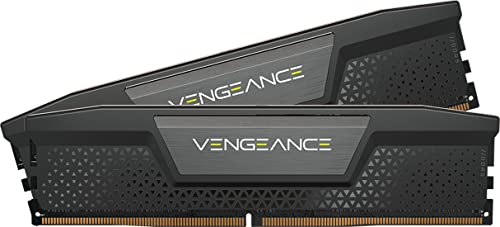
Best for Intel and mixed platforms: Corsair Vengeance DDR5-6000 CL30
Specs
Capacity | 32 GB (2x16 GB) |
Rated speed | 6000 MT/s |
Timings | CL30-36-36-76 |
Voltage | 1.40 V |
Profile | Intel XMP 3.0 |
Rank | Single-rank per module |
True latency | 10.0 ns |
Capacity
32 GB (2x16 GB)
Rated speed
6000 MT/s
Timings
CL30-36-36-76
Voltage
1.40 V
Profile
Intel XMP 3.0
Rank
Single-rank per module
True latency
10.0 ns
What it does well
Same 6000 MT/s target, carried on an XMP 3.0 profile. Intel boards read that natively, so a Core Ultra or 14th-gen build gets its rated speed from one BIOS toggle, the same way an AM5 build does with EXPO.
The secondary timings are the tightest of the three picks. CL30-36-36-76 pulls tRCD and tRP in against the Flare X5's 38, and tRAS at 76 against 96 is a meaningful step. Same 10.0 nanosecond first-word delay, less time held open on each row.
XMP 3.0 stores more than one profile, so a board can drop to a slower validated set instead of falling all the way back to JEDEC when the top profile does not hold. The spreader is low-profile, so cooler clearance is a non-issue.
What you give up
1.40 V against the Flare X5's 1.35 V. In a well-ventilated case that gap disappears. In a small-form-factor build with a radiator over the DIMMs, it is one more heat source in a space that has none to spare.
This kit runs on AM5 and most AM5 boards will apply the XMP profile. What you do not get is AMD's validation, so if it refuses to post at 6000 you are entering timings by hand rather than choosing a different profile.
Corsair's Vengeance line spans a long list of SKUs at this speed, and several ship as generic "Up to 6000MHz" listings that cover more than one timing bin. Buyers have flagged that the model number is the only way to be certain which bin arrives.
Who it's for
Intel builders on LGA 1851 or LGA 1700, and anyone who expects this memory to outlive the platform it is going into first.
Best for capacity: G.Skill Trident Z5 Neo RGB (64 GB)

Specs
Capacity | 64 GB (2x32 GB) |
Rated speed | 6000 MT/s |
Timings | CL30-40-40-96 |
Voltage | 1.40 V |
Profile | AMD EXPO |
Rank | Dual-rank per module |
True latency | 10.0 ns |
Capacity
64 GB (2x32 GB)
Rated speed
6000 MT/s
Timings
CL30-40-40-96
Voltage
1.40 V
Profile
AMD EXPO
Rank
Dual-rank per module
True latency
10.0 ns
What it does well
Doubling capacity usually means loosening timings, and this kit does not. CL30 at 6000 MT/s across 2x32 GB gives the same first-word delay as the 32 GB picks, which most 64 GB kits do not manage.
What 64 GB buys is headroom under simultaneous load. A large project file open, a game running, twenty browser tabs, and a chat client: that is the workload where a 32 GB build starts leaning on the page file, and the cost shows up in frametimes rather than in average FPS.
It carries an EXPO profile, so on AM5 it is still a one-toggle setup when the CPU sample cooperates. Our 64 GB kits for creator workloads roundup covers the rest of the field at this capacity.
What you give up
Every 32 GB DDR5 module is dual-rank, and dual-rank loads the memory controller harder. Reports suggest 2x32 GB kits are the ones most likely to need a manual FCLK entry on AM5 rather than posting clean on EXPO alone. A good CPU sample handles it. A marginal one needs help.
tRCD and tRP loosen to 40 against the Flare X5's 38, and the profile runs at 1.40 V. Neither is a large penalty, but this is not a free step up from the 32 GB kit.
The RGB is not optional on this SKU, so a lighting-free build inherits lighting until the control software is installed and told otherwise. And for a machine that only games, the second 32 GB does close to nothing.
Who it's for
Editors, streamers, and anyone running virtual machines or a local model alongside a game. If the machine is only for gaming, buy the 32 GB kit and put the difference into storage or the GPU.
Bottom line
If you are building on AM5, buy the G.Skill Flare X5 DDR5-6000 CL30. If you are on Intel, buy the Corsair Vengeance DDR5-6000 CL30 for the XMP profile. If you edit or stream, step up to the G.Skill Trident Z5 Neo RGB 64 GB kit and accept the slightly looser secondaries. If you are still on DDR4, the arithmetic in this guide holds, and our DDR4 gaming guide covers that platform. Whichever you buy, turn the profile on in BIOS before you benchmark anything.
FAQ
Is DDR5-6000 CL30 still the right target in 2026?
On AM5, yes. DDR5-6000 is the highest speed where the memory controller and the memory clock still run in a 1:1 ratio on Ryzen 7000 and 9000 parts, and dropping out of that ratio usually costs more latency than the extra bandwidth returns. Intel platforms tolerate higher speeds more gracefully, so a Core Ultra build can use 6400 or above productively. If you want one answer that holds on both, 6000 CL30 is it.
What does CL30-38-38-96 actually mean?
Those are four primary timings in a fixed order: CAS latency, tRCD, tRP, and tRAS, all counted in clock cycles. CL is the delay before the first word of data arrives once a column is addressed. tRCD and tRP govern opening and closing a row. tRAS is the minimum a row stays open. CL is the headline because it gates every read, but two kits with the same CL and different tRCD behave differently under load.
Can I use an XMP kit on an AMD AM5 board?
Usually. The modules are standard DDR5 and most AM5 boards can read an XMP profile and apply it. What you lose is validation against AMD's memory controller, so if the kit will not post at its rated speed you are entering timings manually instead of choosing a different profile. For a new AM5 build, an EXPO kit removes that risk for no extra effort. For a kit you already own, try XMP before assuming it will fail.
Does a lower CAS latency number always mean faster RAM?
No, because CAS latency is counted in cycles rather than in time. A DDR5-8000 CL38 kit carries a higher CL number than a DDR5-6000 CL30 kit but a shorter real delay, because each cycle at 8000 MT/s is shorter. Convert both to nanoseconds before comparing: divide CL by the rated transfer rate and multiply by 2000. Comparing raw CL numbers across different speeds is the most common way buyers talk themselves into the wrong kit.
Should I buy 2x16 GB or 2x32 GB?
2x16 GB for a gaming build. 32 GB covers a modern game, a browser, and a chat client with room left over, and the second 32 GB does close to nothing for framerate. Step up to 2x32 GB when something else stays resident: video editing, streaming while playing, virtual machines, or a local model. Buy two sticks either way. A single high-capacity module runs single-channel and gives up real performance for no benefit.
Do I have to turn EXPO or XMP on myself?
Yes, and this is where most of the paid-for speed goes missing. A fresh build boots memory at the JEDEC fallback rate, typically 4800 or 5600 MT/s, whatever the kit is rated for. Enter BIOS, find the profile setting, select EXPO or XMP, save, and reboot. Then verify in Task Manager or CPU-Z, remembering those tools report clock rather than transfers, so a 6000 MT/s kit reads as 3000 MHz.
Related Articles

How to Choose RAM and Storage
A builder's framework for RAM and storage: match the platform, buy capacity over speed, and put your money in the right SSD tier.
Jun 29, 2026

Best DDR5 RAM for the Ryzen 7 9800X3D (2026 Picks)
The best DDR5 RAM for the Ryzen 7 9800X3D: why DDR5-6000 CL30 EXPO is the AM5 sweet spot, the exact 32GB and 64GB kits to buy, and how to dodge the 4-DIMM trap.
Jul 8, 2026

How Much RAM Do You Need for Gaming in 2026? (Guide)
How much RAM do you need for gaming in 2026? 16GB still holds up for esports, but 32GB is the real sweet spot for modern AAA. Pick the right kit by use case.
Jun 28, 2026

Best 64GB DDR5 RAM Kits for Content Creators and Workstation Builders (2026)
The best 64GB DDR5 RAM kits for content creators, workstation builders, and hybrid creator-gamers — 2x32GB EXPO/XMP picks segmented by workload tier, with AM5 2-DIMM stability guidance and Intel CUDIMM context.
May 25, 2026

Is 144Hz Enough, or Do You Need 240Hz for Gaming? (2026)
Is 144Hz enough for gaming, or do you need 240Hz? Our verdict, the monitor to buy at each tier, and the frame rate your GPU has to sustain to earn it.
Aug 7, 2026