Affiliate Disclosure: As an Amazon Associate we earn from qualifying purchases. Some links may earn us a commission at no cost to you.

RTX 5060 vs RX 9060 XT (2026): 8GB vs 16GB Decides It
The Radeon RX 9060 XT wins the benchmark: more raw frames at 1080p and 1440p, and 16GB of VRAM against the RTX 5060's 8GB. The RTX 5060 wins the ecosystem: more mature ray tracing, DLSS 4 upscaling, and NVENC for streaming. Both land in the same budget bracket in 2026, which is why the honest answer here cuts against the obvious one.
So the question is not which card is faster. It is which kind of buyer you are. The VRAM split is the part most people underweight, and it decides more than the few percent of average FPS ever will.
At a glance
Card | VRAM | Boost clock | Power | Buy |
|---|---|---|---|---|
16 GB GDDR6 | 3290 MHz | 182 W | ||
8 GB GDDR7 | 2.53 GHz | 145 W |
- VRAM
16 GB GDDR6
- Boost clock
3290 MHz
- Power
182 W
- Buy
- VRAM
8 GB GDDR7
- Boost clock
2.53 GHz
- Power
145 W
- Buy
Where each one wins
Find your scenario, then buy the card that wins it. If your use case spans more than one row, weight the row that describes what you do most.
Scenario | Winner | Why | Get it |
|---|---|---|---|
Pure raster FPS at 1080p and 1440p | Sapphire Pulse RX 9060 XT 16GB | Around 6 percent more raw frames, plus a 16GB buffer that holds frame-times steady in VRAM-heavy titles. | |
Future-proofing and modern Unreal Engine 5 games | Sapphire Pulse RX 9060 XT 16GB | 8GB is the texture cliff. 16GB removes it. A VRAM shortfall never gets better with time. | |
Ray-tracing showcase titles like Cyberpunk 2077 and Alan Wake 2 | MSI RTX 5060 Ventus 2X OC | NVIDIA wins ray tracing per clock, and these games get the full DLSS 4 feature suite first. | |
Best upscaling image quality and frame gen | MSI RTX 5060 Ventus 2X OC | DLSS 4's transformer model has the edge and the widest native game support. | |
Streaming with NVENC AV1 or CUDA creative work | MSI RTX 5060 Ventus 2X OC | NVENC and CUDA are NVIDIA-only levers that flip the value math for creators. | |
Linux gaming or local AI dabbling | Sapphire Pulse RX 9060 XT 16GB | Rock-solid open drivers, and a 16GB pool the 8GB card simply cannot match for local models. | |
Best overall value for most buyers | Sapphire Pulse RX 9060 XT 16GB | Wins the benchmark and the VRAM for similar money. The default unless one row above is your whole use case. |
Pure raster FPS at 1080p and 1440p
- Winner
Sapphire Pulse RX 9060 XT 16GB
- Why
Around 6 percent more raw frames, plus a 16GB buffer that holds frame-times steady in VRAM-heavy titles.
- Get it
Future-proofing and modern Unreal Engine 5 games
- Winner
Sapphire Pulse RX 9060 XT 16GB
- Why
8GB is the texture cliff. 16GB removes it. A VRAM shortfall never gets better with time.
- Get it
Ray-tracing showcase titles like Cyberpunk 2077 and Alan Wake 2
- Winner
MSI RTX 5060 Ventus 2X OC
- Why
NVIDIA wins ray tracing per clock, and these games get the full DLSS 4 feature suite first.
- Get it
Best upscaling image quality and frame gen
- Winner
MSI RTX 5060 Ventus 2X OC
- Why
DLSS 4's transformer model has the edge and the widest native game support.
- Get it
Streaming with NVENC AV1 or CUDA creative work
- Winner
MSI RTX 5060 Ventus 2X OC
- Why
NVENC and CUDA are NVIDIA-only levers that flip the value math for creators.
- Get it
Linux gaming or local AI dabbling
- Winner
Sapphire Pulse RX 9060 XT 16GB
- Why
Rock-solid open drivers, and a 16GB pool the 8GB card simply cannot match for local models.
- Get it
Best overall value for most buyers
- Winner
Sapphire Pulse RX 9060 XT 16GB
- Why
Wins the benchmark and the VRAM for similar money. The default unless one row above is your whole use case.
- Get it
Benchmarks
These are representative 1080p figures drawn from independent reviewer coverage. Treat them as anchors for the gap between the two cards, not exact targets for your specific game and settings.
Average FPS across a mix of modern titles in standard rendering.
- 94 FPS
- RTX 506083 FPS
Native ray-tracing average with no upscaling.
- 47 FPS
- RTX 506044 FPS
Both cards clear 144 FPS comfortably in lighter competitive games.
- RX 9060 XT240 FPS
- RTX 5060240 FPS
Where the 8GB ceiling shows up in texture-streaming behavior.
- RX 9060 XT70 FPS
- RTX 506045 FPS
Is 8GB enough in 2026?
Not comfortably, and this is the axis the whole comparison turns on. At 1080p with high textures, several 2026 releases already push past 8GB, and the moment a card runs out of buffer it does not lose a few frames, it stutters. The RTX 5060 is locked to 8GB, so it carries that ceiling for the life of the build. The 9060 XT 16GB does not.
The trap runs both ways. AMD also sells an 8GB RX 9060 XT, and it is the cheaper listing you will see first. It gives up the one advantage that makes the AMD card the default pick here, so it is not the card this comparison recommends. If the budget only reaches an 8GB board, the RTX 5060 at least pairs that buffer with DLSS 4 and better ray tracing. If it reaches 16GB, buy the 16GB.
Does DLSS 4 close the FPS gap?
Partly, and only in the games that support it. DLSS 4's transformer-model upscaling at 1080p Quality is genuinely hard to tell apart from native, and in NVIDIA-favored titles like Cyberpunk 2077 it can pull the RTX 5060 ahead of where its raw frames land. FSR 4 closed most of that quality gap on RDNA 4, so the 9060 XT is no longer giving up obvious image quality the way older AMD cards did, but DLSS 4 still has broader native support and a head start in the marquee ray-tracing showcases.
Multi-Frame Gen is the part to read carefully. It is a smoothness multiplier, not a performance level. It turns a 60 FPS base into a high-refresh experience on the right monitor. It does not turn 30 into 120. Below a 60 FPS base you feel the added latency and see artifacts on fast motion, so the cards that benefit most from frame gen are the ones already producing good native frames. On a budget card, compare native or Quality-upscaled numbers first, then add frame gen on top mentally.
Sapphire Pulse RX 9060 XT 16GB
The 9060 XT is the card that wins on the things that decide a budget build: raw frames and VRAM. The Sapphire Pulse is the quiet, efficient, no-light-show version of it, and it is the one most builders should default to.

Specs
Chip | Radeon RX 9060 XT (RDNA 4, Navi 44) |
VRAM | 16 GB GDDR6 (128-bit) |
Boost clock | 3290 MHz |
Interface | PCIe 5.0 x16 |
Power | 182 W (single 8-pin) |
Outputs | 2x HDMI 2.1b, 1x DisplayPort 2.1a |
Cooling | Dual-X, Honeywell PTM7950 TIM, Zero RPM idle |
Chip
Radeon RX 9060 XT (RDNA 4, Navi 44)
VRAM
16 GB GDDR6 (128-bit)
Boost clock
3290 MHz
Interface
PCIe 5.0 x16
Power
182 W (single 8-pin)
Outputs
2x HDMI 2.1b, 1x DisplayPort 2.1a
Cooling
Dual-X, Honeywell PTM7950 TIM, Zero RPM idle
What it does well
It wins raw raster at 1080p and 1440p, and the 16GB pool means the texture-streaming cliff that hits 8GB cards in modern Unreal Engine 5 titles simply is not your problem. Buyers coming from older cards report it powering modern games at high settings without breaking a sweat, and several note it holds 1440p ultra where they expected to compromise.
It runs the full PCIe 5.0 x16 interface, not the cut-down x8 link the older RX 7600 was stuck on, so it does not choke when paired with an older platform. Sapphire's cooler keeps edge temperatures in the mid-to-high 50s Celsius under typical load, helped by a pre-applied Honeywell PTM7950 thermal pad, and the fans sit idle until the card needs them.
The 16GB buffer also makes it a credible side-hustle card. Linux support is rock solid out of the box, and buyers running local LLMs and ComfyUI report the memory pool handling diffusion and inference work that an 8GB card can't load. That is not the headline use case, but it is a real bonus at this price.
What you give up
Ray tracing per clock still trails NVIDIA, and the games built as ray-tracing showcases tend to get NVIDIA's full feature set first. DLSS 4 has broader native support than FSR 4, so in a library that leans on those marquee titles, the RTX 5060 can feel more capable than its raw frames suggest. For how the two upscalers compare outside this price tier, see our DLSS vs FSR verdict for 2026.
There is no CUDA, which closes the door on CUDA-locked creative and AI tools, and NVENC AV1 encode remains NVIDIA's advantage for streamers. AMD's driver control panel also behaves differently from GeForce, and first-time switchers occasionally trip over its power-plan quirks. One more small note from owners: AMD memory can run warm, into the high 60s or low 70s Celsius, so a custom fan curve instead of the silent Zero RPM default is worth setting if you push the card.
Who it's for
Buy the 9060 XT if you are a 1080p or 1440p raster gamer who wants the most frames per dollar and a VRAM buffer that ages well. It fits the player who is not married to one DLSS-heavy title and who values a quiet, efficient card that doubles as a Linux-friendly local-AI machine. If that describes you, the screen is the next decision, and our monitor pairings for the RX 9060 XT sort panels by the refresh tier this card actually feeds.
MSI RTX 5060 Ventus 2X OC
The RTX 5060 is the feature card. It loses the raw-frames fight, but it brings the most mature ray tracing at this tier and the upscaling stack that NVIDIA buyers come for. The MSI Ventus 2X OC is the mainstream, compact, dual-fan version of it.
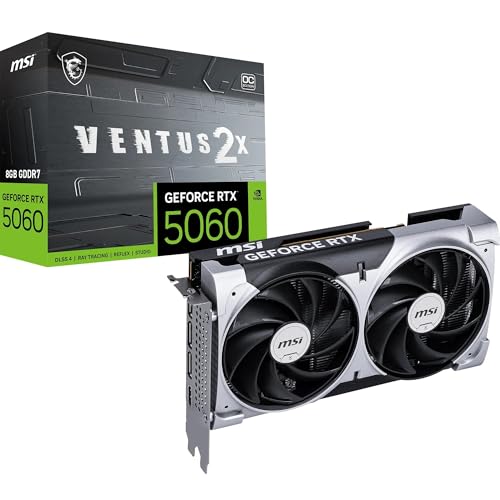
Specs
Chip | GeForce RTX 5060 (Blackwell) |
VRAM | 8 GB GDDR7 (128-bit, 28 Gbps) |
Boost clock | 2.53 GHz (factory OC) |
Interface | PCIe 5.0 x8 |
Power | 145 W (single 8-pin, 550 W PSU rec.) |
Outputs | 3x DisplayPort 2.1b, 1x HDMI 2.1b |
Length | 197 mm dual-fan (TORX Fan 5.0, Zero Frozr) |
Chip
GeForce RTX 5060 (Blackwell)
VRAM
8 GB GDDR7 (128-bit, 28 Gbps)
Boost clock
2.53 GHz (factory OC)
Interface
PCIe 5.0 x8
Power
145 W (single 8-pin, 550 W PSU rec.)
Outputs
3x DisplayPort 2.1b, 1x HDMI 2.1b
Length
197 mm dual-fan (TORX Fan 5.0, Zero Frozr)
What it does well
Ray tracing is the clearest win. At this tier the RTX 5060 handles RT effects with more headroom than the AMD card, and DLSS 4 Quality upscaling at 1080p is genuinely hard to distinguish from native. In the games that support the full DLSS 4 suite, that combination can lift the card above where its raw frames sit.
The GDDR7 memory brings strong bandwidth, and NVENC AV1 encode is the deciding factor for anyone streaming to Twitch or YouTube. Feature support arrives day one on NVIDIA hardware more often than not, so new releases tend to get DLSS and ray tracing without waiting. The card draws a modest 145 W and the 197 mm MSI board fits comfortably in small cases, with TORX Fan 5.0 cooling that idles silent under light load.
What you give up
The 8GB of VRAM is the headline compromise, and it is the reason this is not the default pick. Modern 1440p titles like The Last of Us Part I, Hogwarts Legacy, and Forza push past 8GB, and reviewers have flagged texture-streaming stutter or auto-dropped texture quality when that happens. It is a card that wants to stay at 1080p to stay happy.
It also loses around 6 percent of raw raster at 1080p to the cheaper 9060 XT, and it runs a PCIe 5.0 x8 link, which matters more on older boards with less bus headroom. Lean on Multi-Frame Gen to paper over the frame deficit and you run into the latency-and-artifacts problem below a 60 FPS base. Frame gen makes a good base better. It does not rescue a weak one.
Who it's for
Buy the RTX 5060 if you live in DLSS-and-RT showcase titles like Cyberpunk 2077 and Alan Wake 2, if you stream and need NVENC AV1, or if you are already inside the NVIDIA ecosystem and value feature maturity over raw frames and VRAM headroom. Keep it on a 1080p monitor and it does its best work. If the 5060 is the pick, the panel is the other half of that decision. Our monitor pairing guide for the RTX 5060 covers which 1080p high-refresh panels match the frame-rate band this card produces.
Which one should you buy?
The raster gamer on a 1080p or 1440p monitor who wants the most frames and the least worry should buy the 9060 XT. It wins the benchmark, and the 16GB buffer keeps it smooth in the exact modern titles that punish an 8GB card. That same raster-versus-features split decides the brand question one tier up as well, and we break down how AMD and Nvidia compare at every resolution with the winning card named for 1080p, 1440p, and 4K.
The ray-tracing and streaming buyer should take the RTX 5060. If your library is built around Cyberpunk 2077 and Alan Wake 2, or you stream with NVENC AV1, the feature set earns its keep in a way raw frames don't capture.
The Linux user or local-AI dabbler should buy the 9060 XT. Open drivers that work out of the box plus a 16GB memory pool make it the obvious tool for that job.
The committed NVIDIA upgrader who already owns a GeForce card and wants DLSS 4 without relearning a driver stack will be happy on the RTX 5060, as long as they stay at 1080p and accept the VRAM ceiling.
Bottom line
For most builders, the RX 9060 XT 16GB is the card to buy. It wins the raw frames, it wins the VRAM, and the 16GB buffer is the difference between a card that ages gracefully and one that starts dropping textures inside two years. If you play ray-tracing showcases, stream with NVENC, or need CUDA, the RTX 5060 is the right call and a genuinely good 1080p card. If you are not sure, you are probably the raster gamer, and that means the 9060 XT.
FAQ
Is the RX 9060 XT better than the RTX 5060?
For raw gaming performance, yes. The RX 9060 XT averages around 6 percent more frames at 1080p and carries 16GB of VRAM against the RTX 5060's 8GB, which keeps it smooth in modern titles that the 8GB card stutters in. The RTX 5060 is better at ray tracing and brings DLSS 4, so it wins for buyers who play RT-heavy games or stream. For most budget builders, the 9060 XT is the stronger overall card.
Is 8GB of VRAM enough for 1080p gaming in 2026?
At 1080p it is usually fine, but it is the floor, not the comfortable choice. Many modern titles allocate more than 8GB at high textures even at 1080p, and at 1440p several games cross 8GB and force texture-streaming stutter. If you want a card that stays smooth as games get heavier, 16GB is the safer buy, which is the 9060 XT's main argument.
Does the RTX 5060 beat the RX 9060 XT in ray tracing?
Per clock, NVIDIA still has the ray-tracing edge, and the showcase titles tend to favor it. In raw native numbers the gap is narrow, and the 9060 XT's 16GB can actually hold up better in heavier RT scenes that lean on VRAM. The bigger NVIDIA advantage is DLSS 4, which boosts ray-traced framerates with cleaner upscaling than the AMD card gets in those specific games.
Is DLSS 4 better than FSR 4?
DLSS 4's transformer model has a small image-quality edge and broader native game support, especially in the marquee ray-tracing titles. FSR 4 closed most of the gap on RDNA 4 and is genuinely good at 1080p and 1440p Quality, so the 9060 XT is no longer giving up obvious image quality. If your favorite games support DLSS 4 natively, that is a real point for the RTX 5060.
Which is better for streaming, the RTX 5060 or the RX 9060 XT?
The RTX 5060, because of NVENC AV1 encode. NVIDIA's hardware encoder is the established pick for streaming to Twitch and YouTube, and AV1 support helps quality at a given bitrate. The 9060 XT can stream too, but if streaming is a core part of what you do, the NVIDIA card is the safer choice.
Should I buy the RX 9060 XT or wait for the RTX 5060 Ti 16GB?
If your budget can reach it, the RTX 5060 Ti 16GB is a step up that pairs NVIDIA's feature set with a 16GB buffer, and it is worth comparing directly. But it costs more, and the 9060 XT delivers the strongest value at its price. If you want the best frames per dollar today, the 9060 XT is the buy. If you specifically want NVIDIA features plus 16GB, look at the Ti.
Related Articles

RTX 5060 Ti vs RX 9060 XT: 8GB vs 16GB Verdict for 2026
RTX 5060 Ti vs RX 9060 XT: we call the winner at 1080p and at 1440p, and say when the 8GB SKUs are a trap. Straight buy advice for 2026, no spec-sheet filler.
Sep 8, 2026

Best GPUs Under $500 for 1440p Gaming (2026): 5 Picks by VRAM
Five sub-$500 GPUs for 1440p, segmented by monitor pairing and VRAM ceiling. Honest street pricing, the 8GB-versus-16GB call, and which card matches your library.
May 19, 2026

CPU Cooler Clearance: 4 Numbers That Decide Fit (2026)
CPU cooler clearance explained: what your case spec really means, the margin to leave, RAM height under the fan, and two coolers that fit tight builds.
Sep 17, 2026

Best CPU for Cities: Skylines II (2026): 5 Picks by Tier
The best CPU for Cities: Skylines II is the one that holds full simulation speed as your city grows. Five picks ranked by the city size each sustains.
Sep 18, 2026

Is 550W Enough for an RX 9070 GRE? 650W Math (2026)
Is 550W enough for an RX 9070 GRE? The card pulls 220W measured, so the answer turns on your CPU. Here is the full wattage math and which PSU to buy instead.
Sep 18, 2026