Affiliate Disclosure: As an Amazon Associate we earn from qualifying purchases. Some links may earn us a commission at no cost to you.

RTX 5070 Ti: Do You Need a Native 12V-2x6 Cable? (2026)
Do you need a native 12V-2x6 cable for an RTX 5070 Ti? No. The adapter in the box is rated for exactly the power this card draws, and the connector failures that made the news happened on 600W-class hardware, not on a 300W one.
There is one setup where the answer changes, and it is not about safety. If your power supply already has a 16-pin port, a single native run is tidier than three cables feeding a splitter. Here is the arithmetic, and the specific thing to buy if your setup is the exception.
At a glance
Option | Rated for | Works when | Verdict |
|---|---|---|---|
Bundled 12V-2x6 to 2x 8-pin adapter | 300W, two 8-pin inputs at 150W each | Your PSU has two spare 8-pin PCIe connectors | Fine for a 5070 Ti. Buy nothing. |
Native 12V-2x6 cable from an ATX 3.1 PSU | 600W on a single run | Your PSU has a 16-pin PSU-side port | Tidier and fewer joints, not safer at this wattage. |
Aftermarket native 12V-2x6 cable | 600W on a single run | Your PSU has a 16-pin port and the stock cable fights you | A routing upgrade, not a safety fix. |
Bundled 12V-2x6 to 2x 8-pin adapter
- Rated for
300W, two 8-pin inputs at 150W each
- Works when
Your PSU has two spare 8-pin PCIe connectors
- Verdict
Fine for a 5070 Ti. Buy nothing.
Native 12V-2x6 cable from an ATX 3.1 PSU
- Rated for
600W on a single run
- Works when
Your PSU has a 16-pin PSU-side port
- Verdict
Tidier and fewer joints, not safer at this wattage.
Aftermarket native 12V-2x6 cable
- Rated for
600W on a single run
- Works when
Your PSU has a 16-pin port and the stock cable fights you
- Verdict
A routing upgrade, not a safety fix.
Verdict by setup: does your RTX 5070 Ti need a native 12V-2x6 cable?
Your setup | What to do | Why | What to buy |
|---|---|---|---|
ATX 3.1 PSU with a 16-pin port | Use the cable that came with the PSU | Native run, rated 600W, already in the box | Nothing to buy |
ATX 3.0 PSU with a 12VHPWR port | Use the cable that came with the PSU | The cable side is identical; the revision is in the socket | Nothing to buy |
Older ATX 2.x PSU, two spare 8-pin PCIe | Use the bundled adapter | 300W of adapter capacity against a 300W card | Nothing to buy |
Replacing the power supply anyway | Buy a native ATX 3.1 unit | One run instead of three cables and a splice | |
Native port, stiff or damaged stock cable | Swap the cable, keep the PSU | Softer sleeving and no external sense wires |
ATX 3.1 PSU with a 16-pin port
- What to do
Use the cable that came with the PSU
- Why
Native run, rated 600W, already in the box
- What to buy
Nothing to buy
ATX 3.0 PSU with a 12VHPWR port
- What to do
Use the cable that came with the PSU
- Why
The cable side is identical; the revision is in the socket
- What to buy
Nothing to buy
Older ATX 2.x PSU, two spare 8-pin PCIe
- What to do
Use the bundled adapter
- Why
300W of adapter capacity against a 300W card
- What to buy
Nothing to buy
Replacing the power supply anyway
- What to do
Buy a native ATX 3.1 unit
- Why
One run instead of three cables and a splice
- What to buy
Native port, stiff or damaged stock cable
- What to do
Swap the cable, keep the PSU
- Why
Softer sleeving and no external sense wires
- What to buy
How we picked
Start with the numbers printed on the spec sheets. A PCIe 8-pin connector is rated to deliver 150W. The RTX 5070 Ti draws 300W at board power, and the adapter Nvidia ships in the box feeds the card's 12V-2x6 plug from two 8-pin inputs. Two inputs at 150W each cover 300W exactly. The adapter is not being asked to stretch.
A single 12V-2x6 cable is rated for 600W. Three 8-pin PCIe connectors together deliver 450W. Both ceilings sit well above what this card pulls, which is the mechanical reason the melting-connector reports clustered on 4090 and 5090 cards running near the top of that 600W envelope. A 300W card is not in the same conversation. For the full wattage picture on this GPU, we worked through whether 750W is enough for a 5070 Ti separately.
The second thing worth clearing up is what 12V-2x6 changed. It is a socket revision, not a new cable. The four sense pins are about 1.5 mm shorter and the conductor terminals 0.25 mm longer, so a plug that is not fully seated drops its sense signal before it carries serious current. The card then refuses full power instead of funnelling it through a bad contact. Existing 12VHPWR cables work with a 12V-2x6 socket, so shopping for a native cable because you think the old one is obsolete solves a problem that does not exist.
So the picks below are not safety upgrades. They cover two situations: you are buying a power supply anyway and would rather have the native harness, or your supply already has the 16-pin port and the stock cable is too stiff to route cleanly. We looked for units with a real ATX 3.1 rating and a factory 12V-2x6 run, and for a cable that removes the fragile part rather than adding another joint. Our native 12V-2x6 power supply picks go deeper on the first group, and the PSU, cooler and case guide covers how the three parts fit together.
Best ATX 3.1 upgrade: Corsair RM850x ATX 3.1

Specs
Output | 850W |
Standard | ATX 3.1, PCIe 5.1 ready |
GPU power | Native 12V-2x6 connector |
Efficiency | Cybenetics Gold |
Cabling | Fully modular |
Acoustics | Low-noise zero-RPM fan profile |
Output
850W
Standard
ATX 3.1, PCIe 5.1 ready
GPU power
Native 12V-2x6 connector
Efficiency
Cybenetics Gold
Cabling
Fully modular
Acoustics
Low-noise zero-RPM fan profile
What it does well
The reason to buy this one is the single run. The GPU cable leaves the supply as one 16-pin harness and arrives at the card as one plug. No splitter, no three-cable bundle crammed behind the motherboard tray, and one fewer place for a connector to sit half seated.
850W is comfortable rather than tight for a 5070 Ti build. The card's 300W board power leaves room for a high-draw CPU and for the brief transient spikes that land well above the sustained figure. Cybenetics Gold efficiency and a zero-RPM fan profile keep the unit quiet at the loads this build spends its time at.
It is fully modular, so the 8-pin PCIe cables you no longer need stay in the accessory box instead of coiled in the basement of the case.
What you give up
This is the most expensive answer to a question whose correct answer is usually nothing. If your current supply is healthy, has two spare 8-pin PCIe connectors and enough total capacity, the adapter in the GPU box does the same electrical job for free. Buying this unit to avoid the adapter is buying tidiness, not safety.
850W is also more than this card needs on paper. Part of what you are paying for is headroom for a future GPU rather than anything the 5070 Ti requires. If you would rather see the tier above before committing, our 1000W picks for the 5070 Ti lay out when the extra capacity earns its place.
Who it's for
Builders starting a 5070 Ti system from scratch, and anyone whose current unit predates ATX 3.0 and was already on the replacement list. If the supply is staying, skip this and use the adapter.
One buying note: Corsair has shipped several RM850x generations, and only the ATX 3.1 PCIe 5.1 revision carries the native 12V-2x6 connector. Check that the listing says ATX 3.1 before you order.
Best budget native option: MSI MAG A750GL PCIE5

Specs
Output | 750W |
Standard | ATX 3.1, PCIe 5.1 ready |
GPU power | Native dual-color 12V-2x6 cable |
Efficiency | 80 Plus Gold |
Cabling | Fully modular |
Chassis | Compact ATX body |
Warranty | 10 years |
Output
750W
Standard
ATX 3.1, PCIe 5.1 ready
GPU power
Native dual-color 12V-2x6 cable
Efficiency
80 Plus Gold
Cabling
Fully modular
Chassis
Compact ATX body
Warranty
10 years
What it does well
The detail that earns this unit its place is the dual-color cable. The 12V-2x6 run is banded, and the band only disappears into the socket when the plug is fully home. The most common failure on this connector family is a plug that looks seated and is not, and this turns that into something you can check with your eyes from across the case.
750W covers a 5070 Ti and a mainstream CPU with room left over. That is the floor we recommend for this card rather than the comfortable number, but it is a real floor. Ten years of warranty on an 80 Plus Gold unit at this tier is unusually long.
The compact ATX body also fits bays that will not take a longer unit, which matters more than it sounds in cases built around a front-mounted radiator.
What you give up
750W is the floor, not the comfortable number. Pair this with a high-draw CPU, add an overclock, and the headroom disappears. A card a tier or two above the 5070 Ti will probably want a bigger unit, so this is a buy-for-now decision rather than a buy-once one.
The compact chassis cuts both ways. A shorter body means shorter cable runs, and in a full tower with a bottom-mounted supply the 24-pin can end up stretched. MSI also sells an A750GLS revision at the same wattage with a near-identical listing, so read the model string before you add to cart.
Who it's for
A tight-budget 5070 Ti build, or a small case where the power supply bay is the constraint. If you are not sure how to size a unit at all, start with how to choose a power supply and come back.
Best cable-only fix: CableMod Pro ModFlex StealthSense
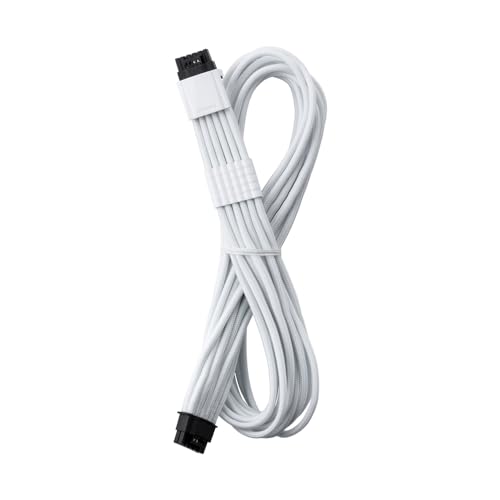
Specs
Type | Replacement GPU cable, 16-pin to 16-pin |
Rated power | 600W |
Wire gauge | 16 AWG |
Sense wires | None, StealthSense hidden bridge |
Sleeving | ModFlex with pre-installed combs |
Works with | ATX 3.1 supplies that have a 16-pin PSU-side port |
Colorway | White |
Type
Replacement GPU cable, 16-pin to 16-pin
Rated power
600W
Wire gauge
16 AWG
Sense wires
None, StealthSense hidden bridge
Sleeving
ModFlex with pre-installed combs
Works with
ATX 3.1 supplies that have a 16-pin PSU-side port
Colorway
White
What it does well
StealthSense is the part worth paying for. Instead of running four thin sense wires from the connector back to the power supply, CableMod puts a bridge inside the connector itself that tells the card 600W is available. Those sense wires are the most fragile thing in a 12VHPWR run, and the black screens and pinned fans people blame on the connector are often a dislodged sense pin rather than anything thermal. If you were planning to bolt a temperature sensor onto the problem instead, we looked at whether that is worth doing on an RTX 5090.
The conductors are 16 AWG and the cable is rated for the full 600W, so it is not the limiting part of any current card. ModFlex sleeving with pre-installed combs makes it genuinely easier to route than the stiff cable most supplies ship with, and that matters. A cable that bends without strain near the plug is a cable that stays seated.
What you give up
It only helps if your power supply already has a 16-pin port on its side. Every ATX 2.x unit is out, and that is exactly the situation most people asking this question are in. Read the compatibility line before you buy.
The listing is the white colorway, which will stand out in a black build. CableMod also asks for 4 to 4.5 cm of clearance between the card and the side panel for the connector to sit properly, which is tight in a slim case. One more thing to flag: CableMod recalled its standalone angled 12VHPWR adapters in December 2023, with reports at the time putting the failure rate near 1.07 percent. That recall covered the angled adapters, not the cables, but it is a good reason to prefer a direct cable over bolting another adapter onto the chain.
Who it's for
Someone already running an ATX 3.0 or 3.1 supply who wants a tidier, less fragile run than the stock cable. It is not an escape route from the bundled adapter, and buying it will not make a 5070 Ti safer than it already is.
Bottom line
If you own an RTX 5070 Ti and a working power supply, use what you have. The bundled adapter is rated for exactly the power this card draws. If you are replacing the supply anyway, buy the Corsair RM850x ATX 3.1 and get the native run as part of the deal. If your unit already has a 16-pin port and the stock cable fights you, swap the cable and keep the supply. If the budget is tight and you still want native, the MSI MAG A750GL PCIE5 is the floor that clears it. Nobody reading this has to spend money to be safe.
FAQ
Is the adapter that comes with the RTX 5070 Ti safe?
Yes, for this card. The adapter feeds the GPU's 12V-2x6 plug from two PCIe 8-pin inputs rated 150W each, which covers the card's 300W board power exactly. The connector failures that drove the anxiety happened on 4090 and 5090 cards drawing close to 600W. Seat the plug until it clicks and sits flush, keep a hard bend a few centimeters away from the connector, and it will do its job.
What is the difference between 12VHPWR and 12V-2x6?
The socket, not the cable. 12V-2x6 shortens the four sense pins by about 1.5 mm and lengthens the conductor terminals by 0.25 mm, so a partially seated plug loses its sense signal before it starts carrying serious current. The card then refuses full power instead of concentrating it through a bad contact. Existing 12VHPWR cables and adapters work with a 12V-2x6 socket, so there is nothing to replace on the cable side.
Do I need an ATX 3.1 power supply for an RTX 5070 Ti?
No. An older unit with two spare 8-pin PCIe connectors and enough total capacity runs this card through the bundled adapter without trouble. ATX 3.1 buys you a native 12V-2x6 harness and a defined transient-spike tolerance, both of which are nice and neither of which is required at 300W. Buy one when you are replacing the supply anyway, not as a reaction to the card.
Can I use three 8-pin cables with the 5070 Ti adapter?
The adapter in a 5070 Ti box has two 8-pin inputs, so three is not an option on that part. Some third-party adapters take three or four, and those exist for the 5080 and 5090, which draw more. Fitting one to a 5070 Ti is harmless but pointless. What does matter is running separate cables from the supply rather than one cable with two daisy-chained 8-pin ends.
How much power can a single 12V-2x6 cable actually deliver?
600W, which is the figure the standard was built around. Three PCIe 8-pin connectors together top out at 450W, and the 5070 Ti's two-input adapter at 300W. All three ceilings clear what this card pulls, so the cable choice is about tidiness and failure points rather than available wattage. The 600W rating only becomes the deciding factor on cards in the 5090 class.
Related Articles

Best ATX 3.1 Power Supplies (2026): 5 Native 12V-2x6 Picks
Five ATX 3.1 power supplies with native 12V-2x6 connectors, Cybenetics Gold through Platinum, all 850W, plus how to spot an ATX 3.0 unit sold with an adapter.
Aug 14, 2026

Is 750W Enough for a 5070 Ti, or Do You Need 850W? (2026)
Is 750W enough for an RTX 5070 Ti? For a stock card on a mainstream CPU, yes. Here is the real power draw, the transient spike data, and when 850W is worth it.
Aug 18, 2026

Do You Need a 12VHPWR Monitor for an RTX 5090? No (2026)
Do you need a 12VHPWR power monitor for an RTX 5090? For a stock card on a native 12V-2x6 cable, no. The three exceptions, plus the PSU picks that cut the risk.
Sep 26, 2026

How to Choose a PSU, Cooler, and Case
A builder's framework for the chassis side of a PC: size the PSU with sane headroom, match the cooler to the chip, and pick a case that fits and breathes.
Jun 29, 2026

Best CPU for RTX 5090 (2026): 5 Picks Graded at 1440p and 4K
Best CPU for RTX 5090: the 9800X3D for gaming, the 9950X3D for creators, and an honest 4K budget floor. Five picks graded by bottleneck, plus the 9850X3D.
Oct 4, 2026