Affiliate Disclosure: As an Amazon Associate we earn from qualifying purchases. Some links may earn us a commission at no cost to you.

Best 14-Inch Gaming Laptops (2026): 5 Picks That Fit a Bag
The best 14-inch gaming laptop for most people in late 2026 is the ASUS ROG Zephyrus G14 with an RTX 5060. It weighs about 1.5 kg, carries a 3K OLED, and runs Cyberpunk 2077 at 1080p Ultra without upscaling. Every 14-inch gaming laptop trades sustained power for weight, so the useful question is which trade you can live with.
These five 14-inch-class machines run from an RTX 5080 flagship to a Strix Halo laptop with no discrete GPU at all. Each pick is judged on weight, GPU power limit, battery and the soldered memory every one of them shares.
Our top pick: ASUS ROG Zephyrus G14 RTX 5060
The Zephyrus G14 RTX 5060 is the lightest real gaming chassis in this class, and its 2880x1800 OLED and RTX 5060 clear 1080p Ultra in current AAA games without upscaling.

Quick picks
Pick | Laptop | Best for | Buy |
|---|---|---|---|
Best Overall | Daily carry with a 3K OLED and an RTX 5060 | ||
Best Value | 115W RTX 5060 and an OLED for less money | ||
Best Premium | 1440p Ultra and 16GB of VRAM | ||
Best Budget | Lowest-cost 14-inch-class laptop with an RTX card | ||
Editor's Pick | Battery life and light gaming, no discrete GPU |
Best Overall
- Laptop
- Best for
Daily carry with a 3K OLED and an RTX 5060
- Buy
Best Value
- Laptop
- Best for
115W RTX 5060 and an OLED for less money
- Buy
Best Premium
- Laptop
- Best for
1440p Ultra and 16GB of VRAM
- Buy
Best Budget
- Laptop
- Best for
Lowest-cost 14-inch-class laptop with an RTX card
- Buy
Editor's Pick
- Laptop
- Best for
Battery life and light gaming, no discrete GPU
- Buy
Specs at a glance
Laptop | GPU | CPU | Display | Memory | Weight |
|---|---|---|---|---|---|
RTX 5060 Laptop, 8GB GDDR7 | AMD Ryzen 9 270 (8 cores) | 14-inch 2880x1800 OLED, 120Hz | 16GB LPDDR5X, soldered | About 1.5 kg (3.3 lb) | |
RTX 5060 Laptop, 115W | Intel Core Ultra 9 285H (16 cores) | 14.5-inch 2880x1800 OLED, 120Hz | 16GB LPDDR5X, soldered | 4.14 lb (about 1.9 kg) | |
RTX 5080 Laptop, 16GB GDDR7, 110W (120W manual) | AMD Ryzen AI 9 HX 370 (12 cores) | 14-inch 2880x1800 OLED, 120Hz | 32GB LPDDR5X, soldered | 1.58 kg (3.48 lb) | |
RTX 4060 Laptop, 8GB GDDR6 | Intel Core Ultra 7 155H (16 cores) | 14.5-inch 2560x1600 IPS, 120Hz | 16GB LPDDR5X, soldered | About 1.9 kg (4.2 lb) | |
Radeon 8060S integrated (no discrete GPU) | AMD Ryzen AI Max+ 392 (12 cores) | 14-inch 2560x1600, 165Hz | 32GB LPDDR5X, shared with graphics | About 1.48 kg (3.3 lb) |
- GPU
RTX 5060 Laptop, 8GB GDDR7
- CPU
AMD Ryzen 9 270 (8 cores)
- Display
14-inch 2880x1800 OLED, 120Hz
- Memory
16GB LPDDR5X, soldered
- Weight
About 1.5 kg (3.3 lb)
- GPU
RTX 5060 Laptop, 115W
- CPU
Intel Core Ultra 9 285H (16 cores)
- Display
14.5-inch 2880x1800 OLED, 120Hz
- Memory
16GB LPDDR5X, soldered
- Weight
4.14 lb (about 1.9 kg)
- GPU
RTX 5080 Laptop, 16GB GDDR7, 110W (120W manual)
- CPU
AMD Ryzen AI 9 HX 370 (12 cores)
- Display
14-inch 2880x1800 OLED, 120Hz
- Memory
32GB LPDDR5X, soldered
- Weight
1.58 kg (3.48 lb)
- GPU
RTX 4060 Laptop, 8GB GDDR6
- CPU
Intel Core Ultra 7 155H (16 cores)
- Display
14.5-inch 2560x1600 IPS, 120Hz
- Memory
16GB LPDDR5X, soldered
- Weight
About 1.9 kg (4.2 lb)
- GPU
Radeon 8060S integrated (no discrete GPU)
- CPU
AMD Ryzen AI Max+ 392 (12 cores)
- Display
14-inch 2560x1600, 165Hz
- Memory
32GB LPDDR5X, shared with graphics
- Weight
About 1.48 kg (3.3 lb)
Benchmarks
Each chart uses Notebookcheck numbers at native resolution, no upscaling. The RTX 5080 rows come from the Zephyrus G14 review itself. The RTX 5060 rows come from a 95W preview unit, so the 115W Helios Neo 14 AI should land at or slightly above them. Notebookcheck had no matching Ultra numbers for the Radeon 8060S in the TUF A14, so it is not charted; its section covers what reviewers measured.
Native rendering. The RTX 5080 row is the Zephyrus G14 itself; the RTX 5060 row is a 95W preview unit and the RTX 4060 row a 115W Lenovo LOQ 15.
- 109.9 FPS
- 89.9 FPS
- 82 FPS
Closest standard test to the 2880x1800 panels on the G14 and Helios Neo 14 AI.
- 79.6 FPS
- 55.5 FPS
Late-game city acts lean on the CPU as well as the GPU.
- 144 FPS
- 105.5 FPS
Both clear 60 fps; the RTX 5080 holds about 48 percent more.
- 106.9 FPS
- 72.1 FPS
How we picked the best 14-inch gaming laptops
What counts as 14-inch here
We kept to laptops with a 14-inch or 14.5-inch panel and a footprint that fits a 14-inch or 15-inch laptop sleeve. The two Acer Predator Helios Neo 14 models use 14.5-inch screens in a chassis close to 1.9 kg, so they stretch the definition on weight but not on footprint. Anything with a 15.3-inch or 16-inch panel belongs on the RTX 5060 gaming laptops list instead.
Weight against power limit
A 14-inch chassis has less room for fans and heatpipes, so makers cap the GPU's power. The Helios Neo 14 AI runs its RTX 5060 at 115W, the Zephyrus G14 RTX 5080 at 110W with a 120W manual mode, and the HP OMEN Transcend 14 we left out caps its RTX 5070 at 75W. That cap is why reviewers found the Transcend's RTX 5070 performing like an RTX 5060, and why we rank power limit above the GPU name on the box.
Soldered RAM and the 8GB VRAM ceiling
Every pick here solders its memory to the board. Unlike the two-slot budget machines in our gaming laptops under a thousand dollars guide, you cannot add a stick later, so buy the memory you need on day one. 16GB is fine for gaming today; 32GB is the safer buy if you also edit video or keep a browser full of tabs open while you play.
The RTX 5060 and RTX 4060 carry 8GB of VRAM. That is enough at 1080p and the 1440p-class panels these laptops use, but the newest games at Ultra textures push past it. The RTX 5080's 16GB removes that ceiling.
Battery numbers, honestly
Battery claims depend on the test. Notebookcheck ran the Zephyrus G14 for 10 hours 27 minutes of Wi-Fi browsing, while PCWorld got just over five hours of video playback from the Helios Neo 14 AI. Reviewers report one to two hours of gaming unplugged, at sharply lower frame rates, so treat battery as a work-day number, not a gaming number.
Will it fit your bag
All five fit a backpack with a 14-inch or 15-inch sleeve. The power bricks are the hidden weight: the G14's charger alone is 572 g. If you are shopping for the bag too, our backpacks for gaming laptops guide covers sleeve sizes and brick pockets. If you mostly game at one desk, read our gaming laptop vs desktop breakdown before paying the portability premium.
Best Overall: ASUS ROG Zephyrus G14 RTX 5060
Specs
CPU | AMD Ryzen 9 270 (8 cores) |
GPU | RTX 5060 Laptop, 8GB GDDR7 |
Display | 14-inch 2880x1800 OLED, 120Hz |
Memory | 16GB LPDDR5X, soldered |
Storage | 1TB PCIe SSD |
Battery | 73Wh |
Weight | About 1.5 kg (3.3 lb) |
CPU
AMD Ryzen 9 270 (8 cores)
GPU
RTX 5060 Laptop, 8GB GDDR7
Display
14-inch 2880x1800 OLED, 120Hz
Memory
16GB LPDDR5X, soldered
Storage
1TB PCIe SSD
Battery
73Wh
Weight
About 1.5 kg (3.3 lb)
What it does well
The Zephyrus G14 is the reason this class exists. Its aluminum chassis weighs about 1.5 kg in the RTX 5060 configuration, according to TechRadar's spec sheet, which is lighter than any other discrete-GPU pick here.
The 14-inch 2880x1800 OLED runs at 120Hz with G-Sync, and Notebookcheck rated the same panel's factory calibration very good in its RTX 5080 review. The RTX 5060 Laptop lands close to last generation's RTX 4070 Laptop: Notebookcheck's 95W preview unit averaged 89.9 fps in Cyberpunk 2077 at 1080p Ultra and 72.1 fps in Baldur's Gate 3 at 1440p Ultra, no upscaling.
Battery life is the other win. The same chassis and 73Wh battery ran 10 hours 27 minutes of Wi-Fi browsing in Notebookcheck's test of the RTX 5080 model, so a full class day away from an outlet is realistic.
What you give up
The fans are loud under load. PC Gamer called the fan noise grating, and Notebookcheck measured 54.4 dB(A) in Turbo mode on the RTX 5080 model with an occasional pulsing tone. Performance mode is quieter at a small frame-rate cost.
The 16GB of LPDDR5X is soldered, and the RTX 5060's 8GB of VRAM will force texture settings down in the heaviest new releases. One listing note: this configuration is sold through HIDevolution, an ASUS reseller, with Windows 11 Pro; the hardware is the standard GA403UM.
Who it's for
Students, commuters and anyone who carries a laptop every day and games at 1080p to 1440p-class settings. If you want the most frame rate per kilogram in this list, this is it.
Best Value: Acer Predator Helios Neo 14 AI RTX 5060

Specs
CPU | Intel Core Ultra 9 285H (16 cores) |
GPU | RTX 5060 Laptop, 115W |
Display | 14.5-inch 2880x1800 OLED, 120Hz |
Memory | 16GB LPDDR5X, soldered |
Storage | 1TB PCIe Gen 4 SSD |
Battery | 76Wh |
Weight | 4.14 lb (about 1.9 kg) |
CPU
Intel Core Ultra 9 285H (16 cores)
GPU
RTX 5060 Laptop, 115W
Display
14.5-inch 2880x1800 OLED, 120Hz
Memory
16GB LPDDR5X, soldered
Storage
1TB PCIe Gen 4 SSD
Battery
76Wh
Weight
4.14 lb (about 1.9 kg)
What it does well
The Predator Helios Neo 14 AI pairs the same RTX 5060 tier with a 115W power limit, the highest for that chip on this list, and PCWorld's review unit shipped at that limit. Its Intel Core Ultra 9 285H has 16 cores, which helps if you stream or edit between matches.
The 14.5-inch 2880x1800 OLED runs at 120Hz with G-Sync, and PCWorld called the display excellent. You get G14-class frame rates and an OLED for noticeably less than the Zephyrus.
What you give up
It is the least pocketable laptop here. PCWorld weighed it at 4.14 lb and measured it 1.02 inches thick, and its verdict was that the machine ends up neither small enough nor fast enough to beat its rivals. Battery was disappointing at just over five hours of video playback.
Reviewers also flagged an uncomfortable keyboard, and the 16GB of LPDDR5X-7467 cannot be upgraded after purchase. In 3DMark Port Royal it trailed the Razer Blade 14 with an RTX 5070, so it is a value pick, not a speed pick.
Who it's for
Buyers who want an RTX 5060 and an OLED at the lowest price in this list's top tier, and who carry the laptop a few days a week rather than every day.
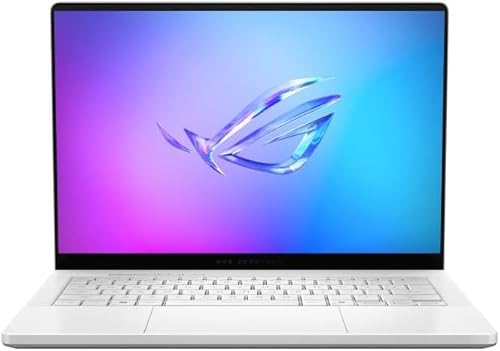
Best Premium: ASUS ROG Zephyrus G14 RTX 5080
Specs
CPU | AMD Ryzen AI 9 HX 370 (12 cores) |
GPU | RTX 5080 Laptop, 16GB GDDR7, 110W (120W manual) |
Display | 14-inch 2880x1800 OLED, 120Hz |
Memory | 32GB LPDDR5X, soldered |
Storage | 2TB PCIe SSD |
Battery | 73Wh |
Weight | 1.58 kg (3.48 lb) |
CPU
AMD Ryzen AI 9 HX 370 (12 cores)
GPU
RTX 5080 Laptop, 16GB GDDR7, 110W (120W manual)
Display
14-inch 2880x1800 OLED, 120Hz
Memory
32GB LPDDR5X, soldered
Storage
2TB PCIe SSD
Battery
73Wh
Weight
1.58 kg (3.48 lb)
What it does well
Notebookcheck calls the Zephyrus G14 with an RTX 5080 Laptop the fastest 14-inch gaming laptop it has tested, and rated it 89 percent. It averaged 109.9 fps in Cyberpunk 2077 at 1080p Ultra and 79.6 fps at 1440p Ultra, both native.
Baldur's Gate 3 ran at 106.9 fps at 1440p Ultra. The GPU runs at 110W including Dynamic Boost, with a 120W manual mode, and its 16GB of GDDR7 removes the texture ceiling the 8GB cards hit. The configuration ships with 32GB of memory and a 2TB SSD, so there is nothing to upgrade on day one.
It keeps the G14's strengths too: about 1.58 kg, the same 120Hz OLED, and 10 hours 27 minutes of Wi-Fi browsing in Notebookcheck's battery test.
What you give up
More power means more heat and noise in the same chassis. Notebookcheck measured 54.4 dB(A) in Turbo and surface temperatures around 51 C on top and bottom under stress, so use a desk, not your lap, for long sessions.
The memory is still soldered, and the price sits in desktop RTX 5080 build territory. If you mostly play at one desk, a desktop gets you more frame rate for the money.
Who it's for
Players who want one compact machine for 1440p-class gaming and creative work, and who will pay for the fastest 14-inch option rather than step up to a 16-inch chassis.
Best Budget: Acer Predator Helios Neo 14 RTX 4060

Specs
CPU | Intel Core Ultra 7 155H (16 cores) |
GPU | RTX 4060 Laptop, 8GB GDDR6 |
Display | 14.5-inch 2560x1600 IPS, 120Hz |
Memory | 16GB LPDDR5X, soldered |
Storage | 1TB PCIe Gen 4 SSD |
Battery | 76Wh |
Weight | About 1.9 kg (4.2 lb) |
CPU
Intel Core Ultra 7 155H (16 cores)
GPU
RTX 4060 Laptop, 8GB GDDR6
Display
14.5-inch 2560x1600 IPS, 120Hz
Memory
16GB LPDDR5X, soldered
Storage
1TB PCIe Gen 4 SSD
Battery
76Wh
Weight
About 1.9 kg (4.2 lb)
What it does well
The original Predator Helios Neo 14 is the lowest-cost way into a 14-inch-class chassis that still carries a discrete RTX card. Its RTX 4060 Laptop handles 1080p Ultra in most games: Notebookcheck measured a 115W RTX 4060 at 82 fps in Cyberpunk 2077 at that setting, in a 15-inch Lenovo LOQ.
The 14.5-inch 2560x1600 IPS panel is matte, which helps in bright rooms, and Reviewed measured about 9 hours of light work on integrated graphics from the same chassis and 76Wh battery in its RTX 4070 review unit.
What you give up
This is last generation's GPU and CPU, with 16GB of soldered memory. Reviewed called the display underwhelming for the price and the body chunky and heavy for its size.
The savings over the RTX 5060 Helios Neo 14 AI are modest. Check the current gap on both listings before you buy; if it is small, the newer model is the better laptop.
Who it's for
Buyers who need the smallest footprint at the lowest price, game at 1080p, and are fine with an IPS screen instead of OLED.
If a 15.6-inch screen is acceptable, our budget gaming laptops guide goes much cheaper than anything in the 14-inch class.
Editor's Pick: ASUS TUF Gaming A14 Ryzen AI Max+ 392

Specs
CPU | AMD Ryzen AI Max+ 392 (12 cores) |
GPU | Radeon 8060S integrated (no discrete GPU) |
Display | 14-inch 2560x1600, 165Hz |
Memory | 32GB LPDDR5X, shared with graphics |
Storage | 1TB PCIe Gen 4 SSD |
Battery | 73Wh |
Weight | About 1.48 kg (3.3 lb) |
CPU
AMD Ryzen AI Max+ 392 (12 cores)
GPU
Radeon 8060S integrated (no discrete GPU)
Display
14-inch 2560x1600, 165Hz
Memory
32GB LPDDR5X, shared with graphics
Storage
1TB PCIe Gen 4 SSD
Battery
73Wh
Weight
About 1.48 kg (3.3 lb)
What it does well
The 2026 TUF Gaming A14 has no discrete GPU at all. AMD's Ryzen AI Max+ 392 puts Radeon 8060S graphics on the same chip as a 12-core CPU, sharing 32GB of LPDDR5X, in a chassis of about 1.48 kg.
That makes it the lightest pick here and one of the strongest work laptops in the class, with a 165Hz 2560x1600 panel and battery life reviewers praise. Reviewers found esports titles and older games playable at medium settings.
What you give up
Heavy AAA games are another story. Tom's Hardware measured 16 fps in Cyberpunk 2077 at 1080p with ray tracing on Ultra, and its headline called this a mispriced gaming laptop. Notebookcheck's advice is to find an RTX 4060 or RTX 5060 version of the A14 if gaming comes first.
Reports suggest the price is the main sticking point; at its current listing it costs more than the RTX 5060 Helios Neo 14 AI, which is far faster in games.
Who it's for
Work-first buyers who game lightly, at medium settings or in esports titles, and value battery life and weight over frame rate. If games are the point, buy the Zephyrus G14 instead.
Bottom line
If you carry your laptop every day and want the best mix of weight and frame rate, buy the ASUS ROG Zephyrus G14 RTX 5060. If you want the same GPU tier and an OLED for less, and can carry an extra pound, buy the Acer Predator Helios Neo 14 AI RTX 5060. If 1440p Ultra and 16GB of VRAM matter more than price, buy the Zephyrus G14 RTX 5080. If budget is the limit and 1080p is enough, the Helios Neo 14 RTX 4060 is the floor. If you mostly work and only game lightly, the TUF Gaming A14 is the lightest and longest-lasting option here.
FAQ
Is a 14-inch gaming laptop worth it?
Yes, if you carry the laptop most days. A 14-inch model like the Zephyrus G14 weighs about 1.5 kg, noticeably less than most 16-inch gaming laptops, and still runs 1080p Ultra in current games. You give up some sustained GPU power, a larger screen and upgradeable memory. If the laptop rarely leaves your desk, a 16-inch model or a desktop gives you more performance for the money.
Is an RTX 5060 enough in a 14-inch gaming laptop?
For 1080p and the 1440p-class panels these laptops use, yes. Notebookcheck's RTX 5060 Laptop preview averaged 89.9 fps in Cyberpunk 2077 at 1080p Ultra and 55.5 fps at 1440p Ultra without upscaling, and DLSS lifts both. The limit is its 8GB of VRAM, which forces texture settings down in the heaviest new releases. If you want 1440p Ultra with headroom, the RTX 5080 Zephyrus G14 is the step up.
Can you upgrade the RAM in a 14-inch gaming laptop?
Not on any pick in this list. The Zephyrus G14, both Helios Neo 14 models and the TUF Gaming A14 all use soldered LPDDR5X, which saves space and power but cannot be replaced. Buy the capacity you need at checkout: 16GB is fine for gaming, and 32GB is the safer choice for editing, streaming or long-term use. Most 14-inch models do let you swap or add the SSD.
How long does a 14-inch gaming laptop battery last?
It depends on the work. Notebookcheck measured the Zephyrus G14 at 10 hours 27 minutes of Wi-Fi browsing, while PCWorld got just over five hours of video from the Helios Neo 14 AI. Gaming unplugged is a different story: expect one to two hours and lower frame rates, since the GPU drops power on battery. Plan on plugging in to game and treat battery as a work-day figure.
Do 14-inch gaming laptops overheat?
They run warm but not dangerously so. Notebookcheck measured surfaces around 51 C on the RTX 5080 Zephyrus G14 under a stress test, and the fans reached 54.4 dB(A) in Turbo mode. The chips throttle before they reach unsafe temperatures. Use the laptop on a desk or a stand for long sessions, keep the vents clear, and pick a quieter performance mode when you do not need every frame.
Will a 14-inch gaming laptop fit in a normal backpack?
Yes. Every pick here fits a backpack with a 14-inch or 15-inch laptop sleeve, and the Zephyrus G14 and TUF Gaming A14 slip into most everyday school bags. The charger is the part people forget: the G14's power brick weighs 572 g on its own. Check that the bag has a separate pocket for the brick so it does not press against the screen.
Related Articles

Best Gaming Laptops Under $1,000 (2026): RTX 4050 vs 5050
The best gaming laptops under $1,000 in 2026 run RTX 4050 and 3050 chips: four honest picks, one RTX 5050 stretch, the 8GB RAM fix, and when to wait for a sale.
Oct 24, 2026

Best RTX 5060 Gaming Laptops (2026): 5 TGP-Ranked Picks
The best RTX 5060 gaming laptop is the one with the highest TGP. We rank five picks by sustained wattage, from a 115W ASUS TUF F16 down to an 85W Acer Nitro.
Sep 7, 2026

Best Backpacks for Gaming Laptops 2026: 5 That Fit 17-18"
The best backpack for a gaming laptop in 2026: a fit matrix so your 17.3 or 18-inch rig and its brick actually go in, plus the liter capacity you need.
Aug 22, 2026

Gaming Laptop vs Desktop 2026: Value Math and 4 Picks
Gaming laptop vs desktop in 2026: desktops deliver about 30-40% more frames per dollar, laptops deliver portability. See which fits you, plus 4 picks.
Sep 2, 2026

Best Gaming Laptops for WoW Forever (2026): 5 Launch Picks
The best laptop for WoW Forever pairs raid-ready CPU cores with an 8 GB GPU and 128 GB of free SSD. Five Amazon-sold picks, from an RTX 5050 to an X3D raid rig.
Nov 7, 2026