Affiliate Disclosure: As an Amazon Associate we earn from qualifying purchases. Some links may earn us a commission at no cost to you.

Best Gaming Laptops for WoW Forever (2026): 5 Picks
WoW Forever moves the floor. Blizzard's published minimum is a four-core CPU and a 4 GB DirectX 12 card; the recommended sheet asks for an 8 GB DX12 GPU, 16 GB of memory, and Windows 11. Both tiers want 128 GB free on an SSD.
That storage line is what quietly disqualifies older machines. And the GPU badge on the lid is the wrong thing to shop by anyway, because WoW falls over in raids and capital cities, and those frames come from cores and sustained clocks. These five laptops are ranked in that order.
Our top pick: Lenovo Legion 5i RTX 5070 OLED
The Legion 5i puts a 20-core i7-14700HX behind an RTX 5070 and a 2.5K OLED panel, which is the split WoW rewards: cores for raid night, GPU headroom for the resolution.

Quick picks
Pick | Laptop | Best for | Buy |
|---|---|---|---|
Best Overall | Raid nights at 2.5K | ||
Best Value | 1200p high, most laptop per dollar | ||
Best Premium | Raiding, streaming, and everything else | ||
Best Budget | 1080p WoW on a floor budget | ||
Editor's Pick | Playing away from a desk |
Best Overall
- Laptop
- Best for
Raid nights at 2.5K
- Buy
Best Value
- Laptop
- Best for
1200p high, most laptop per dollar
- Buy
Best Premium
- Laptop
- Best for
Raiding, streaming, and everything else
- Buy
Best Budget
- Laptop
- Best for
1080p WoW on a floor budget
- Buy
Editor's Pick
- Laptop
- Best for
Playing away from a desk
- Buy
Specs at a glance
Laptop | GPU | CPU | Display | Memory | Storage |
|---|---|---|---|---|---|
RTX 5070 Laptop, 8 GB | i7-14700HX, 20 cores | 15in 2.5K OLED 165 Hz | 16 GB DDR5 | 1 TB | |
RTX 5060 Laptop, 8 GB, 115 W | i7-14650HX, 16 cores | 16in FHD+ 165 Hz | 16 GB DDR5 | 1 TB | |
RTX 5080 Laptop, 16 GB | Ultra 9 275HX, 24 cores | 16in WQXGA OLED 240 Hz | 32 GB DDR5 | 1 TB | |
RTX 5050 Laptop, 8 GB | i7-14650HX, 16 cores | 15.6in FHD 144 Hz | 16 GB DDR5 | 1 TB | |
RTX 5070 Ti Laptop | Ryzen AI 9 HX 370, 12 cores | 14in 3K OLED 120 Hz | 32 GB LPDDR5X | 2 TB |
- GPU
RTX 5070 Laptop, 8 GB
- CPU
i7-14700HX, 20 cores
- Display
15in 2.5K OLED 165 Hz
- Memory
16 GB DDR5
- Storage
1 TB
- GPU
RTX 5060 Laptop, 8 GB, 115 W
- CPU
i7-14650HX, 16 cores
- Display
16in FHD+ 165 Hz
- Memory
16 GB DDR5
- Storage
1 TB
- GPU
RTX 5080 Laptop, 16 GB
- CPU
Ultra 9 275HX, 24 cores
- Display
16in WQXGA OLED 240 Hz
- Memory
32 GB DDR5
- Storage
1 TB
- GPU
RTX 5050 Laptop, 8 GB
- CPU
i7-14650HX, 16 cores
- Display
15.6in FHD 144 Hz
- Memory
16 GB DDR5
- Storage
1 TB
- GPU
RTX 5070 Ti Laptop
- CPU
Ryzen AI 9 HX 370, 12 cores
- Display
14in 3K OLED 120 Hz
- Memory
32 GB LPDDR5X
- Storage
2 TB
How we picked: WoW Forever's real laptop floor
Start with the published requirements, because they are unusually specific this time. The minimum tier is Windows 10 64-bit, a four-core CPU, 8 GB of system memory, and a 4 GB DirectX 12 graphics card in the GTX 10 series class. The recommended tier moves to Windows 11, 16 GB of memory, and an 8 GB DX12 GPU. Both tiers require 128 GB of free space on an SSD.
That storage clause does more filtering than anything else on the sheet. A 512 GB laptop that already carries Windows, a browser cache, and one other modern game does not have 128 GB free, and no amount of GPU buys it back. Every pick below ships with at least a terabyte for exactly that reason.
Next, weight the CPU harder than the GPU tier suggests. WoW is GPU-bound in an empty zone and CPU-bound everywhere that matters: a 20-player boss pull with everyone casting, or a capital city at reset. The 1% lows argument gets overplayed for the average buyer at 1440p, but it is genuinely load-bearing for MMO and strategy players. We looked at the CPU side of the same question in our guide to the best CPUs for World of Warcraft, and the conclusion carries over to laptops with the extra wrinkle that mobile chips throttle.
Then read the wattage, not the model name. Laptop GPUs ship at wildly different max graphics power, so two machines with the same RTX 5060 sticker can sit a quarter apart in sustained frames. Where a listing states the TGP, we used it; where it does not, we treated the chassis size and cooling design as the proxy. If you want the desktop-side version of the same question, our rundown of which GPUs clear the Forever bar covers it, and the pillar on how to choose a GPU and a matching display explains the resolution math.
Finally, panels. WoW renders a dense, static interface, and small addon text is easier to read on a sharper screen than on a fast one. We favoured resolution and panel quality over refresh rate past 144 Hz, since the game is rarely the thing limiting your reaction time.
Best Overall: Lenovo Legion 5i RTX 5070 OLED
Specs
CPU | Intel Core i7-14700HX (20 cores) |
GPU | GeForce RTX 5070 Laptop, 8 GB |
Display | 15in 2.5K WQXGA OLED, 165 Hz |
Memory | 16 GB DDR5 |
Storage | 1 TB PCIe SSD |
Panel type | PureSight OLED |
OS | Windows 11 Home |
CPU
Intel Core i7-14700HX (20 cores)
GPU
GeForce RTX 5070 Laptop, 8 GB
Display
15in 2.5K WQXGA OLED, 165 Hz
Memory
16 GB DDR5
Storage
1 TB PCIe SSD
Panel type
PureSight OLED
OS
Windows 11 Home
What it does well
The i7-14700HX is the reason this one leads. Twenty cores and a high sustained boost are what hold a frame rate together when twenty other players are casting at once, and that is the scenario the rest of the spec sheet cannot rescue. In an empty zone almost any modern laptop is fine. In a Mythic pull it is the CPU talking.
The 2.5K WQXGA OLED at 165 Hz is the second reason. WoW's interface is dense by design, and at 2560 by 1600 the addon text, cooldown numbers, and raid frames stop fighting you. OLED contrast also flatters the game's darker instanced content in a way an IPS panel does not.
An RTX 5070 with 8 GB has enough headroom to drive that panel at the high preset natively rather than upscaling from 1080p, and 1 TB of storage swallows the 128 GB install without a cleanup session first.
What you give up
Fifteen inches is tight for a heavy addon layout. If you run WeakAuras, a boss mod, a raid frame replacement, and a loot tracker at once, you will be docking this to a monitor on raid nights, which partly defeats the point of the OLED.
Sixteen gigabytes of system memory is the floor rather than the comfortable number once Discord, a browser full of reference tabs, and a combat logger are running alongside the client. The 14700HX is also last-generation silicon, so battery life away from the wall is short, and 8 GB of VRAM leaves nothing spare for whatever you play next year.
The OLED carries its own caveat. Reports suggest that long sessions with a fixed interface are the burn-in scenario people worry about on laptop OLED panels, and WoW's HUD is about as static as a HUD gets. Panel protection settings help and no hard failure data has surfaced, but it is the tradeoff that comes with the contrast.
Who it's for
The raider or Mythic+ runner who wants one machine for everything, plays plugged in at a desk most nights, and would rather spend on the panel and the processor than on a GPU tier they will not use.
Best Value: ASUS TUF F16 RTX 5060

Specs
CPU | Intel Core i7-14650HX (16 cores) |
GPU | GeForce RTX 5060 Laptop, 8 GB |
Max graphics power | 115 W TGP |
Display | 16in FHD+ 165 Hz IPS, 16:10 |
Memory | 16 GB DDR5 |
Storage | 1 TB PCIe SSD |
OS | Windows 11 Home |
CPU
Intel Core i7-14650HX (16 cores)
GPU
GeForce RTX 5060 Laptop, 8 GB
Max graphics power
115 W TGP
Display
16in FHD+ 165 Hz IPS, 16:10
Memory
16 GB DDR5
Storage
1 TB PCIe SSD
OS
Windows 11 Home
What it does well
The number that matters here is 115 W max TGP. An RTX 5060 at 115 W behaves much closer to a power-starved 5070 than to the same chip squeezed into a thin chassis at 75 W, and that gap is invisible on a spec sheet that only lists the model name.
Behind it sits the same 16-core i7-14650HX used in the budget pick, so the CPU-bound half of WoW is covered properly rather than being the thing you notice first. The 16-inch 16:10 panel at 165 Hz also gives you more vertical room for action bars than a 16:9 screen of the same diagonal.
A terabyte of storage clears the install requirement outright. If you are cross-shopping, other RTX 5060 laptops land in the same band with worse wattage, which is the trap this pick avoids.
What you give up
It is an IPS panel, and after you have seen the OLED options that is a real downgrade in instanced content. FHD+ also caps how sharp small addon text can get, which matters more in this game than in most.
TUF cooling prioritises clocks over acoustics, so the fans are audible under sustained load. There is no premium port loadout either, so a dock is a separate purchase rather than something the chassis already handles gracefully.
Who it's for
The player whose main game is WoW, who wants headroom for other titles, and who would rather put the difference toward a monitor and a decent dock than into a higher GPU tier.
Best Premium: Lenovo Legion Pro 7i Gen 10 RTX 5080

Specs
CPU | Intel Core Ultra 9 275HX (24 cores) |
GPU | GeForce RTX 5080 Laptop, 16 GB |
Display | 16in WQXGA OLED, 240 Hz |
Memory | 32 GB DDR5 (configuration varies) |
Storage | 1 TB PCIe SSD (configuration varies) |
Cooling | Coldfront vapor chamber |
OS | Windows 11 |
CPU
Intel Core Ultra 9 275HX (24 cores)
GPU
GeForce RTX 5080 Laptop, 16 GB
Display
16in WQXGA OLED, 240 Hz
Memory
32 GB DDR5 (configuration varies)
Storage
1 TB PCIe SSD (configuration varies)
Cooling
Coldfront vapor chamber
OS
Windows 11
What it does well
The Core Ultra 9 275HX is the fastest mobile processor you can currently point at a raid encounter, and the Coldfront vapor chamber is what lets it hold clocks for a three-hour lockout instead of the first ten minutes. Sustained performance, not peak, is the whole argument for this machine.
The RTX 5080 with 16 GB removes every VRAM question for the life of the laptop, and the 16-inch WQXGA OLED at 240 Hz is the best panel in this roundup by a clear margin. Memory and storage are configurable upward, which the soldered thin-and-light options are not.
What you give up
Weight, charger size, and a price that only makes sense if WoW is not the only demanding thing you run. The 5080 is heavily overspecified for Forever specifically. You are buying it for the processor, the panel, and the next four years of everything else.
Fan noise under full load is still real despite the cooling budget, and memory and storage vary by configuration on this SKU family, so confirm the exact build before you order rather than assuming the listing photo matches.
Who it's for
The player who raids, records or streams, and runs other AAA titles on the same machine, and who does not want to have a compatibility conversation again for several years.
Best Budget: MSI Katana 15 HX RTX 5050
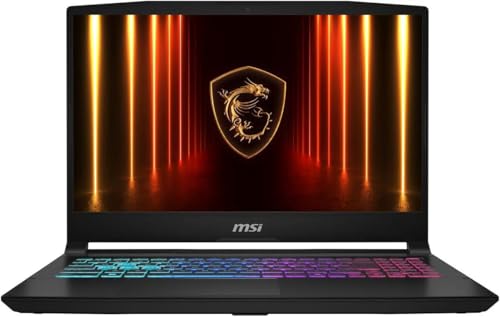
Specs
CPU | Intel Core i7-14650HX (16 cores) |
GPU | GeForce RTX 5050 Laptop, 8 GB GDDR7 |
Display | 15.6in FHD 144 Hz IPS |
Memory | 16 GB DDR5 |
Storage | 1 TB PCIe SSD |
Wireless | Wi-Fi 6E |
OS | Windows 11 Home |
CPU
Intel Core i7-14650HX (16 cores)
GPU
GeForce RTX 5050 Laptop, 8 GB GDDR7
Display
15.6in FHD 144 Hz IPS
Memory
16 GB DDR5
Storage
1 TB PCIe SSD
Wireless
Wi-Fi 6E
OS
Windows 11 Home
What it does well
This is the cheapest route to a 16-core HX processor and a full terabyte under WoW Forever, and that pairing is what decides whether the game feels good at the bottom of the market. The i7-14650HX here is the same chip as in the value pick.
The RTX 5050 with 8 GB of GDDR7 clears Blizzard's recommended tier rather than scraping the minimum, and 144 Hz at 1080p is a sensible match for what the GPU can sustain. Nothing about the configuration is aspirational, which is the point.
What you give up
1080p is the ceiling, and the GPU has no headroom for anything more demanding than this game. Build quality is plastic, the keyboard deck flexes, and the IPS panel is dim by current standards.
Katana chassis also run warm, and sustained clocks drop accordingly once the vents are working against a duvet or a desk mat. A cooling pad meaningfully changes that picture and costs a fraction of the next GPU tier.
Who it's for
The returning or casual player who wants WoW Forever to run well at 1080p, plays a few evenings a week, and has no interest in paying for graphics performance they will never load.
Editor's Pick: ASUS ROG Zephyrus G14 RTX 5070 Ti

Specs
CPU | AMD Ryzen AI 9 HX 370 (12 cores) |
GPU | GeForce RTX 5070 Ti Laptop |
Display | 14in 3K OLED, 120 Hz, 2880 x 1800 |
Memory | 32 GB LPDDR5X (soldered) |
Storage | 2 TB PCIe SSD |
Model | GA403WR-XS97 |
OS | Windows 11 Pro |
CPU
AMD Ryzen AI 9 HX 370 (12 cores)
GPU
GeForce RTX 5070 Ti Laptop
Display
14in 3K OLED, 120 Hz, 2880 x 1800
Memory
32 GB LPDDR5X (soldered)
Storage
2 TB PCIe SSD
Model
GA403WR-XS97
OS
Windows 11 Pro
What it does well
WoW has an unusually travel-heavy audience. Long sessions from hotels, dorms, and couches are normal in a way they are not for most games, and this is the only machine here you would genuinely carry every day without resenting it.
The 14-inch 3K OLED at 120 Hz renders addon text sharply despite the size, the RTX 5070 Ti is not a compromise tier, and 2 TB of storage ends the install conversation permanently. The Ryzen AI 9 HX 370 also idles efficiently, so questing on battery is viable in a way it is not on the HX-series picks.
What you give up
Thirty-two gigabytes of LPDDR5X is soldered, so what you buy is what you keep for the life of the machine. A 14-inch panel is cramped for a dense raid interface, and you will want an external display for serious progression nights.
Sustained performance also sits below a 16-inch chassis carrying the same GPU, because there is simply less cooling to go around. Twelve Zen 5 cores at laptop power is a step down from the 16 and 20-core HX parts in heavy raid scenes, and you are paying premium money for portability rather than throughput.
Who it's for
The player who plays away from a desk as often as at one, and who will dock to a monitor when it counts.
Bottom line
If you raid and want one machine that covers everything, buy the Legion 5i. If you want the most sustained performance per dollar, buy the TUF F16 and spend the difference on a monitor. If WoW is one of several demanding things you run, the Legion Pro 7i is the only pick here with genuine headroom. If the budget is fixed and 1080p is fine, the Katana 15 HX is the honest answer. And if you are mostly deciding whether a laptop is the right shape at all, our value math on laptop versus desktop is the argument to read first.
FAQ
Can a laptop run WoW Forever?
Yes, and comfortably. Blizzard's minimum tier is a four-core CPU with a 4 GB DirectX 12 graphics card, which most gaming laptops built since 2018 clear. The practical blocker is storage rather than silicon: both the minimum and recommended tiers require 128 GB of free SSD space, which rules out a lot of half-full 512 GB machines. Aim for the recommended tier, an 8 GB DX12 GPU and 16 GB of memory, if you raid.
What are the WoW Forever laptop requirements?
The minimum is Windows 10 64-bit, a four-core processor, 8 GB of system memory, and a 4 GB DirectX 12 GPU in the GTX 10 series class. The recommended configuration is Windows 11, 16 GB of memory, and an 8 GB DirectX 12 GPU. Both tiers need 128 GB free on an SSD, a broadband connection, a Battle.net account, and the Battle.net desktop app.
Is 8 GB of VRAM enough for WoW Forever on a laptop?
For this game, yes. Eight gigabytes is what Blizzard lists at the recommended tier, and WoW's texture budget is modest next to current AAA releases. The reason to want 16 GB is everything else you will run on the machine over the next few years, not Forever itself. If WoW is genuinely your main game, spend the difference on the processor or the panel instead.
Can a MacBook run WoW Forever?
It can, within limits. Blizzard lists macOS 12 on an Apple M2 with 8 GB of memory as the minimum and macOS 15 on an M4 with 16 GB as the recommended configuration. The M1 does not appear on the published sheet, so treat it as unsupported rather than merely slow. The 128 GB free SSD requirement applies on macOS too, which is a real constraint on the smaller base configurations.
How much SSD space does WoW Forever need?
128 GB of free space on an SSD, at both the minimum and the recommended tier. That is free space, not total drive size, so a 512 GB laptop already holding Windows and one other modern game will not qualify without deleting something. It is the single most common reason an otherwise capable laptop fails the check, and it is why every pick in this guide ships with at least 1 TB.
Does a high refresh rate screen matter for WoW Forever?
Less than resolution does. WoW is not a twitch shooter, and past roughly 144 Hz the returns fall away quickly for most players. Sharpness matters more, because the interface is dense and addon text is small: a 2.5K or 3K panel makes raid frames and cooldown timers legible in a way a 1080p screen at the same size does not. Treat refresh rate above 144 Hz as a bonus rather than a target.
Related Articles

Best CPUs for World of Warcraft 2026: 5 Picks by Tier
The best CPU for World of Warcraft is an X3D chip. We rank five AM5 picks by tier for raid and capital-city frame rates, from a budget floor up to endgame.
Aug 19, 2026

Is My GPU Supported for WoW Forever? 3 Picks by Budget 2026
Is my GPU supported for WoW Forever? Get the architecture floor, the minimum vs recommended specs, and three cards that clear the bar at any budget tier.
Sep 27, 2026

Best RTX 5060 Gaming Laptops (2026): 5 TGP-Ranked Picks
The best RTX 5060 gaming laptop is the one with the highest TGP. We rank five picks by sustained wattage, from a 115W ASUS TUF F16 down to an 85W Acer Nitro.
Sep 7, 2026

Best Gaming Laptops Under $1500 2026: 5 Picks, OLED vs 5070
Best gaming laptops under $1500 in 2026: five picks compared on GPU tier, display and hour-two thermals, plus a straight answer on RTX 5060 vs RTX 5070.
Aug 19, 2026

Gaming Laptop vs Desktop 2026: Value Math and 4 Picks
Gaming laptop vs desktop in 2026: desktops deliver about 30-40% more frames per dollar, laptops deliver portability. See which fits you, plus 4 picks.
Sep 2, 2026