Affiliate Disclosure: As an Amazon Associate we earn from qualifying purchases. Some links may earn us a commission at no cost to you.

Best Fans for the Lancool 217 (2026): 5 Picks by Mount
The Lancool 217 ships with two 170mm fans at the front, and nothing else on the market is that size. We could not find a 170mm case fan sold on its own anywhere, so the factory pair is the front for the life of the case. That moves the fan budget somewhere else, and where depends on which 217 you own.
The standard 217 ships with five fans and needs very little. The 217 INF ships with three, and its empty bottom row is the one upgrade a reviewer has put a number on.
Our top pick: ARCTIC P12 Pro A-RGB LN 3-Pack
Three 120mm fans fill the INF's empty bottom row exactly, the A-RGB matches the lit front pair, and the low-noise speed range goes straight at the complaint owners raise most about this case.

Quick picks
Pick | Fan | Best mount | Buy |
|---|---|---|---|
Best Overall | Bottom intake, 3 x 120mm (INF) | ||
Best Value | Bottom plus top, standard 217 | ||
Best Premium | Bottom intake, quiet builds | ||
Best Budget | Bottom intake, 3 x 120mm | ||
Editor's Pick | Bottom intake, glass-side view |
Best Overall
- Fan
- Best mount
Bottom intake, 3 x 120mm (INF)
- Buy
Best Value
- Fan
- Best mount
Bottom plus top, standard 217
- Buy
Best Premium
- Fan
- Best mount
Bottom intake, quiet builds
- Buy
Best Budget
- Fan
- Best mount
Bottom intake, 3 x 120mm
- Buy
Editor's Pick
- Fan
- Best mount
Bottom intake, glass-side view
- Buy
Specs at a glance
Fan | Size | Speed | Connector | Lighting | Pack |
|---|---|---|---|---|---|
120mm | 450 to 2000 RPM | 4-pin PWM, Y-splitter | A-RGB | 3 fans | |
120mm | 200 to 1800 RPM | 4-pin PWM with PST | None | 5 fans | |
120mm | Up to 1800 RPM | 4-pin PWM | None | 1 fan | |
120mm | Up to 1550 RPM | 4-pin PWM | ARGB | 3 fans | |
120mm | 200 to 2300 RPM | Wireless controller | ARGB | 3 fans plus controller |
- Size
120mm
- Speed
450 to 2000 RPM
- Connector
4-pin PWM, Y-splitter
- Lighting
A-RGB
- Pack
3 fans
- Size
120mm
- Speed
200 to 1800 RPM
- Connector
4-pin PWM with PST
- Lighting
None
- Pack
5 fans
- Size
120mm
- Speed
Up to 1800 RPM
- Connector
4-pin PWM
- Lighting
None
- Pack
1 fan
- Size
120mm
- Speed
Up to 1550 RPM
- Connector
4-pin PWM
- Lighting
ARGB
- Pack
3 fans
- Size
120mm
- Speed
200 to 2300 RPM
- Connector
Wireless controller
- Lighting
ARGB
- Pack
3 fans plus controller
What the Lancool 217 gives you to work with
Mount | Sizes it takes | 217 ships with | 217 INF ships with | Verdict |
|---|---|---|---|---|
Front | 2 x 170mm (standard 217 also 3 x 140mm or 3 x 120mm) | 2 x 170mm | 2 x 170mm ARGB | Leave alone. No retail 170mm fan exists. |
Above PSU shroud | 3 x 120mm | 2 x 120mm | Nothing | The INF upgrade that matters. Optional third fan on the 217. |
Top | 3 x 120mm / 2 x 140mm | Nothing | Nothing | Optional exhaust. Its real job is a radiator. |
Rear | 1 x 140mm / 1 x 120mm | 1 x 140mm | 1 x 140mm ARGB | Leave alone. |
Under PSU shroud | 2 x 120mm | Nothing | Nothing | Skip it. |
Front
- Sizes it takes
2 x 170mm (standard 217 also 3 x 140mm or 3 x 120mm)
- 217 ships with
2 x 170mm
- 217 INF ships with
2 x 170mm ARGB
- Verdict
Leave alone. No retail 170mm fan exists.
Above PSU shroud
- Sizes it takes
3 x 120mm
- 217 ships with
2 x 120mm
- 217 INF ships with
Nothing
- Verdict
The INF upgrade that matters. Optional third fan on the 217.
Top
- Sizes it takes
3 x 120mm / 2 x 140mm
- 217 ships with
Nothing
- 217 INF ships with
Nothing
- Verdict
Optional exhaust. Its real job is a radiator.
Rear
- Sizes it takes
1 x 140mm / 1 x 120mm
- 217 ships with
1 x 140mm
- 217 INF ships with
1 x 140mm ARGB
- Verdict
Leave alone.
Under PSU shroud
- Sizes it takes
2 x 120mm
- 217 ships with
Nothing
- 217 INF ships with
Nothing
- Verdict
Skip it.
Lian Li sells two cases under this name. The standard 217 comes with five fans: the 170mm front pair, two 120mm fans standing on the PSU shroud, and a 140mm rear exhaust. The 217 INF swaps the front for an infinity-mirror panel with lit 170mm fans, keeps the lit 140mm rear, and drops the bottom pair entirely. Same chassis, very different shopping lists.
The front is where the two variants split on compatibility. Lian Li's spec page for the standard 217 lists three 140mm or three 120mm fans as front alternatives. The INF page lists the 170mm pair and nothing else, and one hands-on review states plainly that the INF front takes no 120mm or 140mm fans. Treat the INF front as sealed.
Radiators go in one place only. Both spec pages list top support for 360, 280 and 240mm radiators, and neither lists a front radiator, which reviewers flagged as a weak point for custom cooling. The INF page caps a top radiator plus fans at 85mm total thickness. Tower coolers get 180mm of height, and our cooler clearance guide covers the numbers that decide whether yours fits.
The mounts that are not worth populating
The front is the obvious trap. Buyers who want a quieter or brighter front go looking for a 170mm replacement and come back empty. On the standard 217 you can swap down to three 140mm fans, but that trades a larger intake for a smaller one to solve a problem a fan curve already solves.
The space under the PSU shroud takes two more 120mm fans, and on most builds it is the least useful mount in the case. Those fans sit beside the power supply, well below the graphics card, feeding air into a compartment that is not short of it.
The top is a judgment call rather than a trap. The front and bottom rows already push enough air for the 140mm rear exhaust and the open top vent to clear, so a pair of top exhaust fans is worth adding mainly with a hot CPU or a top radiator in the plan. Before filling more mounts, read why more case fans rarely fix temperatures past the first few.
How we picked
Mount first. The INF leaves three 120mm positions empty above the PSU shroud, directly under the graphics card, and that row is where a measured gain exists. In KitGuru's testing of the 217 INF, adding bottom intake fans cut the GPU from 49 to 46 degrees over ambient and took a point off the CPU as well. Every pick is a 120mm fan for that row.
Noise second. Reviewers measured the INF at around 37 dBA idle and about 50 dBA under load, and owners report the stock fans as the loudest part of the machine. Most of that is fan curves, not hardware, so the speed range of a fan you add matters more than its peak airflow. Low minimum speeds score well here.
Headers third. The INF's built-in hub drives its own lit fans and does not accept outside fans, so new fans need motherboard headers or a PWM fan hub. The standard 217's hub lists six PWM ports and has room to spare. Every fan here also appears in independent testing, the same bar our PC fan roundup holds.
Best Overall: ARCTIC P12 Pro A-RGB LN 3-Pack
Specs
Size | 120mm |
Speed | 450 to 2000 RPM |
Bearing | Fluid dynamic |
Connector | 4-pin PWM with Y-splitter |
Lighting | A-RGB |
Pack size | 3 fans |
Best mount | Bottom intake above the shroud |
Size
120mm
Speed
450 to 2000 RPM
Bearing
Fluid dynamic
Connector
4-pin PWM with Y-splitter
Lighting
A-RGB
Pack size
3 fans
Best mount
Bottom intake above the shroud
What it does well
Three 120mm fans is exactly what the INF's bottom row takes, so this pack fills it in one order with nothing left over. The fans sit under the graphics card and push cool air straight into its intake, which is the configuration KitGuru measured three degrees of GPU improvement from.
The LN version runs from 450 to 2000 RPM, lower at the bottom of the range than ARCTIC's standard Pro fans. Run them slow and a bottom row adds airflow without adding a new noise source, which matters in a case where noise is already the complaint.
The A-RGB matches the lit 170mm front pair and the lit rear fan on the INF, so the bottom row does not sit dark under a glowing front panel.
What you give up
These fans cannot join the INF's own hub, since that hub does not accept outside fans. The included Y-splitter puts the fans on one motherboard header, but the A-RGB leads still need a motherboard ARGB header or a controller of their own.
On a standard 217 most of the value disappears. That case already has two bottom fans, so this pack would replace working hardware for a lighting match the standard 217's non-lit fans do not need.
Who it's for
The INF owner. You want the empty bottom row filled correctly in one purchase, lit to match the front, and quiet enough that you do not notice it was added.
Best Value: ARCTIC P12 PWM PST 5-Pack

Specs
Size | 120mm |
Speed | 200 to 1800 RPM |
Bearing | Fluid dynamic |
Connector | 4-pin PWM with PST |
Lighting | None |
Pack size | 5 fans |
Best mount | Bottom intake, top exhaust |
Size
120mm
Speed
200 to 1800 RPM
Bearing
Fluid dynamic
Connector
4-pin PWM with PST
Lighting
None
Pack size
5 fans
Best mount
Bottom intake, top exhaust
What it does well
Five fans covers more of this case than any other pick here. On the INF, three fill the bottom row and two cover the top as exhaust. On the standard 217, two replace the 1900 RPM stock bottom fans, a third fills the empty bottom slot, and two are spare.
PWM sharing chains every fan onto one header, which suits the INF since its hub is closed to outside fans. A pressure-tuned blade also handles the dust filter and shroud grille the bottom row breathes through.
What you give up
No lighting at all. On the INF, with a mirror front and lit fans on two sides, a dark bottom row is easy to see through the glass.
The pack also invites overfilling. Five fans tempts you into the under-shroud mount and the top, and the first of those does almost nothing. Buy it for the price per fan, not for the count.
Who it's for
Standard 217 owners who want quieter bottom fans than the factory set, and INF owners who care more about airflow per dollar than about the lighting match.
Best Premium: Noctua NF-A12x25 G2 PWM

Specs
Size | 120mm, 25mm thick |
Speed | Up to 1800 RPM |
Bearing | SSO2 hydrodynamic |
Connector | 4-pin PWM |
Lighting | None |
Pack size | 1 fan |
Best mount | Bottom intake |
Size
120mm, 25mm thick
Speed
Up to 1800 RPM
Bearing
SSO2 hydrodynamic
Connector
4-pin PWM
Lighting
None
Pack size
1 fan
Best mount
Bottom intake
What it does well
The stock bottom fans on the standard 217 are rated to 1900 RPM, the fastest fans in the case, and they sit closest to the floor and to your legs. Replacing them with fans that hold the same airflow at lower speed is the most direct way to quiet the machine without losing the bottom intake.
The G2's speed tops out at 1800 RPM, and it holds its air better at low speed than most fans in the category. A bottom row at a few hundred RPM is close to inaudible.
What you give up
One fan per box. Filling a three-fan bottom row costs several times what the Best Overall pack does, and the gain over a well-curved budget fan is a few decibels, not a few degrees.
There is no lighting, which looks out of place under the INF's mirror front. The 25mm frame also leaves less margin than you might expect if a tall GPU support bracket sits on the shroud.
Who it's for
The owner who named quiet as a hard requirement: the machine sits on the desk, you work beside it, and the GPU is already the loudest thing you will tolerate.
Best Budget: Thermalright TL-C12C-S X3
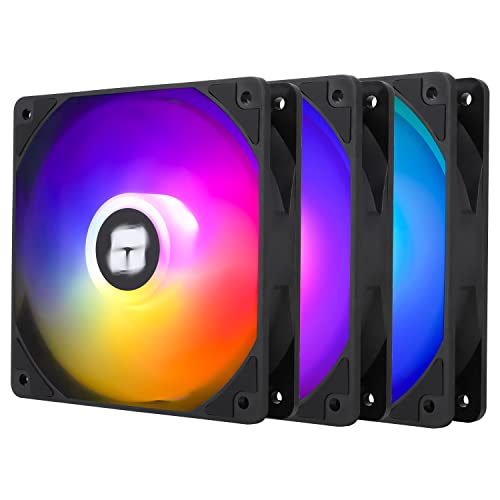
Specs
Size | 120mm |
Speed | Up to 1550 RPM |
Bearing | S-FDB |
Connector | 4-pin PWM |
Lighting | ARGB |
Pack size | 3 fans |
Best mount | Bottom intake |
Size
120mm
Speed
Up to 1550 RPM
Bearing
S-FDB
Connector
4-pin PWM
Lighting
ARGB
Pack size
3 fans
Best mount
Bottom intake
What it does well
Three lit 120mm fans for less than a single premium fan. Thermalright's budget line keeps appearing on independent test charts rather than only on retailer listings, which is the bar worth holding at this price.
The S-FDB bearing is a step up from the plain sleeve bearings common at this price, and that is the difference between a fan that is still quiet in year three and one that starts ticking in month eight. A 1550 RPM ceiling is plenty for a bottom row with a dust filter in front of it.
What you give up
No PWM sharing, so three fans mean three leads. With the INF hub closed to outside fans, that likely means a splitter or a hub in the same order.
The ARGB will sit beside Lian Li's lit front and not quite match it, since the two run from different controllers. Static pressure is also modest, which matters less in the open bottom row than it would behind a radiator.
Who it's for
An INF owner on a real budget who wants the bottom row filled and lit without pulling money from the GPU line.
Editor's Pick: Lian Li UNI Fan TL Flex 120 Reverse 3-Pack

Specs
Size | 120mm, 28mm thick |
Speed | 200 to 2300 RPM |
Bearing | Fluid dynamic |
Connector | L-Wireless controller included |
Lighting | ARGB |
Pack size | 3 fans plus controller |
Best mount | Bottom intake |
Size
120mm, 28mm thick
Speed
200 to 2300 RPM
Bearing
Fluid dynamic
Connector
L-Wireless controller included
Lighting
ARGB
Pack size
3 fans plus controller
Best mount
Bottom intake
What it does well
Reverse blades are the reason this pick exists. A normal fan mounted as bottom intake shows its frame struts and sticker through the glass; a reverse-blade fan pushes air upward with the clean face showing. On a case built around a glass side and a mirror front, that is visible every time you look at the machine.
The three-pack includes Lian Li's L-Wireless controller, so the fans need no daisy-chain cable to the board and do not compete for the INF's closed hub. Speed runs from 200 to 2300 RPM, with a low floor for quiet idling.
What you give up
The highest price per fan here by a wide margin, and the worst airflow per unit spent. You are paying for the view and the wireless control, not for the air.
A 28mm frame is thicker than standard, which eats into shroud-to-GPU space on very long cards. And the wireless ecosystem is another piece of Lian Li software to run beside whatever controls the INF's own lighting.
Who it's for
The owner building a showcase INF who wants the bottom row to look as finished as the front panel, and who already runs Lian Li gear.
Bottom line
If you own a 217 INF and want this settled in one order, buy the ARCTIC P12 Pro A-RGB LN 3-Pack and fill the bottom row. If you own the standard 217 or want the most fans for the money, the ARCTIC P12 PWM PST 5-Pack covers the bottom and the top. If quiet is a hard requirement, swap the bottom row to the Noctua NF-A12x25 G2 PWM. If the budget is tight, the Thermalright TL-C12C-S X3 fills the INF's bottom row for very little. And if the build is a showcase, the Lian Li UNI Fan TL Flex 120 Reverse 3-Pack is the one that looks right through the glass. Whatever you pick, leave the 170mm front alone. The Lancool 216 and the Lancool 207 follow the same rule, and our case and cooling guide covers the wider decision.
FAQ
Can you replace the Lancool 217's 170mm front fans?
Not with another 170mm fan. We could not find one sold as a retail part, so the factory pair is the only 170mm option the case has. The standard 217 front also takes three 140mm or three 120mm fans, but that trades a larger intake for a smaller one. The 217 INF front takes only the 170mm pair. If the front fans are loud, fix the fan curve rather than the hardware.
Does the Lancool 217 INF front take 120mm or 140mm fans?
No. Lian Li's spec page for the INF lists only the two 170mm fans for the front, and a hands-on review states that no 120mm or 140mm fan fits there. The standard 217 is different: its spec page lists three 140mm or three 120mm fans as front alternatives. Check which variant you own before buying anything for the front.
Are bottom fans worth it in the Lancool 217?
On the INF, yes. It ships with the bottom row empty, and in KitGuru's testing adding bottom intake fans cut the GPU from 49 to 46 degrees over ambient, took a degree off the CPU and dropped load noise slightly. The standard 217 already ships with two bottom fans, so the third slot adds little. Skip the mount under the PSU shroud either way.
Should the Lancool 217's top fans be intake or exhaust?
Exhaust. The front and bottom rows are the intake side, and the case moves air front to back and bottom to top. Top intake fights that path and traps warm air around the CPU cooler. On most builds the top can stay empty, since the 140mm rear fan and the open top vent already clear the heat. Add a top pair for a hot CPU or a radiator.
How do you make the Lancool 217's stock fans quieter?
Start with the fan curve, not the fans. Reviewers measured the INF near 50 dBA under load with default curves, and most of that comes from fans running faster than the temperatures need. Set the front and bottom fans to stay slow until the GPU is warm. On the standard 217, the 1900 RPM stock bottom fans are the fastest in the case and the best candidates for a quieter replacement.
Can you fit a 360mm radiator in the Lancool 217?
Yes, at the top only. Both the standard 217 and the INF list 360, 280 and 240mm radiator support at the top, and neither lists a front radiator. The INF page caps a top radiator plus its fans at 85mm total thickness, so check the radiator's depth before buying. For radiator picks that fit that slot, see our 360mm AIO roundup.
Related Articles

Best Fans for the Lancool 216 (2026): 5 Picks by Mount
The best fans for the Lancool 216 start with what not to buy: nothing replaces the stock 160mm front pair. Five picks mapped across every other mount.
Sep 22, 2026

Best Fans for the Lian Li Lancool 207: 5 Picks for 2026
The best fans for the Lancool 207 start with its empty rear mount. Five picks for rear, top and front, plus the 30mm thickness trap that costs buyers returns.
Sep 1, 2026

Best PC Case Fans 2026: 5 Picks for 120mm and 140mm
The best PC case fans for 2026: five 120mm and 140mm picks by mount position, so you know exactly which fan to buy for intake, exhaust and a radiator.
Aug 17, 2026

Best PWM Fan Hubs and Controllers (2026): 5 Top Picks
The best PWM fan hub picks for 2026, plus the header budget math that tells you whether your build needs a powered hub, a passive splitter, or neither.
Sep 17, 2026

Best 9850X3D Prebuilt Gaming PCs (2026), by GPU Tier
The best 9850X3D prebuilt gaming PCs for 2026, sorted by GPU tier from RTX 5070 to RTX 5080, each checked for power supply, memory and its 9800X3D twin.
Nov 8, 2026