Affiliate Disclosure: As an Amazon Associate we earn from qualifying purchases. Some links may earn us a commission at no cost to you.

Best Fans for the Montech King 65 Pro (2026): 5 Picks
Before you buy anything for this case, check the two fans on the side panel. They are reverse-blade units, which means the motor hub faces out and the blades are shaped to pull air in through the side rather than push it out. Fit ordinary fans in those mounts and you reverse the intake path the case was built around.
That single detail decides most of this guide. The other half is pressure: the panelling sits close enough to the blades that airflow ratings stop predicting results, so the picks below are mapped to specific mounts rather than ranked in the abstract.
Our top pick: Phanteks D30-140 Reverse (3-pack)
It is the one fan here that keeps the side intake pointing the right way and still beats the stock unit on static pressure, which is the pairing this case actually needs.

Quick picks
Pick | Fan | Where it goes | Buy |
|---|---|---|---|
Best Overall | Side intake, 2x 140 mm | ||
Best Value | Top exhaust and bottom intake | ||
Best Premium | Top exhaust, quiet builds | ||
Best Budget | Bottom intake and rear exhaust | ||
Editor's Pick | Any restricted mount |
Best Overall
- Fan
- Where it goes
Side intake, 2x 140 mm
- Buy
Best Value
- Fan
- Where it goes
Top exhaust and bottom intake
- Buy
Best Premium
- Fan
- Where it goes
Top exhaust, quiet builds
- Buy
Best Budget
- Fan
- Where it goes
Bottom intake and rear exhaust
- Buy
Editor's Pick
- Fan
- Where it goes
Any restricted mount
- Buy
Specs at a glance
Fan | Size | Thickness | Max speed | Static pressure | Lighting |
|---|---|---|---|---|---|
140 mm | 30 mm | 1,800 RPM | 3.08 mm H2O | D-RGB | |
140 mm | 25 mm | 1,500 RPM | Not published | ARGB | |
140 mm | 25 mm | 1,500 RPM | 2.08 mm H2O | None | |
120 mm | 25 mm | 1,550 RPM | Not published | ARGB | |
120 mm | 30 mm | 3,000 RPM | 7.11 mm H2O | None |
- Size
140 mm
- Thickness
30 mm
- Max speed
1,800 RPM
- Static pressure
3.08 mm H2O
- Lighting
D-RGB
- Size
140 mm
- Thickness
25 mm
- Max speed
1,500 RPM
- Static pressure
Not published
- Lighting
ARGB
- Size
140 mm
- Thickness
25 mm
- Max speed
1,500 RPM
- Static pressure
2.08 mm H2O
- Lighting
None
- Size
120 mm
- Thickness
25 mm
- Max speed
1,550 RPM
- Static pressure
Not published
- Lighting
ARGB
- Size
120 mm
- Thickness
30 mm
- Max speed
3,000 RPM
- Static pressure
7.11 mm H2O
- Lighting
None
Benchmarks
There is no useful game benchmark for a case fan, so the chart below is the specification that decides the side mounts: peak static pressure as the manufacturers rate it. Pressure matters here more than in an open case because the side panelling covers a large share of each blade, and a fan with high airflow but low pressure simply stalls against it.
Higher is better behind a restricted panel. Both Thermalright sets publish no pressure figure and are left out rather than estimated.
- 7.11 mmH2O
- Phanteks D30-140 Reverse3.08 mmH2O
- 2.08 mmH2O
The reverse-blade problem
The case arrives with three fans: two 140 mm reverse-blade units on the side panel pulling air in, and one 120 mm fan at the rear pushing it out. They run from a six-port hub. The side mounts take either two 140 mm or two 120 mm fans, the top takes three 120 mm or two 140 mm, the bottom matches the top, and the rear takes a single 120 mm.
A conventional fan in the side position spins the same direction but moves air the other way once it is mounted on the panel with its hub facing in. You end up with two intakes fighting the rear exhaust and a case that runs hotter than it did out of the box. So either buy reverse-blade fans for that position, or leave the stock pair alone and spend the money on the top and bottom mounts, which is a perfectly good plan.
Pressure is the second constraint. Reviewers measuring this chassis found the panelling obstructs roughly 20 mm of each blade per side, close to 40 mm across the pair, and GamersNexus recorded it at the bottom of their CPU thermal chart at 57 degrees over ambient. That is why the picks below lean on pressure ratings rather than airflow, and why the upgrade is worth doing at all here when it would be marginal in an airflow-first mid tower.
How we picked
Every fan here clears a simple floor: a real bearing rather than a sleeve, four-pin PWM control rather than a fixed-speed three-pin unit, and a brand that shows up on independent fan testing. Beyond that the mount decides the fan. Side position means reverse blades and high pressure. Top and bottom mean ordinary good fans, because nothing obstructs them. Rear means one 120 mm fan and no reason to overthink it. The same method drives the Corsair 4000D fan plan and the O11 Dynamic EVO fan plan, with the layout doing the deciding rather than a league table.
One more practical limit: the bundled hub has six ports. Fill all nine 120 mm mounts and you need a splitter or a second motherboard header, so plan the count before the order rather than after it.
Best Overall: Phanteks D30-140 Reverse (3-pack)
Specs
Size | 140 mm |
Thickness | 30 mm |
Airflow direction | Reverse, intake through the side panel |
Speed | 250 to 1,800 RPM |
Max airflow | 71.76 CFM |
Max static pressure | 3.08 mm H2O |
Connector | 4-pin PWM, D-RGB daisy-chain |
Pack | 3 fans |
Size
140 mm
Thickness
30 mm
Airflow direction
Reverse, intake through the side panel
Speed
250 to 1,800 RPM
Max airflow
71.76 CFM
Max static pressure
3.08 mm H2O
Connector
4-pin PWM, D-RGB daisy-chain
Pack
3 fans
What it does well
It is a true reverse-airflow fan, so it reproduces the direction the case was built for instead of fighting it. At 3.08 mm H2O it carries roughly half again the pressure of a typical 140 mm case fan, which is the property that counts when the panel is covering part of the blade. The extra 5 mm of depth over a standard fan is where that pressure comes from.
The daisy-chain wiring keeps a two-fan side bank down to one run, and a three-pack fills both mounts with a spare in the box. The lighting reads as a match for the stock ARGB rather than an obvious transplant.
What you give up
It is the costliest way to fill two mounts, and the 30 mm thickness is a genuine constraint rather than a footnote. Measure the side tray before ordering, because a dual-chamber layout puts that bracket close to the motherboard side.
The D-RGB chain wants Phanteks' own linking to look right, which sits awkwardly next to the case's six-port hub, so expect to pick one lighting scheme and commit. The third fan is a spare, not a third side mount.
Who it's for
Anyone replacing the side intakes rather than keeping them, and anyone who wants the stock lighting look to survive the upgrade.
Best Value: Thermalright TL-C14C-S X3 (140 mm)

Specs
Size | 140 mm |
Thickness | 25 mm |
Bearing | S-FDB |
Speed | Up to 1,500 RPM |
Connector | 4-pin PWM |
Lighting | ARGB |
Pack | 3 fans |
Size
140 mm
Thickness
25 mm
Bearing
S-FDB
Speed
Up to 1,500 RPM
Connector
4-pin PWM
Lighting
ARGB
Pack
3 fans
What it does well
The top and bottom mounts sit in open air, so they do not need premium pressure and the money is better spent on the positions that do. A three-pack covers two top 140s and a bottom fan in one order.
The S-FDB bearing is a real bearing rather than a sleeve, the ARGB lines up with the stock lighting on the bundled hub, and PWM control means they actually slow down at idle instead of droning.
What you give up
Static pressure is not published for this line, so treat these as airflow fans and keep them out of the obstructed side mounts. A 1,500 RPM ceiling is modest if you plan to push a hot build hard.
The lighting is not addressable from the Phanteks or Lian Li ecosystems, and the listings for this family are confusingly similar, so order against the exact model string rather than the photo.
Who it's for
The builder filling the unobstructed mounts who still wants ARGB and proper PWM control without paying premium prices.
Best Premium: Noctua NF-A14 PWM chromax.Black

Specs
Size | 140 mm |
Thickness | 25 mm |
Bearing | SSO2 |
Speed | 0 to 1,500 RPM |
Max airflow | 140.2 m3/h (82.5 CFM) |
Max static pressure | 2.08 mm H2O |
Noise | 24.6 dB(A) max |
Warranty | 6 years |
Size
140 mm
Thickness
25 mm
Bearing
SSO2
Speed
0 to 1,500 RPM
Max airflow
140.2 m3/h (82.5 CFM)
Max static pressure
2.08 mm H2O
Noise
24.6 dB(A) max
Warranty
6 years
What it does well
It moves 140.2 cubic metres an hour at a rated 24.6 dB(A), the best airflow per decibel on this list. In a chassis that already measures badly for temperature, the realistic win is holding that temperature without the fans becoming the loudest thing in the room.
The chromax.Black finish removes the only serious objection to putting Noctua in a dark case. PWM response goes down to a full stop, so idle is genuinely silent, and the SSO2 bearing plus a six-year warranty will outlive the case.
What you give up
At 2.08 mm H2O it has the least pressure of the three picks that publish a figure, so it is the wrong choice behind the restricted side panel even though it is the best fan here in open air.
It sells as a single fan, so filling several mounts adds up fast. There is no lighting at all, which breaks the stock scheme if the build is meant to match.
Who it's for
The builder who weights noise over lighting, filling the top mounts in a quiet-first build.
Best Budget: Thermalright TL-C12C-S X3 (120 mm)

Specs
Size | 120 mm |
Thickness | 25 mm |
Bearing | S-FDB |
Speed | Up to 1,550 RPM |
Connector | 4-pin PWM |
Lighting | ARGB |
Pack | 3 fans |
Size
120 mm
Thickness
25 mm
Bearing
S-FDB
Speed
Up to 1,550 RPM
Connector
4-pin PWM
Lighting
ARGB
Pack
3 fans
What it does well
This case takes up to nine 120 mm fans, and filling the cheap positions should not cost more than the case did. For the bottom row and the rear exhaust, where nothing obstructs the blade and nobody sees the fan, this is the rational spend.
It still clears the floor that matters: a real bearing, four-pin PWM rather than a fixed-speed unit, and lighting that matches what is already in the case.
What you give up
No published pressure or airflow figures, so it is a value bet rather than a measured one, and the brand does not appear on independent test charts the way the premium names do.
The 1,550 RPM ceiling means a loaded build runs these near maximum, where they are audible. Variant naming across this family is messy, so match the model string exactly.
Who it's for
The builder filling five or more mounts who wants PWM and ARGB at the lowest sensible price.
Editor's Pick: Phanteks T30-120 (3-pack)
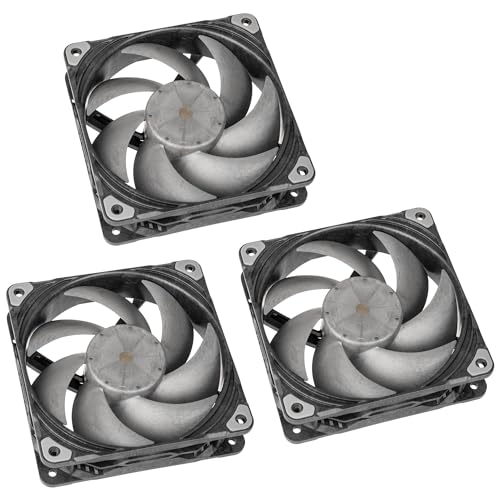
Specs
Size | 120 mm |
Thickness | 30 mm |
Bearing | VAPO |
Advanced mode | 3,000 RPM, 171.4 m3/h, 7.11 mm H2O |
Performance mode | 2,000 RPM, 113.6 m3/h, 3.3 mm H2O |
Hybrid mode | 1,200 RPM, 66.4 m3/h, 1.27 mm H2O |
Frame | LCP frame and blades |
Pack | 3 fans |
Size
120 mm
Thickness
30 mm
Bearing
VAPO
Advanced mode
3,000 RPM, 171.4 m3/h, 7.11 mm H2O
Performance mode
2,000 RPM, 113.6 m3/h, 3.3 mm H2O
Hybrid mode
1,200 RPM, 66.4 m3/h, 1.27 mm H2O
Frame
LCP frame and blades
Pack
3 fans
What it does well
At 7.11 mm H2O in advanced mode it carries more than twice the pressure of the reverse D30 and more than triple the NF-A14. If the obstruction is the problem, this is the fan that answers it head on.
The three-mode switch is what makes that practical rather than punishing: run hybrid at 1,200 RPM for daily use and keep advanced in reserve for a hot afternoon. The LCP frame and blades stay rigid at 3,000 RPM instead of flexing and buzzing.
What you give up
It uses conventional blades, so it does not solve the side-intake direction problem. Use it in the bottom and rear mounts, or in the 120 mm side configuration only if you have decided to abandon the reverse-intake layout entirely.
Advanced mode is loud, there is no lighting, it is 30 mm thick with the same clearance caveat as the D30, and it is the most expensive set here.
Who it's for
The builder chasing temperature in a case that measures badly, willing to trade lighting and some noise for real pressure.
Bottom line
If you are replacing the side intakes, buy the Phanteks D30-140 Reverse and keep the airflow pointing the way the case intended. If you would rather not touch them, leave the stock pair in place and fill the top and bottom with the Thermalright TL-C14C-S X3. If noise is the thing you care about, put the Noctua NF-A14 chromax.Black on top. If you are filling every 120 mm mount on a budget, the Thermalright TL-C12C-S X3 is the sensible choice. And if you want to beat the panel restriction outright, the Phanteks T30-120 has the pressure to do it. For the wider decision, see how to choose cooling and a case, or our general case-fan picks.
FAQ
Does the Montech King 65 Pro need reverse-blade fans?
For the side mounts, yes, if you are replacing the fans that came in them. The stock side pair is reverse-blade and pulls air in through the panel. A conventional fan in that position ends up moving air the other way, so you lose the intake path and the case runs warmer than it did new. The alternative is simply to keep the stock side fans and upgrade the top, bottom, and rear instead, which is a legitimate plan and costs less.
How many fans can the Montech King 65 Pro hold?
Up to nine 120 mm fans, or six 140 mm. The split is three 120s or two 140s on top, two of either size on the side, three 120s or two 140s on the bottom, and one 120 mm at the rear. It ships with three fans installed and a six-port hub, so a full build needs a splitter or a spare motherboard header before you reach nine.
Will 140mm fans fit the King 65 Pro's side mount?
Yes. The side tray takes either two 120 mm or two 140 mm fans, and the stock configuration is already 140 mm. Thickness is the thing to check rather than diameter: several high-pressure fans are 30 mm deep instead of the usual 25 mm, and the side bracket in a dual-chamber case sits closer to the motherboard than you might expect. Measure before ordering.
Should you replace the stock King 65 Pro fans?
The rear and side fans are reasonable, and the side pair has the advantage of already being the correct blade direction. The strongest argument for replacing them is pressure rather than quality: reviewers found the panelling covers a large part of each side blade, which rewards a higher-pressure fan. If you only want to spend once, add fans to the empty top and bottom mounts first and leave the stock three alone.
Will 30mm-thick fans fit the King 65 Pro side bracket?
Both Phanteks picks here are 30 mm deep rather than 25 mm, and that is the one measurement worth confirming against your own unit before you order. The side tray is the tightest of the four positions in a dual-chamber layout. The top and bottom mounts have more room, so if clearance is marginal, put the thick fans there and keep standard-depth fans on the side.
Related Articles

Best Fans for the Corsair 4000D Airflow (2026): 5 Picks
The best fans for the Corsair 4000D Airflow, matched to its six mounts: five picks from budget to premium, plus a mount, size, and radiator clearance guide.
Aug 18, 2026

Best Fans for the Lian Li O11 Dynamic EVO (2026): 5 Picks
Best fans for the Lian Li O11 Dynamic EVO: 5 picks matched to the top, side, and bottom brackets, plus the intake and exhaust layout that keeps temps down.
Aug 23, 2026

Best Dual-Chamber PC Cases (2026): 5 Picks by Airflow
The best dual-chamber PC cases in 2026, ranked by measured airflow and the fan budget each one hides. Five picks, from compact builds to showcase flagships.
Aug 27, 2026

Best PC Case Fans 2026: 5 Picks for 120mm and 140mm
The best PC case fans for 2026: five 120mm and 140mm picks by mount position, so you know exactly which fan to buy for intake, exhaust and a radiator.
Aug 17, 2026

How to Choose a PSU, Cooler, and Case
A builder's framework for the chassis side of a PC: size the PSU with sane headroom, match the cooler to the chip, and pick a case that fits and breathes.
Jun 29, 2026