Affiliate Disclosure: As an Amazon Associate we earn from qualifying purchases. Some links may earn us a commission at no cost to you.

Best Fans for the NZXT H5 Flow (2026): 5 Picks by Mount
The NZXT H5 Flow ships with two fans and eight mounts. One F120Q sits in the front as intake, one sits at the rear as exhaust, and the other six positions are yours. This is written against the current H5 Flow, not the 2022 model, which NZXT lists with a single bottom fan position.
The fan plan here runs the opposite way to the bigger H7 Flow. Stay 120mm up front, fill the floor pair, and keep the top stack inside its 55mm radiator limit.
Our top pick: ARCTIC P12 PWM PST 5-Pack
Five fans for the H5 Flow's five 120mm intake mounts, three across the front and two in the floor, all chained back to one header.

Quick picks
Pick | Fan | Mount it fills | Buy |
|---|---|---|---|
Best Overall | Front 3x 120mm plus bottom 2x 120mm | ||
Best Value | Top exhaust or 240mm top radiator | ||
Best Premium | Front intake, quiet build | ||
Best Budget | Bottom pair plus rear swap | ||
Editor's Pick | Top exhaust, 2x 140mm |
Best Overall
- Fan
- Mount it fills
Front 3x 120mm plus bottom 2x 120mm
- Buy
Best Value
- Fan
- Mount it fills
Top exhaust or 240mm top radiator
- Buy
Best Premium
- Fan
- Mount it fills
Front intake, quiet build
- Buy
Best Budget
- Fan
- Mount it fills
Bottom pair plus rear swap
- Buy
Editor's Pick
- Fan
- Mount it fills
Top exhaust, 2x 140mm
- Buy
Specs at a glance
Fan | Size | Max speed | Airflow | Static pressure | Lighting |
|---|---|---|---|---|---|
120 x 25mm | 1800 RPM | 56.3 CFM | 2.2 mmH2O | None | |
120 x 25mm | 3000 RPM | 77 CFM | 6.9 mmH2O | None | |
120 x 25mm | 1800 RPM | 107.3 m3/h | 3.14 mmH2O | None | |
120 x 25mm | 1550 RPM | 66.17 CFM | 1.53 mmH2O | 5V ARGB | |
140 x 25mm | 1500 RPM | 82.5 m3/h | 2.08 mmH2O | None |
- Size
120 x 25mm
- Max speed
1800 RPM
- Airflow
56.3 CFM
- Static pressure
2.2 mmH2O
- Lighting
None
- Size
120 x 25mm
- Max speed
3000 RPM
- Airflow
77 CFM
- Static pressure
6.9 mmH2O
- Lighting
None
- Size
120 x 25mm
- Max speed
1800 RPM
- Airflow
107.3 m3/h
- Static pressure
3.14 mmH2O
- Lighting
None
- Size
120 x 25mm
- Max speed
1550 RPM
- Airflow
66.17 CFM
- Static pressure
1.53 mmH2O
- Lighting
5V ARGB
- Size
140 x 25mm
- Max speed
1500 RPM
- Airflow
82.5 m3/h
- Static pressure
2.08 mmH2O
- Lighting
None
What the H5 Flow gives you to work with
One naming check first: the H5 Elite has a glass front, and the Flow is the mesh version this guide covers. Buyers order the wrong one more often than you would expect.
Eight mounts. The front takes three 120mm or two 140mm fans, the top takes two of either size, the floor takes two 120mm, and the rear takes one 120mm. NZXT fills the front with one fan and the rear with one, so six positions start empty.
The included F120Q is rated at 1350 RPM, 60.2 CFM and 1.05 mm H2O at 24.1 dBA. The catch is the connector. Both stock fans are three-pin DC, not four-pin PWM, so the motherboard can drop the voltage but it cannot run a proper per-fan curve. That is the real reason to replace them, more than the airflow figure.
Radiator support is the other half of the plan. The front takes up to 360mm, the top takes up to 240mm, and the rear takes none, inside 45 litres with 410mm of graphics card clearance and 170mm for a tower cooler. The top has a hard limit: radiator plus fan can be no thicker than 55mm. A standard 27mm radiator with 25mm fans fits. A 30mm fan on top of that radiator does not, which is why no thick fans made this list. The H5 Flow RGB changes the starting point again, with an F360 RGB Core in the front instead of a single F120Q, so check which box you have.
Stay 120mm up front
On the H7 Flow the best first move is three 140mm fans across the front. Here it is not. The H5 Flow front takes three 120mm or only two 140mm, and three 120mm fans cover more of the mesh than two 140mm units do. The 120mm layout also keeps the full 360mm front radiator option open, where 140mm drops the ceiling to 280mm.
The 140mm question belongs at the top instead. Two 120s or two 140s fit up there, so the bigger fan costs nothing in count and runs slower for the same air. Our case fan roundup covers the sizing argument in general terms.
How we picked
Mount first. A floor intake, a top exhaust over a radiator, and a front intake behind mesh want different things from a fan, so these picks are mapped to positions rather than ranked against each other. Static pressure matters behind the front mesh and through a radiator. The headline airflow figure matters less.
Then whether the stock fans should move at all. We replace case fans when they buzz, when they run fixed-speed with no per-fan control, or when the case ships too few. The F120Q pair fails the last two tests: two fans for eight mounts, both on three-pin. Past a point, extra fans stop paying, and in most builds more case fans stop helping past three.
Headers last. Eight fans outrun the fan headers on most boards. Every PWM pick here either chains through ARCTIC's PST passthrough or is cheap to run off a PWM fan hub, and with 28.7mm of cable space behind the tray, fewer runs is the tidier build. The wider framework lives in how to choose a PSU, cooler and case.
Best Overall: ARCTIC P12 PWM PST 5-Pack
Specs
Size | 120 x 120 x 25mm |
Speed | 200 to 1800 RPM |
Airflow | 56.3 CFM |
Static pressure | 2.2 mmH2O |
Noise | 0.3 Sone |
Bearing | Fluid dynamic |
Connector | 4-pin PWM with PST daisy-chain |
Pack | 5 fans |
Size
120 x 120 x 25mm
Speed
200 to 1800 RPM
Airflow
56.3 CFM
Static pressure
2.2 mmH2O
Noise
0.3 Sone
Bearing
Fluid dynamic
Connector
4-pin PWM with PST daisy-chain
Pack
5 fans
What it does well
Five fans, five intake mounts. Three go across the front and two go in the floor, and the whole intake side of the case runs on PWM from one purchase.
The blade is pressure-optimised, which is what a mesh front and a floor intake ask for. A fan tuned for free air gives much of its rated 56.3 CFM back to a dust filter. This one holds more of it, and the 200 to 1800 RPM range gives a fan curve room at both ends, with the fans stopping entirely below 5% PWM.
PST is the quiet win in this case. The fans chain off one another, so five fans can come back to one or two motherboard headers instead of five separate runs through a 28.7mm cable channel. The same reasoning put this pack near the top of the Lancool 216 fan plan.
What you give up
No lighting at all. In a glass-side case that is a visible gap, and it matters more if you bought the RGB variant for its front fan.
PST means one curve across every fan on the chain. If you want the floor pair quieter than the front, that is two headers and two chains.
The front stock F120Q comes out to make room for the new three. Do not bin it: move it to a top exhaust slot, where a fixed-voltage three-pin fan is a reasonable choice.
Who it's for
Any H5 Flow owner who wants the full intake side populated with PWM fans in one order and does not care what colour they are.
Best Value: ARCTIC P12 Pro PST

Specs
Size | 120 x 120 x 25mm |
Speed | 600 to 3000 RPM |
Airflow | 77 CFM |
Static pressure | 6.9 mmH2O |
Zero RPM | Below 5% PWM |
Bearing | Fluid dynamic |
Connector | 4-pin PWM with PST daisy-chain |
Pack | Single fan |
Size
120 x 120 x 25mm
Speed
600 to 3000 RPM
Airflow
77 CFM
Static pressure
6.9 mmH2O
Zero RPM
Below 5% PWM
Bearing
Fluid dynamic
Connector
4-pin PWM with PST daisy-chain
Pack
Single fan
What it does well
6.9 mm H2O is a radiator number, at a single-fan price. The top of the H5 Flow is where a 240mm AIO goes when the front is kept for intake, and this is the fan that pushes through it.
Depth is the quiet reason it fits. At 25mm, two of these on a standard 27mm radiator land at 52mm, inside the 55mm stack the top allows. The 600 to 3000 RPM range covers a calm desktop and a loaded CPU, and the fans stop below 5% PWM. Our 240mm AIO roundup covers the coolers that sit underneath them.
What you give up
It is sold as a single fan, so the top pair means buying two.
Near 3000 RPM it is loud, and there is no lighting. As plain exhaust with no radiator below it, most of that pressure goes unused.
Check the listing. ARCTIC sells the P12 Pro PST CO, a continuous-operation unit for servers, plus LN and Reverse versions under near-identical titles. Buyers have flagged the naming as easy to trip over.
Who it's for
The buyer running a 240mm AIO in the top of the H5 Flow, or anyone wanting strong exhaust over a hot CPU for the least money.
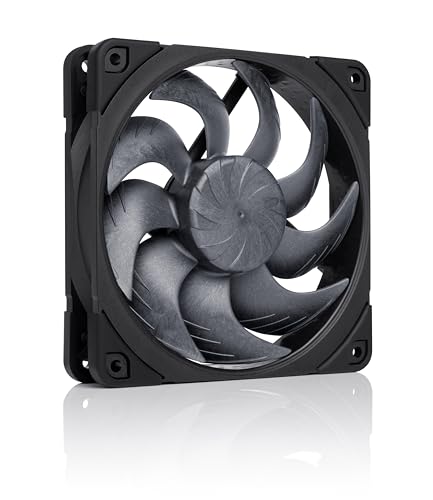
Best Premium: Noctua NF-A12x25 G2 PWM chromax.Black
Specs
Size | 120 x 120 x 25mm |
Speed | up to 1800 RPM |
Airflow | 107.3 m3/h |
Static pressure | 3.14 mmH2O |
Noise | 22.5 dBA |
Bearing | SSO2 |
Connector | 4-pin PWM |
Warranty | 6 years |
Size
120 x 120 x 25mm
Speed
up to 1800 RPM
Airflow
107.3 m3/h
Static pressure
3.14 mmH2O
Noise
22.5 dBA
Bearing
SSO2
Connector
4-pin PWM
Warranty
6 years
What it does well
The quietest way to fill the three front mounts at full airflow. 22.5 dBA at 1800 RPM, with 3.14 mm H2O to pull through the mesh and the filter behind it.
It keeps the 120mm format the H5 Flow front is built around, which means three of them across the bracket and the full 360mm radiator option still open behind them.
The black finish is the version that suits a glass-side build, and the included low-noise adaptor drops it to 1500 RPM for a machine that sits next to your head. Six years of warranty stands behind it. Front intake spends most of its life at low RPM, and that is where this fan earns its place.
What you give up
The price, three times over for the front. Against the ARCTIC 5-pack the temperature difference in a case this size is small. You are buying acoustics and build quality.
No lighting, which is a visible gap behind a glass panel.
Check the suffix. Noctua sells this fan as an LS-PWM low-speed version and as an Sx2-PP two-pack under near-identical names, and reports suggest the LS-PWM is the one people buy by mistake.
Who it's for
Desk-adjacent builds, work-from-home machines and anyone who has already decided noise is the constraint they are solving.
Best Budget: Thermalright TL-C12C-S X3

Specs
Size | 120 x 120 x 25mm |
Speed | up to 1550 RPM |
Airflow | 66.17 CFM |
Static pressure | 1.53 mmH2O |
Noise | 25.6 dBA |
Bearing | S-FDB |
Connector | 4-pin PWM |
Lighting | 5V 3-pin ARGB |
Size
120 x 120 x 25mm
Speed
up to 1550 RPM
Airflow
66.17 CFM
Static pressure
1.53 mmH2O
Noise
25.6 dBA
Bearing
S-FDB
Connector
4-pin PWM
Lighting
5V 3-pin ARGB
What it does well
Three ARGB fans for less than one premium unit, and three is a neat fit here. Two fill the floor and the third replaces the three-pin rear F120Q, which puts the exhaust on a real PWM curve too.
1550 RPM, 66.17 CFM and 25.6 dBA on an S-FDB bearing that does not rattle at low speed. Lighting runs on the standard 5V three-pin header, so it joins whatever chain the case already has. We reached the same conclusion in the 4000D Airflow fan guide.
What you give up
Static pressure. 1.53 mm H2O is the lowest figure in this group, and floor intake pulls through a filter.
Build quality matches the price. These are fine fans. They are not the ones you carry to the next build.
Check the suffix. Thermalright ships a near-identical TL-C12C without the S, and the version without the S is the one without lighting. Cables are short for a floor run, so budget an extension if the header sits at the top of the board.
Who it's for
The owner filling the floor on a budget who wants the rear on PWM as well and likes a bit of light through the glass.
Editor's Pick: Noctua NF-A14 chromax.Black

Specs
Size | 140 x 140 x 25mm |
Speed | up to 1500 RPM |
Airflow | 82.5 m3/h |
Static pressure | 2.08 mmH2O |
Noise | 24.6 dBA |
Bearing | SSO2 |
Connector | 4-pin PWM |
Warranty | 6 years |
Size
140 x 140 x 25mm
Speed
up to 1500 RPM
Airflow
82.5 m3/h
Static pressure
2.08 mmH2O
Noise
24.6 dBA
Bearing
SSO2
Connector
4-pin PWM
Warranty
6 years
What it does well
The top is the one place in the H5 Flow where 140mm is free. It takes two 120s or two 140s, so the bigger fan costs nothing in count and moves the same air at a lower, quieter speed.
1500 RPM, 2.08 mm H2O and 24.6 dBA, with swappable anti-vibration pads that keep motor hum out of the steel top panel. Six years of warranty. For an air-cooled build where the top is pure exhaust, this is the quietest way to pull heat off a tower cooler.
What you give up
The price for two. No lighting.
A 140mm top rules out the 240mm radiator up there. A 280mm radiator on the 140mm base only clears with low-profile memory, per NZXT, so check your RAM height before planning one.
Who it's for
Air-cooled H5 Flow builds where the top is exhaust only and noise is the priority.
Bottom line
If your H5 Flow still runs the stock pair, buy the ARCTIC P12 PWM PST 5-Pack and fill the front three and the floor two. If a 240mm AIO is going in the top, put two ARCTIC P12 Pro PST fans on it. If the machine sits next to your head, the Noctua NF-A12x25 G2 PWM chromax.Black is the quiet front. If the budget is tight, the Thermalright TL-C12C-S X3 fills the floor and fixes the rear. If the top is pure exhaust, the Noctua NF-A14 chromax.Black is the quiet 140mm answer.
FAQ
How many fans does the NZXT H5 Flow come with?
Two. The current H5 Flow ships with two F120Q 120mm fans, one in the front as intake and one at the rear as exhaust. Both are three-pin DC. The H5 Flow RGB is different: it ships an F360 RGB Core in the front, which is three 120mm fans in a single frame, plus the same F120Q at the rear. Either way, the top and the floor start empty, so there is room for at least four more fans.
Can you put 140mm fans in the NZXT H5 Flow?
Yes, in the front and the top. The front takes two 140mm fans instead of three 120mm, and the top takes two of either size. The floor and the rear are 120mm only. Going 140mm in the top costs nothing in fan count, so it is a sensible quiet-exhaust choice. Going 140mm in the front drops you from three fans to two and lowers the front radiator ceiling from 360mm to 280mm, so 120mm is usually the better front layout.
Are the bottom fan mounts on the H5 Flow worth filling?
They are if you run a warm graphics card. Two 120mm floor fans push fresh air up toward the underside of the card instead of relying on the front intake alone. They are the cheapest thermal gain left once the front is full. Fit them before the graphics card goes in, because reaching the screws afterwards usually means pulling the card back out, and plan the cable run before you close the side panel.
Should I replace the stock F120Q fans in the H5 Flow?
Not for airflow alone. At 60.2 CFM and 24.1 dBA they are a reasonable included fan. The reason to replace them is the connector: they are three-pin DC, so the motherboard can only vary voltage rather than run a proper per-fan PWM curve. If you want fans that track CPU or GPU temperature, swap them. If you set them once and never touch them, keep them, and move the front one to the top when new intake goes in.
What is the best fan setup for the NZXT H5 Flow?
Three 120mm intake in the front, two 120mm intake in the floor, one 120mm exhaust at the rear, and two exhaust fans in the top. That runs slightly positive pressure, which pushes dust out through the seams rather than in, and puts fresh air under the graphics card. If a 240mm AIO takes the top as exhaust, keep the same layout and put high-pressure fans on the radiator. Watch the header count, because eight fans outrun most boards.
Will a 240mm radiator and fans fit in the top of the H5 Flow?
Yes, within limits. The top takes up to a 240mm radiator, and the radiator plus fans can be no thicker than 55mm. A standard 27mm radiator with 25mm fans comes to 52mm and fits. Thicker 30mm fans on that radiator do not. A 280mm radiator only fits up there with low-profile memory, so the safest top cooler is a 240mm unit with standard-depth fans, or the front for anything larger.
Related Articles

Best Fans for the NZXT H7 Flow (2026): 5 Picks by Mount
The best fans for the NZXT H7 Flow start at the front bracket: it takes 140mm, not just the stock 120mm trio. Five picks mapped across all ten mounts.
Sep 15, 2026

Best PC Case Fans 2026: 5 Picks for 120mm and 140mm
The best PC case fans for 2026: five 120mm and 140mm picks by mount position, so you know exactly which fan to buy for intake, exhaust and a radiator.
Aug 17, 2026

Best PWM Fan Hubs and Controllers (2026): 5 Top Picks
The best PWM fan hub picks for 2026, plus the header budget math that tells you whether your build needs a powered hub, a passive splitter, or neither.
Sep 17, 2026

Best Fans for the Lancool 216 (2026): 5 Picks by Mount
The best fans for the Lancool 216 start with what not to buy: nothing replaces the stock 160mm front pair. Five picks mapped across every other mount.
Sep 22, 2026

Best 240mm AIO Coolers (2026): 5 Picks for 9800X3D and 285K
Best 240mm AIO coolers for 2026: five picks that cool the 9800X3D, 285K and most sub-250W chips, plus radiator thickness, case fitment and noise notes.
Aug 26, 2026