Affiliate Disclosure: As an Amazon Associate we earn from qualifying purchases. Some links may earn us a commission at no cost to you.

Best Fans for the NZXT H7 Flow (2026): 5 Picks by Mount
The NZXT H7 Flow arrives with three 120mm fans across the front and seven empty mounts behind them. This is written against the 2024 revision, the one with three F120Q fans in the box rather than the 2022 model's two.
The front bracket is the interesting part. It takes 140mm fans, not just the 120mm trio NZXT fits at the factory, so the highest-value first move here is a size change rather than a brand change. The bottom row is the second, and it only exists because the power supply stands vertically.
Our top pick: ARCTIC P14 PWM PST A-RGB
Three 140mm fans, which is exactly what the front bracket holds, at a price that does not make you think about it. This is the swap that turns the stock 120mm trio into the layout the case was built for.

Quick picks
Pick | Fan | Mount it fills | Buy |
|---|---|---|---|
Best Overall | Front intake, 3x 140mm | ||
Best Value | Bottom row plus rear, 120mm | ||
Best Premium | Top exhaust or 360mm radiator | ||
Best Budget | Bottom intake, 120mm | ||
Editor's Pick | Front intake, quiet build |
Best Overall
- Fan
- Mount it fills
Front intake, 3x 140mm
- Buy
Best Value
- Fan
- Mount it fills
Bottom row plus rear, 120mm
- Buy
Best Premium
- Fan
- Mount it fills
Top exhaust or 360mm radiator
- Buy
Best Budget
- Fan
- Mount it fills
Bottom intake, 120mm
- Buy
Editor's Pick
- Fan
- Mount it fills
Front intake, quiet build
- Buy
Specs at a glance
Fan | Size | Max speed | Airflow | Static pressure | Lighting |
|---|---|---|---|---|---|
140 x 27mm | 1700 RPM | 72.8 CFM | 2.4 mmH2O | 5V A-RGB | |
120 x 25mm | 1800 RPM | 56.3 CFM | 2.2 mmH2O | None | |
120 x 30mm | 3000 RPM | 100.9 CFM | 7.37 mmH2O | None | |
120 x 25mm | 1550 RPM | 66.17 CFM | 1.53 mmH2O | 5V ARGB | |
140 x 25mm | 1500 RPM | 82.5 m3/h | 2.08 mmH2O | None |
- Size
140 x 27mm
- Max speed
1700 RPM
- Airflow
72.8 CFM
- Static pressure
2.4 mmH2O
- Lighting
5V A-RGB
- Size
120 x 25mm
- Max speed
1800 RPM
- Airflow
56.3 CFM
- Static pressure
2.2 mmH2O
- Lighting
None
- Size
120 x 30mm
- Max speed
3000 RPM
- Airflow
100.9 CFM
- Static pressure
7.37 mmH2O
- Lighting
None
- Size
120 x 25mm
- Max speed
1550 RPM
- Airflow
66.17 CFM
- Static pressure
1.53 mmH2O
- Lighting
5V ARGB
- Size
140 x 25mm
- Max speed
1500 RPM
- Airflow
82.5 m3/h
- Static pressure
2.08 mmH2O
- Lighting
None
What the H7 Flow gives you to work with
Ten mounts. Three across the front, three across the top, three along the floor, and one at the rear. The front takes 120mm or 140mm, the top takes three 120mm or two 140mm, the bottom is 120mm only, and the rear will take either. NZXT fills the front and leaves the other seven for you.
The included F120Q is rated at 1350 RPM, 60.2 CFM and 1.05 mm H2O, at 24.1 dBA. Those are respectable numbers for a fan that came free with the case. The catch is the connector. It is three-pin DC, not four-pin PWM, so the board can drop the voltage but it cannot run a proper per-fan curve, and that is the honest reason to think about replacing them at all. Our airflow mid-tower roundup covers where this chassis sits against the rest of that shelf.
Radiator support runs 420mm in the front, 360mm up top, and 140mm at the rear, inside 62.1 litres with 410mm of graphics card clearance and 185mm for a tower cooler. The radiator numbers matter before you buy a single fan: if the front bay is already spent on an AIO, the fan plan moves to the floor and the top, and the 140mm front question never comes up.
The front bracket takes 140mm
Three 140mm fans move more air than three 120mm fans at the same speed, and they do it more quietly because the blade tips travel slower. On most mid-towers that trade is unavailable, because the front bracket is drilled for 120mm and nothing else. Here it is drilled for both, which is the whole reason this case earns its own fan article. The smaller H5 Flow is the counterexample: its front takes three 120mm or only two 140mm, so the best fans for the NZXT H5 Flow stay at 120mm up front.
The gain is real and it is not free. A 140mm front moves the front radiator ceiling from 360mm to 420mm, a size very few all-in-one coolers come in, so committing to 140mm intake usually means committing to no front radiator at all. Plan the cooling first, then the fans. Our case fan roundup covers the sizing argument in general terms.
One fork before you order. The H7 Flow RGB does not ship three separate fans. It ships an F360 RGB Core, three 120mm fans bonded into a single frame, and pulling that out to fit 140mm units means giving up the lighting chain the case was sold on. Check which box you have on the shelf.
How we picked
Slot first. A rear exhaust and a bottom intake want different things from a fan, so these picks are mapped to mounts rather than ranked against each other. Static pressure is what counts behind the front mesh and under the floor filter; the headline airflow figure matters less than the spec sheets imply.
Then whether the stock fans should move at all. We replace case fans when they buzz, when they run fixed-speed with no per-fan control, or when the case ships with too few. The F120Q trio fails the middle test on its three-pin connector and passes the other two, which makes the front swap a considered upgrade rather than a rescue. The wider framework lives in how to choose a PSU, cooler and case.
Lighting last. Two of the five picks carry 5V ARGB and three do not, and that is a build-aesthetic call rather than a thermal one. Do not pay for lighting in a position nobody can see, and the floor of this case is exactly that position.
Best Overall: ARCTIC P14 PWM PST A-RGB
Specs
Size | 140 x 140 x 27mm |
Speed | 200 to 1700 RPM |
Airflow | 72.8 CFM |
Static pressure | 2.4 mmH2O |
Noise | 0.3 Sone |
Bearing | Fluid dynamic |
Connector | 4-pin PWM with PST daisy-chain |
Lighting | 5V 3-pin A-RGB |
Size
140 x 140 x 27mm
Speed
200 to 1700 RPM
Airflow
72.8 CFM
Static pressure
2.4 mmH2O
Noise
0.3 Sone
Bearing
Fluid dynamic
Connector
4-pin PWM with PST daisy-chain
Lighting
5V 3-pin A-RGB
What it does well
Three fans, three front mounts, one purchase. The bracket fills and nothing is left over, which is rarer than it should be in a category that sells fans in twos and fives.
The blade profile is pressure-optimised, and that is what a perforated front panel asks for. A fan tuned for free air gives most of its rated 72.8 CFM back to a mesh panel and a dust filter. This one holds more of it. The range runs 200 to 1700 RPM, so a curve has somewhere to go at both ends.
PST is the quiet convenience. The fans chain off one another and run from a single motherboard header, which is the difference between a tidy build and three splitters stuffed behind the tray. The A-RGB version specifically carries the 5V lighting header on the same chain.
What you give up
Depth. These are 27mm rather than the standard 25mm, and that 2mm comes straight off the gap between the front bracket and whatever sits behind it. In the H7 Flow that gap is generous, but a front radiator plus a 27mm fan is a stack you measure rather than assume.
Noise at the top of the range. Nothing here is a quiet fan at 1700 RPM, and the A-RGB version adds a second cable per fan to route.
Check the listing. ARCTIC sells a P14 Pro PST CO under a near-identical title, and the CO is a continuous-operation unit built for servers rather than the standard P14. Buyers have flagged the naming as easy to trip over.
Who it's for
Any H7 Flow owner who wants the biggest single airflow gain the case has to offer and is happy to pull the front panel once.
Best Value: ARCTIC P12 PWM PST 5-Pack

Specs
Size | 120 x 120 x 25mm |
Speed | 200 to 1800 RPM |
Airflow | 56.3 CFM |
Static pressure | 2.2 mmH2O |
Noise | 0.3 Sone |
Bearing | Fluid dynamic |
Connector | 4-pin PWM with PST daisy-chain |
Pack | 5 fans |
Size
120 x 120 x 25mm
Speed
200 to 1800 RPM
Airflow
56.3 CFM
Static pressure
2.2 mmH2O
Noise
0.3 Sone
Bearing
Fluid dynamic
Connector
4-pin PWM with PST daisy-chain
Pack
5 fans
What it does well
Four empty 120mm mounts, five fans in the box. The bottom row takes three, the rear takes one, and the spare covers the one that arrives with a bent blade.
Same pressure-optimised family as the P14, scaled down: 200 to 1800 RPM, 56.3 CFM, 2.2 mm H2O. The bottom row sits behind a dust filter, which is exactly the restriction that profile exists for. The same reasoning put this fan near the top of our case fan roundup.
PST chaining again, which matters more down here than up front. Four fans across two mounts on one header keeps the cable run short in a zone you cannot reach once the graphics card is in.
What you give up
No lighting at all. In a case with a glass side panel and a stock ARGB chain on the RGB variant, that is a visible gap rather than a technicality.
PST means one curve across every chained fan. If you want the bottom row quieter than the rear, that is two headers and no chaining.
The bottom mounts sit under the graphics card. Fit them before the card goes in, not after.
Who it's for
The owner who wants every mount filled, does not care what colour the fans are, and would rather spend the difference on something that shows.
Best Premium: Phanteks T30-120 3-Pack
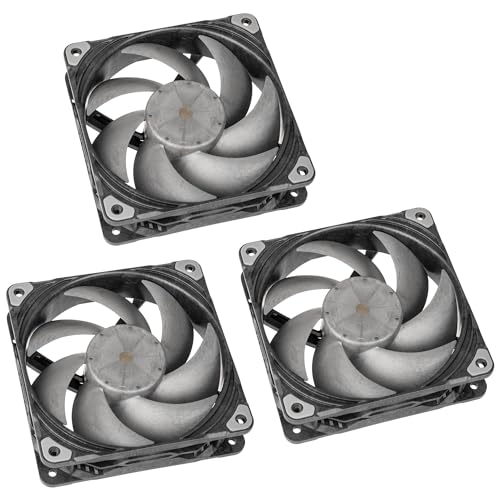
Specs
Size | 120 x 120 x 30mm |
Speed modes | Hybrid 1200 / Performance 2000 / Advanced 3000 RPM |
Airflow | 100.9 CFM at 3000 RPM |
Static pressure | 7.37 mmH2O |
Noise | up to 39.7 dBA |
Bearing | VAPO |
Frame | Liquid crystal polymer |
Pack | 3 fans |
Size
120 x 120 x 30mm
Speed modes
Hybrid 1200 / Performance 2000 / Advanced 3000 RPM
Airflow
100.9 CFM at 3000 RPM
Static pressure
7.37 mmH2O
Noise
up to 39.7 dBA
Bearing
VAPO
Frame
Liquid crystal polymer
Pack
3 fans
What it does well
7.37 mm H2O is not a case-fan static pressure number, it is a radiator number. The top of this chassis is the only 360mm radiator mount it has, and this is the fan built for that job.
The mode switch is the reason to buy three of these rather than three of anything else. Hybrid tops out at 1200 RPM and stops spinning below half PWM. Performance runs to 2000. Advanced runs to 3000 RPM and 100.9 CFM. One fan covers a silent build and a loaded one, and the switch is physical rather than software.
The liquid crystal polymer frame resists flex when a radiator is clamped against it, which is where cheaper frames start to buzz. The same logic put them in our O11 Dynamic EVO fan plan.
What you give up
The price. Three of these cost more than the case does on sale, which is a strange sentence to write about fans and an honest one.
30mm of depth. In the top of the H7 Flow, with a radiator above the motherboard, that is clearance to measure rather than assume.
Advanced mode at 39.7 dBA is loud in a way the spec sheet understates. Reports suggest units arrive with the switch in different positions, so a fan that seems weak out of the box may simply be set to Hybrid.
Who it's for
The buyer putting a 360mm AIO in the top of this case and wanting to never revisit the decision.
Best Budget: Thermalright TL-C12C-S X3

Specs
Size | 120 x 120 x 25mm |
Speed | up to 1550 RPM |
Airflow | 66.17 CFM |
Static pressure | 1.53 mmH2O |
Noise | 25.6 dBA |
Bearing | S-FDB |
Connector | 4-pin PWM |
Lighting | 5V 3-pin ARGB |
Size
120 x 120 x 25mm
Speed
up to 1550 RPM
Airflow
66.17 CFM
Static pressure
1.53 mmH2O
Noise
25.6 dBA
Bearing
S-FDB
Connector
4-pin PWM
Lighting
5V 3-pin ARGB
What it does well
Three ARGB fans for less than one premium unit, and three is exactly what the bottom row holds. Nothing is wasted and nothing is missing.
The important word is PWM. The stock F120Q fans are three-pin, so this is the cheapest way to get a real per-fan curve into the build. 1550 RPM, 66.17 CFM, 25.6 dBA, on an S-FDB bearing that does not rattle at low speed.
Lighting runs on the standard 5V three-pin header, so it joins whatever chain is already in the case rather than needing its own controller. We reached the same conclusion in the 4000D Airflow fan guide.
What you give up
Static pressure. 1.53 mm H2O is the lowest figure in this group, and the bottom row sits behind a filter that eats exactly that.
Build quality that matches the price. These are fine. They are not fans you will carry to the next build.
Check the suffix. Thermalright ships a near-identical TL-C12C without the S, and the version without the S is the one without lighting. Cables are short for a bottom run, so budget an extension if the header sits at the top of the board.
Who it's for
The owner adding bottom intake on a budget who does not want to touch the front bracket at all.
Editor's Pick: Noctua NF-A14 chromax.Black

Specs
Size | 140 x 140 x 25mm |
Speed | up to 1500 RPM |
Airflow | 82.5 m3/h |
Static pressure | 2.08 mmH2O |
Noise | 24.6 dBA |
Bearing | SSO2 |
Connector | 4-pin PWM |
Warranty | 6 years |
Size
140 x 140 x 25mm
Speed
up to 1500 RPM
Airflow
82.5 m3/h
Static pressure
2.08 mmH2O
Noise
24.6 dBA
Bearing
SSO2
Connector
4-pin PWM
Warranty
6 years
What it does well
The same 140mm front slot as the top pick, solved for noise instead of airflow. 1500 RPM, 2.08 mm H2O, 24.6 dBA, and it holds airflow at low RPM where cheaper fans stall out. Front intake spends most of its life at low RPM.
The swappable anti-vibration pads matter more here than they sound. The front bracket is a large steel panel, and a 140mm fan bolted straight to it transmits motor hum into the whole chassis.
chromax.Black.swap is the version that fixes the colour, which is the objection most people raise before they raise the price. Six years of warranty sits behind it. Our Fractal North fan guide landed on the same fan for the same reason.
What you give up
The price, three times over if the whole bracket gets done. Against the ARCTIC P14 the temperature difference in this case is small. You are buying acoustics and build quality.
No lighting, which is a visible gap in a glass-panel case already running an ARGB chain.
The honest version of the premium-quiet argument is that it is real but narrow. If you game in headphones, the upcharge buys nothing you will ever hear.
Who it's for
Desk-adjacent machines, work-from-home builds, and anyone who has already decided noise is the constraint they are solving.
Bottom line
If you own the 2024 H7 Flow and the front still carries the stock trio, buy the ARCTIC P14 PWM PST A-RGB and fill the bracket with 140mm fans. If the front is already spent on a radiator, put the ARCTIC P12 PWM PST 5-Pack in the floor row and the rear instead.
If a 360mm radiator is going in the top, the Phanteks T30-120 3-Pack is the fan for it. If the budget is tight and the floor is the only gap, the Thermalright TL-C12C-S X3 covers it. If the machine sits next to your head, the Noctua NF-A14 chromax.Black is the quiet answer. Ten mounts does not mean ten fans. It means you get to choose which ones matter.
FAQ
How many fans does the NZXT H7 Flow come with?
The 2024 revision ships with three F120Q 120mm fans, all mounted in the front as intake. The 2022 model shipped two. The H7 Flow RGB is different again: it comes with an F360 RGB Core, which is three 120mm fans in a single frame rather than three separate units. Seven mounts sit empty on every version, so whichever box you have, the top, the bottom and the rear are yours to fill.
Can you put 140mm fans in the NZXT H7 Flow?
Yes, in the front and at the rear. The front bracket takes three 120mm or three 140mm fans, and the rear takes one of either. The top is the exception at three 120mm or two 140mm, and the bottom row is 120mm only. Going 140mm in the front is the single biggest airflow change available in this case, but it moves the front radiator ceiling from 360mm to 420mm, so decide the cooling before the fans.
Are the bottom fan mounts on the H7 Flow worth filling?
They are if you run a warm graphics card. The vertical power supply layout frees a three-slot 120mm row along the floor, and those fans blow straight up into the underside of the card rather than across the board. Most mid-towers this size do not have that row at all. Fit them before the graphics card goes in, because reaching the screws afterwards means pulling the card back out.
Should I replace the stock F120Q fans?
Not for performance alone. At 60.2 CFM and 24.1 dBA they are a reasonable included fan. The reason to replace them is the connector: they are three-pin DC, so the motherboard can only vary voltage rather than run a proper per-fan PWM curve. If you want a curve that tracks CPU or GPU temperature, they have to go. If you set them once and never think about them again, they are fine where they are.
What is the best fan setup for the NZXT H7 Flow?
Three 140mm intake in the front, three 120mm intake along the bottom, one 120mm exhaust at the rear, and the top left open or given to a radiator. That runs slightly positive pressure, pushes dust out through the seams rather than in, and puts fresh air directly under the graphics card. If a 360mm AIO takes the top as exhaust, drop the bottom row to two fans and keep the rear.
Can the H7 Flow take a 360mm radiator in the top and the front?
The top takes up to 360mm and the front takes up to 420mm, so a 360mm unit fits either position. Running one in each is possible on paper. In practice the front position eats the bracket you would otherwise fill with 140mm intake, and two radiators inside 62.1 litres leaves very little room for cable routing. One radiator up top and fans everywhere else is the shape this chassis was designed around.
Related Articles

Best PC Case Fans 2026: 5 Picks for 120mm and 140mm
The best PC case fans for 2026: five 120mm and 140mm picks by mount position, so you know exactly which fan to buy for intake, exhaust and a radiator.
Aug 17, 2026

Best Fans for the Lian Li Lancool 207: 5 Picks for 2026
The best fans for the Lancool 207 start with its empty rear mount. Five picks for rear, top and front, plus the 30mm thickness trap that costs buyers returns.
Sep 1, 2026

Best Fans for the Corsair 4000D Airflow (2026): 5 Picks
The best fans for the Corsair 4000D Airflow, matched to its six mounts: five picks from budget to premium, plus a mount, size, and radiator clearance guide.
Aug 18, 2026

Best Airflow ATX Mid-Tower Cases 2026: 5 Picks by Budget
Best ATX mid-tower cases for airflow in 2026: five picks that keep a hot GPU and a 360mm AIO cool, from the budget Phanteks G400A to the five-fan Torrent.
Oct 21, 2026

Best PC Cases for a 360mm AIO (2026): 5 Picks by Mount
The best PC case for a 360mm AIO comes down to mount location and top clearance. Five picks with radiator positions, clearance in mm, and GPU length costs.
Aug 22, 2026