Affiliate Disclosure: As an Amazon Associate we earn from qualifying purchases. Some links may earn us a commission at no cost to you.

Best Fight Sticks for Street Fighter 6 and Tekken 8 (2026)
Street Fighter 6 and Tekken 8 are the two games holding up the modern fighting-game scene, and the first real decision you make is not which stick to buy, it is which input method you commit to. Leverless all-button boards have taken over the top of the ladder, but a traditional lever stick is still a valid, comfortable choice, and the wrong pick means relearning your movement from scratch.
Three things actually decide the buy: whether the board is tournament legal, whether it reaches your platform (most competitive play runs on PS5), and whether you will pay the learning-curve tax that leverless charges. The picks below are ranked on that.
Our top pick: Victrix Pro KO Leverless
The Victrix Pro KO is where a lot of serious Street Fighter 6 and Tekken 8 players land. It is a competition-ready leverless board with swappable switches, a repositionable top plate, and a dedicated tournament lock, and it undercuts the other premium boards while matching them on build.
Quick picks
Pick | Controller | Why it wins | Where to buy |
|---|---|---|---|
Best Overall | Tournament-legal leverless, swappable switches, Momochi layout | ||
Best Premium | The slim low-profile leverless benchmark, PS5-licensed | ||
Best Traditional Stick | HAYABUSA parts, Sony-licensed, no adapter needed | ||
Best Budget | Cheapest genuinely good lever stick, Sanwa-moddable | ||
Editor's Pick | Makes 150+ wired sticks work on PS5 |
Best Overall
- Controller
- Why it wins
Tournament-legal leverless, swappable switches, Momochi layout
- Where to buy
Best Premium
- Controller
- Why it wins
The slim low-profile leverless benchmark, PS5-licensed
- Where to buy
Best Traditional Stick
- Controller
- Why it wins
HAYABUSA parts, Sony-licensed, no adapter needed
- Where to buy
Best Budget
- Controller
- Why it wins
Cheapest genuinely good lever stick, Sanwa-moddable
- Where to buy
Editor's Pick
- Controller
- Why it wins
Makes 150+ wired sticks work on PS5
- Where to buy
Specs at a glance
Controller | Input type | Switches / parts | Tournament lock | Platforms |
|---|---|---|---|---|
Leverless (all-button) | 16 Cherry MX, swappable | Yes | PS5, PS4, PC | |
Leverless (all-button) | Low-profile optical | Yes (SOCD legal) | PS5, PC | |
Traditional lever | HORI HAYABUSA | Yes | PS5, PS4, PC | |
Traditional lever | Sanwa-compatible | N/A | Switch, PC (PS5 via adapter) | |
Converter / adapter | Passthrough | Event-dependent | PS5, PS4, PC |
- Input type
Leverless (all-button)
- Switches / parts
16 Cherry MX, swappable
- Tournament lock
Yes
- Platforms
PS5, PS4, PC
- Input type
Leverless (all-button)
- Switches / parts
Low-profile optical
- Tournament lock
Yes (SOCD legal)
- Platforms
PS5, PC
- Input type
Traditional lever
- Switches / parts
HORI HAYABUSA
- Tournament lock
Yes
- Platforms
PS5, PS4, PC
- Input type
Traditional lever
- Switches / parts
Sanwa-compatible
- Tournament lock
N/A
- Platforms
Switch, PC (PS5 via adapter)
- Input type
Converter / adapter
- Switches / parts
Passthrough
- Tournament lock
Event-dependent
- Platforms
PS5, PS4, PC
Which one wins for your situation
Your situation | Best fit | Get it |
|---|---|---|
You have committed to leverless and want a tournament-ready board | Victrix Pro KO Leverless (Best Overall) | |
You want the thinnest, cleanest leverless feel and play on PS5 | Razer Kitsune (Best Premium) | |
You prefer a real lever and want it to work on PS5 out of the box | HORI Fighting Stick Alpha (Best Traditional Stick) | |
You want the cheapest way into the lever format | 8BitDo Arcade Stick (Best Budget) | |
Your favorite stick is PC-only or Switch-native but you play on PS5 | Brook Wingman FGC VX (Editor's Pick) |
You have committed to leverless and want a tournament-ready board
- Best fit
Victrix Pro KO Leverless (Best Overall)
- Get it
You want the thinnest, cleanest leverless feel and play on PS5
- Best fit
Razer Kitsune (Best Premium)
- Get it
You prefer a real lever and want it to work on PS5 out of the box
- Best fit
HORI Fighting Stick Alpha (Best Traditional Stick)
- Get it
You want the cheapest way into the lever format
- Best fit
8BitDo Arcade Stick (Best Budget)
- Get it
Your favorite stick is PC-only or Switch-native but you play on PS5
- Best fit
Brook Wingman FGC VX (Editor's Pick)
- Get it
Leverless vs stick vs pad: which input method should you pick?
Leverless boards replace the joystick with four directional buttons you press with your left hand, so movement becomes a keyboard-style input instead of a physical throw. The upside is precision and speed: inputs register the instant you press, diagonal and dash motions are cleaner, and there is no lever to wear out. That is why so much of the top level has moved to them.
The catch is real. If you are coming from a pad or an arcade lever, leverless resets your movement muscle memory to zero. Expect weeks of deliberate practice before dashing, walking, and anti-airing feel natural again. It is a genuine tax, and it is the single biggest reason to think before buying one.
A traditional lever stick is not obsolete. If you grew up on arcade cabinets, or you simply like the tactile feel of a ball-top and the wrist motion of a real lever, a modern stick with good parts will not hold you back at the vast majority of skill levels. The pad is the third option, and it is fine to stay on one, but this guide is about the two formats built for the desk.
If you already play one input well, the safest move is usually to stay on it and buy a better version. If you are starting fresh, leverless has the higher ceiling, and the budget entry below is a low-cost way to find out whether the lever feel suits you first.
How we picked
Five things separate a fight stick that helps you from one that fights back. The first is input-method fit. A leverless board and a lever stick are different instruments, and the best board for you is the one whose format you will actually commit to, not the one with the flashiest spec sheet.
The second is tournament legality. Modern brackets require legal SOCD handling, where the controller resolves simultaneous opposing directions in a defined, allowed way. Every board here handles it legally and includes a way to lock out system buttons for bracket play.
The third is cross-platform reach. Most competitive Street Fighter 6 and Tekken 8 play happens on PS5, and PS5 locks out unlicensed controllers after a timeout. A board that is officially licensed works out of the box; one that is PC-only or Switch-native needs an adapter, which is why the converter earns a slot here rather than a footnote.
The fourth is switch and part quality plus moddability. Optical, mechanical, and HAYABUSA parts feel different, and a board that lets you swap switches or drop in Sanwa parts will grow with you. The fifth is plain build and value: whether the chassis is tournament-grade, and whether you are paying for engineering or for a logo.
Best Overall: Victrix Pro KO Leverless
Specs
Input type | Leverless (all-button) |
Switches | 16 Cherry MX mechanical, swappable |
Top plate | Removable aluminum, repositionable |
Tournament lock | Yes, dedicated switch |
SOCD | Tournament-legal handling |
Connection | USB-C wired |
Platforms | PS5, PS4, PC |
Input type
Leverless (all-button)
Switches
16 Cherry MX mechanical, swappable
Top plate
Removable aluminum, repositionable
Tournament lock
Yes, dedicated switch
SOCD
Tournament-legal handling
Connection
USB-C wired
Platforms
PS5, PS4, PC
What it does well
The Pro KO is built for competition, not just marketed for it. Sixteen Cherry MX mechanical switches give it a tactile press, and because they are swappable you can tune the feel over time instead of living with whatever shipped in the box. The aluminum top plate lifts off so you can reposition buttons into your own layout, which matters when you are chasing a comfortable hand position for long sets.
The dedicated tournament lock switch disables the system buttons for legal bracket play, so you are not fumbling through settings at an event. The layout was tuned with fighting-game veteran Momochi, and the board works on PS5, PS4, and PC. For a player who has decided leverless is the format, this is the safe landing spot that will not hold you back at the top of the ladder.
What you give up
Leverless carries a genuine learning curve. If you are coming from a lever or a pad, plan on weeks of relearning movement before it feels natural, and go in expecting that tax rather than being surprised by it.
It is wired-only, which is standard for tournament play but worth knowing if you wanted wireless couch sessions. Reports suggest the Cherry MX switches, while swappable, feel different from the optical switches on some rival leverless boards, so try both input styles if you get the chance before committing.
Who it's for
The player who has committed to leverless and wants a competition-ready board that is legal at events, plays primarily on PS5 or PC, and wants to tune switches and button placement over time. It is also the right pick for the stick-to-leverless convert who wants a board built to keep up at the highest level.
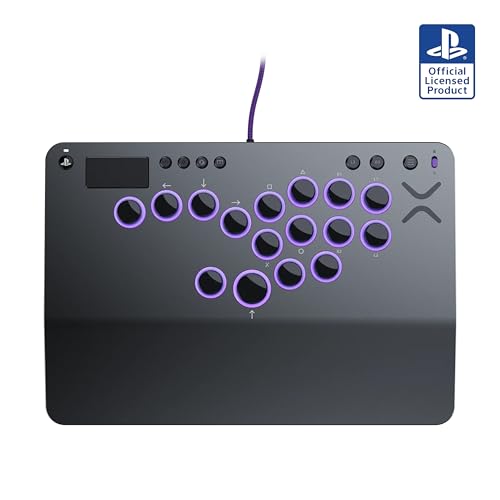
Best Premium: Razer Kitsune

Specs
Input type | Leverless (all-button) |
Switches | Low-profile Razer optical |
Form factor | Ultra-slim (~0.75 in tall) |
Top plate | Removable |
SOCD | Tournament-legal handling |
Connection | USB-C wired |
Platforms | PS5, PC |
Input type
Leverless (all-button)
Switches
Low-profile Razer optical
Form factor
Ultra-slim (~0.75 in tall)
Top plate
Removable
SOCD
Tournament-legal handling
Connection
USB-C wired
Platforms
PS5, PC
What it does well
The Kitsune is the board a lot of people point to as the leverless benchmark, and the reason is feel. The low-profile optical switches actuate fast and shallow, so inputs register with very little travel, and the chassis is one of the thinnest here, which lets your hands rest almost flat on the desk. Over a long set that comfort adds up.
The wide layout is easy to settle into, and the top plate lifts off for cleaning and maintenance. It is officially licensed for PS5, so it works on the platform most brackets run on without an adapter. You are paying for polish and switch feel more than for any single headline spec, but for players who want the cleanest low-profile leverless experience it earns the look.
What you give up
The top plate comes off for maintenance, but the Kitsune does not offer the same three-and-five-pin switch flexibility as some rivals, so switch swapping is more limited than on a board built around it. Optical switch feel is also polarizing; some players prefer the tactile bump of a mechanical switch and will find the optical press too light.
It is a premium-priced board, and like every leverless option it still charges the same learning-curve tax if you are coming from a lever or a pad.
Who it's for
The leverless player who wants the thinnest, cleanest board and the fast optical switch feel, plays on PS5 and PC, and values comfort over a long session. It suits the buyer who has already tried leverless and knows they want to stay on it.
Best Traditional Stick: HORI Fighting Stick Alpha
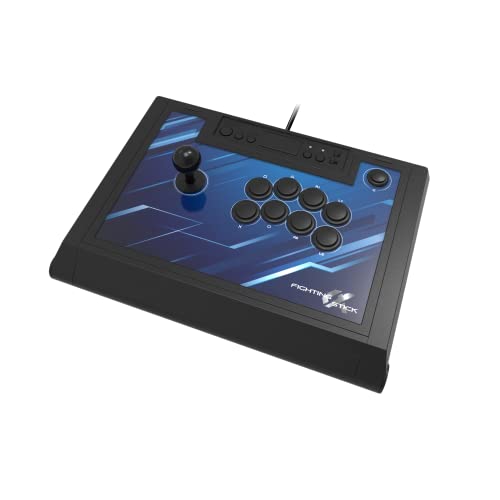
Specs
Input type | Traditional lever + buttons |
Parts | HORI HAYABUSA stick and buttons |
Build | Tournament-grade, weighted |
Tournament lock | Yes |
Extras | Storage compartment, cable routing |
Connection | USB-C wired |
Platforms | PS5, PS4, PC (Sony-licensed) |
Input type
Traditional lever + buttons
Parts
HORI HAYABUSA stick and buttons
Build
Tournament-grade, weighted
Tournament lock
Yes
Extras
Storage compartment, cable routing
Connection
USB-C wired
Platforms
PS5, PS4, PC (Sony-licensed)
What it does well
Leverless gets the headlines, but the lever stick is not obsolete, and the Alpha is the one to buy before spending more. It uses HORI's HAYABUSA stick and buttons, which are quiet, quick, and durable, and the throw of a real lever is what a lot of arcade-raised players want under their hand. The whole chassis is built to tournament standard, with a storage compartment for the cable and clean internal routing.
It is officially licensed by Sony, so it works on PS5 out of the box with no adapter, and it carries a large, well-reviewed track record behind it. For most players who want a traditional stick and do not want to relearn movement on all-buttons, this covers the format without overspending.
What you give up
A full-size lever stick is large and heavy next to a slim leverless board, so it is less travel-friendly and takes up more lap or desk space. That is the cost of the format, not a flaw in this specific stick.
Reports suggest the stock HAYABUSA parts are excellent, but some competitive players still swap in Sanwa parts for a preferred feel, which is an added cost if you go that route. It is also wired-only.
Who it's for
The player who prefers a lever over all-buttons, wants a durable Sony-licensed stick that works on PS5 without an adapter, and does not want to relearn movement on leverless. It is a natural fit for the arcade-raised buyer who values HAYABUSA parts and a tournament-ready chassis.
Best Budget: 8BitDo Arcade Stick

Specs
Input type | Traditional lever + buttons |
Connectivity | Bluetooth, 2.4GHz, wired USB-C |
Extras | Macro buttons, turbo, dynamic layout |
Battery | Long (30+ hrs typical) |
Mods | Sanwa-compatible mounting |
Platforms | Switch, Switch 2, PC (PS5 via adapter) |
Input type
Traditional lever + buttons
Connectivity
Bluetooth, 2.4GHz, wired USB-C
Extras
Macro buttons, turbo, dynamic layout
Battery
Long (30+ hrs typical)
Mods
Sanwa-compatible mounting
Platforms
Switch, Switch 2, PC (PS5 via adapter)
What it does well
This is proof you do not need flagship money for a genuinely competitive arcade stick. It covers wired USB-C, Bluetooth, and a low-latency 2.4GHz link, so you can play wired for tournaments and go wireless on the couch when it does not matter. The parts are Sanwa-compatible, so if you catch the modding bug later you can upgrade the stick and buttons without buying a whole new board.
For a first fight stick, or a spare that costs a fraction of the premium boards, nothing here is a better entry point into the lever format. It is also a low-risk way to find out whether a lever suits you before committing to a pricier stick.
What you give up
This model is native to Switch and PC, not PS5. If your main platform is PS5, you will need a Brook Wingman adapter, which is the Editor's Pick below, to use it in most brackets. That is the trade for the price.
Build quality is good for the money but not premium-tier, and while the wireless modes are convenient, wired remains the tournament standard when latency counts.
Who it's for
The newcomer buying their first arcade stick, the player on a tight budget, or anyone on PC and Switch who wants a moddable lever stick with wireless flexibility. It is also a smart low-cost way to test the lever format before spending more.
Editor's Pick: Brook Wingman FGC VX
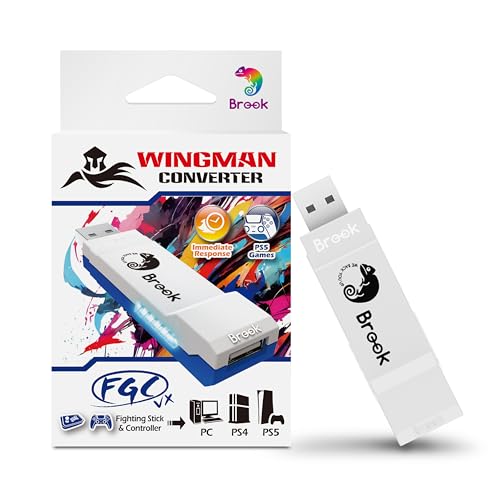
Specs
Type | Controller converter / adapter |
Unlocks | 150+ wired sticks on PS5 |
Latency | Low-latency passthrough |
Game support | All PS5 / PS4 games |
Setup | Plug-and-play, firmware-updatable |
Connection | USB (wired sticks) |
Platforms | PS5, PS4, PC |
Type
Controller converter / adapter
Unlocks
150+ wired sticks on PS5
Latency
Low-latency passthrough
Game support
All PS5 / PS4 games
Setup
Plug-and-play, firmware-updatable
Connection
USB (wired sticks)
Platforms
PS5, PS4, PC
What it does well
This is the pick that quietly saves people the most money and frustration. Most competitive fighting-game play runs on PS5, but a lot of great sticks and leverless boards are PC-only or Switch-native, and PS5 locks out unlicensed controllers after a timeout. The Wingman FGC VX sits between your stick and the console, breaks that lock, and passes inputs through with low latency.
That means a Switch-native or PC-only board, like the budget 8BitDo above, suddenly works in PS5 brackets. If you already own a stick you love, or you want to buy the best board on the market regardless of its native platform, this adapter is what makes it possible without buying a second stick.
What you give up
It only works with wired controllers, not wireless connections, so it is a tournament-and-desk tool rather than a couch one. Some events also have their own rules about adapters, so confirm your tournament allows converters before you rely on one.
Firmware updates are occasionally needed to keep game compatibility current. Reports suggest keeping it updated avoids most issues, but it is one more thing to maintain.
Who it's for
The player whose favorite stick is PC-only or Switch-native but who needs to play on PS5, the buyer pairing a budget stick with a PS5, or anyone who wants to buy the best board on the market without being boxed in by platform licensing.
Bottom line
If you have committed to leverless and want a tournament-ready board that will not hold you back, buy the Victrix Pro KO Leverless. If you want the thinnest, cleanest leverless feel and play on PS5, the Razer Kitsune is the premium benchmark. If you prefer a real lever and want it to work on PS5 out of the box, the HORI Fighting Stick Alpha is the traditional pick to beat.
If money is tight or you are buying your first stick, the 8BitDo Arcade Stick is the cheapest genuinely good way in, just remember it needs a Brook Wingman FGC VX to play on PS5. And if you already own a great stick that is stuck on the wrong platform, that same adapter is the piece that unlocks it. Pick the input method you will commit to, confirm it reaches your platform, and the rest is practice.
FAQ
Is a leverless controller better than a fight stick for Street Fighter 6 and Tekken 8?
It is not strictly better, it is different. Leverless boards give faster, more precise directional inputs, which is why much of the top level uses them, but a traditional lever stick is still fully competitive and more comfortable for players raised on arcade cabinets. The real question is which format you will commit to learning, since switching resets your movement muscle memory either way.
Are leverless controllers tournament legal?
Yes, the major boards are. Every leverless board in this guide, including the Victrix Pro KO and Razer Kitsune, handles SOCD in a tournament-legal way and includes a lock for system buttons. Rules can vary by event, so it is always worth checking the specific tournament ruleset, but a licensed, SOCD-compliant board like these will be legal at the vast majority of them.
Do I need a Brook adapter to use a fight stick on PS5?
Only if your stick is not officially licensed for PS5. Sony-licensed boards like the HORI Fighting Stick Alpha and PS5-licensed leverless boards like the Victrix Pro KO and Razer Kitsune work out of the box. A PC-only or Switch-native board, like the budget 8BitDo Arcade Stick, needs a converter such as the Brook Wingman FGC VX to get past the PS5 controller lock.
Is there a big learning curve switching to a leverless controller?
Yes, expect a real one. Moving from a lever or a pad to all-buttons resets your movement inputs, and most players need a few weeks of deliberate practice before dashing, walking, and anti-airing feel natural again. It is the single biggest reason to be sure you want leverless before buying one, because the payoff comes after you push through the relearning period.
What is the best budget fight stick for beginners?
The 8BitDo Arcade Stick. It gives you a genuinely competitive lever stick with wired, Bluetooth, and 2.4GHz connectivity plus Sanwa-compatible parts for later modding, all for a fraction of the premium boards. It is a low-risk way to learn the format, though PS5 players should budget for a Brook Wingman FGC VX to use it in most brackets.
Can I use the same fight stick for both Street Fighter 6 and Tekken 8?
Absolutely. Both games use the same core stick and button inputs, so any board in this guide works for both without changes. Fight sticks and leverless boards are game-agnostic hardware, which is why buying for the format and your platform matters far more than buying a version branded for one specific game.
Related Articles

Marvel Tokon: Fighting Souls System Requirements (2026)
Marvel Tokon: Fighting Souls system requirements: official min and recommended specs, the real CPU bottleneck, and which upgrades fix it before launch.
Jul 30, 2026

Best Gaming Controllers for PC (2026): Hall-Effect & TMR
Pick the right PC controller for 2026: five picks across layout, stick technology, and budget tier, framed for what actually matters on PC.
May 14, 2026

Best Fans for the Corsair 4000D Airflow (2026): 5 Picks
The best fans for the Corsair 4000D Airflow, matched to its six mounts: five picks from budget to premium, plus a mount, size, and radiator clearance guide.
Aug 18, 2026

Best Monitors for the RX 9060 XT (2026): 5 Picks by Tier
Five monitors matched to the RX 9060 XT 16GB by refresh tier, from 1440p 180Hz IPS up to 240Hz QD-OLED, plus the real 1440p frame ceiling the card hits.
Aug 18, 2026

Best AIO Cooler 2026: 5 Picks, 240mm vs 280mm vs 360mm
Best AIO cooler picks for 2026: match a 240mm, 280mm, or 360mm radiator to your case and CPU TDP in minutes, plus five tested picks and when air still wins.
Aug 18, 2026