Affiliate Disclosure: As an Amazon Associate we earn from qualifying purchases. Some links may earn us a commission at no cost to you.

Best Gaming Laptops for Aion 2 (2026): 5 Picks Ranked
Aion 2 is free to play and PC only, so a lot of the people downloading it from Steam or PURPLE do not own a gaming PC. If that is you, a gaming laptop is the shortest path in, and the requirement sheet tells you which ones are worth it.
NCSoft's recommended tier is an RTX 2070 with 8 GB, an eight-core CPU and 16 GB of memory, and the fine print says that tier targets the Low preset at 1080p. Every pick below clears it with room to spare.
Our top pick: ASUS ROG Strix G16 RTX 5070
The Strix G16 pairs a 16-core Ryzen 9 9955HX with an RTX 5070, which covers both halves of an MMO: the GPU for open-world scenery and the CPU for crowded siege fights.

Quick picks
Pick | Laptop | Best for | Buy |
|---|---|---|---|
Best Overall | Siege nights and raids at High | ||
Best Value | Questing at High, 32 GB out of the box | ||
Best Premium | Max settings on a 2.5K OLED | ||
Best Budget | Clearing the recommended tier at 1080p | ||
Editor's Pick | A sharp 16:10 panel for a busy interface |
Best Overall
- Laptop
- Best for
Siege nights and raids at High
- Buy
Best Value
- Laptop
- Best for
Questing at High, 32 GB out of the box
- Buy
Best Premium
- Laptop
- Best for
Max settings on a 2.5K OLED
- Buy
Best Budget
- Laptop
- Best for
Clearing the recommended tier at 1080p
- Buy
Editor's Pick
- Laptop
- Best for
A sharp 16:10 panel for a busy interface
- Buy
Specs at a glance
Laptop | GPU | CPU | Display | Memory | Storage |
|---|---|---|---|---|---|
RTX 5070, 8 GB | Ryzen 9 9955HX, 16 cores | 16 in FHD+ 165 Hz | 16 GB DDR5 | 1 TB | |
RTX 5060, 8 GB | Ryzen 7 260, 8 cores | 16 in WUXGA 180 Hz | 32 GB DDR5 | 1 TB | |
RTX 5080, 16 GB | Ryzen 9 9955HX3D, 16 cores | 16 in 2560 x 1600 OLED 240 Hz | 32 GB DDR5 | 1 TB | |
RTX 5050, 8 GB | Core i7-13650HX, 14 cores | 15.6 in FHD 144 Hz | 16 GB | 1 TB | |
RTX 5060, 8 GB | Core 7 240H, 10 cores | 16 in 2560 x 1600 120 Hz | 16 GB DDR5 | 1 TB |
- GPU
RTX 5070, 8 GB
- CPU
Ryzen 9 9955HX, 16 cores
- Display
16 in FHD+ 165 Hz
- Memory
16 GB DDR5
- Storage
1 TB
- GPU
RTX 5060, 8 GB
- CPU
Ryzen 7 260, 8 cores
- Display
16 in WUXGA 180 Hz
- Memory
32 GB DDR5
- Storage
1 TB
- GPU
RTX 5080, 16 GB
- CPU
Ryzen 9 9955HX3D, 16 cores
- Display
16 in 2560 x 1600 OLED 240 Hz
- Memory
32 GB DDR5
- Storage
1 TB
- GPU
RTX 5050, 8 GB
- CPU
Core i7-13650HX, 14 cores
- Display
15.6 in FHD 144 Hz
- Memory
16 GB
- Storage
1 TB
- GPU
RTX 5060, 8 GB
- CPU
Core 7 240H, 10 cores
- Display
16 in 2560 x 1600 120 Hz
- Memory
16 GB DDR5
- Storage
1 TB
How we picked: Aion 2's real laptop floor
Start with the requirement sheet on the Aion 2 Steam page, because it is more honest than most. The minimum tier is a GTX 1050 Ti with 4 GB, a Ryzen 5 2600 or Core i5-10500, and 8 GB of memory, and NCSoft notes that it means the Very Low preset at 1080p. The recommended tier is an RTX 2070 with 8 GB, a Ryzen 7 3700X or Core i7-11700, and 16 GB, aimed at the Low preset. Read that way, the recommended spec is a floor rather than a target, so every pick here sits above it.
Storage is the next filter. Both tiers ask for 100 GB of free space with an SSD recommended, and MMO patches only grow. A 512 GB laptop that already holds Windows and one other modern game will be fighting for space within months, so every pick below ships with a 1 TB SSD.
Then weight the CPU harder than the GPU badge suggests. An MMO is GPU-bound when you quest alone and CPU-bound when a hundred players and their effects land on one screen in a fortress siege or a world boss. That is why the overall pick leads with a 16-core HX chip and the premium pick carries 3D V-Cache, the same logic our WoW Forever laptop guide uses for raid nights.
Read the wattage, not just the model name. Laptop GPUs ship at very different power limits, so two machines with the same RTX badge can land a full tier apart. Our GPU and display guide covers how to read those numbers before you buy.
Finally, plan for long sessions. MMO evenings run for hours, so sustained clocks and fan noise matter more than a short benchmark run. Keep the vents clear, and if you play on a bed or a couch, a laptop cooling pad is the cheapest way to hold clocks steady.
Best Overall: ASUS ROG Strix G16 RTX 5070
Specs
CPU | AMD Ryzen 9 9955HX (16 cores, 32 threads) |
GPU | GeForce RTX 5070 Laptop, 8 GB |
Display | 16 in FHD+ (1920 x 1200), 165 Hz, 16:10 |
Memory | 16 GB DDR5-5600 |
Storage | 1 TB PCIe Gen 4 SSD |
Wireless | Wi-Fi 6E |
Model | G614FP-OS94 |
CPU
AMD Ryzen 9 9955HX (16 cores, 32 threads)
GPU
GeForce RTX 5070 Laptop, 8 GB
Display
16 in FHD+ (1920 x 1200), 165 Hz, 16:10
Memory
16 GB DDR5-5600
Storage
1 TB PCIe Gen 4 SSD
Wireless
Wi-Fi 6E
Model
G614FP-OS94
What it does well
The Ryzen 9 9955HX is the reason this one leads. Sixteen Zen 5 cores keep frame pacing steady when a siege or a world boss puts dozens of players and their skill effects on screen at once, which is exactly where an eight-core chip starts to stutter.
The RTX 5070 with 8 GB has enough headroom to run Aion 2 at the High preset at 1080p rather than living at the Low preset the recommended tier targets. That is the difference between a game that looks like its trailers and one that looks like a phone port.
The 16:10 FHD+ panel at 165 Hz gives you a little more vertical room for chat, party frames and quest tracking than a 16:9 screen, and the 1 TB SSD clears the 100 GB install without a cleanup project.
What you give up
Sixteen gigabytes of memory is enough for the game but tight once Discord, a browser full of guides and a voice overlay are open. Plan to add a second stick if you multitask heavily.
The display is 1920 x 1200, not 2.5K, so it trades sharpness for frame rate. Strix chassis also run their fans hard in the performance profile, and buyers have flagged that it is audible across a quiet room during long sessions.
Who it's for
The player who wants one laptop to handle questing, sieges and raids at High settings for the next few years, and who mostly plays plugged in at a desk.
Best Value: Acer Nitro V 16S RTX 5060

Specs
CPU | AMD Ryzen 7 260 (8 cores, 16 threads) |
GPU | GeForce RTX 5060 Laptop, 8 GB |
Display | 16 in WUXGA (1920 x 1200) IPS, 180 Hz |
Memory | 32 GB DDR5 |
Storage | 1 TB PCIe Gen 4 SSD |
Wireless | Wi-Fi 6 |
Model | ANV16S-41-R2AJ |
CPU
AMD Ryzen 7 260 (8 cores, 16 threads)
GPU
GeForce RTX 5060 Laptop, 8 GB
Display
16 in WUXGA (1920 x 1200) IPS, 180 Hz
Memory
32 GB DDR5
Storage
1 TB PCIe Gen 4 SSD
Wireless
Wi-Fi 6
Model
ANV16S-41-R2AJ
What it does well
Thirty-two gigabytes of DDR5 out of the box is the standout here. MMO players run the game, voice chat and a browser at the same time, and this is the only pick under the premium tier that never makes you think about memory.
The RTX 5060 with 8 GB comfortably clears the recommended RTX 2070 tier, so the High preset at 1080p is a realistic target for questing and dungeons. The 180 Hz WUXGA panel and 1 TB SSD round out a configuration with no obvious weak spot. If you are cross-shopping, our RTX 5060 laptop roundup ranks the rest of the field by power limit.
What you give up
The Ryzen 7 260 is an eight-core chip, so the biggest fights will drop further than they do on the 16-core Strix. It still meets the recommended CPU tier, but it is the first part of this laptop you will notice in a crowded siege.
Nitro builds are plastic and the speakers are thin. Use a headset, which you will want for group content anyway.
Who it's for
The new player who wants Aion 2 to look good, wants to run Discord and guides alongside it without slowdowns, and would rather not pay for a 16-core CPU.
Best Premium: GIGABYTE AORUS Master 16 RTX 5080

Specs
CPU | AMD Ryzen 9 9955HX3D (16 cores, 3D V-Cache) |
GPU | GeForce RTX 5080 Laptop, 16 GB |
Display | 16 in 2560 x 1600 OLED, 240 Hz |
Memory | 32 GB DDR5 |
Storage | 1 TB SSD |
OS | Windows 11 Home |
Model | AORUS Master 16 Gen 2 |
CPU
AMD Ryzen 9 9955HX3D (16 cores, 3D V-Cache)
GPU
GeForce RTX 5080 Laptop, 16 GB
Display
16 in 2560 x 1600 OLED, 240 Hz
Memory
32 GB DDR5
Storage
1 TB SSD
OS
Windows 11 Home
Model
AORUS Master 16 Gen 2
What it does well
The Ryzen 9 9955HX3D is the strongest laptop CPU you can point at an MMO. Its extra 3D V-Cache helps most in the CPU-heavy scenes, so the crowded capital and the big open-world fights hold frame rate better than on any other pick here.
The RTX 5080 with 16 GB removes every VRAM question for the life of the laptop, and the 2560 x 1600 OLED at 240 Hz makes the game's scenery and flight sequences look the way the trailers promised. Thirty-two gigabytes of memory means nothing else on the machine competes with the game.
What you give up
This is a lot of laptop to buy for one free-to-play game. It only makes sense if you also play demanding AAA titles, stream, or want the machine to last well past this MMO's first expansion.
OLED panels carry a burn-in caveat. Reports suggest long sessions with a fixed interface are the riskiest pattern, so use a dark theme for the taskbar and let the panel's pixel refresh run.
Who it's for
The player who wants maximum settings at 2.5K, plays other demanding games on the same machine, and treats the laptop as a desktop replacement. For more options at this tier, see our RTX 5080 laptop guide.
Best Budget: Lenovo LOQ 15 RTX 5050

Specs
CPU | Intel Core i7-13650HX (14 cores, 20 threads) |
GPU | GeForce RTX 5050 Laptop, 8 GB GDDR7 |
Display | 15.6 in FHD (1920 x 1080) IPS, 144 Hz, G-Sync |
Memory | 16 GB |
Storage | 1 TB SSD |
Color | Luna Grey |
CPU
Intel Core i7-13650HX (14 cores, 20 threads)
GPU
GeForce RTX 5050 Laptop, 8 GB GDDR7
Display
15.6 in FHD (1920 x 1080) IPS, 144 Hz, G-Sync
Memory
16 GB
Storage
1 TB SSD
Color
Luna Grey
What it does well
The LOQ is the least expensive laptop here that still clears the recommended tier with margin. The RTX 5050 with 8 GB of GDDR7 lands at or above the RTX 2070 class the sheet asks for, and the 14-core Core i7-13650HX is well ahead of the recommended i7-11700 for crowded scenes.
It also ships with a 1 TB SSD, which a lot of entry gaming laptops skip. That matters more than it sounds for a 100 GB game that patches often. Our budget gaming laptop guide covers cheaper machines, but most of them stop at 512 GB.
What you give up
Expect Medium to High settings at 1080p rather than High everywhere, and plan to use DLSS when a siege gets busy. The 144 Hz FHD panel is fine but not bright, and 16 GB of memory is the floor rather than the comfortable number.
LOQ chassis run warm under sustained load. Buyers have flagged louder fans than the Legion line once the GPU is working, so keep it on a hard surface.
Who it's for
The new or returning player who wants Aion 2 to run well at 1080p, plays a few evenings a week, and wants the most capable machine at the lowest price on this list.
Editor's Pick: Alienware 16 Aurora RTX 5060
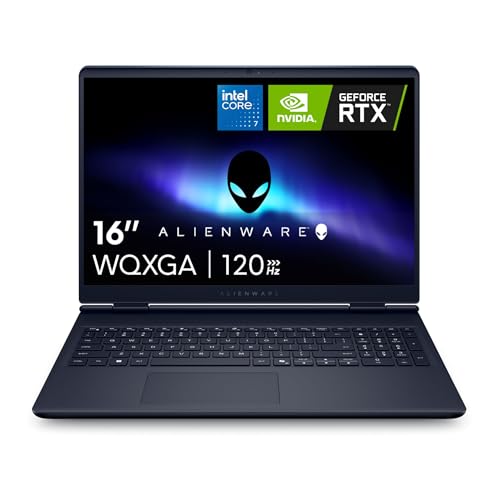
Specs
CPU | Intel Core 7 240H (10 cores, 16 threads) |
GPU | GeForce RTX 5060 Laptop, 8 GB |
Display | 16 in 2560 x 1600, 120 Hz, 16:10 |
Memory | 16 GB DDR5 |
Storage | 1 TB SSD |
OS | Windows 11 Home |
CPU
Intel Core 7 240H (10 cores, 16 threads)
GPU
GeForce RTX 5060 Laptop, 8 GB
Display
16 in 2560 x 1600, 120 Hz, 16:10
Memory
16 GB DDR5
Storage
1 TB SSD
OS
Windows 11 Home
What it does well
The 16-inch 2560 x 1600 panel is the reason this is here. Aion 2 puts a lot on screen at once, between skill bars, party frames, quest tracking and chat, and the extra resolution and 16:10 shape make that interface easier to read without shrinking it.
The RTX 5060 with 8 GB clears the recommended tier, and Alienware's chassis is better built than most laptops at this tier, with a 1 TB SSD as standard. Lower the preset a step when you run native 2560 x 1600, or use DLSS and keep High.
What you give up
The Core 7 240H is a 10-core H-series chip, not an HX part, so it is the weakest CPU on this list for crowded sieges. It meets the recommended tier, but the 16-core picks hold up better when a fight gets big.
The panel is 120 Hz rather than 165 Hz or higher, which is fine for an MMO but noticeable if you also play shooters. Sixteen gigabytes of memory is the floor here too.
Who it's for
The player who spends long evenings reading the interface, prefers sharp text over raw frame rate, and wants a well-built laptop that also works for everyday tasks.
Bottom line
If you want one laptop that handles questing, sieges and raids at High, buy the ASUS ROG Strix G16. If you want the best value with 32 GB of memory already installed, buy the Acer Nitro V 16S. If you want maximum settings on an OLED and play other demanding games, buy the GIGABYTE AORUS Master 16. If you want the lowest-cost route past the recommended tier, buy the Lenovo LOQ 15. If you care most about a sharp, readable screen, buy the Alienware 16 Aurora. Still deciding whether a laptop is the right call at all? Our gaming laptop vs desktop guide runs the numbers, and an MMO mouse is the best accessory you can add.
FAQ
Can a laptop run Aion 2?
Yes. Any gaming laptop with an 8 GB RTX 5050 or better clears Aion 2's recommended tier, which NCSoft lists as an RTX 2070 with 8 GB, an eight-core CPU and 16 GB of memory. The minimum tier is a GTX 1050 Ti with 4 GB, but that targets the Very Low preset. The more common blocker is storage: the game needs 100 GB free, so a nearly full 512 GB laptop will struggle.
What are the Aion 2 laptop requirements?
The Steam page lists the same requirements for any PC. Minimum is a GTX 1050 Ti with 4 GB, a Ryzen 5 2600 or Core i5-10500, 8 GB of memory and 100 GB of storage on Windows 10 or 11, for the Very Low preset at 1080p. Recommended is an RTX 2070 with 8 GB, a Ryzen 7 3700X or Core i7-11700 and 16 GB, for the Low preset. An SSD is recommended at both tiers.
What is the best budget laptop for Aion 2?
The Lenovo LOQ 15 with an RTX 5050 is our budget pick. It clears the recommended GPU tier, its 14-core Core i7-13650HX handles crowded scenes better than the recommended i7-11700, and it ships with a 1 TB SSD. Expect Medium to High settings at 1080p, with DLSS for the busiest fights.
Is 8 GB of VRAM enough for Aion 2?
Yes, for 1080p and 1920 x 1200. The recommended tier itself specifies an 8 GB card, and every 8 GB pick on this list sits above it. If you want to run 2560 x 1600 at the highest settings for years, the 16 GB RTX 5080 in the AORUS Master 16 removes the question entirely.
Can a MacBook run Aion 2?
Not natively. Aion 2 lists Windows 10 and 11 64-bit only, with DirectX 12, and there is no macOS version. Workarounds through translation layers are unsupported and risky for an online game with anti-cheat. If you want to play reliably, a Windows gaming laptop is the safer choice.
How much storage does Aion 2 need?
Aion 2 needs 100 GB of free space, and NCSoft recommends an SSD. Treat that as a starting point, because MMO patches and new regions grow the install over time. Every laptop on this list ships with a 1 TB SSD for that reason.
Related Articles

Best Gaming Laptops for WoW Forever (2026): 5 Picks
WoW Forever needs an 8 GB DX12 GPU and 128 GB of free SSD space. These five gaming laptops clear that bar, from an RTX 5050 budget pick to an RTX 5080 raid rig.
Sep 28, 2026

Best RTX 5060 Gaming Laptops (2026): 5 TGP-Ranked Picks
The best RTX 5060 gaming laptop is the one with the highest TGP. We rank five picks by sustained wattage, from a 115W ASUS TUF F16 down to an 85W Acer Nitro.
Sep 7, 2026

Best RTX 5070 Gaming Laptops (2026): TGP-Ranked Picks
The best RTX 5070 gaming laptops in 2026, ranked by the TGP each chassis actually sustains. Five picks from budget to 18-inch, plus the 8GB VRAM catch.
Jul 21, 2026

Best Gaming Laptops With 32GB RAM (2026): 5 TGP Picks
Best gaming laptops with 32GB RAM in 2026, ranked by GPU TGP first. Per-pick memory config (soldered or SO-DIMM) so you know what you can upgrade later.
Aug 9, 2026

Gaming Laptop vs Desktop 2026: Value Math and 4 Picks
Gaming laptop vs desktop in 2026: desktops deliver about 30-40% more frames per dollar, laptops deliver portability. See which fits you, plus 4 picks.
Sep 2, 2026