Affiliate Disclosure: As an Amazon Associate we earn from qualifying purchases. Some links may earn us a commission at no cost to you.

Best Gaming Laptops for Marvel Rivals (2026): 144Hz to 300Hz
Marvel Rivals asks very little on paper. The Steam page recommends a Core i5-10400 or Ryzen 5 5600X, an RTX 2060 Super class GPU, 16 GB of memory and 70 GB on an SSD, which almost any current gaming laptop clears. The best gaming laptop for Marvel Rivals is the one whose GPU can feed its screen.
So we sorted these picks by FPS target: 144Hz for casual Quick Match, 165 to 240Hz for ranked, and 300Hz for players who chase every frame. Every listing is sold and shipped by Amazon itself.
Our top pick: ASUS ROG Strix G16 RTX 5070
The Strix G16 pairs a 16-core Ryzen 9 9955HX with an RTX 5070 at up to 115 W, so the CPU holds up in crowded team fights and the GPU has room to keep its 165Hz panel busy on high settings.

Quick picks
Pick | Laptop | Best for | Buy |
|---|---|---|---|
Best Overall | 165Hz Quick Match on high settings | ||
Best Value | 144Hz casual play with 32 GB of memory | ||
Best Premium | 240Hz at 1600p with headroom for streaming | ||
Best Budget | Clearing the recommended spec for the least | ||
Editor's Pick | Competitive play on a 300Hz panel |
Best Overall
- Laptop
- Best for
165Hz Quick Match on high settings
- Buy
Best Value
- Laptop
- Best for
144Hz casual play with 32 GB of memory
- Buy
Best Premium
- Laptop
- Best for
240Hz at 1600p with headroom for streaming
- Buy
Best Budget
- Laptop
- Best for
Clearing the recommended spec for the least
- Buy
Editor's Pick
- Laptop
- Best for
Competitive play on a 300Hz panel
- Buy
Specs at a glance
Laptop | GPU | CPU | Display | Memory | Storage |
|---|---|---|---|---|---|
RTX 5070 Laptop, 8 GB, up to 115 W | Ryzen 9 9955HX, 16 cores | 16in FHD+ 165 Hz | 16 GB DDR5 | 1 TB | |
RTX 5060 Laptop, 8 GB, 85 W | Ryzen 7 260, 8 cores | 16in WUXGA 180 Hz | 32 GB DDR5 | 1 TB | |
RTX 5080 Laptop, 16 GB, 175 W | Ryzen 9 9955HX3D, 16 cores | 16in 2560 x 1600 OLED 240 Hz | 32 GB DDR5 | 1 TB | |
RTX 5050 Laptop, 8 GB, up to 115 W | Core i5-13450HX, 10 cores | 16in FHD+ 165 Hz | 16 GB DDR5 | 512 GB | |
RTX 5070 Ti Laptop, 12 GB, up to 140 W | Ryzen 9 9955HX3D, 16 cores | 16in 2.5K 300 Hz | 32 GB DDR5 | 1 TB |
- GPU
RTX 5070 Laptop, 8 GB, up to 115 W
- CPU
Ryzen 9 9955HX, 16 cores
- Display
16in FHD+ 165 Hz
- Memory
16 GB DDR5
- Storage
1 TB
- GPU
RTX 5060 Laptop, 8 GB, 85 W
- CPU
Ryzen 7 260, 8 cores
- Display
16in WUXGA 180 Hz
- Memory
32 GB DDR5
- Storage
1 TB
- GPU
RTX 5080 Laptop, 16 GB, 175 W
- CPU
Ryzen 9 9955HX3D, 16 cores
- Display
16in 2560 x 1600 OLED 240 Hz
- Memory
32 GB DDR5
- Storage
1 TB
- GPU
RTX 5050 Laptop, 8 GB, up to 115 W
- CPU
Core i5-13450HX, 10 cores
- Display
16in FHD+ 165 Hz
- Memory
16 GB DDR5
- Storage
512 GB
- GPU
RTX 5070 Ti Laptop, 12 GB, up to 140 W
- CPU
Ryzen 9 9955HX3D, 16 cores
- Display
16in 2.5K 300 Hz
- Memory
32 GB DDR5
- Storage
1 TB
How we picked the best gaming laptops for Marvel Rivals
Tier | CPU | GPU | Memory | Panel to pair | Our picks |
|---|---|---|---|---|---|
Minimum (Steam) | Core i5-6600K or Ryzen 5 1600X | GTX 1060, RX 580 or Arc A380 | 16 GB | 60Hz is fine | Every pick clears it |
Recommended (Steam) | Core i5-10400 or Ryzen 5 5600X | RTX 2060 Super, RX 5700 XT or Arc A750 | 16 GB | 144Hz with tuned settings | TUF Gaming F16 and Nitro V 16S |
Ranked (our tier) | 12 or more current cores | RTX 5070 class at 100 W or more | 16 to 32 GB | 165Hz to 240Hz | Strix G16 RTX 5070 and AORUS Master 16 |
Competitive (our tier) | 16 cores, ideally with 3D V-Cache | RTX 5070 Ti class at 140 W | 32 GB | 240Hz to 300Hz | Strix G16 RTX 5070 Ti X3D |
Minimum (Steam)
- CPU
Core i5-6600K or Ryzen 5 1600X
- GPU
GTX 1060, RX 580 or Arc A380
- Memory
16 GB
- Panel to pair
60Hz is fine
- Our picks
Every pick clears it
Recommended (Steam)
- CPU
Core i5-10400 or Ryzen 5 5600X
- GPU
RTX 2060 Super, RX 5700 XT or Arc A750
- Memory
16 GB
- Panel to pair
144Hz with tuned settings
- Our picks
TUF Gaming F16 and Nitro V 16S
Ranked (our tier)
- CPU
12 or more current cores
- GPU
RTX 5070 class at 100 W or more
- Memory
16 to 32 GB
- Panel to pair
165Hz to 240Hz
- Our picks
Strix G16 RTX 5070 and AORUS Master 16
Competitive (our tier)
- CPU
16 cores, ideally with 3D V-Cache
- GPU
RTX 5070 Ti class at 140 W
- Memory
32 GB
- Panel to pair
240Hz to 300Hz
- Our picks
Strix G16 RTX 5070 Ti X3D
The published sheet is generous, so we added two tiers above it. Both Steam tiers list Windows 10, DirectX 12, 16 GB of memory and 70 GB of storage, with an SSD install recommended. The recommended GPU line is an RTX 2060 Super, RX 5700 XT or Arc A750, which every RTX 50-series laptop chip meets or beats.
Start with the screen, then pick the GPU that can feed it. A 165Hz panel only pays off when the GPU holds well over 100 FPS through a full team fight, and a 300Hz panel asks for the fastest GPU and CPU you can fit in a laptop. Our guide to the best GPUs for Marvel Rivals maps the same refresh tiers on the desktop side, and the pillar on how to choose a GPU and a matching display explains the resolution math.
Then weight the CPU. Player reports point to Marvel Rivals leaning on the processor in big 6v6 fights, when ultimates, shields and destructible scenery all land at once, and laptop chips throttle harder than desktop parts. Every pick here carries a current HX-class processor, and two carry AMD's 9955HX3D with 3D V-Cache.
Read the wattage, not the badge. Laptop GPUs ship at very different power limits, so two machines with the same RTX 5060 sticker can sit a long way apart in sustained frames. Each spec table lists the graphics power from the maker's sheet or a published review.
Last, the seller. Every listing is sold and shipped by Amazon.com, so the price on the product card is Amazon's own and returns go through Amazon. No reviewer has published a controlled Marvel Rivals test across these laptop GPUs yet, so the tiers above are guidance built from the requirements and each chip's class, not measured frame rates. We applied the same method to the best laptop for WoW Forever, where the CPU matters even more.
Best Overall: ASUS ROG Strix G16 RTX 5070
Specs
CPU | AMD Ryzen 9 9955HX (16 cores, 32 threads) |
GPU | GeForce RTX 5070 Laptop, 8 GB |
Max graphics power | Up to 115 W with Dynamic Boost |
Display | 16 in FHD+ (1920 x 1200), 165 Hz, 16:10 |
Memory | 16 GB DDR5-5600 |
Storage | 1 TB PCIe Gen 4 SSD |
Model | G614FP-OS94 |
CPU
AMD Ryzen 9 9955HX (16 cores, 32 threads)
GPU
GeForce RTX 5070 Laptop, 8 GB
Max graphics power
Up to 115 W with Dynamic Boost
Display
16 in FHD+ (1920 x 1200), 165 Hz, 16:10
Memory
16 GB DDR5-5600
Storage
1 TB PCIe Gen 4 SSD
Model
G614FP-OS94
What it does well
This is the balanced machine. The RTX 5070 runs at up to 115 W with Dynamic Boost on ASUS's spec sheet, the full-power end of the range, and it has the headroom to hold the 165Hz panel on high settings in most matches rather than only in quiet ones.
The Ryzen 9 9955HX is the other half of the case. Sixteen Zen 5 cores sit well past the recommended Ryzen 5 5600X, and that margin is what keeps frame times steady when a six-player dive lands on your backline.
A terabyte of storage takes the 70 GB install with room for a few more games, and the 16:10 screen gives you extra vertical space for the kill feed and ability timers.
What you give up
The panel tops out at 165Hz and FHD+. If you play ranked and want 240Hz, the Editor's Pick below doubles the refresh rate at a much higher price, or you can plug into one of the best monitors for Marvel Rivals at your desk.
Sixteen gigabytes of memory matches the Steam minimum and recommended line exactly, with no slack for Discord, a browser and a recording tool. Plan on a 32 GB upgrade if you stream or clip. Strix cooling is tuned for clocks, so expect audible fans through a long session.
Who it's for
The player who wants one laptop that runs Marvel Rivals well at 165Hz, plugs in most nights, and would rather spend on the processor than on a GPU tier the screen cannot show. Our roundup of RTX 5070 gaming laptops covers more chassis on the same chip.
Best Value: Acer Nitro V 16S RTX 5060

Specs
CPU | AMD Ryzen 7 260 (8 cores, 16 threads) |
GPU | GeForce RTX 5060 Laptop, 8 GB |
Max graphics power | 85 W (as reviewed) |
Display | 16 in WUXGA (1920 x 1200) IPS, 180 Hz |
Memory | 32 GB DDR5 |
Storage | 1 TB PCIe Gen 4 SSD |
Model | ANV16S-41-R2AJ |
CPU
AMD Ryzen 7 260 (8 cores, 16 threads)
GPU
GeForce RTX 5060 Laptop, 8 GB
Max graphics power
85 W (as reviewed)
Display
16 in WUXGA (1920 x 1200) IPS, 180 Hz
Memory
32 GB DDR5
Storage
1 TB PCIe Gen 4 SSD
Model
ANV16S-41-R2AJ
What it does well
Thirty-two gigabytes of memory is the standout at this tier. Marvel Rivals lists 16 GB as its floor, and the game plus Discord, a browser and a recording tool add up fast. This is the cheapest Amazon-sold laptop here that never makes you close anything.
The 16-inch WUXGA panel runs at 180Hz, and an RTX 5060 is a comfortable step past the recommended RTX 2060 Super line. Drop a few settings from the high preset and a steady 144 FPS target is the right expectation for casual play.
A terabyte drive clears the 70 GB install outright, with space left for the next season's patches.
What you give up
Wattage is the catch. Tom's Hardware's review unit ran its RTX 5060 at 85 W, well below the 115 W versions in thicker chassis, so sustained frames trail other RTX 5060 laptops with the same badge. That gap shows most when you push toward the panel's 180Hz ceiling.
The Ryzen 7 260 is an eight-core Zen 4 chip. It clears the recommended CPU, but crowded fights will dip harder here than on the 16-core picks. A cooling pad from our list of the best cooling pads for gaming laptops helps the thin chassis hold its clocks.
Who it's for
The casual player who wants Marvel Rivals at a steady 144 FPS, keeps a lot open beside it, and would rather put the difference toward a good mouse than a higher GPU tier.
Best Premium: GIGABYTE AORUS Master 16 RTX 5080

Specs
CPU | AMD Ryzen 9 9955HX3D (16 cores, 3D V-Cache) |
GPU | GeForce RTX 5080 Laptop, 16 GB |
Max graphics power | 175 W |
Display | 16 in 2560 x 1600 OLED, 240 Hz |
Memory | 32 GB DDR5 |
Storage | 1 TB SSD |
Model | AORUS Master 16 Gen 2 |
CPU
AMD Ryzen 9 9955HX3D (16 cores, 3D V-Cache)
GPU
GeForce RTX 5080 Laptop, 16 GB
Max graphics power
175 W
Display
16 in 2560 x 1600 OLED, 240 Hz
Memory
32 GB DDR5
Storage
1 TB SSD
Model
AORUS Master 16 Gen 2
What it does well
The RTX 5080 Laptop at 175 W is the fastest mobile GPU on this page, with 16 GB of video memory. It is the pick that can run Marvel Rivals near the top of its quality presets at the panel's native 2560 by 1600 and still chase the 240Hz ceiling with a few settings lowered.
The Ryzen 9 9955HX3D adds 3D V-Cache to sixteen Zen 5 cores. AMD's cache chips are the processors players point to for steadier frame times in CPU-heavy scenes, which is exactly where a 6v6 brawl lives.
The 240Hz OLED panel has near-instant pixel response, so motion stays clear in the fast flank-and-dive fights the game is built around. Thirty-two gigabytes of memory covers streaming or recording alongside the game.
What you give up
Price is the obvious one. This is a lot of laptop for a game that recommends an RTX 2060 Super, and you only collect the value if you also play heavier games or stream.
OLED and a static HUD are a known pairing to watch. Reports of burn-in on OLED panels usually involve fixed interface elements left on screen for hundreds of hours, and Marvel Rivals keeps its health bar and ability icons in the same place every match. Use the panel's pixel-refresh features and hide the taskbar.
Who it's for
The player who wants 240Hz at 1600p, streams or records, and wants the laptop to carry the next several years of releases. Pair it with one of the best headsets for Marvel Rivals so footstep and ultimate callouts land as cleanly as the frames.
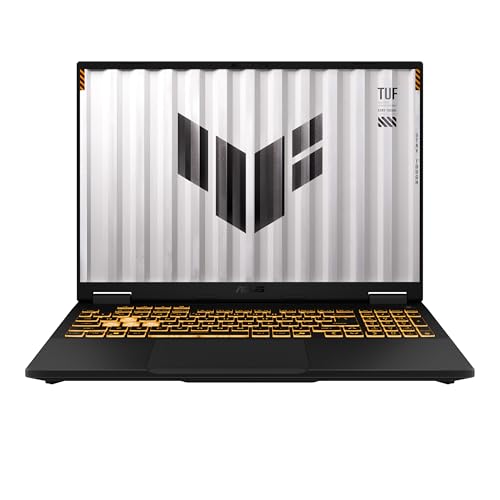
Best Budget: ASUS TUF Gaming F16 RTX 5050
Specs
CPU | Intel Core i5-13450HX (10 cores, 16 threads) |
GPU | GeForce RTX 5050 Laptop, 8 GB GDDR7 |
Max graphics power | Up to 115 W (as reviewed) |
Display | 16 in FHD+ (1920 x 1200), 165 Hz, 16:10 |
Memory | 16 GB DDR5 |
Storage | 512 GB PCIe Gen 4 SSD |
Model | FX608JH |
CPU
Intel Core i5-13450HX (10 cores, 16 threads)
GPU
GeForce RTX 5050 Laptop, 8 GB GDDR7
Max graphics power
Up to 115 W (as reviewed)
Display
16 in FHD+ (1920 x 1200), 165 Hz, 16:10
Memory
16 GB DDR5
Storage
512 GB PCIe Gen 4 SSD
Model
FX608JH
What it does well
The TUF Gaming F16 clears the recommended spec for the least money on this page. Tom's Hardware measured its RTX 5050 at up to 115 W, the high end of the chip's power range and a real step over the low-power versions in slimmer budget laptops.
The 16-inch FHD+ panel runs at 165Hz on a 16:10 layout. With medium to high settings, 144 FPS is a reasonable target in most matches, and DLSS upscaling buys more when big fights drag the frame rate down.
The Core i5-13450HX is a ten-core chip with 16 threads, a full HX-class part rather than a low-power H chip, and it sits ahead of the recommended Core i5-10400.
What you give up
Storage is the squeeze. A 512 GB drive holds the 70 GB install, but Windows plus two or three other modern games fills it quickly, and season patches only grow. Budget for a second SSD down the line.
The RTX 5050 is the entry tier of the 50-series. Expect to lower settings to hold high refresh rates through the busiest fights, and do not count on it for 240Hz. Our list of gaming laptops under 1200 has more machines at this price.
Who it's for
The new player or student who wants Marvel Rivals at 144Hz on a budget and plays plugged in. Pick up one of the best mice for Marvel Rivals before anything else; a trackpad will cost you more fights than the GPU will.
Editor's Pick: ASUS ROG Strix G16 RTX 5070 Ti X3D

Specs
CPU | AMD Ryzen 9 9955HX3D (16 cores, 3D V-Cache) |
GPU | GeForce RTX 5070 Ti Laptop, 12 GB |
Max graphics power | Up to 140 W with Dynamic Boost |
Display | 16 in 2.5K (2560 x 1600), 300 Hz, 16:10 |
Memory | 32 GB DDR5-5600 |
Storage | 1 TB SSD |
Model | G615FR-DB96 |
CPU
AMD Ryzen 9 9955HX3D (16 cores, 3D V-Cache)
GPU
GeForce RTX 5070 Ti Laptop, 12 GB
Max graphics power
Up to 140 W with Dynamic Boost
Display
16 in 2.5K (2560 x 1600), 300 Hz, 16:10
Memory
32 GB DDR5-5600
Storage
1 TB SSD
Model
G615FR-DB96
What it does well
This is the competitive build. The 2.5K panel refreshes at 300Hz, and the RTX 5070 Ti at up to 140 W with 12 GB of video memory is the chip that can push competitive settings toward that ceiling.
The Ryzen 9 9955HX3D matters even more here than on the premium pick. Chasing 240 FPS and beyond turns Marvel Rivals into a CPU test in team fights, and the extra cache is the strongest laptop answer to that. Thirty-two gigabytes of memory and a terabyte drive round it out.
DLSS 4 frame generation can also push the counter far higher. Tom's Guide reported Marvel Rivals around 300 to 320 FPS on an RTX 5070 Ti laptop with multi frame generation on.
What you give up
Frame generation adds input latency, so competitive players often leave it off. Native frames are what count in ranked, and those come from the GPU and the X3D chip, not the multiplier.
It costs nearly as much as the RTX 5080 premium pick, and the 300Hz panel is an IPS-type screen rather than OLED, so contrast and motion clarity trail the AORUS. Fans run loud when the CPU and GPU are both pinned.
Who it's for
The ranked grinder who wants the highest refresh rate in a laptop and will tune settings for frames over looks. If you would rather have a desktop-class screen at your desk, our list of monitors for Marvel Rivals starts at 240Hz.
Bottom line
If you want one laptop that plays Marvel Rivals well at 165Hz, buy the ASUS ROG Strix G16 RTX 5070. If you play casually and keep a lot open, buy the Acer Nitro V 16S RTX 5060. If you want the cheapest Amazon-sold laptop that clears the recommended spec, buy the ASUS TUF Gaming F16 RTX 5050. If you grind ranked and want 300Hz, buy the ASUS ROG Strix G16 RTX 5070 Ti X3D. If you also stream and want an OLED panel, the GIGABYTE AORUS Master 16 RTX 5080 is the ceiling.
FAQ
Can my laptop run Marvel Rivals?
Most gaming laptops from the last few years can. The Steam minimum is a Core i5-6600K or Ryzen 5 1600X, a GTX 1060 or RX 580 class GPU, 16 GB of memory and 70 GB of storage. The usual blocker on older laptops is memory, not the GPU: 8 GB machines fall short of the 16 GB floor. For a smooth 144 FPS, aim at the recommended tier or above, which every pick on this page clears.
What are the Marvel Rivals laptop requirements?
Steam lists Windows 10 64-bit, DirectX 12 and 16 GB of memory for both tiers, plus 70 GB of storage with an SSD recommended. The minimum is a Core i5-6600K or Ryzen 5 1600X with a GTX 1060, RX 580 or Arc A380. The recommended tier is a Core i5-10400 or Ryzen 5 5600X with an RTX 2060 Super, RX 5700 XT or Arc A750. Any RTX 50-series laptop meets the recommended GPU line.
Is an RTX 5060 laptop good for Marvel Rivals?
Yes, for 144Hz play. An RTX 5060 laptop clears the recommended RTX 2060 Super line, and with a few settings lowered from the high preset it suits a 144Hz or 165Hz panel. Check the graphics power before you buy: a 115 W RTX 5060 holds frames noticeably better than an 85 W one. For 240Hz, step up to an RTX 5070 Ti class laptop like our Editor's Pick.
Is an RTX 4060 laptop still enough for Marvel Rivals?
Yes. An RTX 4060 laptop sits at or above the recommended RTX 2060 Super line and handles Marvel Rivals at 144Hz with tuned settings. If you already own one, there is no reason to replace it for this game. If you are buying new, the RTX 50-series adds DLSS 4 multi frame generation and GDDR7 memory, which is why every pick here is a 50-series machine.
Should I turn on frame generation in Marvel Rivals?
For casual play it is worth trying, because it raises the FPS counter a lot on RTX 50-series laptops. For ranked play, most players leave it off. Frame generation inserts generated frames between rendered ones, which adds input latency, and in a hero shooter the delay between your click and the shot matters more than the number in the corner. Use DLSS upscaling first; it lifts real frame rates without the latency cost.
Do I need a 240Hz laptop screen for Marvel Rivals?
Only if your GPU can feed it. A 240Hz screen pays off when the laptop holds well over 200 FPS in real matches, which in practice means an RTX 5070 Ti or RTX 5080 class GPU with competitive settings. For casual play, a 144Hz or 165Hz panel matched to an RTX 5050, 5060 or 5070 is the better use of the money. Our Editor's Pick runs a 300Hz panel for players who want the ceiling.
Related Articles

Best GPUs for Marvel Rivals 2026: 5 Picks From 1080p to 4K
The best GPU for Marvel Rivals at 1080p, 1440p and 4K: 5 picks with real FPS targets, VRAM headroom notes, and what each one gives up at high refresh.
Sep 3, 2026

Best Monitors for Marvel Rivals (2026): 5 Picks, 165-360Hz
The best monitors for Marvel Rivals, matched to your GPU: 5 picks from a 280Hz 1080p esports panel up to a 4K 240Hz OLED, plus honest OLED burn-in verdicts.
Sep 25, 2026

Best RTX 5070 Gaming Laptops (2026): TGP-Ranked Picks
The best RTX 5070 gaming laptops in 2026, ranked by the TGP each chassis actually sustains. Five picks from budget to 18-inch, plus the 8GB VRAM catch.
Jul 21, 2026

Best RTX 5060 Gaming Laptops (2026): 5 TGP-Ranked Picks
The best RTX 5060 gaming laptop is the one with the highest TGP. We rank five picks by sustained wattage, from a 115W ASUS TUF F16 down to an 85W Acer Nitro.
Sep 7, 2026

Best Mouse for Marvel Rivals (2026): 5 Picks + DPI Settings
The best mouse for Marvel Rivals in 2026: 5 picks matched to Duelist, Strategist and Vanguard aim, plus the DPI, polling and sensitivity settings to start with.
Oct 3, 2026