Affiliate Disclosure: As an Amazon Associate we earn from qualifying purchases. Some links may earn us a commission at no cost to you.

Best Gaming Laptops for Roblox (2026): 5 Picks by Budget
The best laptop for Roblox costs less than most buyers expect. Roblox itself is light, so any current gaming laptop runs it well. What separates these five is what else the laptop has to handle: crowded servers, a 144 Hz or 240 Hz screen, Roblox Studio, or a younger player who carries it everywhere.
We ranked them on the parts that change the experience: graphics memory, a fast screen, enough system memory for Roblox, Discord and a browser at once, and how well the chassis survives a household.
Our top pick: Acer Nitro V 15 RTX 5050
It pairs an RTX 5050 with 8 GB of graphics memory and a 165 Hz screen, which covers every Roblox experience at high settings and the 144 FPS setting for shooters, for well under the cost of the premium picks.

Quick picks
Pick | Laptop | Best for | Buy |
|---|---|---|---|
Best Overall | Every experience, plus 144 FPS in competitive ones | ||
Best Value | High settings and 144 Hz on a smaller budget | ||
Best Premium | Roblox Studio, recording and 240 FPS | ||
Best Budget | Roblox at high settings for the least money | ||
Editor's Pick | A tough laptop for a younger player |
Best Overall
- Laptop
- Best for
Every experience, plus 144 FPS in competitive ones
Best Value
- Laptop
- Best for
High settings and 144 Hz on a smaller budget
Best Premium
- Laptop
- Best for
Roblox Studio, recording and 240 FPS
Best Budget
- Laptop
- Best for
Roblox at high settings for the least money
Editor's Pick
- Laptop
- Best for
A tough laptop for a younger player
Specs at a glance
Laptop | CPU | GPU (VRAM) | Memory | Storage | Display |
|---|---|---|---|---|---|
Core i5-13420H, 8 cores | RTX 5050 (8 GB) | 16 GB | 512 GB | 15.6 in, 1080p, 165 Hz | |
Ryzen 5 7235HS, 4 cores | RTX 4050 (6 GB) | 16 GB DDR5 | 512 GB | 15.6 in, 1080p, 144 Hz | |
Ryzen 7 260, 8 cores | RTX 5060 (8 GB) | 32 GB DDR5 | 1 TB | 16 in, 1200p, 180 Hz | |
Core i5-13420H, 8 cores | RTX 3050 | 16 GB | 512 GB | 15.6 in, 1080p, 144 Hz | |
Core i5-13450HX, 10 cores | RTX 5050 (8 GB) | 16 GB DDR5 | 512 GB | 16 in, 1200p, 165 Hz |
- CPU
Core i5-13420H, 8 cores
- GPU (VRAM)
RTX 5050 (8 GB)
- Memory
16 GB
- Storage
512 GB
- Display
15.6 in, 1080p, 165 Hz
- CPU
Ryzen 5 7235HS, 4 cores
- GPU (VRAM)
RTX 4050 (6 GB)
- Memory
16 GB DDR5
- Storage
512 GB
- Display
15.6 in, 1080p, 144 Hz
- CPU
Ryzen 7 260, 8 cores
- GPU (VRAM)
RTX 5060 (8 GB)
- Memory
32 GB DDR5
- Storage
1 TB
- Display
16 in, 1200p, 180 Hz
- CPU
Core i5-13420H, 8 cores
- GPU (VRAM)
RTX 3050
- Memory
16 GB
- Storage
512 GB
- Display
15.6 in, 1080p, 144 Hz
- CPU
Core i5-13450HX, 10 cores
- GPU (VRAM)
RTX 5050 (8 GB)
- Memory
16 GB DDR5
- Storage
512 GB
- Display
16 in, 1200p, 165 Hz
How we picked: what a Roblox laptop needs in 2026
Tier | Who it suits | CPU | Memory | Graphics |
|---|---|---|---|---|
Floor (ours) | Plays, but drops frames in busy servers | Any recent 64-bit chip on Windows 10 or 11 | 8 GB | Integrated graphics |
Comfortable (ours) | High settings, 60 to 144 FPS | 6 to 8 cores | 16 GB | RTX 3050 or RTX 4050 |
Headroom (ours) | 240 FPS, Roblox Studio, other PC games | 8 cores or more | 16 GB, 32 GB for Studio | RTX 5050 or RTX 5060, 8 GB |
Floor (ours)
- Who it suits
Plays, but drops frames in busy servers
- CPU
Any recent 64-bit chip on Windows 10 or 11
- Memory
8 GB
- Graphics
Integrated graphics
Comfortable (ours)
- Who it suits
High settings, 60 to 144 FPS
- CPU
6 to 8 cores
- Memory
16 GB
- Graphics
RTX 3050 or RTX 4050
Headroom (ours)
- Who it suits
240 FPS, Roblox Studio, other PC games
- CPU
8 cores or more
- Memory
16 GB, 32 GB for Studio
- Graphics
RTX 5050 or RTX 5060, 8 GB
Start with the requirement sheet, because it is short. Roblox installs on 64-bit Windows 10 or Windows 11 and runs on almost any machine from the last few years, including laptops with integrated graphics. The catch is that Roblox is not one game. Creators build each experience, and a busy showcase map or a 50-player server asks far more than a quiet obby.
System memory is where cheap laptops fall down. 8 GB runs Roblox alone, but Roblox, Discord and a browser at the same time push past it, and that shows up as stutter rather than a crash. Every pick here has 16 GB or more. Treat 16 GB as the floor and skip any budget listing with 8 GB.
The screen matters more than it does in most games. Roblox's settings menu has a Maximum Frame Rate option with 60, 120, 144 and 240 steps, and the default is 60. A 144 Hz or 165 Hz laptop panel is what makes the higher steps worth turning on, and every pick on this list has one. For competitive experiences such as Rivals, that is the single biggest upgrade over a school laptop.
Then think about the household. A gaming laptop for a younger player needs a chassis that survives drops and a wired Ethernet port for steady online play, more than it needs a faster graphics card. If Roblox is a first step toward bigger PC games, our guide to choosing a GPU and display explains which tier holds up longest, and our budget gaming laptop picks cover more options at the low end.
Best Overall: Acer Nitro V 15 RTX 5050
Specs
CPU | Intel Core i5-13420H (8 cores, 12 threads) |
GPU | NVIDIA RTX 5050 Laptop GPU, 8 GB GDDR7 |
Memory | 16 GB |
Storage | 512 GB PCIe SSD |
Display | 15.6-inch FHD (1920 x 1080) IPS, 165 Hz |
OS | Windows 11 Home |
CPU
Intel Core i5-13420H (8 cores, 12 threads)
GPU
NVIDIA RTX 5050 Laptop GPU, 8 GB GDDR7
Memory
16 GB
Storage
512 GB PCIe SSD
Display
15.6-inch FHD (1920 x 1080) IPS, 165 Hz
OS
Windows 11 Home
What it does well
This is the cheapest laptop on the list that never makes you think about Roblox settings again. The RTX 5050 has 8 GB of graphics memory, which matters more than its speed here: the big showcase experiences stream in detailed maps, and a card with room to hold them keeps the Graphics Quality slider near the top without hitches.
The 165 Hz screen is the other reason it leads. Roblox ships with a 60 FPS cap, and the Maximum Frame Rate option in its settings menu lifts that to 120, 144 or 240. On the Acer Nitro V 15 with the RTX 5050, the 144 setting is the one to pick for shooters like Rivals and Arsenal, where a smoother picture makes tracking a strafing player easier.
The Core i5-13420H is an eight-core chip with headroom for Discord and a browser running beside the game. Crowded servers lean on the processor more than the graphics card, so the CPU is the part that keeps a full 50-player lobby from dropping frames.
What you give up
Build quality is plain. The chassis is plastic, the keyboard flexes a little in the middle, and the speakers are thin. None of that hurts Roblox, but it is a laptop you buy for the inside, not the shell.
This listing comes from a third-party seller with a mouse pad bundled in, so check the seller rating and return terms before you buy. Reports suggest the fans get loud under load, so a headset helps in shared rooms.
Who it's for
A player who wants every experience to run well, from Dress to Impress to competitive shooters, and who also plays a few heavier games such as Fortnite. It is the safe default when you are not sure where their tastes will go next.
Best Value: Lenovo LOQ 15 RTX 4050

Specs
CPU | AMD Ryzen 5 7235HS (4 cores, 8 threads) |
GPU | NVIDIA RTX 4050 Laptop GPU, 6 GB GDDR6 |
Memory | 16 GB DDR5 |
Storage | 512 GB SSD |
Display | 15.6-inch FHD (1920 x 1080), 144 Hz |
Ports | Ethernet, USB-C, HDMI |
CPU
AMD Ryzen 5 7235HS (4 cores, 8 threads)
GPU
NVIDIA RTX 4050 Laptop GPU, 6 GB GDDR6
Memory
16 GB DDR5
Storage
512 GB SSD
Display
15.6-inch FHD (1920 x 1080), 144 Hz
Ports
Ethernet, USB-C, HDMI
What it does well
The RTX 4050 is a full step above the integrated graphics in a school laptop, and for Roblox it is plenty. High graphics settings at 1080p are well inside its reach, and the 144 Hz panel pairs with Roblox's 144 FPS setting for smooth play in fast experiences.
It has a wired Ethernet port, which is rare at this tier and worth more than it looks. Roblox is an online game first, and a cable to the router fixes the rubber-banding and lag spikes that busy home Wi-Fi causes far more often than a slow graphics card does.
What you give up
The Ryzen 5 7235HS has four cores. That is fine for Roblox on its own, but crowded servers, a Discord call and a browser full of tabs can add up, and this is where the LOQ will dip first. The Best Overall pick's eight-core chip has more room.
Six gigabytes of graphics memory is enough today, but it is the first thing heavier games outgrow. If Roblox is a gateway to bigger PC games, the RTX 5050 above ages better.
Who it's for
A Roblox-first player who wants a real gaming laptop and 144 Hz without paying for headroom they will not use. Families with patchy Wi-Fi should pick it for the Ethernet port alone.
Best Premium: Acer Nitro V 16S RTX 5060

Specs
CPU | AMD Ryzen 7 260 (8 cores, 16 threads) |
GPU | NVIDIA RTX 5060 Laptop GPU, 8 GB GDDR7 |
Memory | 32 GB DDR5 |
Storage | 1 TB PCIe Gen 4 SSD |
Display | 16-inch WUXGA (1920 x 1200) IPS, 180 Hz |
Model | ANV16S-41-R2AJ |
CPU
AMD Ryzen 7 260 (8 cores, 16 threads)
GPU
NVIDIA RTX 5060 Laptop GPU, 8 GB GDDR7
Memory
32 GB DDR5
Storage
1 TB PCIe Gen 4 SSD
Display
16-inch WUXGA (1920 x 1200) IPS, 180 Hz
Model
ANV16S-41-R2AJ
What it does well
This is the pick for the player who has started building, not just playing. Roblox Studio recommends 8 GB of memory, and that is the floor; a big place file, the Studio test server, a browser full of documentation and a recording running at the same time chew through 16 GB fast. The Nitro V 16S with 32 GB never runs short.
The RTX 5060 and the 180 Hz screen also make it the best laptop here for the 240 FPS setting in competitive experiences, and the 1 TB drive holds Roblox, a few large PC games and a folder of recorded clips without juggling.
What you give up
It costs noticeably more than the Best Overall pick, and for playing Roblox alone you will not see the difference. The extra money buys memory, storage and a faster graphics card for Studio and other games.
The 16-inch chassis is bigger than the 15.6-inch picks and less comfortable on a lap or in a backpack. The screen is 180 Hz, so 240 FPS in Roblox only shows as lower input delay, not as extra smoothness you can see.
Who it's for
A teen who builds in Roblox Studio, records gameplay for YouTube or TikTok, or plays heavier PC games beside Roblox. If none of those apply, the Best Overall pick does the same job for Roblox itself.
Best Budget: HP Victus 15 RTX 3050

Specs
CPU | Intel Core i5-13420H (8 cores, 12 threads) |
GPU | NVIDIA RTX 3050 Laptop GPU |
Memory | 16 GB |
Storage | 512 GB SSD |
Display | 15.6-inch FHD (1920 x 1080), 144 Hz |
OS | Windows 11 Home |
CPU
Intel Core i5-13420H (8 cores, 12 threads)
GPU
NVIDIA RTX 3050 Laptop GPU
Memory
16 GB
Storage
512 GB SSD
Display
15.6-inch FHD (1920 x 1080), 144 Hz
OS
Windows 11 Home
What it does well
Roblox is light, and this is the laptop that proves it. The RTX 3050 is an older entry-level card, but it runs Roblox at high settings at 1080p, and the same eight-core i5-13420H as the Best Overall pick handles crowded servers just as well.
This configuration ships with 16 GB of memory, which is the detail to check on budget listings. Many cheap Victus and Nitro listings carry 8 GB, and 8 GB with Roblox, Discord and a browser open is where stutter starts. The 144 Hz panel is a bonus at this tier.
What you give up
The RTX 3050 is a generation behind, with less graphics memory than the newer cards on this list, and it is the first pick to struggle when Roblox is not the only game. Newer PC releases will push it to low settings quickly.
HP's budget chassis is plastic and the screen is dim next to the Acer and ASUS panels, which matters in a bright room. This listing is a third-party build with upgraded memory, so keep the box and check the return window.
Who it's for
A player who only plays Roblox and Minecraft, and a parent who wants a real graphics card for the lowest spend. It is the most laptop you need for Brookhaven, Blox Fruits or Grow a Garden.
Editor's Pick: ASUS TUF Gaming F16 RTX 5050
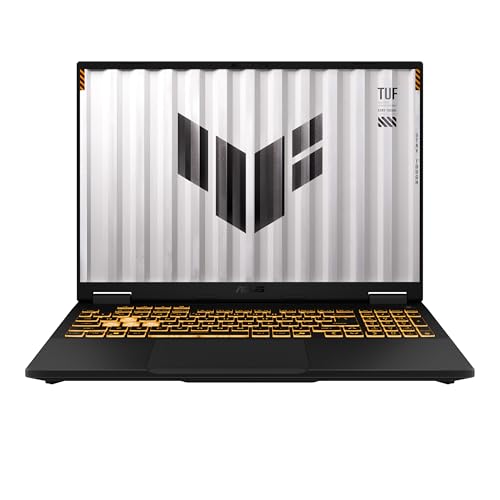
Specs
CPU | Intel Core i5-13450HX (10 cores, 16 threads) |
GPU | NVIDIA RTX 5050 Laptop GPU, 8 GB GDDR7 |
Memory | 16 GB DDR5 |
Storage | 512 GB PCIe Gen 4 SSD |
Display | 16-inch FHD+ (1920 x 1200), 165 Hz |
Durability | MIL-STD-810H tested chassis |
CPU
Intel Core i5-13450HX (10 cores, 16 threads)
GPU
NVIDIA RTX 5050 Laptop GPU, 8 GB GDDR7
Memory
16 GB DDR5
Storage
512 GB PCIe Gen 4 SSD
Display
16-inch FHD+ (1920 x 1200), 165 Hz
Durability
MIL-STD-810H tested chassis
What it does well
ASUS tests the TUF line against the MIL-STD-810H drop, vibration and temperature routine, and it is the laptop here most likely to survive a younger player. It gets carried between rooms, dropped onto a couch and used with a drink nearby. A tougher shell is worth more to that household than a few extra frames.
Inside it matches the Best Overall pick where Roblox cares: the same RTX 5050 with 8 GB, a 165 Hz panel, and a ten-core HX processor with even more room for busy servers. The taller 16:10 screen also shows more of the Roblox chat and menus.
What you give up
It costs more than the Acer Nitro V 15 for the same graphics card, so you are paying for the chassis. A military test label is not a promise against every drop, and it does not cover a spilled drink on the keyboard.
The 16-inch body is heavier than the 15.6-inch picks, and like every gaming laptop it lasts a few hours away from the charger when browsing and far less when gaming. Plan on playing plugged in.
Who it's for
Parents buying a first gaming laptop for a child in the 8 to 13 range who mostly plays Roblox. If the laptop will sit on a desk and be treated well, the Best Overall pick is the better buy.
Bottom line
If you want the safe answer for any Roblox player, buy the Acer Nitro V 15 RTX 5050.
If Roblox is the main game and the budget is tighter, buy the Lenovo LOQ 15 RTX 4050, and plug it into the router.
If they build in Roblox Studio or record their games, buy the Acer Nitro V 16S RTX 5060.
If it only needs to run Roblox and Minecraft, buy the HP Victus 15 RTX 3050. If it is for a younger kid who drops things, buy the ASUS TUF Gaming F16 RTX 5050.
Playing more than Roblox? Our picks for Minecraft, Fortnite and WoW Forever rank laptops for those games, and the best RTX 5050 gaming laptops go deeper on our top pick's graphics card.
FAQ
Can a laptop run Roblox?
Yes. Roblox installs on 64-bit Windows 10 or Windows 11 and runs on almost any laptop from the last few years, including models with integrated graphics. The difference is how it runs. A school laptop with 8 GB of memory plays at low settings and stutters in busy servers, while a gaming laptop with a dedicated graphics card and 16 GB keeps high settings and frame rates above 60. Every pick in this guide clears that bar.
What are the Roblox laptop requirements?
Roblox's official minimum is a 64-bit copy of Windows 10 or Windows 11 and a steady internet connection, with very modest hardware behind it. For a good experience we recommend a six-core or better processor, 16 GB of memory, a dedicated graphics card such as an RTX 3050 or newer, and a 144 Hz screen. Our Best Budget pick, the HP Victus 15 RTX 3050, is the cheapest laptop here that meets all of that.
How do I get more than 60 FPS in Roblox on a laptop?
Open the in-game menu, go to Settings, and change Maximum Frame Rate from the default to 120, 144 or 240. Then plug the laptop in, because many gaming laptops limit the graphics card on battery, and set Windows to its best-performance power mode. Use 144 on the 144 Hz and 165 Hz screens in this guide. The 240 step lowers input delay a little more, but it only looks smoother on a panel that refreshes that fast.
What is the best budget laptop for Roblox?
The HP Victus 15 RTX 3050 is our Best Budget pick. It has a real graphics card, an eight-core processor, 16 GB of memory and a 144 Hz screen, which runs Roblox at high settings with room to spare. Avoid budget laptops that ship with 8 GB of memory: Roblox, Discord and a browser together run out of room and stutter. If you can stretch a little, the Lenovo LOQ 15 RTX 4050 adds a faster card and an Ethernet port.
Is a gaming laptop worth it for a kid who plays Roblox?
For a child who plays Roblox most days, yes. A gaming laptop holds high settings in busy servers, runs cooler under load than a thin school laptop, and handles the other games kids move on to, like Minecraft and Fortnite. Pick for durability first: our Editor's Pick, the ASUS TUF Gaming F16 RTX 5050, has a MIL-STD-810H tested chassis. Expect a few hours of battery away from the charger, so plan for play at a desk.
Is a gaming laptop good for Roblox Studio?
Yes, and memory matters most. Roblox recommends 8 GB of memory for Studio, but large places, the test server, a browser and a screen recorder running together use far more, so 16 GB is the practical floor and 32 GB is comfortable. The Acer Nitro V 16S RTX 5060 is our pick for builders: it has 32 GB, a 1 TB drive and an eight-core Ryzen 7 for faster testing.
Related Articles

Best Gaming Laptops for Minecraft (2026): 5 Shader Picks
The best laptop for Minecraft depends on shaders and mods. Five gaming laptops on Amazon, from a vanilla-ready RTX 3050 to an RTX 5070 for ultra shader packs.
Nov 11, 2026

Best Gaming Laptops for Fortnite (2026): 5 Picks by Mode
The best gaming laptop for Fortnite depends on your mode: 240Hz Performance mode or DX12 with Lumen. Five RTX 50 laptops, from an RTX 5050 to an RTX 5080.
Nov 4, 2026

Best Gaming Laptops Under $1,000 (2026): RTX 4050 vs 5050
The best gaming laptops under $1,000 in 2026 run RTX 4050 and 3050 chips: four honest picks, one RTX 5050 stretch, the 8GB RAM fix, and when to wait for a sale.
Oct 24, 2026

Best RTX 5050 Gaming Laptops (2026): 5 TGP-Ranked Picks
The best RTX 5050 gaming laptop runs its GPU at 115W. We rank five picks by configured TGP, from the ASUS TUF Gaming F16 down to a 75W Acer Nitro V 15.
Nov 2, 2026

Best Gaming Laptops for Baldur's Gate 3 (2026): 4 Picks
The best laptop for Baldur's Gate 3 needs CPU headroom for Act 3's Lower City, 16 GB of RAM and a 150 GB SSD. Four Amazon-sold picks, RTX 5060 to 5070 Ti.
Nov 21, 2026