Affiliate Disclosure: As an Amazon Associate we earn from qualifying purchases. Some links may earn us a commission at no cost to you.

Best Gaming Laptops for Minecraft (2026): 5 Shader Picks
The best laptop for Minecraft is not the one with the biggest GPU. Vanilla Minecraft runs on almost any gaming laptop sold today. The machine you need is decided by what you add on top: a shader pack, a 200-mod pack, or a younger player who drops it off the couch.
Mojang raised the Java Edition requirements in July 2026 for the first time in years, ahead of its move to Vulkan, so the floor moved too. We sorted these five picks by the three things that change the answer: graphics memory for shaders, system memory for mods, and how much abuse the chassis takes.
Our top pick: Acer Nitro V 16S RTX 5060
It pairs an RTX 5060 with 8 GB of VRAM and a full 32 GB of system memory, which covers shader packs and big modpacks on the same machine without an upgrade later.

Quick picks
Pick | Laptop | Best for | Buy |
|---|---|---|---|
Best Overall | Shaders plus modpacks at 1080p | ||
Best Value | Shaders at 1080p on a big screen | ||
Best Premium | Ultra shader presets and long render distance | ||
Best Budget | Vanilla Java and Bedrock | ||
Editor's Pick | A tough laptop for a younger player |
Best Overall
- Laptop
- Best for
Shaders plus modpacks at 1080p
- Buy
Best Value
- Laptop
- Best for
Shaders at 1080p on a big screen
- Buy
Best Premium
- Laptop
- Best for
Ultra shader presets and long render distance
- Buy
Best Budget
- Laptop
- Best for
Vanilla Java and Bedrock
- Buy
Editor's Pick
- Laptop
- Best for
A tough laptop for a younger player
- Buy
Specs at a glance
Laptop | CPU | GPU (VRAM) | Memory | Storage | Display |
|---|---|---|---|---|---|
Ryzen 7 260, 8 cores | RTX 5060 (8 GB) | 32 GB DDR5 | 1 TB | 16 in, 1200p, 180 Hz | |
Ryzen 5 240, 6 cores | RTX 5060 (8 GB) | 16 GB DDR5 | 512 GB | 17.3 in, 1080p | |
Ryzen 9 9955HX, 16 cores | RTX 5070 (8 GB) | 16 GB DDR5 | 1 TB | 16 in, 1200p, 165 Hz | |
Ryzen 5 7535HS, 6 cores | RTX 3050 (4 GB) | 16 GB DDR5 | 512 GB | 15.6 in, 1080p, 144 Hz | |
Core i5-13450HX, 10 cores | RTX 5050 (8 GB) | 16 GB DDR5 | 512 GB | 16 in, 1200p, 165 Hz |
- CPU
Ryzen 7 260, 8 cores
- GPU (VRAM)
RTX 5060 (8 GB)
- Memory
32 GB DDR5
- Storage
1 TB
- Display
16 in, 1200p, 180 Hz
- CPU
Ryzen 5 240, 6 cores
- GPU (VRAM)
RTX 5060 (8 GB)
- Memory
16 GB DDR5
- Storage
512 GB
- Display
17.3 in, 1080p
- CPU
Ryzen 9 9955HX, 16 cores
- GPU (VRAM)
RTX 5070 (8 GB)
- Memory
16 GB DDR5
- Storage
1 TB
- Display
16 in, 1200p, 165 Hz
- CPU
Ryzen 5 7535HS, 6 cores
- GPU (VRAM)
RTX 3050 (4 GB)
- Memory
16 GB DDR5
- Storage
512 GB
- Display
15.6 in, 1080p, 144 Hz
- CPU
Core i5-13450HX, 10 cores
- GPU (VRAM)
RTX 5050 (8 GB)
- Memory
16 GB DDR5
- Storage
512 GB
- Display
16 in, 1200p, 165 Hz
How we picked: what a Minecraft laptop needs in 2026
Tier | Target | CPU | Memory | GPU |
|---|---|---|---|---|
Minimum (Mojang) | 1080p, 30 FPS, Fast preset | 4 cores, 64-bit | 8 GB (12 GB on integrated graphics) | Vulkan 1.3, 2 GB VRAM |
Recommended (Mojang) | 1080p, 60 FPS, Fancy preset | A modern multi-core chip | 16 GB | 6 GB VRAM |
Shader-ready (ours) | 1080p, 60 FPS, BSL or Complementary | 6 cores or more | 16 GB, 32 GB for big modpacks | 8 GB VRAM, RTX class |
Minimum (Mojang)
- Target
1080p, 30 FPS, Fast preset
- CPU
4 cores, 64-bit
- Memory
8 GB (12 GB on integrated graphics)
- GPU
Vulkan 1.3, 2 GB VRAM
Recommended (Mojang)
- Target
1080p, 60 FPS, Fancy preset
- CPU
A modern multi-core chip
- Memory
16 GB
- GPU
6 GB VRAM
Shader-ready (ours)
- Target
1080p, 60 FPS, BSL or Complementary
- CPU
6 cores or more
- Memory
16 GB, 32 GB for big modpacks
- GPU
8 GB VRAM, RTX class
Start with the new sheet. Mojang's minimum now asks for a Vulkan 1.3 GPU with 2 GB of memory, and its recommended tier jumps to 16 GB of RAM and a 6 GB card. Older integrated graphics that ran Minecraft for a decade may still launch, but Mojang no longer promises they will keep working.
Then decide whether shaders are part of the plan, because that is where laptops separate. Light packs fit inside 6 GB of VRAM at 1080p. BSL or Complementary on their high presets want 8 GB to stay comfortable, which is why four of these five carry 8 GB. Our guide to the best GPUs for Minecraft shaders breaks the shader tiers down card by card.
Modpacks move the bottleneck to system memory and single-thread CPU speed. A large pack wants 8 to 10 GB allocated to Java, and the laptop needs room left over for Windows, Discord and a browser. That makes 16 GB the floor and 32 GB the comfortable number. Giving Java every free gigabyte does not help: oversized allocations can cause long garbage-collection pauses.
Last, read the GPU name with care. Laptop RTX chips run at very different wattages from one chassis to the next, and the 8 GB memory ceiling holds through the RTX 5070. A laptop with 12 GB of VRAM means stepping up to the RTX 5070 Ti tier. If you are still choosing a GPU tier in general, how to choose a GPU covers the same ground outside Minecraft.
Best Overall: Acer Nitro V 16S RTX 5060
Specs
CPU | AMD Ryzen 7 260 (8 cores, 16 threads) |
GPU | NVIDIA RTX 5060 Laptop GPU, 8 GB GDDR7 |
Memory | 32 GB DDR5 |
Storage | 1 TB PCIe Gen 4 SSD |
Display | 16-inch WUXGA (1920 x 1200) IPS, 180 Hz |
Model | ANV16S-41-R2AJ |
CPU
AMD Ryzen 7 260 (8 cores, 16 threads)
GPU
NVIDIA RTX 5060 Laptop GPU, 8 GB GDDR7
Memory
32 GB DDR5
Storage
1 TB PCIe Gen 4 SSD
Display
16-inch WUXGA (1920 x 1200) IPS, 180 Hz
Model
ANV16S-41-R2AJ
What it does well
Thirty-two gigabytes of memory is the reason this one leads. A big Java modpack can take 10 GB for itself and the rest of the laptop still has room to breathe, so you never have to choose between the pack and Discord. Most laptops at this tier ship with 16 GB and need a memory upgrade within a year of serious modding.
The RTX 5060 carries 8 GB of GDDR7, which is the line BSL and Complementary want at their high presets in 1080p. The 16-inch 1920 by 1200 panel at 180 Hz shows a little more of the world vertically than a 16:9 screen, and the terabyte drive holds worlds, packs and backups without a cleanup session.
What you give up
Wattage is the catch. Reports suggest Acer runs the RTX 5060 in this chassis below the full-power 115 W you get in bigger laptops, which costs some shader frame rate against the same chip elsewhere. You will feel it at the top shader presets, not in vanilla.
Eight gigabytes of VRAM is also a ceiling, not a cushion. Stack a 512x resource pack on top of a heavy shader and the card starts running out of memory. If that is your setup, look at the Best Premium pick or a desktop.
Who it's for
The Java player who runs a shader pack most sessions and a modpack on weekends, at 1080p, and wants one laptop that handles both without a memory upgrade.
Best Value: Acer Nitro V 17 RTX 5060

Specs
CPU | AMD Ryzen 5 240 (6 cores, 12 threads) |
GPU | NVIDIA RTX 5060 Laptop GPU, 8 GB GDDR7 |
Memory | 16 GB DDR5 |
Storage | 512 GB SSD |
Display | 17.3-inch FHD (1920 x 1080) IPS |
Model | ANV17-41-R8ML |
CPU
AMD Ryzen 5 240 (6 cores, 12 threads)
GPU
NVIDIA RTX 5060 Laptop GPU, 8 GB GDDR7
Memory
16 GB DDR5
Storage
512 GB SSD
Display
17.3-inch FHD (1920 x 1080) IPS
Model
ANV17-41-R8ML
What it does well
At the time of writing this is the cheapest route on this list to an RTX 5060, and the shader packs most people run only care that the card has 8 GB of memory and modern ray-tracing hardware. You get the same GPU tier as the top pick for less, sold through Acer's authorized storefront on Amazon.
The 17.3-inch screen is the other draw. Minecraft is a game you stare at for hours, and a bigger panel makes inventory screens, chat and mod menus easier to read from a desk. For more RTX 5060 laptops ranked by power limit, see our RTX 5060 gaming laptop picks.
What you give up
Sixteen gigabytes of memory and a six-core CPU are where the savings come from. Vanilla and shaders are fine. A 300-mod pack is not comfortable here until you add memory, and with two fewer cores than the top pick, chunk generation in a world-gen modpack slows down sooner.
The 512 GB drive fills faster than you expect once other games sit beside Minecraft, and a 17-inch laptop is heavy to carry. Treat this as a desk machine that travels occasionally.
Who it's for
The player who wants shaders at 1080p on a big screen, mostly plays vanilla or light mods, and would rather keep the difference than pay for 32 GB up front.
Best Premium: ASUS ROG Strix G16 RTX 5070

Specs
CPU | AMD Ryzen 9 9955HX (16 cores, 32 threads) |
GPU | NVIDIA RTX 5070 Laptop GPU, 8 GB GDDR7, up to 115 W with Dynamic Boost |
Memory | 16 GB DDR5-5600 |
Storage | 1 TB PCIe Gen 4 SSD |
Display | 16-inch FHD+ (1920 x 1200), 165 Hz |
Model | G614FP-OS94 |
CPU
AMD Ryzen 9 9955HX (16 cores, 32 threads)
GPU
NVIDIA RTX 5070 Laptop GPU, 8 GB GDDR7, up to 115 W with Dynamic Boost
Memory
16 GB DDR5-5600
Storage
1 TB PCIe Gen 4 SSD
Display
16-inch FHD+ (1920 x 1200), 165 Hz
Model
G614FP-OS94
What it does well
The Ryzen 9 9955HX is what you are paying for. Sixteen Zen 5 cores with high boost clocks generate new chunks faster than anything else here, which is what you notice when you fly with elytra at a long render distance or run a modpack with world-gen mods. Java's main thread still does most of the work, and this chip has the fastest single core on the list.
The RTX 5070 runs at up to 115 W with Dynamic Boost on ASUS's spec sheet, the full-power end of the laptop range, so ultra shader presets and path-traced packs like SEUS PTGI at sensible settings become playable at 1080p rather than a slideshow.
What you give up
It still has 8 GB of VRAM, the same as the cheaper RTX 5060 picks. The extra money buys speed, not memory, so the heaviest resource packs hit the same ceiling. Sixteen gigabytes of system memory is also low for this class if you mod heavily; plan on an upgrade.
Strix cooling is tuned for clocks, so expect audible fans through a long shader session, and the laptop is a heavy 16-inch machine. If you mostly play at one desk, our gaming laptop vs desktop breakdown shows what the same money buys in a tower.
Who it's for
The player who runs ultra shader presets, long render distances or path tracing, plays other demanding games on the same machine, and wants the fastest CPU on a laptop for Java's chunk loading.
Best Budget: ASUS TUF Gaming A15 RTX 3050
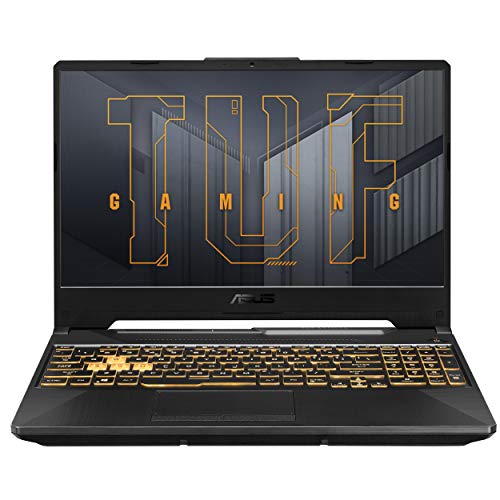
Specs
CPU | AMD Ryzen 5 7535HS (6 cores, 12 threads) |
GPU | NVIDIA RTX 3050 Laptop GPU, 4 GB GDDR6 |
Memory | 16 GB DDR5 |
Storage | 512 GB PCIe Gen 4 SSD |
Display | 15.6-inch FHD (1920 x 1080), 144 Hz |
Model | FA506NC-DS53 |
CPU
AMD Ryzen 5 7535HS (6 cores, 12 threads)
GPU
NVIDIA RTX 3050 Laptop GPU, 4 GB GDDR6
Memory
16 GB DDR5
Storage
512 GB PCIe Gen 4 SSD
Display
15.6-inch FHD (1920 x 1080), 144 Hz
Model
FA506NC-DS53
What it does well
This is the cheapest laptop sold by Amazon itself that we would hand someone for Minecraft. It clears Mojang's new minimum comfortably: six cores, 16 GB of memory and a Vulkan-capable RTX card. Vanilla Java and Bedrock run well at 1080p, and the 144 Hz screen makes high frame rates in vanilla worth having.
Sixteen gigabytes is the detail that sets it apart at this price. Many budget gaming laptops still ship with 8 GB, which now sits at Mojang's minimum and leaves nothing for a browser alongside the game. For more choices at this price, see our best gaming laptops under 1,000 dollars.
What you give up
Four gigabytes of VRAM is below Mojang's new 6 GB recommended line. Light shader packs at reduced settings work; BSL or Complementary on high will stutter, and this card will not age gracefully as Java moves to Vulkan.
The RTX 3050 is also an older chip. If shaders are even a maybe, the Editor's Pick costs more but doubles the graphics memory.
Who it's for
The player who sticks to vanilla Java or Bedrock, maybe a few performance mods, and wants a real gaming laptop at the lowest price on this list.
Editor's Pick: ASUS TUF Gaming F16 RTX 5050
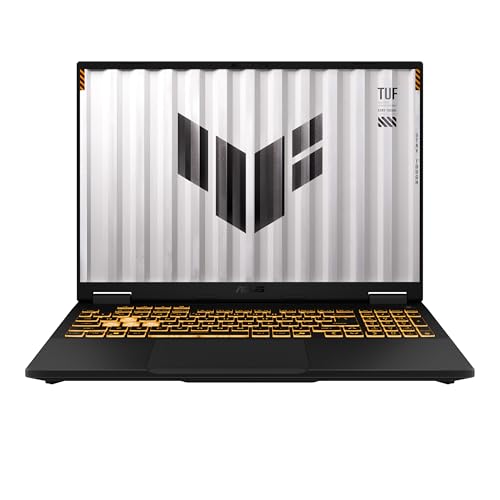
Specs
CPU | Intel Core i5-13450HX (10 cores: 6P + 4E, 16 threads) |
GPU | NVIDIA RTX 5050 Laptop GPU, 8 GB GDDR7, 115 W (100 W + 15 W Dynamic Boost) |
Memory | 16 GB DDR5 |
Storage | 512 GB PCIe Gen 4 SSD |
Display | 16-inch FHD+ (1920 x 1200), 165 Hz |
Durability | MIL-STD-810H tested chassis |
CPU
Intel Core i5-13450HX (10 cores: 6P + 4E, 16 threads)
GPU
NVIDIA RTX 5050 Laptop GPU, 8 GB GDDR7, 115 W (100 W + 15 W Dynamic Boost)
Memory
16 GB DDR5
Storage
512 GB PCIe Gen 4 SSD
Display
16-inch FHD+ (1920 x 1200), 165 Hz
Durability
MIL-STD-810H tested chassis
What it does well
This is the laptop we would buy for a younger player. ASUS tests the TUF chassis to MIL-STD-810H for drops, vibration and temperature swings, which is the kind of testing that matters when the laptop lives in a backpack and gets used on a bed. ASUS is clear that this is a lab standard, not a promise it survives everything.
Inside, the RTX 5050 carries 8 GB of GDDR7 at 115 W, so it clears the 6 GB recommended line with room for shader packs at 1080p when the player grows into them. The 16:10 screen at 165 Hz is a step up from the usual budget panel, and the 10-core Intel chip handles Java's chunk loading without trouble.
What you give up
The RTX 5050 is the entry tier of the current generation, so heavy shader presets run at medium rather than high. It is enough for Complementary at sensible settings, not for path tracing.
The 512 GB drive and 16 GB of memory are fine for vanilla and moderate mods; a parent buying for a modding teenager should budget for more memory later. It is also a full 16-inch laptop, not a light school machine.
Who it's for
The parent buying for a Minecraft player who will carry the laptop around, or the player who wants shader headroom over the Best Budget pick without paying for an RTX 5060.
Bottom line
If you want one laptop that handles shaders and modpacks, buy the Acer Nitro V 16S RTX 5060. If you want shaders on a big screen for less, buy the Acer Nitro V 17 RTX 5060. If you run ultra shader presets or long render distances, buy the ASUS ROG Strix G16 RTX 5070. If you only play vanilla, the ASUS TUF Gaming A15 RTX 3050 is enough. If you are buying for a younger player, get the ASUS TUF Gaming F16 RTX 5050.
FAQ
Can any laptop run Minecraft?
Most can run vanilla Minecraft, but the floor rose in July 2026. Mojang's new Java Edition minimum is a 64-bit four-core CPU, 8 GB of memory with a discrete GPU (12 GB on integrated graphics), and a Vulkan 1.3 GPU with 2 GB of VRAM, targeting 1080p at 30 FPS on the Fast preset. Laptops below that may still launch the game, but Mojang no longer guarantees it. Any current gaming laptop, including our Best Budget pick, clears the minimum.
How much RAM does a laptop need for Minecraft with mods?
Sixteen gigabytes is the floor and 32 GB is the comfortable number for big modpacks. A large pack wants 8 to 10 GB allocated to Java, and Windows, Discord and a browser need their own share. Raise the allocation in your launcher rather than leaving the default, but do not hand Java every free gigabyte, because oversized heaps cause long garbage-collection pauses. Our Best Overall pick ships with 32 GB for this reason.
Is an RTX 5050 or RTX 5060 laptop enough for Minecraft shaders?
Yes, at 1080p. Both carry 8 GB of VRAM, which is what BSL and Complementary want at their high presets. The RTX 5060 holds higher frame rates at the same settings, and the RTX 5050 suits medium presets. Neither is a path-tracing card; for SEUS PTGI or ultra presets, the RTX 5070 in our Best Premium pick is the realistic laptop starting point.
What is a good laptop for Minecraft for kids?
Look for durability, 16 GB of memory and an RTX card with at least 6 GB of VRAM so shaders are an option later. Our Editor's Pick, the ASUS TUF Gaming F16 RTX 5050, ticks all three and has a MIL-STD-810H tested chassis. If the player only runs vanilla Bedrock, the cheaper TUF Gaming A15 is enough. For tighter budgets, see our best gaming laptops under 700 dollars.
Does Minecraft Bedrock or Java need a better laptop?
Java is heavier. It runs on a single main thread for most of its work, leans on system memory, and is the edition shader packs and large modpacks are built for. Bedrock is better optimized and runs well on modest hardware, though its Vibrant Visuals and RTX modes still want a capable GPU. If the player is on Java with mods or shaders, buy for Java; Bedrock will run fine on the same machine.
Related Articles

Best GPU for Minecraft Shaders (2026): 5 Picks by VRAM
The best GPU for Minecraft shaders is the one with VRAM headroom to spare. Five current picks for BSL, Complementary, and path-traced packs from 1080p to 4K.
Aug 19, 2026

Best Gaming Laptops for WoW Forever (2026): 5 Launch Picks
The best laptop for WoW Forever pairs raid-ready CPU cores with an 8 GB GPU and 128 GB of free SSD. Five Amazon-sold picks, from an RTX 5050 to an X3D raid rig.
Nov 7, 2026

Best RTX 5060 Gaming Laptops (2026): 5 TGP-Ranked Picks
The best RTX 5060 gaming laptop is the one with the highest TGP. We rank five picks by sustained wattage, from a 115W ASUS TUF F16 down to an 85W Acer Nitro.
Sep 7, 2026

Best Gaming Laptops Under $1,000 (2026): RTX 4050 vs 5050
The best gaming laptops under $1,000 in 2026 run RTX 4050 and 3050 chips: four honest picks, one RTX 5050 stretch, the 8GB RAM fix, and when to wait for a sale.
Oct 24, 2026

Best Gaming Laptops for League of Legends (2026): 5 Picks
The best laptop for League of Legends pairs a 144 Hz+ screen with a strong CPU, not a big GPU. Five Amazon-sold picks, from an RTX 3050 to a 14-inch travel rig.
Nov 11, 2026