Affiliate Disclosure: As an Amazon Associate we earn from qualifying purchases. Some links may earn us a commission at no cost to you.

Best RTX 5050 Gaming Laptops (2026): 5 TGP-Ranked Picks
NVIDIA lets laptop makers run the RTX 5050 Laptop GPU anywhere from 35W to 100W, then add up to 15W of Dynamic Boost. That is a threefold spread of power under one badge. Notebookcheck tested a 45W configuration, while ASUS ships the same chip at 115W.
So every pick below is slotted by the power its chassis gives the GPU first, and by the screen and spec sheet second. If you are shopping on a firm budget rather than by GPU, our budget gaming laptop guide weighs the RTX 5050 against the older RTX 4050.
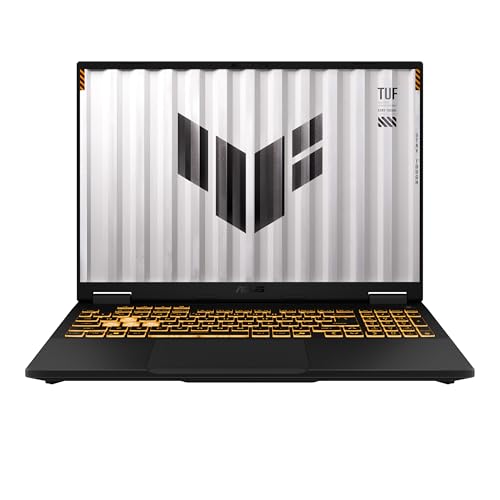
Our top pick: ASUS TUF Gaming F16
The ASUS TUF Gaming F16 runs its RTX 5050 at the full 115W NVIDIA allows, and Tom's Hardware measured it within a few frames of RTX 5060 laptops capped at 80W to 85W. Nothing else here gets more out of the badge.
Quick picks
Pick | Laptop | Max TGP | Best for | Buy |
|---|---|---|---|---|
Best Overall | 115W | Most frames per dollar at 1080p and 1200p | ||
Best Value | 100W | HX Core i7 and a 1 TB drive at 1080p | ||
Best Premium | 115W | A 2560x1600 screen at full GPU power | ||
Best Budget | 75W | The cheapest way into an RTX 5050 | ||
Editor's Pick | Not published | Battery, ports and build over frames |
Best Overall
- Laptop
- Max TGP
115W
- Best for
Most frames per dollar at 1080p and 1200p
- Buy
Best Value
- Laptop
- Max TGP
100W
- Best for
HX Core i7 and a 1 TB drive at 1080p
- Buy
Best Premium
- Laptop
- Max TGP
115W
- Best for
A 2560x1600 screen at full GPU power
- Buy
Best Budget
- Laptop
- Max TGP
75W
- Best for
The cheapest way into an RTX 5050
- Buy
Editor's Pick
- Laptop
- Max TGP
Not published
- Best for
Battery, ports and build over frames
- Buy
Specs at a glance
Laptop | Max TGP | CPU | Display | Storage |
|---|---|---|---|---|
115W | Core i5-13450HX | 16-inch 1920x1200, 165Hz | 512 GB | |
100W | Core i7-13650HX | 15.6-inch 1920x1080, 144Hz | 1 TB | |
115W | Ryzen 7 260 | 16-inch 2560x1600, 165Hz | 512 GB | |
75W | Core i5-13420H | 15.6-inch 1920x1080, 165Hz | 512 GB | |
Not published | Core 7 240H | 16-inch 2560x1600, 120Hz | 1 TB |
- Max TGP
115W
- CPU
Core i5-13450HX
- Display
16-inch 1920x1200, 165Hz
- Storage
512 GB
- Max TGP
100W
- CPU
Core i7-13650HX
- Display
15.6-inch 1920x1080, 144Hz
- Storage
1 TB
- Max TGP
115W
- CPU
Ryzen 7 260
- Display
16-inch 2560x1600, 165Hz
- Storage
512 GB
- Max TGP
75W
- CPU
Core i5-13420H
- Display
15.6-inch 1920x1080, 165Hz
- Storage
512 GB
- Max TGP
Not published
- CPU
Core 7 240H
- Display
16-inch 2560x1600, 120Hz
- Storage
1 TB
Benchmarks
Reviewers test the RTX 5050 Laptop GPU at whatever power the review unit was configured for, so these charts are grouped by wattage rather than by retail model. The first shows a full-power 115W machine, the second a 45W one, the third where the chip sits against its neighbours, and the last the configured ceiling of each pick.
Review unit ran a Core i7-14650HX at the 115W GPU ceiling.
- 95 FPS
- 90 FPS
What a low-wattage RTX 5050 configuration does across its power modes.
- 56.3 FPS
- 55.2 FPS
- 36.2 FPS
Averages across every tested laptop of each GPU, all power levels pooled.
- 1854 points
- 2315 points
- 2395 points
- 2854 points
Dell does not publish the Alienware 16 Aurora's RTX 5050 figure, so it is left off.
- 115 W
- 115 W
- Lenovo LOQ 15100 W
- 75 W
How we picked
Wattage first. The RTX 5050 Laptop is one piece of silicon with a configurable power window, and Notebookcheck notes that its performance depends heavily on that setting and on cooling. A 115W machine and a 45W machine wear the same sticker. The second chart above is what the low end of that window looks like: the 45W MSI Cyborg 15 loses about a third of its Cyberpunk 2077 frame rate in its quiet mode.
The RTX 5060 question second. Notebookcheck's 3DMark Speed Way averages put the RTX 5060 Laptop roughly 23 percent ahead of the RTX 5050 Laptop. That gap shrinks or flips when the 5060 is capped low and the 5050 runs at 115W, which is why the TUF F16 keeps pace with 80W to 85W RTX 5060 machines. If the same chassis sells with an RTX 5060 at the same wattage for a small step up, take the 5060; our RTX 5060 gaming laptop picks rank those configs the same way.
Panel and memory third. Eight gigabytes of video memory is comfortable at 1080p and 1200p. On a 2560x1600 panel, demanding games need DLSS upscaling or a lower render resolution, so the two higher-resolution picks here are for buyers who value the sharper screen for work and lighter games. Our guide to choosing a GPU and a matching monitor covers that pairing in more depth.
What we skipped: configurations that cap the GPU near the bottom of the window, like the 45W MSI Cyborg 15, and models whose published wattage conflicts between sources, like the GIGABYTE Gaming A16, where reviewers and retailers list 75W, 80W and 85W for the same RTX 5050 config.
Best Overall: ASUS TUF Gaming F16
Specs
Max GPU power (TGP) | 115W (100W base plus 15W Dynamic Boost) |
GPU | GeForce RTX 5050 Laptop, 8 GB GDDR7 |
CPU | Intel Core i5-13450HX |
Display | 16-inch 1920x1200, 165Hz |
Memory | 16 GB DDR5 |
Storage | 512 GB PCIe 4.0 SSD |
Wireless | Wi-Fi 6E |
Max GPU power (TGP)
115W (100W base plus 15W Dynamic Boost)
GPU
GeForce RTX 5050 Laptop, 8 GB GDDR7
CPU
Intel Core i5-13450HX
Display
16-inch 1920x1200, 165Hz
Memory
16 GB DDR5
Storage
512 GB PCIe 4.0 SSD
Wireless
Wi-Fi 6E
What it does well
The ceiling is the point. ASUS lists every TUF Gaming F16 RTX 5050 configuration at 100W of base power plus 15W of Dynamic Boost, the top of the range NVIDIA allows for this chip, and it holds that figure in both Turbo and Manual modes.
Tom's Hardware measured 95 fps in Shadow of the Tomb Raider at 1080p on the Highest preset and 90 fps at the panel's native 1200p. That put the TUF within a few frames of the RTX 5060 laptops it was tested against, which ran their faster chip at 80W to 85W.
The panel suits the GPU. Sixteen inches, 1920x1200, 165Hz: enough resolution to look sharp, low enough that 8 GB of video memory is never the limit.
What you give up
Tom's Hardware flagged a skimpy SSD and short battery life, and both are real. The 512 GB drive fills after a few current releases, and 115W of GPU power drains a battery fast.
Digit reported thermal throttling during sustained gaming on its unit, and 115W has to leave the chassis somewhere, so expect fan noise in Turbo mode. Headphones handle the noise; a cooling pad helps the heat.
Tom's review unit carried a Core i7-14650HX. The Amazon configuration here uses a Core i5-13450HX, so expect slightly lower results in CPU-heavy games than the review shows.
Who it's for
You play at 1080p or 1200p, you want every frame the RTX 5050 can give, and you use headphones. This is the default pick unless one of the sections below describes you better.
Best Value: Lenovo LOQ 15

Specs
Max GPU power (TGP) | 100W (retailer-listed for the 15IRX10) |
GPU | GeForce RTX 5050 Laptop, 8 GB GDDR7 |
CPU | Intel Core i7-13650HX |
Display | 15.6-inch 1920x1080, 144Hz, G-Sync |
Memory | 16 GB |
Storage | 1 TB SSD |
Max GPU power (TGP)
100W (retailer-listed for the 15IRX10)
GPU
GeForce RTX 5050 Laptop, 8 GB GDDR7
CPU
Intel Core i7-13650HX
Display
15.6-inch 1920x1080, 144Hz, G-Sync
Memory
16 GB
Storage
1 TB SSD
What it does well
The most complete spec sheet in the group. Retailer listings for the Intel LOQ 15 (model 15IRX10) put its RTX 5050 at 100W, and this configuration pairs it with a 14-core Core i7-13650HX and a 1 TB drive as standard.
LaptopMedia described the LOQ 15's RTX 5050 as a high-wattage implementation with strong sustained gaming performance. That is the behaviour you want from a laptop that will run long sessions plugged in.
The HX-class Core i7 has more headroom than the RTX 5050 needs in games, which pays off if you stream, record gameplay, or compile and export on the same machine.
What you give up
The 100W figure comes from retailer spec sheets, and Lenovo documents 115W for some AMD LOQ 15 variants. Treat the Intel model's wattage as listed rather than confirmed until Lenovo's own spec reference states it.
The 15.6-inch 1080p 144Hz panel is the plainest screen here. It is a 16:9 panel with no extra vertical space, and the refresh rate trails both TUF models.
Lenovo's naming is a trap on Amazon. The LOQ 15 sells with RTX 4050, RTX 5050 and RTX 5060 GPUs and with AMD or Intel chips under near-identical titles, so check that the listing you land on is this Core i7 and RTX 5050 combination.
Who it's for
You want one laptop that games at 1080p and also handles streaming or creative work, and you would rather have a bigger drive than a bigger screen. If your budget stretches further, our picks under a higher budget cap show what the next tier buys.
Best Premium: ASUS TUF Gaming A16

Specs
Max GPU power (TGP) | 115W (100W base plus 15W Dynamic Boost) |
GPU | GeForce RTX 5050 Laptop, 8 GB GDDR7 |
CPU | AMD Ryzen 7 260 |
Display | 16-inch 2560x1600, 165Hz |
Memory | 16 GB DDR5 |
Storage | 512 GB SSD |
Wireless | Wi-Fi 6E |
Max GPU power (TGP)
115W (100W base plus 15W Dynamic Boost)
GPU
GeForce RTX 5050 Laptop, 8 GB GDDR7
CPU
AMD Ryzen 7 260
Display
16-inch 2560x1600, 165Hz
Memory
16 GB DDR5
Storage
512 GB SSD
Wireless
Wi-Fi 6E
What it does well
Full power and a sharp screen. ASUS lists the TUF Gaming A16 RTX 5050 at the same 115W ceiling as the F16, and this configuration puts it behind a 16-inch 2560x1600 panel at 165Hz.
That panel earns its keep outside games. Sixteen by ten at 2560x1600 gives real room for documents, timelines and browser tabs side by side, and in esports titles the RTX 5050 at 115W has the power to keep the refresh rate busy.
The Ryzen 7 260 is an efficient eight-core chip that pairs sensibly with the GPU and keeps the chassis from running as hot as an HX Intel part would.
What you give up
Eight gigabytes of video memory against a 2560x1600 panel is the tightest pairing in this article. Demanding releases at native resolution run into the memory limit, so plan on DLSS upscaling from a lower internal resolution in AAA games.
You pay more than the F16 for the same GPU power. The extra money buys the screen, not frames.
Storage is 512 GB here too, and it fills quickly once a few large games are installed.
Who it's for
You split time between work and games, you want the sharper screen every day, and you accept upscaling in the heaviest titles. If image quality is the priority over GPU power, our OLED gaming laptop picks go further on the panel.
Best Budget: Acer Nitro V 15

Specs
Max GPU power (TGP) | 75W |
GPU | GeForce RTX 5050 Laptop, 8 GB GDDR7 |
CPU | Intel Core i5-13420H |
Display | 15.6-inch 1920x1080, 165Hz |
Memory | 16 GB |
Storage | 512 GB SSD |
Max GPU power (TGP)
75W
GPU
GeForce RTX 5050 Laptop, 8 GB GDDR7
CPU
Intel Core i5-13420H
Display
15.6-inch 1920x1080, 165Hz
Memory
16 GB
Storage
512 GB SSD
What it does well
The cheapest route into an RTX 5050 laptop on Amazon, with the trade stated plainly. Acer configures the GPU at 75W, and PC Gamer saw it hold around 1,651 MHz at that limit in testing.
PC Gamer called its 1080p performance okay with some help from DLSS, which is a fair summary. The 165Hz 1080p panel suits esports titles, where even a 75W RTX 5050 has the most headroom.
It also costs the least of the five, which leaves room in the budget for a second SSD later.
What you give up
Seventy-five watts is 40W below both TUF picks, and that gap shows in demanding games. PC Gamer's review unit trailed the 85W RTX 5060 versions of the same chassis.
The Core i5-13420H is an eight-core H-series chip, a step below the HX parts in the F16 and LOQ. It is fine for gaming at this GPU level and slower for anything CPU-heavy.
Expect a 512 GB drive that fills after a handful of large installs.
Who it's for
This is a first gaming laptop for a 1080p esports player on a firm budget. If an even lower budget is the real constraint, our gaming laptops under the next price tier down cover the floor, and if the laptop will never leave a desk, read our gaming laptop vs desktop comparison first.
Editor's Pick: Alienware 16 Aurora

Specs
Max GPU power (TGP) | Not published by Dell (combined CPU and GPU budget up to 115W) |
GPU | GeForce RTX 5050 Laptop, 8 GB |
CPU | Intel Core 7 240H |
Display | 16-inch 2560x1600, 120Hz |
Memory | 16 GB DDR5 |
Storage | 1 TB SSD |
Battery | 96 Wh |
Wireless | Wi-Fi 7 |
Max GPU power (TGP)
Not published by Dell (combined CPU and GPU budget up to 115W)
GPU
GeForce RTX 5050 Laptop, 8 GB
CPU
Intel Core 7 240H
Display
16-inch 2560x1600, 120Hz
Memory
16 GB DDR5
Storage
1 TB SSD
Battery
96 Wh
Wireless
Wi-Fi 7
What it does well
The one pick here that trades GPU power for everything else on purpose. Dell gives the Alienware 16 Aurora a 96 Wh battery, Wi-Fi 7, Thunderbolt 4 and a 1 TB drive, and Tom's Hardware summed it up as long on endurance, short on performance.
The 16-inch 2560x1600 panel is good for work and media, and it is the only pick here that ships with Wi-Fi 7.
If you game an hour or two a night and carry the laptop the rest of the day, battery and ports matter more than the last 15 percent of frame rate.
What you give up
Dell does not publish the RTX 5050's TGP for this model. It quotes a combined CPU and GPU power budget of up to 115W, which means the GPU alone runs below the TUF picks under load. CNet called the RTX 5050 here throttled and said buyers will end up gaming at 1080p or 1200p.
The panel tops out at 120Hz, the slowest refresh rate in this article, and its native resolution is more than the GPU can drive in demanding games.
For pure gaming value, the TUF Gaming F16 beats it outright.
Who it's for
You are a student or a traveller who games second. You want a laptop that survives a full day away from the outlet, with modern ports, and you will play at 1080p-class settings without complaint. If you plug in an external display, our monitors for the RTX 5050 are matched to this GPU.
Bottom line
If you want the most frames from an RTX 5050, buy the ASUS TUF Gaming F16. If you want more CPU and storage for streaming or creative work, buy the Lenovo LOQ 15. If you want a 2560x1600 screen without giving up GPU power, buy the ASUS TUF Gaming A16. If the budget is fixed, buy the Acer Nitro V 15 and accept 75W. If battery and build matter more than frames, buy the Alienware 16 Aurora.
FAQ
Is an RTX 5050 laptop good for gaming?
Yes, at 1080p and 1200p. A well-powered RTX 5050 laptop runs older and lighter games at high settings and demanding current releases at medium, and Tom's Hardware measured 95 fps in Shadow of the Tomb Raider at 1080p Highest on a 115W model. Wattage decides how good it is: a 45W configuration loses a large share of that performance, so check the TGP before the badge.
What TGP should an RTX 5050 laptop have?
Aim for 100W or more, and treat 115W as the target. NVIDIA allows 35W to 100W of base power plus up to 15W of Dynamic Boost, so shipping configurations run from roughly 45W to 115W. ASUS publishes 115W for its TUF Gaming F16, TUF Gaming A16 and ROG Strix G16 RTX 5050 models. Below about 80W you are paying for the badge rather than the performance.
Is the RTX 5060 laptop worth the step up from the RTX 5050?
Often, yes, but only at the same wattage. Notebookcheck's 3DMark Speed Way averages put the RTX 5060 Laptop about 23 percent ahead of the RTX 5050 Laptop. A 115W RTX 5050 can keep pace with an RTX 5060 capped at 80W to 85W, though, so compare the two configurations of the same chassis. If the 5060 version runs at the same power for a small price step, buy the 5060.
Can an RTX 5050 laptop handle 1440p?
In lighter games and esports titles, yes. In demanding AAA games at native 1440p or 1600p, the 8 GB of video memory and the chip itself run short, so you will rely on DLSS upscaling from a lower internal resolution. The ASUS TUF Gaming A16 in this guide pairs a 2560x1600 panel with the full 115W, which gives the GPU the best chance at that resolution.
Is 8 GB of VRAM enough on an RTX 5050 laptop?
At 1080p and 1200p, yes, for nearly every current game. At 1440p and above it is the first thing to run out in large open-world titles, and the symptom is lower-quality textures rather than a lower frame counter. Upscaling reduces the memory load by rendering at a lower internal resolution. If you want to keep native high resolution, look at a higher-tier GPU instead.
Is the RTX 5050 laptop faster than the RTX 4060 laptop?
No, they are close. Notebookcheck's Speed Way averages put the RTX 5050 Laptop slightly behind the RTX 4060 Laptop and well ahead of the RTX 4050 Laptop, and NVIDIA positions it as comparable to the 4060 before DLSS frame generation. The RTX 5050 adds DLSS 4 multi-frame generation, which the 4060 lacks, so it pulls ahead in games that support it.
Related Articles

Best RTX 5060 Gaming Laptops (2026): 5 TGP-Ranked Picks
The best RTX 5060 gaming laptop is the one with the highest TGP. We rank five picks by sustained wattage, from a 115W ASUS TUF F16 down to an 85W Acer Nitro.
Sep 7, 2026

Best Gaming Laptops Under $1,000 (2026): RTX 4050 vs 5050
The best gaming laptops under $1,000 in 2026 run RTX 4050 and 3050 chips: four honest picks, one RTX 5050 stretch, the 8GB RAM fix, and when to wait for a sale.
Oct 24, 2026

Gaming Laptop vs Desktop 2026: Value Math and 4 Picks
Gaming laptop vs desktop in 2026: desktops deliver about 30-40% more frames per dollar, laptops deliver portability. See which fits you, plus 4 picks.
Sep 2, 2026

Best CPU for RTX 5080 (2026): 5 Picks for 1080p, 1440p, 4K
Best CPU for RTX 5080: the Ryzen 7 9800X3D at 1080p and 1440p, a cheaper six-core at 4K. Five picks backed by measured scaling, and where extra CPU spend stops.
Nov 1, 2026

Best Monitor for RTX 3080 (2026): 5 Picks for a 10GB Card
The best monitor for RTX 3080 owners is a 1440p panel at 180Hz to 240Hz. Five picks matched to the card's real frame rates, DLSS reach and HDMI 2.1 output.
Nov 1, 2026