Affiliate Disclosure: As an Amazon Associate we earn from qualifying purchases. Some links may earn us a commission at no cost to you.

Best Gaming Monitors for the Arc B580 (2026): 5 Picks
The Intel Arc B580 is a 1440p card at high settings, and its 12 GB buffer is the reason it gets away with that at this price. So the monitor that fits it is a 27-inch 1440p panel at 165 to 180 Hz, plugged in over DisplayPort.
That last part is not a footnote. Arc runs variable refresh through DisplayPort Adaptive-Sync on mainstream monitors, and the HDMI path only works with HDMI 2.1 VRR panels. Every pick below takes a DisplayPort cable, and every pick below needs one.
Our top pick: ASUS TUF Gaming VG27AQ3A
The ASUS TUF Gaming VG27AQ3A gives the B580 a 1440p canvas at 180 Hz with FreeSync Premium, which covers the whole 45 to 90 fps band this card lives in at that resolution.

Quick picks
Pick | Monitor | Best for | Buy |
|---|---|---|---|
Best Overall | 1440p at 180 Hz, the default pairing | ||
Best Value | 1440p for less, with a height stand | ||
Best Premium | Mini-LED HDR at 1440p | ||
Best Budget | 1080p at 200 Hz on a tight budget | ||
Editor's Pick | 1080p at 240 Hz for esports |
Best Overall
- Monitor
- Best for
1440p at 180 Hz, the default pairing
- Buy
Best Value
- Monitor
- Best for
1440p for less, with a height stand
- Buy
Best Premium
- Monitor
- Best for
Mini-LED HDR at 1440p
- Buy
Best Budget
- Monitor
- Best for
1080p at 200 Hz on a tight budget
- Buy
Editor's Pick
- Monitor
- Best for
1080p at 240 Hz for esports
- Buy
Specs at a glance
Monitor | Panel | Resolution | Refresh | DisplayPort |
|---|---|---|---|---|
27-inch Fast IPS | 2560 x 1440 | 180 Hz | 1.2 | |
27-inch IPS | 2560 x 1440 | 180 Hz (200 Hz OC) | 1.4 | |
27-inch VA Mini-LED | 2560 x 1440 | 180 Hz | 1.4 | |
23.8-inch IPS | 1920 x 1080 | 200 Hz | 1.4 | |
24.5-inch Fast IPS | 1920 x 1080 | 240 Hz | 1.2 |
- Panel
27-inch Fast IPS
- Resolution
2560 x 1440
- Refresh
180 Hz
- DisplayPort
1.2
- Panel
27-inch IPS
- Resolution
2560 x 1440
- Refresh
180 Hz (200 Hz OC)
- DisplayPort
1.4
- Panel
27-inch VA Mini-LED
- Resolution
2560 x 1440
- Refresh
180 Hz
- DisplayPort
1.4
- Panel
23.8-inch IPS
- Resolution
1920 x 1080
- Refresh
200 Hz
- DisplayPort
1.4
- Panel
24.5-inch Fast IPS
- Resolution
1920 x 1080
- Refresh
240 Hz
- DisplayPort
1.2
Benchmarks
Average frame rate on the Arc B580 at 1920 x 1080 with no upscaling, at each game's tested preset.
- 128 FPS
- 124 FPS
- 87 FPS
- 51 FPS
Average frame rate on the Arc B580 at 2560 x 1440 with no upscaling, at each game's tested preset.
- 86 FPS
- 85 FPS
- 74 FPS
- 63 FPS
- 53 FPS
- 44 FPS
Read those two charts as a refresh-rate budget. At 1080p the B580 lands between roughly 50 and 130 fps in demanding games, so a 200 Hz panel only fills up in esports titles. At 1440p the same games sit between about 45 and 90 fps native, and XeSS Quality lifts most of them toward 100. That band is exactly where variable refresh earns its keep, which is why the monitor's Adaptive-Sync range matters more on this card than the number on the box.
How we picked
Every pick started from one question: what frame rate does the B580 produce at this resolution, and what panel absorbs that range without tearing or wasted refresh? We asked the same question of the RTX 5060's monitor picks, and the answer here comes out different because of the memory.
Resolution is a memory call before it is a sharpness call. Twelve gigabytes on a 192-bit bus keeps 1440p textures at high without the frame-time collapse 8 GB cards hit, which is why we treat the B580 as a 1440p card and the B580 1440p verdict lands the same way. It is a 1440p high card, not an ultra card, and the picks reflect that.
Variable refresh had to work over DisplayPort. Arc supports VESA Adaptive-Sync on DisplayPort, while HDMI variable refresh needs an HDMI 2.1 VRR monitor, and none of these panels' HDMI ports qualify on Arc. So DisplayPort input was a hard requirement, and the FreeSync Premium tier counted in a pick's favor because it adds low framerate compensation for the dips into the 40s.
Then the Arc checklist, which applies to every monitor here. Use the primary DisplayPort output on the card: the middle connector is the full UHBR13.5 port, and the other two run UHBR10. Enable Adaptive Sync in Intel's graphics software as well as in Windows. And make sure Resizable BAR is on in the BIOS, because the B580 loses real performance without it, whatever it is plugged into.
Buyers have flagged two Arc-specific problems on Intel's forums: VRR not being detected over DisplayPort on some monitors, and refresh rate stuck near 100 Hz until a cable or input is changed. The fixes owners report are a certified DisplayPort 1.4 cable, trying the monitor's other input, and a clean driver install. Treat every pick here the same way: keep the box until Intel's software shows VRR as active.
Best Overall: ASUS TUF Gaming VG27AQ3A
At 1440p the B580 runs from the mid 40s to the high 80s natively in current games, and a 180 Hz panel with FreeSync Premium swallows that whole range.
Specs
Panel | 27-inch Fast IPS |
Resolution | 2560 x 1440 |
Refresh rate | 180 Hz |
Response time | 1 ms GTG |
Adaptive sync | FreeSync Premium, G-SYNC Compatible |
Motion handling | ELMB Sync |
Color | 130% sRGB |
Inputs | DisplayPort 1.2, 2x HDMI 2.0 |
Panel
27-inch Fast IPS
Resolution
2560 x 1440
Refresh rate
180 Hz
Response time
1 ms GTG
Adaptive sync
FreeSync Premium, G-SYNC Compatible
Motion handling
ELMB Sync
Color
130% sRGB
Inputs
DisplayPort 1.2, 2x HDMI 2.0
What it does well
Low framerate compensation is the quiet win here. FreeSync Premium means that when Dragon's Dogma 2 drops into the 40s, the panel doubles frames instead of falling out of its variable range and tearing. On a card that spends real time below 60 at 1440p ultra, that matters more than the 180 Hz ceiling.
The Fast IPS panel holds motion clarity without the dark smearing budget VA panels show, and ELMB Sync lets the backlight strobe and variable refresh run together. At 27 inches, 2560 x 1440 lands near 109 pixels per inch, which is the sharpness jump that makes 1440p worth buying for this card in the first place.
What you give up
The DisplayPort input is version 1.2. That is enough bandwidth for 1440p at 180 Hz, so nothing is lost today, but there is no headroom left over and the card's DisplayPort 2.1 outputs go mostly unused.
Contrast is typical IPS, so dark rooms show grey blacks, and the HDR10 badge does not change that. The 130% sRGB gamut also oversaturates ordinary web and desktop content unless you switch to the sRGB mode.
Who it's for
The B580 owner playing a mixed library of AAA and multiplayer games at 1440p high, with XeSS Quality on in the heaviest titles. This is the default recommendation unless your budget or your games point somewhere else.
Best Value: LG UltraGear 27GS75Q-B
The same 1440p high-refresh recipe for less money, with a DisplayPort 1.4 input and a stand that adjusts for height and pivot.

Specs
Panel | 27-inch IPS |
Resolution | 2560 x 1440 |
Refresh rate | 180 Hz, 200 Hz overclock |
Response time | 1 ms GTG |
Adaptive sync | FreeSync, G-SYNC Compatible |
Stand | Tilt, height, pivot |
Inputs | DisplayPort 1.4, 2x HDMI 2.1 |
Panel
27-inch IPS
Resolution
2560 x 1440
Refresh rate
180 Hz, 200 Hz overclock
Response time
1 ms GTG
Adaptive sync
FreeSync, G-SYNC Compatible
Stand
Tilt, height, pivot
Inputs
DisplayPort 1.4, 2x HDMI 2.1
What it does well
DisplayPort 1.4 gives this panel more bandwidth headroom than the top pick, and the stand adds height and pivot, which saves buying an arm on day two. Refresh runs at 180 Hz natively with a 200 Hz overclock mode that the B580 will rarely reach outside esports.
For a card that is itself the value pick of its generation, a value 1440p panel is the matched pair. If you are still weighing panels outside this card, our 27-inch 1440p high-refresh picks cover the wider field.
What you give up
Leave the overclock mode off. It adds refresh the B580 does not produce in most games and can cost response-time tuning.
IPS glow and contrast are the usual trade at this tier. Buyers have also flagged some LG panels misbehaving over DisplayPort on Arc, with VRR not detected until a different cable or a clean driver install, so test variable refresh in the first week while the return window is open.
Who it's for
The budget builder who wants 1440p and a height-adjustable stand without paying for the ASUS extras, and who is comfortable checking one setting after setup.
Best Premium: AOC Q27G3XMN
The one place it makes sense to outspend the GPU: real local-dimming HDR at the resolution the B580 drives well.
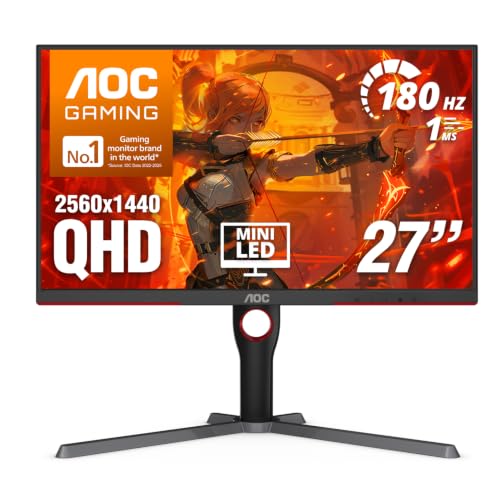
Specs
Panel | 27-inch VA, Mini-LED backlight |
Resolution | 2560 x 1440 |
Refresh rate | 180 Hz |
Local dimming | 336 zones |
HDR | VESA DisplayHDR 1000 |
Adaptive sync | FreeSync Premium Pro |
Inputs | DisplayPort 1.4, 2x HDMI 2.0 |
Panel
27-inch VA, Mini-LED backlight
Resolution
2560 x 1440
Refresh rate
180 Hz
Local dimming
336 zones
HDR
VESA DisplayHDR 1000
Adaptive sync
FreeSync Premium Pro
Inputs
DisplayPort 1.4, 2x HDMI 2.0
What it does well
Mini-LED with 336 dimming zones and VESA DisplayHDR 1000 is HDR that looks like HDR, not a badge. Highlights get genuine brightness while the VA panel keeps blacks dark, so a night scene in Cyberpunk 2077 reads as night rather than grey.
It keeps the 180 Hz ceiling and adds FreeSync Premium Pro, so the variable refresh range and low framerate compensation are as good as the top pick's. A monitor also outlives a GPU by years, which makes this the upgrade that carries into the next card.
What you give up
VA motion is the trade. Dark-to-light transitions smear more than on the IPS picks, and fast shooters show it.
Mini-LED also blooms around bright objects on dark backgrounds, most visibly with subtitles and cursor trails. And this monitor costs more than the card's price class usually justifies, so it only makes sense if HDR is the point.
Who it's for
Single-player players who want HDR highlights and deep blacks, and who plan to keep the monitor through a GPU upgrade or two.
Best Budget: AOC 24G42HE
At 1080p the B580 has headroom to spare, and a 200 Hz IPS panel with DisplayPort 1.4 keeps that headroom smooth for very little money.
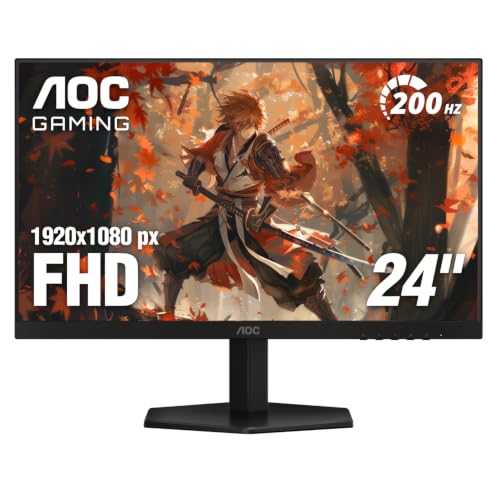
Specs
Panel | 23.8-inch IPS |
Resolution | 1920 x 1080 |
Refresh rate | 200 Hz |
Response time | 0.3 ms MPRT |
Adaptive sync | Adaptive-Sync, G-SYNC Compatible |
HDR | HDR10 |
Inputs | DisplayPort 1.4, HDMI 2.0 |
Panel
23.8-inch IPS
Resolution
1920 x 1080
Refresh rate
200 Hz
Response time
0.3 ms MPRT
Adaptive sync
Adaptive-Sync, G-SYNC Compatible
HDR
HDR10
Inputs
DisplayPort 1.4, HDMI 2.0
What it does well
GamersNexus measured the B580 at 87 fps in Dying Light 2 and 128 fps in Resident Evil 4 at 1080p, so this card runs high and ultra presets comfortably here. A 200 Hz ceiling covers that range and leaves room for esports titles to run fast.
It also keeps the whole build cheap, which is the point of buying a B580. If you are still choosing the card, our budget 1080p GPU picks put the B580 in context.
What you give up
1080p underuses the 12 GB buffer that sets the B580 apart. Spend a little more on a 1440p panel and the card's main advantage starts working for you.
The 0.3 ms figure is an MPRT number, which is measured differently from the GTG figures the other picks quote, and the HDR10 badge is not an HDR experience. The HDMI input is 2.0, so on Arc the DisplayPort input is the only way to get variable refresh.
Who it's for
Builders on a hard total budget, or anyone who wants the monitor to cost less than the graphics card. Plan to upgrade the panel before the GPU.
Editor's Pick: ASUS TUF Gaming VG259QM5A
The esports pick: in Counter-Strike 2 and Valorant at 1080p, the B580 can push past 200 fps, and this is the panel that shows those frames.

Specs
Panel | 24.5-inch Fast IPS |
Resolution | 1920 x 1080 |
Refresh rate | 240 Hz |
Response time | 0.3 ms GTG minimum |
Adaptive sync | G-SYNC Compatible |
Motion handling | ELMB Sync |
Color | 99% sRGB |
Inputs | DisplayPort 1.2, 2x HDMI 2.0 |
Panel
24.5-inch Fast IPS
Resolution
1920 x 1080
Refresh rate
240 Hz
Response time
0.3 ms GTG minimum
Adaptive sync
G-SYNC Compatible
Motion handling
ELMB Sync
Color
99% sRGB
Inputs
DisplayPort 1.2, 2x HDMI 2.0
What it does well
Two hundred and forty hertz is where competitive frame rates on this card end up, and the Fast IPS panel backs the number with a 0.3 ms GTG minimum. ELMB Sync runs backlight strobing alongside variable refresh, which sharpens motion in tracking-heavy games.
It is the same panel class we recommend for the RTX 5050 monitor picks, and the B580 drives it as well as that card does in esports.
What you give up
The B580 carries more driver overhead on the processor than its rivals, and TechSpot measured it 17% behind the RTX 4060 in Counter-Strike 2 at 1080p. How close you get to 240 fps depends on the CPU more than the card, so pair it with a modern six-core or better.
In AAA games this panel behaves like a 1080p 120 Hz monitor with spare refresh. The input is DisplayPort 1.2, which is enough for 1080p at 240 Hz and nothing more.
Who it's for
Players whose main games are Counter-Strike 2, Valorant, Overwatch 2 or Rocket League, on a recent CPU, who want the monitor to stop being the limit.
Bottom line
If you want one monitor that fits everything the B580 does well, buy the ASUS TUF Gaming VG27AQ3A. If you want 1440p for less and a better stand, buy the LG UltraGear 27GS75Q-B. If HDR is the point and you plan to keep the panel through the next GPU, buy the AOC Q27G3XMN. If the budget is tight, buy the AOC 24G42HE. If you play competitive shooters on a fast CPU, buy the ASUS TUF Gaming VG259QM5A. Whichever you pick, connect it over DisplayPort and turn on Adaptive Sync before you judge it.
FAQ
Should I get a 1080p or a 1440p monitor for the Arc B580?
Get 1440p. The B580's 12 GB buffer is what lets it hold high texture settings at 1440p, and that is the card's main advantage over 8 GB rivals. At 1080p it runs everything comfortably but leaves that memory unused. Pick 1080p only for esports at 240 Hz or a hard budget, in which case the AOC 24G42HE or the ASUS TUF Gaming VG259QM5A are the panels to buy.
Does the Arc B580 work with FreeSync and G-SYNC Compatible monitors?
Yes, over DisplayPort. Arc uses VESA Adaptive-Sync, which is the standard FreeSync and G-SYNC Compatible monitors are built on, so every pick here supports variable refresh with the B580. Over HDMI, Arc only supports variable refresh on HDMI 2.1 VRR monitors, so a mainstream panel needs a DisplayPort cable. Enable Adaptive Sync in Intel's graphics software after connecting.
Why is VRR not working on my Arc B580?
Start with the cable and the port. Owners on Intel's forums report VRR not detected over DisplayPort until they swapped to a certified DisplayPort 1.4 cable, moved to the monitor's other input, or did a clean driver install. Use the card's primary DisplayPort output, the middle connector, and confirm Adaptive Sync is on in both Windows and Intel's software. HDMI on a non-HDMI 2.1 monitor will not carry VRR on Arc.
Is a 240Hz monitor worth it with the Arc B580?
Only for esports. In Counter-Strike 2, Valorant and similar titles at 1080p, the B580 can run past 200 fps on a fast CPU, and a 240 Hz panel like the ASUS TUF Gaming VG259QM5A shows the difference. In AAA games the card sits between roughly 50 and 130 fps at 1080p, so a 180 or 200 Hz panel covers it and the extra refresh goes unused.
Can the Arc B580 run a 4K monitor?
It can output 4K, and its DisplayPort 2.1 outputs have the bandwidth, but it cannot game well there. Current games at 4K push the B580 well under 60 fps even with XeSS working hard. For a 4K desktop with light gaming it works; for a gaming monitor, 1440p is the ceiling this card supports properly.
Does the Arc B580 need Resizable BAR?
Yes. The B580 depends on Resizable BAR, and reviewers measured large performance losses on systems where it is off or unsupported. Check that your board and CPU support it and that it is enabled in the BIOS before buying either the card or a monitor to match it. If your platform cannot enable it, a different GPU is the better starting point.
Related Articles

Is the Arc B580 Enough for 1440p in 2026? 12GB Verdict
Is the Arc B580 enough for 1440p in 2026? Its 12GB holds up at high settings with XeSS, but at current street prices the RX 9060 XT 16GB is the smarter buy.
Sep 30, 2026

Best Monitors for the RX 9060 XT (2026): 5 Picks by Tier
Five monitors matched to the RX 9060 XT 16GB by refresh tier, from 1440p 180Hz IPS up to 240Hz QD-OLED, plus the real 1440p frame ceiling the card hits.
Aug 18, 2026

Best Monitors for the RTX 5060 (2026): 5 Picks by Tier
The best monitor for the RTX 5060 is a 1080p high-refresh panel, not a 1440p one. Five picks by tier, plus why the card's 8GB frame buffer sets the ceiling.
Aug 20, 2026

Best GPUs Under $300 for 1080p Gaming (2026): 5 Picks by Tier
Best budget GPUs under $300 for 1080p gaming in 2026. Intel Arc B580 anchors the tier, with honest 8 GB warnings and clearance picks.
May 20, 2026

Best 9800X3D Prebuilt Gaming PCs (2026), by GPU Tier
The best 9800X3D prebuilt gaming PCs for 2026, sorted by GPU tier from RTX 5070 to RTX 5090, each one checked for power supply, memory and the right CPU.
Nov 3, 2026