Affiliate Disclosure: As an Amazon Associate we earn from qualifying purchases. Some links may earn us a commission at no cost to you.

X3D vs Non-X3D for Gaming (2026): 3 Picks by Player Type
Most gamers do not need X3D. The stacked cache pays for itself in flight sims, grand strategy, and dense MMO raids, where the Ryzen 7 9800X3D's 96MB of 3D V-Cache buys a real, repeatable frame-rate gain. In competitive shooters and AAA titles at 1440p or 4K, the graphics card sets the ceiling and a non-X3D chip keeps pace for less money.
So the useful question is not which chip is faster. It is which one is faster at what you actually play. This guide sorts the decision by player type rather than budget and names one Ryzen for each of three buckets: esports and competitive shooters, AAA at 1440p and 4K, and sim, strategy, or MMO.
At a glance
Same generation, same socket, different silicon. Here is the headline matchup between AMD's cache-loaded flagship and its more affordable sibling.
Chip | Cores / cache | Best for | Buy |
|---|---|---|---|
8C / 16T, 96MB L3 (3D V-Cache) | Sim, strategy, and MMO play | ||
8C / 16T, 32MB L3 | AAA and mixed gaming at 1440p/4K |
- Cores / cache
8C / 16T, 96MB L3 (3D V-Cache)
- Best for
Sim, strategy, and MMO play
- Buy
- Cores / cache
8C / 16T, 32MB L3
- Best for
AAA and mixed gaming at 1440p/4K
- Buy
Where each one wins
Three player types, three different answers. Match your actual library against the row below before spending anything.
Player type | What matters most | Winner |
|---|---|---|
Esports and competitive shooters | GPU headroom at your real monitor refresh, not raw cache | |
AAA and mixed library at 1440p/4K | GPU-bound almost everywhere; cache barely shows | |
Sim, strategy, and MMO | Stacked L3 cache, directly, every session |
Esports and competitive shooters
- What matters most
GPU headroom at your real monitor refresh, not raw cache
- Winner
AAA and mixed library at 1440p/4K
- What matters most
GPU-bound almost everywhere; cache barely shows
- Winner
Sim, strategy, and MMO
- What matters most
Stacked L3 cache, directly, every session
- Winner
The pattern holds across generations, not just this one: X3D chips win when the engine itself is the bottleneck, and lose their advantage the moment the graphics card takes over that job. The same logic drives the last-generation AM4 question, where the Ryzen 5 3600 to 5700X3D upgrade turns on exactly this cache-versus-GPU-bound split.
Benchmarks
Numbers back up the buckets above. Two representative titles, tested independently, show exactly where the cache advantage shows up and where it disappears.
CS2 is a cache-sensitive esports title. The V-Cache gap shows up even at competitive settings.
- 770 FPS
- 631 FPS
A GPU-bound AAA title at 1440p. The two chips land within single digits of each other.
- 150 FPS
- 140 FPS
Best for esports and competitive shooters: Ryzen 5 7600
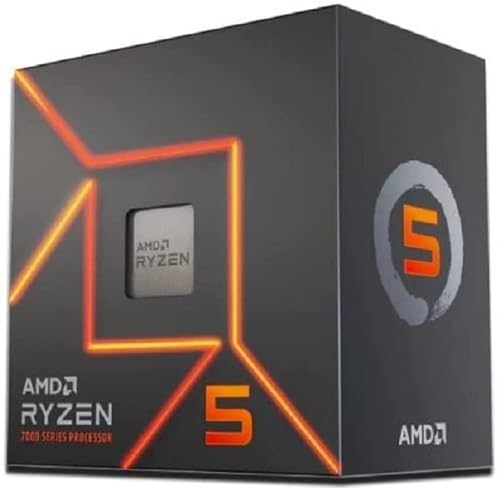
Specs
Cores / Threads | 6C / 12T |
Base Clock | 3.8 GHz |
Boost Clock | Up to 5.1 GHz |
L3 Cache | 32MB |
TDP | 65W |
Socket | AM5 |
Cores / Threads
6C / 12T
Base Clock
3.8 GHz
Boost Clock
Up to 5.1 GHz
L3 Cache
32MB
TDP
65W
Socket
AM5
What it does well
The 7600 handles Counter-Strike 2, Valorant, and Fortnite at 1080p or 1440p without breaking a sweat, and it does it on 65 watts. Six cores and twelve threads is plenty of headroom for a competitive shooter plus Discord, a browser, and an overlay running in the background. It pairs cleanly with anything from an RTX 4060 through a 9070, and at that GPU tier, the graphics card is the limiting factor long before the chip is. For the Valorant-specific breakdown, see Do You Need X3D for Valorant?
The bigger win is where the savings go. A 7600 costs meaningfully less than a 9800X3D. Put the difference toward a GPU tier up, and every game gets faster, not just the handful where cache matters. For a player who wants strong, dependable competitive performance without overspending on a part a mid-tier GPU can't fully use, this is the correct default.
What you give up
Cache-bound titles are the exception, and Counter-Strike 2 is the clearest example: reviewer testing shows the 9800X3D pulling well ahead of the 7600's tier at 1080p once the GPU stops being the bottleneck, because Source 2's tick-rate and physics load respond directly to L3 cache size. If the target is a 240Hz or 360Hz monitor paired with a genuinely high-end GPU, that gap becomes visible frame by frame, and the 7600 is leaving real ceiling on the table.
There's also a practical case for skipping straight to the X3D chip: buyers who know they'll want a flagship GPU within a year or two, and who play primarily competitive shooters, are better served locking in the cache advantage now instead of upgrading the CPU again later. For the fuller sufficiency breakdown pinned to this exact pairing, see our Ryzen 5 7600 versus 7800X3D verdict.
Who it's for
Buyers on a 1080p or 1440p monitor at 144Hz to 240Hz, running a mid-tier GPU, who play mostly competitive shooters and want their budget working on frames rather than a cache advantage the GPU can't showcase yet. This is the default pick for most esports-focused builds under a mid-range budget.
Best for AAA and mixed-library gaming at 1440p/4K: Ryzen 7 7700

Specs
Cores / Threads | 8C / 16T |
Base Clock | 3.8 GHz |
Boost Clock | Up to 5.3 GHz |
L3 Cache | 32MB |
TDP | 65W |
Socket | AM5 |
Cores / Threads
8C / 16T
Base Clock
3.8 GHz
Boost Clock
Up to 5.3 GHz
L3 Cache
32MB
TDP
65W
Socket
AM5
What it does well
At 1440p and 4K, the 7700's eight cores and sixteen threads keep pace with the 9800X3D in almost every AAA title, because the GPU is doing the heavy lifting at those resolutions. Cyberpunk 2077 at 1440p ultra is a clean example: independent testing puts the two chips within single digits of each other, and in a console-port-heavy library (open-world adventures, third-person action, most Ubisoft-style AAA), the gap closes even further. If you are still deciding whether you need an X3D CPU for gaming at all, the same resolution and library test settles it across three AM5 tiers.
The extra two cores over the 7600 also earn their keep for buyers who stream, record, or run background capture while gaming, and the 7700 still runs on 65 watts under a modest air cooler.
What you give up
The 7700 has no 3D V-Cache, so anything that leans on the engine's cache footprint rather than the GPU's horsepower will feel it. Flight sims, grand strategy late-game turns, and dense MMO raid content all show a real gap in favor of the X3D chips, and that gap doesn't close no matter how good the GPU is, because it's a CPU-side bottleneck, not a rendering one.
It also isn't the chip to buy for a 1080p high-refresh esports build specifically. The 7600 does the same job for less, and the extra two cores mostly go unused in a shooter that's already GPU-bound at that tier.
Who it's for
Buyers building a 1440p or 4K rig around a strong GPU whose library is mostly open-world, third-person, or narrative AAA rather than sim, strategy, or MMO. See our best CPUs for 1440p gaming roundup for GPU pairings at this tier. It's also the right call for anyone who streams or multitasks heavily alongside gaming.
Best for sim, strategy, and MMO players: Ryzen 7 9800X3D

Specs
Cores / Threads | 8C / 16T |
Base Clock | 4.7 GHz |
Boost Clock | Up to 5.2 GHz |
L3 Cache | 96MB (3D V-Cache) |
TDP | 120W |
Socket | AM5 |
Cores / Threads
8C / 16T
Base Clock
4.7 GHz
Boost Clock
Up to 5.2 GHz
L3 Cache
96MB (3D V-Cache)
TDP
120W
Socket
AM5
What it does well
The 9800X3D's 96MB of stacked L3 cache is built for exactly the workloads that punish a normal CPU: Microsoft Flight Simulator's photogrammetry-heavy approaches, Total War's late-game battle sims, Baldur's Gate 3's Act 3 crowd scenes, and dense MMO content like WoW Mythic+ pulls or FFXIV alliance raids. Community testing on the flight sim forums puts the 9800X3D roughly 20 percent ahead of the previous-generation X3D chip at demanding settings, and the gap over a non-X3D chip in the same tier runs wider still. See our best CPU for VR sim racing guide for iRacing and ACC-specific pairings.
Escape from Tarkov players see some of the largest real-world gains of any title on this list, because that engine is famously pinned to single-core and cache performance rather than GPU horsepower. Star Citizen sits in the same camp, which is why our best CPU for Star Citizen picks start with the largest V-Cache pool a budget allows.
What you give up
The cache advantage is wasted in a GPU-bound scenario. Pair a 9800X3D with a budget or mid-tier GPU at 1080p, and it produces identical frame counts to a much cheaper chip, because the graphics card runs out of headroom long before the CPU does. It also runs hotter under sustained load than the 7600 or 7700, so it wants a proper tower cooler or an AIO rather than a stock cooler, one more line item on top of an already pricier chip. Buyers who want the cache without the flagship price have two cheaper Zen 4 options, and our 7700X3D vs 7800X3D comparison settles which of them to take.
Buyers whose library is mostly competitive shooters on a mid-tier GPU, or open-world AAA at 1440p and up, are paying for a cache advantage they won't see in daily use. That is the same arithmetic behind our CPU picks for the RX 9070 GRE, where a 12 GB 1440p card makes the cache premium even harder to justify.
Who it's for
Sim racers, flight simmers, grand strategy and 4X players, dense MMO raiders, and Escape from Tarkov regulars, paired with a GPU that can keep up. If the workload is documented as cache-sensitive, this is the chip that earns its price premium instead of just carrying a bigger number on the box. For the resolution-by-resolution breakdown of exactly when that math flips, see our guide on skipping the X3D premium at 1440p and 4K. If that same 9800X3D is also pulling stream duty, our breakdown of Intel vs AMD for streaming covers where Quick Sync and NVENC fit into the picture.
Bottom line
If competitive shooters are most of the library and the GPU is mid-tier, buy the Ryzen 5 7600 and put the difference into the graphics card. If the build centers on AAA and mixed gaming at 1440p or 4K, buy the Ryzen 7 7700 and let the GPU do the work it's already doing.
If flight sim, grand strategy, dense MMO content, or Escape from Tarkov make up the actual playtime, buy the Ryzen 7 9800X3D, because that's the one scenario where the cache tax comes back as real, felt frames. The chip that's wrong for one player type is the correct pick for another, and the workload decides it, not the price tag on the box. Our CPU and motherboard buying guide covers how to pair whichever chip you land on with the right board.
FAQ
Is X3D worth it for gaming?
It depends on what's being played, not on gaming in general. In cache-sensitive engines like flight sims, grand strategy, and dense MMO content, the 3D V-Cache in chips like the Ryzen 7 9800X3D delivers a real, repeatable frame-rate gain. In GPU-bound scenarios, which cover most AAA titles at 1440p and 4K and most competitive shooters on a mid-tier GPU, the X3D chip and a non-X3D chip in the same tier produce nearly identical results. Check which category the actual game library falls into before paying the premium.
What's the difference between X3D and non-X3D?
X3D chips stack an extra 64MB of L3 cache (3D V-Cache) directly onto the processor die, on top of the standard cache the non-X3D version already has. That extra cache lets the CPU keep more of a game's active data close by instead of reaching out to slower system memory, which matters most in engines that lean heavily on CPU-side simulation. Clock speeds on X3D chips also run slightly lower than their non-X3D siblings, which is why the advantage is workload-specific rather than universal.
Do you need X3D for 1440p or 4K gaming?
Usually not. At 1440p and 4K, the graphics card becomes the limiting factor in almost every AAA title, which means an X3D chip and a non-X3D chip in the same generation post nearly identical frame rates. The exception is a cache-sensitive workload like a grand strategy title or a flight sim, where the CPU stays the bottleneck no matter the resolution. If the library is mostly open-world or narrative AAA, a non-X3D chip and a better GPU is the stronger buy.
Is a non-X3D Ryzen good enough for gaming?
For the vast majority of libraries, yes. A non-X3D chip like the Ryzen 7 7700 keeps pace with its X3D sibling in GPU-bound titles, which is most modern AAA gaming at 1440p and 4K, and in most competitive shooters running on a mid-tier GPU. It only falls behind in cache-sensitive engines: flight sims, grand strategy, dense MMO raid content, and a handful of sim titles. Outside of those specific cases, the savings are better spent on the graphics card.
Which Ryzen X3D chip should I buy?
For a fresh build focused on gaming, the Ryzen 7 9800X3D is the current-generation pick: it carries the full 96MB of stacked cache and the best per-core clocks in the X3D lineup. The Ryzen 7 7800X3D is the previous generation and can be a smart buy if it's discounted well below the 9800X3D, since the real-world gap between them is smaller than the launch pricing suggests. See our 9700X vs 9800X3D comparison for the full breakdown. Skip anything older unless it's a budget platform-reuse situation.
Is the Ryzen 7 9800X3D overkill for esports?
For most esports players, yes. The 9800X3D's cache advantage only shows up once the GPU stops being the bottleneck, which means a high-end card and typically a 240Hz-plus monitor to see it. Pair the 9800X3D with a mid-tier GPU at 1080p or 1440p, and it produces the same frame count as a much cheaper chip. Our in-depth look at whether the 9800X3D is worth it for gaming breaks down the exact GPU pairings where it earns its keep. Save it for a build that's already running a flagship GPU, and buy the Ryzen 5 7600 everywhere else.
Related Articles

Ryzen 7 9700X vs 9800X3D (2026): A 2% to 18% Gaming Gap
Ryzen 7 9700X vs 9800X3D: the X3D leads by 2% to 18% across 8 games. See which libraries earn the cache premium and when the 9700X plus a better GPU wins.
Oct 14, 2026

Is the Ryzen 7 9800X3D Worth It in 2026? Buy or Skip
Is the Ryzen 7 9800X3D worth it for gaming? Yes for 360Hz shooters, sims and heavy strategy. Skip it at 1440p on a mid-tier GPU. Full 2026 verdict vs 9600X.
Aug 26, 2026

Best CPU for 1440p Gaming (2026): 5 Picks by GPU Tier
The best CPU for 1440p gaming in 2026 depends on your GPU. Match a chip to a 5070, 9070 XT or 5080, and see when the 9800X3D is overkill and the 9700X wins.
Oct 2, 2026

Best GPU for Death Stranding 2 PC (2026): 5 Picks by Tier
The best GPU for Death Stranding 2 on PC, picked by resolution: five cards with measured native FPS at 1080p, 1440p and 4K, the VRAM floor and upscaling notes.
Oct 22, 2026

Does RAM Speed Matter for Gaming? 2026 DDR5-6000 Verdict
Does RAM speed matter for gaming? Only up to DDR5-6000 CL30 on AM5 or 6400 on Intel. See when faster RAM adds FPS, when it doesn't, and which 32GB kit to buy.
Oct 23, 2026