Affiliate Disclosure: As an Amazon Associate we earn from qualifying purchases. Some links may earn us a commission at no cost to you.

Best Monitor for RX 6600 (2026): 5 High-Refresh Picks
The RX 6600 is a 1080p card. Recent testing puts it at 70 to 85 fps at 1080p high in most current games and well past 150 in competitive shooters, with 8GB of VRAM that gets tight at 1440p. That makes the best monitor for the RX 6600 a 1080p panel at 144 to 180 Hz with FreeSync Premium.
Below are five picks matched to that frame-rate band, from a 144 Hz budget screen to a 310 Hz panel for a future GPU, plus one 1440p stretch option for buyers willing to use FSR.
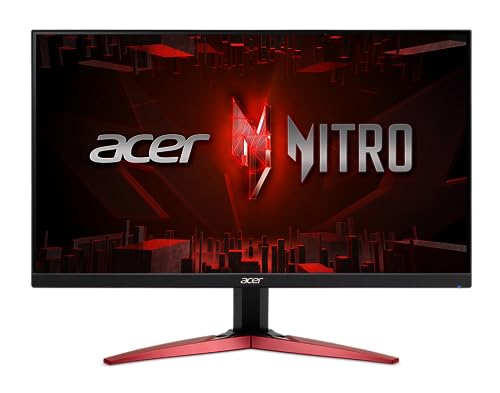
Our top pick: Acer Nitro KG241Y M3
The Acer Nitro KG241Y M3 matches the RX 6600's 1080p frame rates almost exactly: 180 Hz IPS, plus FreeSync Premium to keep heavy-game dips smooth.
Quick picks
Pick | Monitor | Best for | Buy |
|---|---|---|---|
Best Overall | 1080p 180 Hz across a mixed library | ||
Best Value | Esports-first players who want 240 Hz headroom | ||
Best Premium | Competitive 1080p now, a faster GPU later | ||
Best Budget | The cheapest real step up from 60 Hz | ||
Editor's Pick | The 1440p stretch, with FSR in heavy games |
Best Overall
- Monitor
- Best for
1080p 180 Hz across a mixed library
- Buy
Best Value
- Monitor
- Best for
Esports-first players who want 240 Hz headroom
- Buy
Best Premium
- Monitor
- Best for
Competitive 1080p now, a faster GPU later
- Buy
Best Budget
- Monitor
- Best for
The cheapest real step up from 60 Hz
- Buy
Editor's Pick
- Monitor
- Best for
The 1440p stretch, with FSR in heavy games
- Buy
Specs at a glance
Monitor | Panel | Resolution | Refresh | Adaptive sync |
|---|---|---|---|---|
23.8-inch IPS | 1920 x 1080 | 180 Hz | AMD FreeSync Premium | |
24.5-inch SuperSpeed IPS | 1920 x 1080 | 240 Hz | AMD FreeSync Premium | |
25-inch Fast IPS | 1920 x 1080 | 310 Hz | FreeSync Premium, G-Sync Compatible | |
24-inch IPS | 1920 x 1080 | 144 Hz (overclocked) | AMD FreeSync, G-Sync Compatible | |
27-inch SuperSpeed IPS | 2560 x 1440 | 200 Hz (210 Hz overclock) | AMD FreeSync Premium |
- Panel
23.8-inch IPS
- Resolution
1920 x 1080
- Refresh
180 Hz
- Adaptive sync
AMD FreeSync Premium
- Panel
24.5-inch SuperSpeed IPS
- Resolution
1920 x 1080
- Refresh
240 Hz
- Adaptive sync
AMD FreeSync Premium
- Panel
25-inch Fast IPS
- Resolution
1920 x 1080
- Refresh
310 Hz
- Adaptive sync
FreeSync Premium, G-Sync Compatible
- Panel
24-inch IPS
- Resolution
1920 x 1080
- Refresh
144 Hz (overclocked)
- Adaptive sync
AMD FreeSync, G-Sync Compatible
- Panel
27-inch SuperSpeed IPS
- Resolution
2560 x 1440
- Refresh
200 Hz (210 Hz overclock)
- Adaptive sync
AMD FreeSync Premium
How we picked: the RX 6600's real 1080p frame rates
Average frame rates on an Intel Core i5-12400F test system, no upscaling unless noted in the source.
- 182 FPS
- 83 FPS
- 75 FPS
- 72 FPS
- 70 FPS
- 68 FPS
- 47 FPS
Read the chart as two bands. Competitive shooters land at 150 fps and up, which is where 180 to 240 Hz panels earn their refresh. Single-player games sit between 65 and 85 at 1080p, which is exactly the zone adaptive sync exists for: no tearing, no frame pacing judder, no need to lock the frame rate.
The outlier is the point. Oblivion Remastered drops into the 40s even at medium, and that is where FreeSync Premium's low framerate compensation keeps things smooth instead of falling out of sync.
We started from the card, not the monitor. Every panel here had to cover the RX 6600's real 1080p band of roughly 65 fps in heavy games to 180 fps in esports, without paying for refresh the card will never reach. That puts the default at 144 to 180 Hz, with one 240 Hz and one 310 Hz option for competitive players.
FreeSync Premium was the second filter. It requires low framerate compensation, which keeps adaptive sync working when a demanding scene drops the card below the panel's minimum refresh. Four of the five picks carry it; the budget pick does not, and we say so in its section.
We skipped 4K and 240 Hz 1440p panels entirely. Neither matches anything this card can drive, and the money is better spent on the GPU. For a broader view of the resolution, the best 1080p gaming monitors roundup covers panels up to 540 Hz, and the RTX 3060 monitor pairings follow the same logic for a card in the same performance tier.
Finally, every pick resolves to a specific, current Amazon listing with its model number checked, since budget monitor listings are full of near-identical variants with different stands or refresh rates.
How well does the RX 6600 run 1440p?
Same card and settings, resolution changed. Ryzen 7 5800X test system.
- 138 FPS
- 94 FPS
- 120 FPS
- 80 FPS
The RX 6600 loses roughly a third of its frame rate going from 1080p to 1440p, and the reviewer saw the same drop in almost everything tested. Lighter and older games stay comfortable at 1440p. Newer AAA games fall toward the 50s natively, and the 8GB frame buffer starts to limit texture settings before raw speed does.
So 1440p works if you accept FSR upscaling in heavy games, and that is why only one pick here is 1440p. If you want native 1440p at high settings, the better spend is on the card: our RX 6600 XT to RX 9060 XT upgrade breakdown shows what the next tier buys you.
Best Overall: Acer Nitro KG241Y M3
Specs
Panel | 23.8-inch IPS |
Resolution | 1920 x 1080 |
Refresh rate | 180 Hz |
Response time | 0.5 ms (rated) |
Adaptive sync | AMD FreeSync Premium |
Color | 99% sRGB (rated) |
Inputs | 2x HDMI, 1x DisplayPort |
Panel
23.8-inch IPS
Resolution
1920 x 1080
Refresh rate
180 Hz
Response time
0.5 ms (rated)
Adaptive sync
AMD FreeSync Premium
Color
99% sRGB (rated)
Inputs
2x HDMI, 1x DisplayPort
What it does well
The RX 6600 is a 1080p card, and 180 Hz is about the top of what it reaches in competitive shooters. Counter-Strike 2 averaged 182 fps on a mid-range Intel build in recent testing, and heavier single-player games land between 65 and 85 at 1080p high. A 180 Hz panel covers the top of that range without leaving refresh on the table that the card will never fill.
FreeSync Premium is the line item that matters for this pairing. AMD's Premium tier requires low framerate compensation, so when a heavy scene drops the card into the 40s or 50s, the monitor keeps adaptive sync running instead of falling back to tearing or stutter. On an RX 6600 in demanding games, those dips are a weekly event, not a rare one.
IPS at 23.8 inches keeps pixel density sharp enough at 1080p that text and HUDs don't look soft, and the rated 99% sRGB coverage means colors look right out of the box for games and the web.
What you give up
The listing calls out VESA mounting and inputs, not height adjustment, so plan on a basic stand. If your desk height doesn't line up with your eyes, budget for a monitor arm or step to the Best Value pick, which ships with a height-adjustable stand.
There is no meaningful HDR here and no USB-C. The rated 0.5 ms response is a best-case overdrive figure, and buyers of this class of 180 Hz IPS panel have flagged overshoot halos at the fastest overdrive setting. Start at the middle setting on day one.
Who it's for
The default RX 6600 owner: a mixed library of esports and single-player games, a 24-inch desk, 1080p high settings, and no plan to replace the GPU this year. It is the monitor this card was sized for.
Best Value: GIGABYTE G25F2A

Specs
Panel | 24.5-inch SuperSpeed IPS |
Resolution | 1920 x 1080 |
Refresh rate | 240 Hz |
Response time | 1 ms GtG (rated) |
Adaptive sync | AMD FreeSync Premium |
Inputs | HDMI, DisplayPort |
Stand | Height and tilt adjustable |
Panel
24.5-inch SuperSpeed IPS
Resolution
1920 x 1080
Refresh rate
240 Hz
Response time
1 ms GtG (rated)
Adaptive sync
AMD FreeSync Premium
Inputs
HDMI, DisplayPort
Stand
Height and tilt adjustable
What it does well
This is the most monitor per dollar in the set. You get 240 Hz, a fast SuperSpeed IPS panel and a stand that adjusts for height, which is the ergonomic upgrade the top pick skips.
The extra refresh earns its keep in competitive shooters. In lighter esports titles at competitive settings, the RX 6600 can push past 180 fps, and a 240 Hz ceiling lets those frames show up as smoother motion instead of being capped. FreeSync Premium covers the other end when a busy round drags the frame rate down.
What you give up
In single-player games the extra refresh does nothing for you. A card that averages 70 to 85 fps at 1080p high will never touch 240 Hz in those titles, so the upgrade over the top pick only pays off if competitive games are most of your hours.
Watch the model number. Amazon lists a near-identical GS25F2A next to this one, and that variant is tilt-only. The height-adjustable stand is specific to the G25F2A, so confirm the listing before you check out.
Who it's for
The player who spends most nights in Counter-Strike 2, Valorant or Overwatch 2 on an RX 6600 and wants a better stand than the top pick, without spending more.
Best Premium: ASUS TUF Gaming VG259QMRL5A

Specs
Panel | 25-inch Fast IPS |
Resolution | 1920 x 1080 |
Refresh rate | 310 Hz |
Response time | 0.3 ms (rated) |
Adaptive sync | FreeSync Premium, G-Sync Compatible |
HDR | DisplayHDR 400 |
Stand | Height-adjustable ergonomic stand |
Panel
25-inch Fast IPS
Resolution
1920 x 1080
Refresh rate
310 Hz
Response time
0.3 ms (rated)
Adaptive sync
FreeSync Premium, G-Sync Compatible
HDR
DisplayHDR 400
Stand
Height-adjustable ergonomic stand
What it does well
This is the pick for the buyer who plans past the current card. 310 Hz and a rated 0.3 ms Fast IPS panel make it a serious competitive display, and the full ergonomic stand and 99% sRGB coverage put it a tier above the rest of the 1080p picks in build quality.
It also carries both adaptive sync certifications, FreeSync Premium and G-Sync Compatible. That matters if the next GPU you buy is from the other camp: the monitor keeps working the same way whichever card ends up in the case.
What you give up
The RX 6600 cannot feed 310 Hz. Even Counter-Strike 2 averaged around 180 fps in recent testing, so most of this panel's refresh sits idle until a faster card goes in. Buying it today is buying for the next GPU, not this one.
DisplayHDR 400 is an entry-level HDR badge. Without local dimming, HDR content looks brighter rather than better, so don't count it as a reason to buy. Leave HDR off in Windows for games and treat this as an SDR panel.
Who it's for
The competitive player who already knows the RX 6600 is a stopgap and wants the display to carry over. If that upgrade is on your calendar, our RX 6600 GPU upgrade guide covers which card makes the most of a 310 Hz panel.
Best Budget: LG UltraGear 24G411A-B

Specs
Panel | 24-inch IPS |
Resolution | 1920 x 1080 |
Refresh rate | 144 Hz (overclocked) |
Response time | 1 ms MBR (rated) |
Adaptive sync | AMD FreeSync, G-Sync Compatible |
Inputs | HDMI, DisplayPort |
Stand | Slim tilt stand |
Panel
24-inch IPS
Resolution
1920 x 1080
Refresh rate
144 Hz (overclocked)
Response time
1 ms MBR (rated)
Adaptive sync
AMD FreeSync, G-Sync Compatible
Inputs
HDMI, DisplayPort
Stand
Slim tilt stand
What it does well
Going from 60 Hz to 144 Hz is the single largest jump in feel a budget build can buy, larger than the step from 144 to 180. The RX 6600 clears 144 fps in esports titles and sits in the 70s and 80s in heavier games, so this panel is never the bottleneck and never feels like wasted refresh.
LG's UltraGear IPS panels are a known quantity: sensible factory color, tidy overdrive and both AMD FreeSync and G-Sync Compatible support. For a 1080p first gaming monitor, there's not much to get wrong here.
What you give up
This is plain AMD FreeSync, not Premium. The base tier doesn't guarantee low framerate compensation, so when the RX 6600 drops below the panel's adaptive sync floor in a heavy scene, sync can fall out and you see stutter. Check the FreeSync range in the monitor's on-screen menu after setup.
The 144 Hz figure is an overclock, and the slim stand only tilts. If the budget stretches, our 144 Hz versus 180 Hz breakdown explains why the top pick is usually worth the small step up.
Who it's for
The buyer who put every dollar into the RX 6600 build and is still gaming on an old 60 Hz office screen. This is the fix that costs the least.
Editor's Pick: GIGABYTE M27Q2

Specs
Panel | 27-inch SuperSpeed IPS |
Resolution | 2560 x 1440 |
Refresh rate | 200 Hz (210 Hz overclock) |
Response time | 1 ms GtG (rated) |
Adaptive sync | AMD FreeSync Premium |
Connectivity | USB-C, KVM, HDMI, DisplayPort |
Stand | Height and tilt adjustable |
Panel
27-inch SuperSpeed IPS
Resolution
2560 x 1440
Refresh rate
200 Hz (210 Hz overclock)
Response time
1 ms GtG (rated)
Adaptive sync
AMD FreeSync Premium
Connectivity
USB-C, KVM, HDMI, DisplayPort
Stand
Height and tilt adjustable
What it does well
1440p at 27 inches is the bigger day-to-day upgrade for desktop work and slower games, and this panel delivers it with FreeSync Premium, a height-adjustable stand and a USB-C KVM that lets a work laptop share the same screen, keyboard and mouse with one cable.
It is also the pick that ages best. When the RX 6600 eventually gives way to a 1440p-class card, the M27Q2's 200 Hz ceiling is a good match for that next tier, and nothing about the monitor needs replacing.
What you give up
On the RX 6600 this is a compromise today. Native 1440p in modern AAA games drops toward 50 to 60 fps, and the 8GB frame buffer runs out sooner at this resolution, so heavy titles need FSR upscaling and a step down in texture settings. Esports and older games run fine at native 1440p.
Out-of-box color is the thing to check. If you edit photos or video on the same screen, run a calibration profile before trusting it for color-critical work.
Who it's for
The buyer who values desktop space and plans to upgrade the GPU within a year or two. If you want the full 1440p shortlist at this tier, see our best 1440p gaming monitors under 300.
Bottom line
If you want one monitor that fits the RX 6600 and nothing to think about, buy the Acer Nitro KG241Y M3. If competitive shooters are most of your hours, buy the GIGABYTE G25F2A for 240 Hz and a better stand. If a GPU upgrade is coming and you want the display to carry over, buy the ASUS TUF Gaming VG259QMRL5A. If you are on a 60 Hz screen and the budget is spent, the LG UltraGear 24G411A-B is the cheapest real fix. If you want 1440p and will use FSR, buy the GIGABYTE M27Q2.
And if you later move to an RX 9060 XT, our RX 9060 XT monitor picks start where this list ends.
FAQ
Can the RX 6600 run 1440p?
Yes, with limits. Reviewer testing shows the RX 6600 loses about a third of its frame rate going from 1080p to 1440p, so lighter and older games stay above 80 fps while newer AAA titles fall toward the 50s natively. The 8GB of VRAM also forces lower texture settings at 1440p sooner. If you buy a 1440p monitor like the GIGABYTE M27Q2, plan on FSR upscaling in heavy games. For native high settings, 1080p is the better match.
Is 144Hz or 180Hz better for the RX 6600?
180Hz, if the price gap is small. The RX 6600 clears 180 fps in Counter-Strike 2 and similar shooters, so a 180Hz panel lets those frames show. In heavier games it runs 65 to 85 fps, where both refresh rates feel the same with adaptive sync on. The Acer Nitro KG241Y M3 is our 180Hz pick; the LG UltraGear 24G411A-B is the 144Hz choice when budget decides it.
Is a 240Hz monitor worth it with an RX 6600?
Only if competitive shooters are most of what you play. The RX 6600 can pass 180 fps in lighter esports titles at competitive settings, and a 240Hz panel like the GIGABYTE G25F2A shows those extra frames. In single-player games you will sit well under 100 fps, so the extra refresh does nothing. For a mixed library, 180Hz is the better buy.
Do I need FreeSync Premium for the RX 6600?
It is the feature we would not skip. FreeSync Premium requires low framerate compensation, which keeps adaptive sync working when a heavy scene drops the RX 6600 below the monitor's minimum refresh. Base FreeSync does not guarantee it, so sync can drop out in exactly the moments you need it. Four of our five picks carry FreeSync Premium; the budget LG does not.
Should I upgrade the monitor or the GPU first?
If you are still on a 60Hz screen, buy the monitor first. Going from 60Hz to 144 or 180Hz is the biggest change in feel an RX 6600 owner can buy, and the card already produces the frames to use it. If you already have a 144Hz 1080p panel, the GPU is the better next spend, and our RX 6600 upgrade guide covers which card to pick.
Should I use HDMI or DisplayPort with an RX 6600?
Use DisplayPort when the monitor has it. Every pick here includes a DisplayPort input, and it is the connection most reliably rated for each panel's full refresh rate and adaptive sync range. Some budget monitors cap refresh lower over HDMI, so check the manual if you have to use HDMI. After connecting, confirm the refresh rate in Windows display settings and enable FreeSync in AMD Software.
Related Articles

Best GPU Upgrade From RX 6600: 5 Picks Ranked for 2026
The best GPU upgrade from an RX 6600 is the RX 9060 XT 16GB for most builds. Five ranked picks, real 1080p and 1440p uplift, and the PSU each one needs.
Oct 29, 2026

Best 1080p Gaming Monitors 2026: 5 Picks, 144Hz to 540Hz
The best 1080p gaming monitors for 2026, from a 144Hz 27-inch AAA panel to a 540Hz esports flagship. Five picks, real tradeoffs, and which refresh tier to buy.
Sep 2, 2026

Best Monitor for RTX 3060 (2026): 5 Picks, 1080p and 1440p
The best monitor for the RTX 3060 is a 27-inch 1440p 180Hz panel run with DLSS, or a 24-inch 1080p one if you stay native. Five picks matched to the 12GB card.
Oct 14, 2026

Best Monitors for the RX 9060 XT (2026): 5 Picks by Tier
Five monitors matched to the RX 9060 XT 16GB by refresh tier, from 1440p 180Hz IPS up to 240Hz QD-OLED, plus the real 1440p frame ceiling the card hits.
Aug 18, 2026

RX 6600 XT to RX 9060 XT: Worth It for 70% More FPS? (2026)
Upgrading RX 6600 XT to RX 9060 XT? It runs about 70% faster and is worth it, but only the 16GB card. The 8GB trap, PCIe 3.0 boards, and when to hold instead.
Oct 28, 2026