Affiliate Disclosure: As an Amazon Associate we earn from qualifying purchases. Some links may earn us a commission at no cost to you.

Best 32GB RAM Prebuilt Gaming PCs (2026): 5 Top Picks
Memory is the line item that changed. Through most of 2025 a 32GB DDR5 kit was an afterthought on a build sheet. In 2026 it is one of the largest single costs in a gaming PC, and the system integrators who locked in memory contracts early are absorbing that better than a retail parts list can.
So the best prebuilt gaming PC with 32GB of RAM this year is not simply the fastest one. Every machine below ships 32GB. What separates them is what that RAM is rated at, whether the seller says so, and whether the rest of the build earns it.
Our top pick: Skytech King 95 (RTX 5070 Ti)
It is the only machine here whose listing states the whole memory spec: 32GB, DDR5, 6000 MT/s. On AM5 that last number is what keeps memory in step with the Infinity Fabric, and it is the number most sellers leave off.

Quick picks
Pick | PC | Memory | Best for | Buy |
|---|---|---|---|---|
Best Overall | 32GB DDR5-6000 | 1440p, full memory spec stated | ||
Best Value | 32GB DDR5 | 1440p on the 3D cache | ||
Best Premium | 32GB DDR5-6000 | 4K entry with ATX 3.0 headroom | ||
Best Budget | 32GB DDR5 | 1080p with 2TB of storage | ||
Editor's Pick | 32GB DDR5 | Air cooled, standard parts |
Best Overall
- PC
- Memory
32GB DDR5-6000
- Best for
1440p, full memory spec stated
- Buy
Best Value
- PC
- Memory
32GB DDR5
- Best for
1440p on the 3D cache
- Buy
Best Premium
- PC
- Memory
32GB DDR5-6000
- Best for
4K entry with ATX 3.0 headroom
- Buy
Best Budget
- PC
- Memory
32GB DDR5
- Best for
1080p with 2TB of storage
- Buy
Editor's Pick
- PC
- Memory
32GB DDR5
- Best for
Air cooled, standard parts
- Buy
Specs at a glance
PC | CPU | GPU | Memory | Storage | Power and cooling |
|---|---|---|---|---|---|
Ryzen 7 9800X3D | RTX 5070 Ti 16GB | 32GB DDR5-6000 | 2TB Gen4 NVMe | 850W Gold, 360mm AIO | |
Ryzen 7 9800X3D | RTX 5070 12GB | 32GB DDR5 | 2TB SSD | Not stated | |
Ryzen 7 9800X3D | RTX 5080 16GB | 32GB DDR5-6000 | 2TB NVMe | 850W Gold ATX 3.0, 360mm AIO | |
Core Ultra 5 225F | RTX 5060 | 32GB DDR5 | 2TB NVMe | Not stated | |
Core Ultra 9 285 | RTX 5070 Ti | 32GB DDR5 | 2TB M.2 NVMe | Air cooling |
- CPU
Ryzen 7 9800X3D
- GPU
RTX 5070 Ti 16GB
- Memory
32GB DDR5-6000
- Storage
2TB Gen4 NVMe
- Power and cooling
850W Gold, 360mm AIO
- CPU
Ryzen 7 9800X3D
- GPU
RTX 5070 12GB
- Memory
32GB DDR5
- Storage
2TB SSD
- Power and cooling
Not stated
- CPU
Ryzen 7 9800X3D
- GPU
RTX 5080 16GB
- Memory
32GB DDR5-6000
- Storage
2TB NVMe
- Power and cooling
850W Gold ATX 3.0, 360mm AIO
- CPU
Core Ultra 5 225F
- GPU
RTX 5060
- Memory
32GB DDR5
- Storage
2TB NVMe
- Power and cooling
Not stated
- CPU
Core Ultra 9 285
- GPU
RTX 5070 Ti
- Memory
32GB DDR5
- Storage
2TB M.2 NVMe
- Power and cooling
Air cooling
How we read the memory line
PC | Capacity | Rated speed listed | DIMM layout listed | Confirm before you buy |
|---|---|---|---|---|
32GB DDR5 | Yes, 6000 MT/s | No | Whether two slots are used or all four | |
32GB DDR5 | No | No | The rated speed, since sibling SKUs list 5200 | |
32GB DDR5 | Yes, 6000 MT/s | No | Free slots, if 64GB is a later plan | |
32GB DDR5 | No | No | That the listing SKU reads GXi2000CSTV3 | |
32GB DDR5 | No | No | The SKU string C2NVR9-1452US on the box |
- Capacity
32GB DDR5
- Rated speed listed
Yes, 6000 MT/s
- DIMM layout listed
No
- Confirm before you buy
Whether two slots are used or all four
- Capacity
32GB DDR5
- Rated speed listed
No
- DIMM layout listed
No
- Confirm before you buy
The rated speed, since sibling SKUs list 5200
- Capacity
32GB DDR5
- Rated speed listed
Yes, 6000 MT/s
- DIMM layout listed
No
- Confirm before you buy
Free slots, if 64GB is a later plan
- Capacity
32GB DDR5
- Rated speed listed
No
- DIMM layout listed
No
- Confirm before you buy
That the listing SKU reads GXi2000CSTV3
- Capacity
32GB DDR5
- Rated speed listed
No
- DIMM layout listed
No
- Confirm before you buy
The SKU string C2NVR9-1452US on the box
Three things decide whether a 32GB prebuilt is a good one, and only the first is on every listing. Capacity is easy. Rated speed is sometimes there and sometimes not, and the gap between DDR5-5200 and DDR5-6000 on an AM5 board is worth real frames in CPU bound titles. DIMM layout is almost never disclosed, which matters the moment you want to go past 32GB.
Two adjacent questions come up constantly. Whether 16GB is still enough for gaming decides if you need this list at all, and buying memory now versus waiting decides whether a prebuilt is the right vehicle for it. Both are worth reading before you commit.
How we picked the best 32GB prebuilt gaming PCs
Rated memory speed came first. A machine that publishes 6000 MT/s on an AM5 platform gets the benefit of the doubt. One that says only 32GB DDR5 gets marked down, because the sellers who spec the good kit tend to say so.
Storage came second, and the bar was 2TB. Every build we have helped spec around a single 1TB drive came back inside eight months asking how to add storage, and the step from a 1TB to a 2TB Gen4 drive is the cheapest meaningful upgrade on any of these sheets. Every pick below carries 2TB.
Then the graphics card had to earn the memory. Thirty two gigabytes behind an 8GB card is a 1080p machine with a 1440p memory budget, which is fine if you know that going in. Our guide to choosing a GPU and a matching monitor goes deeper on the VRAM floors we hold.
Last came the upgrade path. Ask whether you would swap the graphics card in three years, because the answer changes the supply, the chassis and the board you want. If the answer is yes, our list of the most upgradeable prebuilts is the better starting point. If it is no, buy the memory and the storage you want now, because almost nobody adds a second kit later.
Best Overall: Skytech King 95 (RTX 5070 Ti)
Specs
CPU | Ryzen 7 9800X3D |
GPU | RTX 5070 Ti 16GB |
Memory | 32GB DDR5-6000 |
Storage | 2TB Gen4 NVMe |
Power supply | 850W 80+ Gold |
Cooling | 360mm ARGB AIO |
Operating system | Windows 11 |
CPU
Ryzen 7 9800X3D
GPU
RTX 5070 Ti 16GB
Memory
32GB DDR5-6000
Storage
2TB Gen4 NVMe
Power supply
850W 80+ Gold
Cooling
360mm ARGB AIO
Operating system
Windows 11
What it does well
The memory spec is stated in full, and it is the right one. DDR5-6000 behind a Ryzen 7 9800X3D is the configuration AM5 wants. That last number is the difference between a kit that keeps step with the chip and a kit that quietly costs frames in CPU bound titles.
The rest of the sheet holds up. A 2TB Gen4 drive instead of the usual 1TB. An 850W Gold supply, which is more headroom than an RTX 5070 Ti needs today and roughly the right amount if a bigger card goes in later. Sixteen gigabytes of VRAM, so 1440p ultra has somewhere to put its textures.
What you give up
The 360mm all in one. Pumps fail, and this one sits above the graphics card. We spec air coolers by default now for exactly that reason, and a closed loop only earns its place on a part that genuinely pulls 250W or more sustained. A 9800X3D does not.
It is also the priciest machine here that is not the premium pick, and none of that premium lands on the memory. You are paying for the cooler, the chassis and the lighting.
Who it's for
A 1440p high refresh buyer who wants the memory question closed and does not intend to open the case for three years.
Best Value: iBUYPOWER Element 9800X3D

Specs
CPU | Ryzen 7 9800X3D |
GPU | RTX 5070 12GB |
Memory | 32GB DDR5, speed not listed |
Storage | 2TB SSD |
Wireless | Wi-Fi |
Included | RGB keyboard and mouse |
Operating system | Windows 11 Home |
CPU
Ryzen 7 9800X3D
GPU
RTX 5070 12GB
Memory
32GB DDR5, speed not listed
Storage
2TB SSD
Wireless
Wi-Fi
Included
RGB keyboard and mouse
Operating system
Windows 11 Home
What it does well
Same processor as the top pick, same 2TB drive, one graphics tier down. For a 1440p buyer that is the right place to take money out. The 3D cache on the 9800X3D carries the 1% lows in simulation, strategy and MMO titles, and an RTX 5070 still clears 1440p at high settings in most of what people play.
It keeps the storage honest too. Two terabytes at this price, in a year where the memory line alone has pushed every build sheet up, is the first thing that normally gets cut. Our roundup of prebuilts under two thousand shows how often it is.
What you give up
The listing gives you 32GB DDR5 and stops. No rated speed. Sibling iBUYPOWER machines in the same chassis spec DDR5-5200, and on AM5 that sits under the sweet spot. Buyers have flagged the same gap across the Element and Y40 lines, so treat the speed as unconfirmed until the machine is in front of you.
Twelve gigabytes of VRAM is the floor for 1440p rather than comfort. Texture packs and ray tracing find that ceiling well before the system memory becomes the limit.
Who it's for
A 1440p buyer who would rather have the cache and the storage than the larger graphics card.
Best Premium: Skytech Azure 3 (RTX 5080)

Specs
CPU | Ryzen 7 9800X3D |
GPU | RTX 5080 16GB |
Memory | 32GB DDR5-6000 |
Storage | 2TB NVMe |
Power supply | 850W 80+ Gold, ATX 3.0 |
Cooling | 360mm ARGB AIO |
Wireless | Wi-Fi 5 |
Operating system | Windows 11 |
CPU
Ryzen 7 9800X3D
GPU
RTX 5080 16GB
Memory
32GB DDR5-6000
Storage
2TB NVMe
Power supply
850W 80+ Gold, ATX 3.0
Cooling
360mm ARGB AIO
Wireless
Wi-Fi 5
Operating system
Windows 11
What it does well
This is the 4K entry point on the list, and it does not thin the memory to get there. DDR5-6000 again, 2TB again, and an 850W Gold unit built to the ATX 3.0 spec. That last part matters because a 5080 draws in spikes rather than in a flat line, and sizing a supply off the sticker TDP is how people end up with shutdowns under load.
Sixteen gigabytes of VRAM clears the floor we hold for 4K with nothing to spare, which is an honest place for this tier to sit.
What you give up
Wi-Fi 5 on a machine at this price is a strange corner to cut. Run a cable and you will never notice it. Rely on wireless and you will.
The same pump risk applies, and 32GB is exactly right here rather than generous. 4K gaming with a browser, a voice client and a launcher open works into that number in a way 1440p does not.
Who it's for
A 4K buyer who wants the memory and power questions settled and is happy to run Ethernet to the machine.
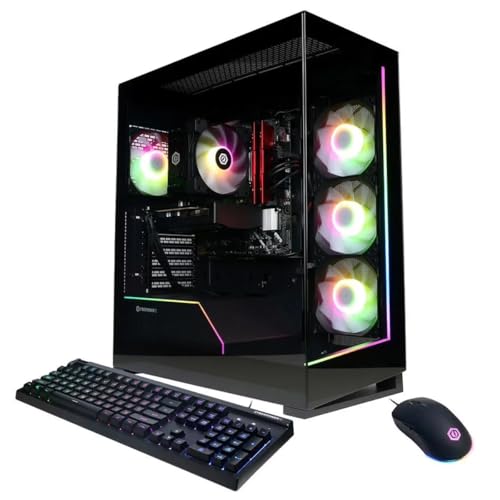
Best Budget: CyberPowerPC Gamer Xtreme GXi2000CSTV3
Specs
CPU | Core Ultra 5 225F |
GPU | RTX 5060 |
Memory | 32GB DDR5, speed not listed |
Storage | 2TB NVMe |
Included | RGB keyboard and mouse |
SKU | GXi2000CSTV3 |
Operating system | Windows 11 Home |
CPU
Core Ultra 5 225F
GPU
RTX 5060
Memory
32GB DDR5, speed not listed
Storage
2TB NVMe
Included
RGB keyboard and mouse
SKU
GXi2000CSTV3
Operating system
Windows 11 Home
What it does well
It is the cheapest listing in this round that pairs 32GB with a 2TB drive from an integrator with a real returns process behind it. Those are the two line items that get thinned first at the bottom of the ladder, and this configuration keeps both.
The Core Ultra 5 225F is unremarkable and does not need to be anything else. At 1080p with an RTX 5060 the graphics card is the limit long before the processor is.
What you give up
The RTX 5060 carries 8GB of VRAM. No amount of system memory fixes a frame buffer, so read this as a 1080p machine that happens to carry a 1440p amount of RAM. That is a reasonable trade if your monitor is 1080p and your library is broad.
Watch the SKU. A Gamer Xtreme VR listing at almost the same price ships 16GB rather than 32GB, and reports of vendors quietly thinning memory configurations this year are common enough that a model name is not an identity. The code GXi2000CSTV3 is.
Who it's for
A 1080p high refresh buyer with a broad library who does not want to live in an uninstall and reinstall loop.
Editor's Pick: MSI Aegis R2 AI (RTX 5070 Ti)

Specs
CPU | Core Ultra 9 285 |
GPU | RTX 5070 Ti |
Memory | 32GB DDR5, speed not listed |
Storage | 2TB M.2 NVMe |
Cooling | Air |
Ports | USB Type-C |
SKU | C2NVR9-1452US |
Operating system | Windows 11 Home |
CPU
Core Ultra 9 285
GPU
RTX 5070 Ti
Memory
32GB DDR5, speed not listed
Storage
2TB M.2 NVMe
Cooling
Air
Ports
USB Type-C
SKU
C2NVR9-1452US
Operating system
Windows 11 Home
What it does well
Same graphics tier and same storage as the top pick, air cooled, in a standard chassis. Nothing inside it fails in year four and dumps warm coolant onto the graphics card, which is the failure mode that moved us off closed loops for mainstream parts.
MSI prints a SKU string on the listing and on the box, so the exact configuration is confirmable after it arrives. On a shelf full of identically named machines carrying different memory and storage, that is worth more than it sounds. If a portable is still in the running, our picks for gaming laptops with 32GB of RAM run the same test on the other side of the aisle.
What you give up
The Core Ultra 9 285 loses to a 9800X3D in CPU bound games and costs more doing it. You are paying for core count that a 1440p gaming load will not touch.
The listing states neither memory speed nor Wi-Fi generation, which is the same gap the Element has. On a machine positioned around knowing what you bought, that is a miss.
Who it's for
The buyer who fully intends to open the case later, whether to add memory, swap the graphics card or just clean the filters.
Bottom line
If you want the memory question closed and the spec stated in full, buy the Skytech King 95. If you want the same processor for less and can live one graphics tier down, the iBUYPOWER Element is the value call. If your monitor is 4K, the Skytech Azure 3 is the only pick here sized for it. If your monitor is 1080p and the budget is fixed, the CyberPowerPC Gamer Xtreme carries 32GB and 2TB for less than anything else on the list. And if you plan to be inside the case again, take the air cooled MSI Aegis R2 AI.
Our wider prebuilt gaming PC roundup covers the machines that did not need 32GB to make it, and the build versus buy maths covers whether a parts list still wins this year.
FAQ
Is 32GB of RAM enough for gaming in 2026?
Yes, for gaming. 32GB is the comfortable number for a 1440p or 4K machine that also runs a browser, a voice client and a launcher in the background, and no current game needs more on its own. The case for 64GB is creative work: long timelines in a video editor, heavy Blender scenes, local AI models. If that is not you, put the money into the graphics card or the drive instead. Buy the 32GB once rather than planning to add a second kit later, because that plan rarely survives a busy year.
Do prebuilt gaming PCs still come with the RAM included?
Almost always, but check the listing rather than the model name. Memory pricing has pushed some vendors to thin their configurations, and the pattern to watch is a machine that keeps its name and its price while dropping from 32GB to 16GB. On this list the CyberPowerPC Gamer Xtreme has a near twin at nearly the same price with half the memory. Read the capacity off the specific listing you are buying, and match the SKU code wherever the seller publishes one.
Is it cheaper to buy a prebuilt or build your own PC right now?
Prebuilts have closed most of the gap, and on some configurations they are ahead. System integrators buy memory on contract months in advance, so a machine assembled against a contract signed before prices moved can undercut a parts list bought at today's retail. That is the reverse of how this normally works. It does not hold everywhere, and a self build still wins on part selection and on knowing exactly which kit and which power supply you are getting.
Can I add more RAM to a prebuilt gaming PC later?
Usually, and it takes about twenty minutes with one screwdriver. The catch is what is already in the slots. Two 16GB sticks in a four slot board leaves two slots free, so you can add a matching pair. Four 8GB sticks fill the board, so reaching 64GB means replacing all of it. Almost no listing says which arrangement you are buying, so if a later upgrade matters, ask the seller before ordering or open the side panel the day it arrives.
Does DDR5 speed matter in a prebuilt, or is 32GB just 32GB?
It matters, especially on AM5. A Ryzen chip runs its Infinity Fabric in step with memory at 6000 MT/s, and dropping to 5200 gives up a few percent in CPU bound games for a saving you will never see itemised on a prebuilt invoice. Intel platforms are less sensitive but not immune. Two picks on this list publish 6000. Three state capacity and stop. Where the speed is not listed, treat it as the slower option until you can confirm it in the BIOS.
Should I buy 16GB now and upgrade to 32GB later?
In this market, no. Memory is the one part whose price is moving against you, so waiting is a bet that it gets cheaper, and current supply forecasts do not support that bet. A 16GB machine also boxes you in if it shipped as two 8GB sticks in a two slot board. Buy the capacity you want with the machine, then spend later upgrades on the graphics card, which is the part that changes what the machine can do.
Related Articles

Best Prebuilt Gaming PCs (2026): 5 Picks, Warranty First
The best prebuilt gaming PCs in 2026: 5 picks from a 1080p budget box up to a 4K rig, judged on warranty and RMA support first, then build quality and VRAM.
Aug 18, 2026

Best Gaming Laptops With 32GB RAM (2026): 5 TGP Picks
Best gaming laptops with 32GB RAM in 2026, ranked by GPU TGP first. Per-pick memory config (soldered or SO-DIMM) so you know what you can upgrade later.
Aug 9, 2026

Is 16GB RAM Enough for Gaming in 2026? 1080p, 1440p and 4K
Is 16GB RAM enough for gaming in 2026? Yes at 1080p or 1440p with few apps open. Add Discord, OBS or a browser behind the game and 32GB stops the stutter.
Oct 14, 2026

Should You Buy RAM Now, or Wait Out the 2026 Crisis?
Should you buy RAM now or wait out the 2026 memory crisis? A clear buy-or-wait call by your situation, plus the exact 32GB and 64GB kits worth owning today.
Jul 23, 2026

Best Upgradeable Prebuilt Gaming PCs (2026): 5 Picks
Five upgradeable prebuilt gaming PCs for 2026, each scored on power supply headroom, motherboard form factor, free RAM and M.2 slots, and GPU clearance.
Aug 14, 2026