Affiliate Disclosure: As an Amazon Associate we earn from qualifying purchases. Some links may earn us a commission at no cost to you.

Best Upgradeable Prebuilt Gaming PCs (2026): 5 Picks
Memory prices did something in 2026 that nobody planned for, and the result is a parts list that can cost more than a finished machine on the same graphics card. That has pushed a lot of first-time buyers toward prebuilts.
The warning attached to that advice is always one sentence long: prebuilts use proprietary boards and power supplies you cannot change. That is true of some lines and flatly false of others, and the difference decides whether you own a computer or a sealed appliance. These five are ranked on what they let you change later.
Our top pick: Skytech King 95
The King 95 is the only system here that clears every upgrade axis with margin left over. An 850W Gold unit in a standard ATX mid-tower, sitting on a live AM5 socket, means the next graphics card is a screwdriver job rather than a second purchase.

Quick picks
Pick | System | Best for | Buy |
|---|---|---|---|
Best Overall | 1440p and 4K, with two GPU generations of headroom | ||
Best Value | 1080p on a live socket, with the supply spec published | ||
Best Premium | 4K, with the chipset named on the listing | ||
Best Budget | The cheapest route onto AM5 | ||
Editor's Pick | A graphics card carrier with storage already sorted |
Best Overall
- System
- Best for
1440p and 4K, with two GPU generations of headroom
- Buy
Best Value
- System
- Best for
1080p on a live socket, with the supply spec published
- Buy
Best Premium
- System
- Best for
4K, with the chipset named on the listing
- Buy
Best Budget
- System
- Best for
The cheapest route onto AM5
- Buy
Editor's Pick
- System
- Best for
A graphics card carrier with storage already sorted
- Buy
Specs at a glance
System | CPU and socket | GPU | Memory | Storage | Power supply |
|---|---|---|---|---|---|
Ryzen 7 9800X3D, AM5 | RTX 5070 Ti 16GB | 32GB DDR5-6000 | 2TB Gen4 NVMe | 850W Gold | |
Ryzen 5 9600X, AM5 | RTX 5060 8GB | 16GB DDR5 | 1TB NVMe | 650W 80+ Gold | |
Ryzen 7 9800X3D, AM5 X670 | RTX 5080 16GB | 32GB DDR5-6000 | 2TB NVMe | 850W Gold ATX 3.0 | |
Ryzen 5 8400F, AM5 | RTX 5060 8GB | 16GB DDR5-5200 | 1TB NVMe | Not published | |
Core i5-14400F, LGA1700 | RTX 5060 Ti 8GB | 16GB DDR5 | 2TB PCIe 4.0 | Not published |
- CPU and socket
Ryzen 7 9800X3D, AM5
- GPU
RTX 5070 Ti 16GB
- Memory
32GB DDR5-6000
- Storage
2TB Gen4 NVMe
- Power supply
850W Gold
- CPU and socket
Ryzen 5 9600X, AM5
- GPU
RTX 5060 8GB
- Memory
16GB DDR5
- Storage
1TB NVMe
- Power supply
650W 80+ Gold
- CPU and socket
Ryzen 7 9800X3D, AM5 X670
- GPU
RTX 5080 16GB
- Memory
32GB DDR5-6000
- Storage
2TB NVMe
- Power supply
850W Gold ATX 3.0
- CPU and socket
Ryzen 5 8400F, AM5
- GPU
RTX 5060 8GB
- Memory
16GB DDR5-5200
- Storage
1TB NVMe
- Power supply
Not published
- CPU and socket
Core i5-14400F, LGA1700
- GPU
RTX 5060 Ti 8GB
- Memory
16GB DDR5
- Storage
2TB PCIe 4.0
- Power supply
Not published
Upgrade headroom scorecard
System | Power supply | Board form factor | Free slots | GPU clearance |
|---|---|---|---|---|
850W Gold, standard ATX | Standard ATX mid-tower | Second M.2 free, DIMM bank populated | 360mm AIO chassis, long-card depth | |
650W 80+ Gold, published | Standard mid-tower | 1TB drive leaves M.2 headroom | Sized for a two-slot card | |
850W Gold ATX 3.0 | X670 ATX, named on the listing | Multiple M.2 per chipset | 360mm AIO chassis | |
Not published | Standard mid-tower | 1TB drive leaves M.2 headroom | Sized for a two-slot card | |
Not published | Standard mid-tower | 2TB drive already fitted | Sized for a two-slot card |
- Power supply
850W Gold, standard ATX
- Board form factor
Standard ATX mid-tower
- Free slots
Second M.2 free, DIMM bank populated
- GPU clearance
360mm AIO chassis, long-card depth
- Power supply
650W 80+ Gold, published
- Board form factor
Standard mid-tower
- Free slots
1TB drive leaves M.2 headroom
- GPU clearance
Sized for a two-slot card
- Power supply
850W Gold ATX 3.0
- Board form factor
X670 ATX, named on the listing
- Free slots
Multiple M.2 per chipset
- GPU clearance
360mm AIO chassis
- Power supply
Not published
- Board form factor
Standard mid-tower
- Free slots
1TB drive leaves M.2 headroom
- GPU clearance
Sized for a two-slot card
- Power supply
Not published
- Board form factor
Standard mid-tower
- Free slots
2TB drive already fitted
- GPU clearance
Sized for a two-slot card
How we picked
Power supply wattage, and the pinout. Wattage is half the question. The other half is the connector. Dell and Alienware Aurora towers have used a proprietary motherboard power socket across several generations, so a retail ATX supply will not drive the board even when it fits the bay. Owner reports also describe firmware refusing to boot on an unrecognised unit. Every machine on this list takes an ordinary ATX supply, and three of them publish the wattage.
Motherboard form factor. A standard ATX or micro-ATX board means the rear I/O cutout, the standoff pattern, and the front panel headers all match parts you can buy at retail. An OEM-specific board matches nothing. This is the axis that quietly decides whether a five-year-old machine is worth repairing or worth recycling, and it is the reason the one listing here that names its chipset gets credit for it.
Free DIMM and M.2 slots. Memory is the worst thing to have to buy at the moment, so a machine that arrives with 32GB already across its DIMM bank is worth more than the spec sheet suggests. Our take on whether to buy memory now or wait goes into the timing. Storage is the friendlier version of the same question. A 1TB drive with a second M.2 socket open is a cheap fix later; a 2TB drive means you can ignore it.
Usable GPU clearance. Card length is the constraint people discover with the side panel already off. Mid-towers built around a 360mm front radiator have depth to spare. Compact OEM shells often do not, and a two-slot ceiling rules out a lot of the current high end. If you are measuring a chassis you already own, our clearance guide covers where to put the tape.
Best Overall: Skytech King 95
Specs
CPU | Ryzen 7 9800X3D, 4.7 GHz base, 5.2 GHz boost |
Socket | AM5 |
GPU | NVIDIA RTX 5070 Ti 16GB |
Memory | 32GB DDR5-6000 RGB |
Storage | 2TB Gen4 NVMe SSD |
Power supply | 850W 80+ Gold |
Cooling | 360mm ARGB AIO |
Connectivity | Wi-Fi, Windows 11 |
CPU
Ryzen 7 9800X3D, 4.7 GHz base, 5.2 GHz boost
Socket
AM5
GPU
NVIDIA RTX 5070 Ti 16GB
Memory
32GB DDR5-6000 RGB
Storage
2TB Gen4 NVMe SSD
Power supply
850W 80+ Gold
Cooling
360mm ARGB AIO
Connectivity
Wi-Fi, Windows 11
What it does well
850W of Gold-rated power is what turns a future GPU swap into a ten-minute job instead of a two-part purchase. That is the whole argument for this machine. A 5080-class card drops in without touching anything else, and so does whatever replaces it.
The 32GB of DDR5-6000 answers the memory question at a moment when a kit that size costs more than the processor. AM5 keeps the CPU path open, which matters more than the 9800X3D itself. And the 360mm radiator up front implies real chassis depth, which is the same depth a long triple-fan card needs. If you are cross-shopping, the mid-tier prebuilt bracket has cheaper routes to a similar GPU with less headroom behind it.
What you give up
It is the most expensive way into the 5070 Ti tier in this roundup, and most 1440p buyers will not saturate a 9800X3D for years. You are paying for a processor that mostly protects a future graphics card from being held back.
The AIO is a wear item. A sealed pump has a shorter service life than anything else in the box, and replacing one is a whole-cooler purchase rather than a fan swap. The listing also declines to name the chipset, so the DIMM and M.2 counts are an inference from the form factor rather than a number you can read off the page.
Who it's for
The buyer who wants one purchase to survive two graphics card generations, plays at 1440p or 4K, and would rather over-spec the power supply now than find the ceiling later.
Best Value: ZOTAC MEK Ryzen 5 9600X

Specs
CPU | Ryzen 5 9600X, up to 5.4 GHz |
Socket | AM5 |
GPU | NVIDIA RTX 5060 8GB GDDR7 |
Memory | 16GB DDR5 |
Storage | 1TB NVMe SSD |
Power supply | 650W 80+ Gold |
Connectivity | Wi-Fi 6E, Bluetooth 5.3 |
OS | Windows 11 Home |
CPU
Ryzen 5 9600X, up to 5.4 GHz
Socket
AM5
GPU
NVIDIA RTX 5060 8GB GDDR7
Memory
16GB DDR5
Storage
1TB NVMe SSD
Power supply
650W 80+ Gold
Connectivity
Wi-Fi 6E, Bluetooth 5.3
OS
Windows 11 Home
What it does well
ZOTAC prints the power supply rating on the listing. That sounds like nothing until you try to find the same number for a competing box at this price and cannot. 650W of 80+ Gold clears a 5070-class card comfortably, which is the upgrade this machine is built to receive.
The 9600X is a current AM5 part, so the socket outlives the processor by several generations. Wi-Fi 6E and Bluetooth are on the board rather than hanging off a card, which leaves the expansion slots alone. For most people here the sequence is obvious, and our take on when a graphics card upgrade is worth it is the decision to read before you spend.
What you give up
8GB of VRAM is the shortest fuse in this roundup. It holds up at 1080p and is already tight at 1440p with high-resolution texture packs, which makes the graphics card the first thing you will want to change rather than the last.
650W leaves less room than 850W if that replacement lands in the 5080 class, so the ceiling is real even though it is a long way off. And 16GB of memory in this market means the RAM upgrade is a genuine budget line rather than an afterthought. Buyers have flagged that budget prebuilts sometimes ship 16GB as a single stick, which turns a free DIMM slot into a matched-kit replacement.
Who it's for
The 1080p buyer who wants a current platform underneath and expects to swap the graphics card first, second, and possibly third.
Best Premium: Skytech Azure 3

Specs
CPU | Ryzen 7 9800X3D, 5.2 GHz turbo |
Motherboard | X670 chipset, AM5 |
GPU | NVIDIA RTX 5080 16GB |
Memory | 32GB DDR5-6000 RGB |
Storage | 2TB NVMe SSD |
Power supply | 850W Gold, ATX 3.0 |
Cooling | 360mm ARGB AIO |
Connectivity | Wi-Fi, Windows 11 |
CPU
Ryzen 7 9800X3D, 5.2 GHz turbo
Motherboard
X670 chipset, AM5
GPU
NVIDIA RTX 5080 16GB
Memory
32GB DDR5-6000 RGB
Storage
2TB NVMe SSD
Power supply
850W Gold, ATX 3.0
Cooling
360mm ARGB AIO
Connectivity
Wi-Fi, Windows 11
What it does well
This is the only listing in the roundup that names its chipset, and the X670 board it calls out is the specific fact the rest of the category refuses to publish. Naming it tells you the board is a full-size enthusiast part with the DIMM bank and multiple M.2 sockets the chipset carries, not an OEM cut-down with two slots and a shrug.
The supply is called out as ATX 3.0, which matters because those units carry the native 12V-2x6 connector current high-end cards expect instead of a handful of adapters. 850W behind a 5080 is a deliberate margin rather than a spec-sheet minimum.
What you give up
This is the top of the price range, and it buys a card already close to the ceiling of what one upgrade cycle needs. The headroom you paid for takes longer to cash in than it does on the King 95.
32GB is generous today, but the DIMM slots are where you would spend next, and doing that at current memory pricing hurts. The AIO carries the same wear-item caveat as the top pick.
Who it's for
The 4K buyer who wants the platform question closed on day one and does not intend to open the case again until the card after next.
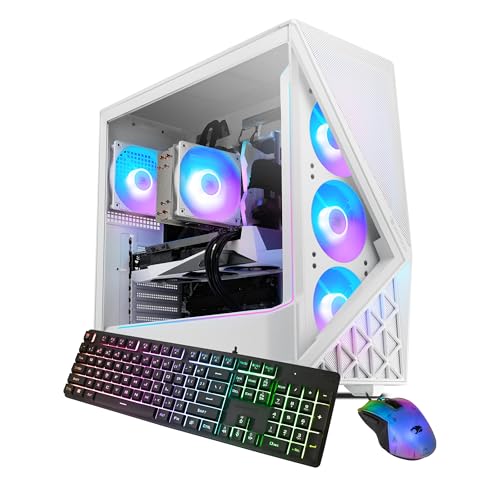
Best Budget: iBUYPOWER Slate
Specs
CPU | AMD Ryzen 5 8400F |
Socket | AM5 |
GPU | NVIDIA RTX 5060 8GB |
Memory | 16GB DDR5-5200 RGB |
Storage | 1TB NVMe SSD |
Model code | SWA5N5601 |
Included | Gaming keyboard and mouse |
OS | Windows 11 Home |
CPU
AMD Ryzen 5 8400F
Socket
AM5
GPU
NVIDIA RTX 5060 8GB
Memory
16GB DDR5-5200 RGB
Storage
1TB NVMe SSD
Model code
SWA5N5601
Included
Gaming keyboard and mouse
OS
Windows 11 Home
What it does well
The 8400F is a modest processor, but it sits in the socket AMD is still shipping new parts into. That makes the CPU a drop-in upgrade later rather than a motherboard purchase, which is the single biggest difference between this and an equivalently priced OEM tower.
A standard mid-tower means the GPU bracket, the power supply mount, and the front panel headers are all retail parts. Peripherals in the box send more of the budget to the tower itself. If your ceiling flexes upward, the machines a tier above buy meaningfully more headroom.
What you give up
The listing does not publish a power supply wattage, and that is the most important number for anyone planning a graphics card upgrade. Assume the unit is sized for the 5060 and nothing beyond it, then budget for a supply swap alongside any serious card. That is a real cost, not a footnote.
8GB of VRAM and 16GB of system memory both sit at the current floor. There is no AIO and no named chipset either, so cooling headroom and slot counts stay unknown until the side panel comes off.
Who it's for
The buyer at the bottom of the budget who wants the platform to outlive the parts, and who is comfortable treating the power supply as a planned second purchase.
Editor's Pick: CyberPowerPC Gamer Xtreme VR

Specs
CPU | Intel Core i5-14400F, 2.5 GHz base |
Socket | LGA1700 |
GPU | GeForce RTX 5060 Ti 8GB |
Memory | 16GB DDR5 |
Storage | 2TB PCIe 4.0 SSD |
Model code | GXiVR8060A34 |
Connectivity | Wi-Fi ready |
OS | Windows 11 Home |
CPU
Intel Core i5-14400F, 2.5 GHz base
Socket
LGA1700
GPU
GeForce RTX 5060 Ti 8GB
Memory
16GB DDR5
Storage
2TB PCIe 4.0 SSD
Model code
GXiVR8060A34
Connectivity
Wi-Fi ready
OS
Windows 11 Home
What it does well
The Gamer Xtreme has been built in conventional mid-towers for years, which is why replacement front panels, power supply brackets, and side panels for it are ordinary retail items rather than a support ticket. Nothing about servicing this machine is unusual.
2TB of PCIe 4.0 storage is the largest drive in the sub-premium half of this roundup, so the storage axis is closed rather than deferred. The 5060 Ti also gives more 1440p runway than the plain 5060 in the value and budget picks.
What you give up
LGA1700 is finished. Intel has moved on, so the processor is the one part in this box you cannot meaningfully upgrade without replacing the motherboard, and that is exactly why a roundup about headroom ranks it fifth rather than second. If you are not sure that matters to you, the graphics card versus processor question is the one to settle before you buy.
No wattage is published for the supply. 8GB of VRAM puts a clock on the graphics card again. And read the model code at checkout: the sibling GXiVR8060A35 is a Core Ultra 5 225F configuration on an entirely different socket, sold under the same family name. The VR in that model name is a marketing badge rather than a spec. If a headset is the actual reason you are shopping, our guide to the best prebuilt gaming PC for VR sets the GPU and VRAM floor each headset class really needs.
Who it's for
The 1440p buyer treating the tower as a carrier for the graphics card, who wants storage sorted out of the box and has no intention of swapping the processor.
Lines that fail the test
Three families were checked and left out, and the reasons are the same four axes in reverse.
Large-OEM gaming towers with proprietary board power. Dell and Alienware Aurora machines from the R13 generation onward are the ones builders name most often. Owner reports across those models describe a proprietary 10 or 12 pin motherboard power socket that a retail ATX supply cannot drive, and firmware that can refuse to post on a unit it does not recognise. HP and Acer gaming lines have shipped similar custom supply footprints. These are decent computers. They are appliances, and worth pricing as appliances.
Compact OEM shells and anything with an unpublished two-slot ceiling. A slim chassis rules out most of the current high end before you start, and a supply mounted in a non-standard bay rules out the fix. If a listing publishes neither a wattage nor a form factor, treat both as the tightest possible answer. The broader prebuilt roundup covers the machines that win on raw value instead.
Bottom line
If you want one machine to carry two graphics card generations, buy the Skytech King 95. If you are building a 1080p rig on a live socket and want the power supply spec in writing, buy the ZOTAC MEK. If you play at 4K and want the platform settled permanently, buy the Skytech Azure 3.
If the budget is the constraint, the iBUYPOWER Slate gets you onto AM5 for the least money, as long as you plan for a supply swap. And if the graphics card is the only thing you will ever change, the CyberPowerPC Gamer Xtreme VR does that job with storage already handled.
FAQ
Can you upgrade a prebuilt gaming PC?
Most of them, yes, and the graphics card is usually the easy one. What decides it is whether the builder used off-the-shelf parts. A system integrator like Skytech, iBUYPOWER, CyberPowerPC, or ZOTAC assembles retail components into a retail case, so the GPU, memory, drives, and power supply all swap the way they would in a machine you built yourself. Large consumer OEM lines are the exception, and the power supply is usually where they stop you. Check the supply connector and the board form factor before you buy.
Do prebuilt gaming PCs use standard parts?
The system integrator brands do. Skytech, iBUYPOWER, CyberPowerPC, and ZOTAC build in ordinary mid-towers on ordinary ATX or micro-ATX boards with ordinary ATX supplies. The large consumer OEMs are the half to watch: proprietary motherboard power connectors, non-standard supply footprints, and custom front panel wiring all show up there. Every pick in this roundup comes from the standard-parts half, which is the reason each one is here at all.
Which prebuilt brands use proprietary motherboards and power supplies?
Dell and Alienware are the names builders raise most often. Owner reports across the Aurora R13 through R16 generations describe a proprietary 10 or 12 pin motherboard power socket that a retail ATX supply cannot drive, plus firmware that can refuse to post on an unrecognised unit. HP and Acer gaming desktops have shipped comparable custom supply footprints. None of that makes them bad computers. It makes them closed systems, and you should buy them knowing the parts inside are the parts you keep.
Can you replace the power supply in a prebuilt gaming PC?
If the machine takes a standard ATX unit, yes, and it is one of the simpler jobs in the case. Unplug everything, remove four rear screws, slide the old one out. The two things that stop you are a proprietary motherboard connector and a non-standard supply footprint, and both are OEM traits rather than system integrator traits. Among the picks here, only the two listings that decline to publish a wattage carry any real uncertainty, and both use conventional ATX bays.
How much power supply headroom do you need to upgrade the GPU later?
Aim for at least 150W above what your current card pulls under load, and more if you expect to move up two tiers rather than one. In practice that means a 650W unit reaches a 5070-class card, 850W covers a 5080 comfortably, and anything under 600W limits you to a sideways move. If the listing publishes no wattage at all, treat the supply as a planned second purchase and budget for it alongside the card instead of discovering the problem at install time.
Is it cheaper to buy a prebuilt or build a PC in 2026?
For most mid-range configurations right now the prebuilt wins, and memory pricing is the reason. A 32GB DDR5 kit costs a multiple of what the same class of kit did two years ago, and system integrators buy memory on contracts individuals cannot touch. Building still wins on part selection and on getting exactly the power supply you want. If the goal is the lowest price on a working machine today, buy prebuilt and put the difference toward the upgrade you were going to make anyway.
Related Articles

Build vs. Buy a Gaming PC in 2026: Which Wins?
Building a gaming PC vs buying a prebuilt in 2026: honest cost math by budget tier, where DIY still wins, and where prebuilts are the smarter buy now.
Jun 27, 2026

Best Prebuilt Gaming PCs (2026): 5 Picks, Warranty First
The best prebuilt gaming PCs in 2026: 5 picks from a 1080p budget box up to a 4K rig, judged on warranty and RMA support first, then build quality and VRAM.
Aug 18, 2026

Best Prebuilt Gaming PCs Under $2,000 in 2026
The five best prebuilt gaming PCs under $2,000 in 2026, all running RTX 5070 + DLSS 4. Tested picks from Skytech, Alienware, and iBUYPOWER with real buyer context.
May 27, 2026

Should You Upgrade Your GPU in 2026? When It's Worth It
Should you upgrade your GPU in 2026? How to tell when a new graphics card is actually worth it, the signs you should wait, and what to buy at every budget.
Jul 19, 2026

Will My GPU Fit in My Case? 3 Numbers to Check (2026)
Will my GPU fit in my case? Check card length, slot thickness and sag in three numbers, then pick a case with clearance to spare, up to a 4-slot RTX 5090.
Sep 6, 2026