Affiliate Disclosure: As an Amazon Associate we earn from qualifying purchases. Some links may earn us a commission at no cost to you.

Is My GPU Supported for WoW Forever? 3 Picks by Budget 2026
Blizzard raised the graphics floor for World of Warcraft: Forever, and one question sits under every thread about it. Is your GPU supported for WoW Forever, or does November leave you at the login screen? If your card is built on AMD Graphics Core Next 1, NVIDIA Maxwell, Intel Skylake, or anything newer, it is supported. Anything older is out.
Supported is not the same as enough. A 4 GB DirectX 12 card clears the minimum. The 8 GB recommended tier is what holds up at 1440p with the new lighting pass on. Here is how to tell which side you land on, and the cheapest card that moves you up a tier.
At a glance
Bucket | Card | VRAM | What it clears | Buy |
|---|---|---|---|---|
Clears recommended | 16 GB GDDR6 | Recommended tier, with the 8 GB floor doubled | ||
Cheapest supported upgrade | 12 GB GDDR6 | Recommended tier, the Arc B-Series Blizzard names | ||
When to step up | 16 GB GDDR7 | Recommended tier plus the DXR headroom for ray-traced shadows |
Clears recommended
- Card
- VRAM
16 GB GDDR6
- What it clears
Recommended tier, with the 8 GB floor doubled
- Buy
Cheapest supported upgrade
- Card
- VRAM
12 GB GDDR6
- What it clears
Recommended tier, the Arc B-Series Blizzard names
- Buy
When to step up
- Card
- VRAM
16 GB GDDR7
- What it clears
Recommended tier plus the DXR headroom for ray-traced shadows
- Buy
Verdict: is your GPU supported for WoW Forever?
Architecture | Example cards | Supported | What it clears |
|---|---|---|---|
AMD Graphics Core Next 1 and newer (2012 onward) | Radeon HD 7850, RX 400 and 500 series, RDNA 1 through RDNA 4 | Yes | Architecture floor. RDNA 1 with 4 GB clears minimum; RDNA 3 or newer with 8 GB clears recommended. |
NVIDIA Maxwell and newer (2014 onward) | GTX 750 and 750 Ti, GTX 900 series, GTX 10 series, RTX 20 through RTX 50 | Yes | Architecture floor. GTX 10 series with 4 GB clears minimum; RTX 40 series with 8 GB clears recommended. |
Intel Skylake and newer (2015 onward) | HD Graphics 530, Iris Xe, Arc A-Series, Arc B-Series | Yes | Architecture floor. Iris Xe2-LPG clears minimum; Arc B-Series clears recommended. |
AMD, anything before Graphics Core Next | Radeon HD 6950 and older | No | Nothing. The compute capability Forever needs is absent. |
NVIDIA Kepler and older | GTX 760, GTX 770, GTX 780, GTX 8xxM | No | Nothing, even though a GTX 770 outruns a supported GTX 750 Ti. |
Intel, anything before Skylake | HD Graphics 6000 and older | No | Nothing. |
AMD Graphics Core Next 1 and newer (2012 onward)
- Example cards
Radeon HD 7850, RX 400 and 500 series, RDNA 1 through RDNA 4
- Supported
Yes
- What it clears
Architecture floor. RDNA 1 with 4 GB clears minimum; RDNA 3 or newer with 8 GB clears recommended.
NVIDIA Maxwell and newer (2014 onward)
- Example cards
GTX 750 and 750 Ti, GTX 900 series, GTX 10 series, RTX 20 through RTX 50
- Supported
Yes
- What it clears
Architecture floor. GTX 10 series with 4 GB clears minimum; RTX 40 series with 8 GB clears recommended.
Intel Skylake and newer (2015 onward)
- Example cards
HD Graphics 530, Iris Xe, Arc A-Series, Arc B-Series
- Supported
Yes
- What it clears
Architecture floor. Iris Xe2-LPG clears minimum; Arc B-Series clears recommended.
AMD, anything before Graphics Core Next
- Example cards
Radeon HD 6950 and older
- Supported
No
- What it clears
Nothing. The compute capability Forever needs is absent.
NVIDIA Kepler and older
- Example cards
GTX 760, GTX 770, GTX 780, GTX 8xxM
- Supported
No
- What it clears
Nothing, even though a GTX 770 outruns a supported GTX 750 Ti.
Intel, anything before Skylake
- Example cards
HD Graphics 6000 and older
- Supported
No
- What it clears
Nothing.
That table is a feature gate, not a performance chart. Forever uses RGBA16F UAV support in compute shaders to drive its updated look, and a card either has that capability or it does not. Three architectures introduced it: Graphics Core Next 1 in 2012, Maxwell in 2014, and Skylake in 2015. Everything released since qualifies.
The GTX 770 is the cleanest way to see why speed is beside the point. It is a Kepler card, one generation short of Maxwell, and Blizzard lists it as unsupported alongside the 760 and the 780. The GTX 750 Ti, a much slower card, is listed as compatible because it is Maxwell. A faster GPU does not buy you a hardware feature it was never built with.
If you are not sure which architecture you own, the card name is usually enough. Anything labelled GTX 900 series or higher on the NVIDIA side qualifies, and so does every RX 400 series card or newer from AMD. For laptops and integrated graphics the safe move is to run dxdiag from the Windows search bar, read the exact chip name off the Display tab, and match it against the table above rather than guessing from the model year of the machine.
One more caveat before you relax. Blizzard says the compatible-architecture examples still sit below the full minimum requirements, so reading Maxwell on your spec sheet and stopping there is a mistake. Architecture support gets you past the door. The minimum and recommended tiers decide what the game looks like once you are inside, and if you are shopping from scratch our guide to how to choose a GPU and a matching monitor covers the rest of that call.
How we read Blizzard's spec sheet
Blizzard published three separate gates in one post, which is why the forum answers contradict each other. Pull them apart and the shopping decision gets simple.
Gate one is the architecture floor above. It is binary, it is checked against the hardware rather than your settings, and lowering the preset does not move it. Gate two is the stated minimum: a DirectX 12 capable 4 GB GPU, with a GTX 10 series card, an RDNA 1 Radeon, or Intel Iris Xe2-LPG given as the examples. That is a 1080p, settings-pulled-back machine.
Gate three is the recommended tier: a DirectX 12 capable 8 GB GPU, anchored to the RTX 40 series, RDNA 3, and the Arc B-Series. Read that 8 GB as a floor and not a target. An MMO that just added a global illumination pass does not get lighter over the years you will own the card, and 8 GB parts above the mainstream tier have aged badly for a while now. Our breakdown of whether 8 GB still holds up goes through that argument in detail.
Here is the part the spec sheet buries. Forever's global illumination comes from Blizzard's own ray tracer, not DirectX Raytracing, and it runs on minimum-spec GPUs that carry no ray-tracing hardware at all. The new lighting is available to a GTX 1060. A separate Ray Traced Shadows option does want DXR, and beta players report it often refuses to switch on even with compatible hardware. So the upgrade case for an RTX card is shadows and resolution, not access to the new look.
Last, a warning about what a GPU cannot fix. Beta players report heavy stutter in crowded zones on machines running an RTX 5080, an RTX 5090, or an RX 9070 XT next to a Ryzen 7 9800X3D or a Core i9-14900K. When the top of the stack stumbles in the same place as the middle, the graphics card is not the bottleneck. Treat it as main-thread behavior in a beta build, and if crowded zones are your problem, the CPU side of the same question is the better read.
Clears recommended: Sapphire Pulse RX 9060 XT (16 GB)

Specs
Chip | AMD Radeon RX 9060 XT (RDNA 4) |
VRAM | 16 GB GDDR6 |
Memory bus | 128-bit |
Compute units | 32 |
Board power | 160 W |
Interface | PCIe 5.0 |
AIB | Sapphire Pulse, dual-fan open-air |
Chip
AMD Radeon RX 9060 XT (RDNA 4)
VRAM
16 GB GDDR6
Memory bus
128-bit
Compute units
32
Board power
160 W
Interface
PCIe 5.0
AIB
Sapphire Pulse, dual-fan open-air
What it does well
RDNA 4 sits a generation above the RDNA 3 line Blizzard names in the recommended tier, so this card clears both the architecture floor and the recommended spec without any reading between the lines. The 16 GB pool doubles the 8 GB figure Blizzard asks for, which is the whole reason to buy this one rather than a cheaper 8 GB part.
That headroom matters more in Forever than a shader count would suggest. Global illumination and high-resolution textures both want memory, and at 1440p an 8 GB card spends its life choosing between them. Sixteen gigabytes means it does not have to. FSR 4 is available on RDNA 4 as well, which is a real lever if you want to hold a high refresh rate in a capital city rather than a marketing number on a slide.
Sapphire Pulse is also the AIB tier we sign off on. The cooler is quiet under sustained load and the card is not throttling its way through a raid night to hit a price point. A 160 W board power figure helps here too. Most older builds coming off a GTX 10 series card have enough PSU headroom for this without a second purchase, which is not something the step-up pick further down can promise.
What you give up
A 128-bit bus and 32 compute units put a hard ceiling on this card, and that ceiling sits well below 4K. If you are running a 4K panel, this is the wrong bucket and the step-up pick below is the honest answer.
Ray Traced Shadows is the other gap. That option wants DirectX Raytracing hardware, and Radeon is not where it lands best. You still get Forever's software global illumination, which is the visual change most players will notice, but the DXR shadow pass is not this card's strength. And it does nothing at all about the crowded-zone stutter from the beta, because that problem does not live on the graphics card.
Who it's for
The reader on a 1080p or 1440p panel who wants to clear Blizzard's recommended tier once and stop thinking about VRAM for the rest of the expansion cycle. If ray-traced shadows are not on your list and 4K is not your panel, this is the card to buy.
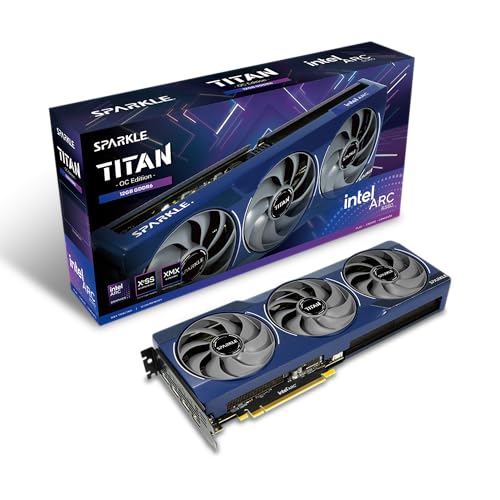
Cheapest supported upgrade: Sparkle Arc B580 Titan OC (12 GB)
Specs
Chip | Intel Arc B580 (Xe2 Battlemage) |
VRAM | 12 GB GDDR6 |
Memory bus | 192-bit |
Xe cores | 20 |
Board power | 190 W |
Interface | PCIe 4.0 |
Cooling | Torn Cooling 2.0 axial fan, metal backplate |
Chip
Intel Arc B580 (Xe2 Battlemage)
VRAM
12 GB GDDR6
Memory bus
192-bit
Xe cores
20
Board power
190 W
Interface
PCIe 4.0
Cooling
Torn Cooling 2.0 axial fan, metal backplate
What it does well
Blizzard names the Arc B-Series by name in the recommended tier, which makes this the literal cheapest way to satisfy the spec Blizzard actually published rather than a card that looks close on a chart. Twelve gigabytes sits above the 8 GB floor, and in an MMO that matters more than shader count does.
Battlemage drivers are also a different story from the Alchemist era. The titles that used to break on Arc mostly run now, and Intel has kept shipping fixes. For a reader whose GTX 700-series card just landed on the unsupported list, this is the smallest cheque that gets them to a supported machine that also clears the recommended tier rather than scraping the minimum.
What you give up
Intel stops being the sensible answer above the low-mid tier, so treat this as a 1080p card with 1440p as a stretch rather than a 1440p card with room to spare. Push the resolution and you will be reaching for upscaling sooner than the other two picks.
Availability is the bigger catch. Street pricing on the B580 has run above Intel's own asking figure and stock has been thin since launch, so the cheapest card on paper is not always the cheapest card you can actually buy this week. Check before you commit to the bucket. Legacy DirectX 9 and DirectX 11 gotchas also still surface occasionally, which is worth knowing for anyone whose library reaches back as far as their Warcraft account does.
Who it's for
The reader whose card just got cut off, on a 1080p panel, who wants the smallest spend that clears both gates at once. If you would rather see the full spread of options at this tier before committing, the wider mid-range picture is worth a look first.
When to step up: ASUS TUF RTX 5070 Ti OC (16 GB)

Specs
Chip | NVIDIA GeForce RTX 5070 Ti (Blackwell) |
VRAM | 16 GB GDDR7 |
Memory bus | 256-bit |
CUDA cores | 8960 |
Board power | 300 W |
Interface | PCIe 5.0 |
AIB | ASUS TUF, triple-fan |
Chip
NVIDIA GeForce RTX 5070 Ti (Blackwell)
VRAM
16 GB GDDR7
Memory bus
256-bit
CUDA cores
8960
Board power
300 W
Interface
PCIe 5.0
AIB
ASUS TUF, triple-fan
What it does well
A 256-bit GDDR7 bus and 8960 CUDA cores are a different class of headroom. This is the card for a high-refresh 1440p panel or an entry 4K display, and it is the best-value part in the 50-series stack by a reasonable margin. If your monitor is the reason you are shopping, our guide to 1440p at high refresh lines up with this bucket.
It is also the only pick here that answers Ray Traced Shadows properly. That option sits alongside Forever's software global illumination and wants DirectX Raytracing hardware, and this is where the Blackwell cards separate from the other two buckets. DLSS 4 is a genuine lever at these resolutions rather than a spec-sheet line, and ASUS TUF is an AIB tier we sign off on.
What you give up
The gap against the recommended-tier pick is large, and most of what it buys is resolution headroom rather than anything Forever-specific. The new global illumination runs on minimum-spec hardware, so nobody needs this card to see the new lighting. Buy it for the panel you own, not for the expansion.
Three hundred watts also wants real PSU headroom and a case that moves air, which is a second line item if your build is older than the card. And it still does not fix crowded-zone stutter. Players report that on 5090 systems too.
Who it's for
The reader on a 1440p 165 Hz panel or a 4K display who plays a good deal more than Warcraft and wants one card that covers all of it, ray-traced shadows included.
Bottom line
If your card is GCN 1, Maxwell, Skylake, or newer, you are supported and you do not have to buy anything. If it is Kepler or older, you do, and no preset will save it. If you want the recommended tier without overspending, buy the Sapphire Pulse RX 9060 XT. If your card just got cut off and the budget is tight, the Sparkle Arc B580 Titan OC clears the same tier for less.
If you game at 1440p high refresh or 4K, or you want ray-traced shadows, buy the ASUS TUF RTX 5070 Ti. And if you want to weigh these against the whole stack, frames per dollar across the stack is the wider comparison.
FAQ
Is my GTX 1060 supported for WoW Forever?
Yes. The GTX 1060 is Pascal, which sits above the Maxwell floor, and the GTX 10 series is what Blizzard names in the minimum spec line. It will launch and it will play. A 6 GB 1060 clears the 4 GB minimum, so expect 1080p with the new lighting pass turned down rather than off. If you want the recommended tier instead of the minimum tier, the Sapphire Pulse RX 9060 XT is the smallest sensible jump from a 1060.
Why is a GTX 770 unsupported when a slower GTX 750 Ti is fine?
Because the gate is a feature, not a frame rate. Forever needs RGBA16F UAV support in compute shaders, and on the NVIDIA side that arrived with Maxwell. The GTX 750 Ti is Maxwell. The GTX 770 is Kepler, one generation earlier, so it lacks the capability no matter how much faster it runs in older titles. Blizzard lists the 760, 770, and 780 as unsupported examples and the 750 Ti as a compatible one.
Do I need a ray tracing GPU for WoW Forever?
No. Forever's global illumination comes from Blizzard's own ray tracer rather than DirectX Raytracing, and it runs on minimum-spec cards with no ray-tracing hardware at all. A GTX 10 series card gets the new lighting. There is a separate Ray Traced Shadows option that does want DXR, and beta players report it frequently refuses to enable even on compatible hardware. If shadows are why you are shopping, the ASUS TUF RTX 5070 Ti is the pick.
Is 4 GB of VRAM enough for WoW Forever?
It is enough to launch and enough to play at 1080p with the lighting settings pulled back. It is not enough to stop thinking about. Blizzard's own split says as much: 4 GB is the minimum and 8 GB is the recommended tier. Treat the 8 GB figure as a floor rather than a target, because an MMO that just added a global illumination pass will not get lighter over time. If you are buying anyway, buy 12 GB or 16 GB and skip the next round of this question.
Will a new GPU fix the stuttering people report in the Forever beta?
Probably not. Players report crowded-zone stutter on systems running an RTX 5080, an RTX 5090, or an RX 9070 XT alongside a Ryzen 7 9800X3D or a Core i9-14900K. When the top of the stack stumbles in the same place as the middle, the graphics card is not the bottleneck. It reads as main-thread behavior in a beta build, and Blizzard has until the November launch to work on it. Buy a GPU to clear the requirement tiers and hit your resolution target.
Does lowering the graphics settings make an unsupported GPU work?
No. Blizzard has said directly that choosing a lower visual setting does not make an officially unsupported GPU compatible. The RGBA16F UAV compute requirement is a property of the architecture, not of the settings menu, so a Radeon HD 6950 or a GTX 780 stays unsupported at every preset. The only fix is a card built on GCN 1, Maxwell, Skylake, or newer, and the cheapest one that also clears the recommended tier is the Sparkle Arc B580 Titan OC.
Related Articles

Best CPUs for World of Warcraft 2026: 5 Picks by Tier
The best CPU for World of Warcraft is an X3D chip. We rank five AM5 picks by tier for raid and capital-city frame rates, from a budget floor up to endgame.
Aug 19, 2026

Is 8GB VRAM Enough for Gaming in 2026, or Do You Need 16GB?
Is 8GB VRAM enough for gaming in 2026? It holds at 1080p, cracks at 1440p, and fails at 4K. Here is when 8GB works, when you need 16GB, and what to buy.
Jul 23, 2026

Best Mid-Range GPUs (2026): 5 Picks for 1080p and 1440p
The best mid-range GPUs for 2026, matched to what you play at 1080p and 1440p. Five 16GB picks from AMD, Nvidia and Intel, with the 8GB traps called out.
Aug 23, 2026

Best GPU for 1440p Gaming 2026: 5 16GB Picks, 144-240Hz
The best GPU for 1440p gaming in 2026: five 16GB picks matched to 144 and 240 Hz targets, the 8GB cards to skip, and the benchmarks behind every call.
Sep 26, 2026

How to Choose a GPU (and a Monitor That Matches)
A buyer's framework for picking a GPU and the monitor that pairs with it. Start with the panel and work the card back.
May 17, 2026