Affiliate Disclosure: As an Amazon Associate we earn from qualifying purchases. Some links may earn us a commission at no cost to you.

RX 9070 GRE vs RTX 5060 Ti 16GB: 1440p Verdict (2026)
Buy the Sapphire Pulse RX 9070 GRE OC. At 1440p it is the faster card by a margin that reads like a whole tier, and most people cross-shopping this pair play games where that margin is the entire story.
The exception is narrow and worth naming. If ray tracing is switched on in the games you actually load, or you create as well as play, or the build is small and the power budget is spoken for, take the ASUS Prime RTX 5060 Ti OC (16 GB) instead. Its 16 GB pool holds together in exactly the places where the GRE's 12 GB starts to buckle. Everything below is the evidence for both halves of that call.
At a glance
Card | VRAM and bus | Board power | Best at | Buy |
|---|---|---|---|---|
12 GB GDDR6, 192-bit | 240 W as rated by Sapphire | 1440p raster | ||
16 GB GDDR7, 128-bit | 180 W TGP | 1440p ray tracing and VRAM-heavy titles |
- VRAM and bus
12 GB GDDR6, 192-bit
- Board power
240 W as rated by Sapphire
- Best at
1440p raster
- Buy
- VRAM and bus
16 GB GDDR7, 128-bit
- Board power
180 W TGP
- Best at
1440p ray tracing and VRAM-heavy titles
- Buy
Where each one wins
Scenario | Winner | Why |
|---|---|---|
1440p high, raster-dominant library | A 22 to 28 percent average raster lead, which is a full tier of headroom | |
1440p with ray tracing switched on | The 12 GB framebuffer folds first; Blackwell RT cores plus 16 GB hold | |
VRAM-heavy titles like Indiana Jones or Spider-Man 2 | 16 GB avoids the 1% low collapse reviewers measured on the GRE | |
Esports and high-refresh competitive play | Raw raster is the whole job; ray tracing is off and frame gen stays off | |
Small-form-factor builds or a tight PSU budget | 180 W and a 2.5-slot SFF-ready board against 240 W on the Pulse | |
Rendering, editing, or streaming on NVENC AV1 | The CUDA tax is real and there is no AMD workaround for it |
1440p high, raster-dominant library
- Winner
- Why
A 22 to 28 percent average raster lead, which is a full tier of headroom
1440p with ray tracing switched on
- Winner
- Why
The 12 GB framebuffer folds first; Blackwell RT cores plus 16 GB hold
VRAM-heavy titles like Indiana Jones or Spider-Man 2
- Winner
- Why
16 GB avoids the 1% low collapse reviewers measured on the GRE
Esports and high-refresh competitive play
- Winner
- Why
Raw raster is the whole job; ray tracing is off and frame gen stays off
Small-form-factor builds or a tight PSU budget
- Winner
- Why
180 W and a 2.5-slot SFF-ready board against 240 W on the Pulse
Rendering, editing, or streaming on NVENC AV1
- Winner
- Why
The CUDA tax is real and there is no AMD workaround for it
How the performance splits
Workload | Result | Source |
|---|---|---|
1440p raster, review-suite average | GRE ahead by 28 percent | Notebookcheck first-reviews roundup, June 2026 |
1440p raster, vendor suite of 40-plus titles | GRE ahead by 22 percent | AMD first-party claim, June 2026 |
1440p raster, absolute | GRE around 90 fps average at high settings | Launch review roundup, June 2026 |
1440p ray tracing, Cyberpunk 2077 | RTX 5060 Ti 16GB ahead | Tom's Hardware, June 2026 |
1440p ray tracing, VRAM-heavy titles | RTX 5060 Ti 16GB ahead, with the older RX 7800 XT 16GB sometimes ahead of the GRE too | ComputerBase, June 2026 |
1440p raster, review-suite average
- Result
GRE ahead by 28 percent
- Source
Notebookcheck first-reviews roundup, June 2026
1440p raster, vendor suite of 40-plus titles
- Result
GRE ahead by 22 percent
- Source
AMD first-party claim, June 2026
1440p raster, absolute
- Result
GRE around 90 fps average at high settings
- Source
Launch review roundup, June 2026
1440p ray tracing, Cyberpunk 2077
- Result
RTX 5060 Ti 16GB ahead
- Source
Tom's Hardware, June 2026
1440p ray tracing, VRAM-heavy titles
- Result
RTX 5060 Ti 16GB ahead, with the older RX 7800 XT 16GB sometimes ahead of the GRE too
- Source
ComputerBase, June 2026
Two numbers explain that whole table. The GRE runs 48 of Navi 48's 64 compute units against a 192-bit bus moving 432 GB/s, and it spends that silicon on raw rasterization. The 5060 Ti answers with 4,608 CUDA cores on a narrower 128-bit bus, fed by GDDR7 at 448 GB/s and backed by 16 GB. In a rasterized frame the compute wins. In a ray-traced frame the memory pool decides, and 12 GB is where the GRE runs out of room.
Our standing floor at 1440p is 12 GB, with 16 GB preferred. The GRE sits exactly on the floor and the 5060 Ti sits on the number we would rather see, which is why the ranking inverts instead of merely compressing. Reviewers measured the GRE's 1% lows sagging in ray-traced Cyberpunk 2077 at 1440p while a 16 GB card held its pacing. If you want the wider version of that framework, we walk through how we size a GPU to a panel.
Sapphire Pulse RX 9070 GRE OC
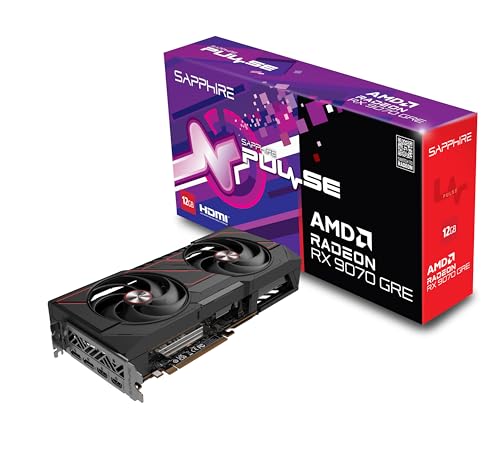
Specs
Chip | Navi 48 (RDNA 4, TSMC 4nm) |
Compute units | 48 of 64 (3,072 stream processors) |
VRAM | 12 GB GDDR6 |
Memory bus | 192-bit, 432 GB/s |
Infinity Cache | 48 MB |
Board power | 220 W AMD TBP, 240 W as rated by Sapphire |
Interface | PCIe 5.0 x16 |
Upscaling | FSR 4.1 and AMD Fluid Motion Frames |
Chip
Navi 48 (RDNA 4, TSMC 4nm)
Compute units
48 of 64 (3,072 stream processors)
VRAM
12 GB GDDR6
Memory bus
192-bit, 432 GB/s
Infinity Cache
48 MB
Board power
220 W AMD TBP, 240 W as rated by Sapphire
Interface
PCIe 5.0 x16
Upscaling
FSR 4.1 and AMD Fluid Motion Frames
What it does well
Rasterized 1440p is what this card is for, and it is good at it. Launch reviews put the GRE around 90 fps average at 1440p high across raster-heavy suites. Against the RTX 5060 Ti 16GB the measured lead ran 28 percent in Notebookcheck's roundup of the first reviews and 22 percent in AMD's own 40-plus title suite, with independent numbers landing in between. Whichever figure you trust, it is not a rounding error. It is the difference between locking your panel's refresh rate and watching frames dip under it.
The silicon backs that up. 48 compute units, 3,072 stream processors, 48 MB of Infinity Cache, and 432 GB/s of bandwidth land it roughly 15 percent behind a full RX 9070 and 25 to 28 percent ahead of the RX 9060 XT 16GB. It fills a real gap in AMD's stack rather than rebadging one that already existed.
FSR 4.1 has also stopped being a consolation prize. Quality mode at 1440p on RDNA 4 is good enough to factor into a buying decision the way DLSS has been for years. That matters more on this card than on a faster one, because upscaling is the lever that keeps the 12 GB pool comfortable when a game gets greedy with textures.
Sapphire's board is the quiet one of the launch SKUs. Reviewers running sustained loads found the Pulse specifically the least intrusive of the GRE designs, which is worth something on a card that pulls 240 W.
What you give up
Twelve gigabytes on a 192-bit bus. That is the counterpoint, and it is not a spec-sheet quibble. Turn ray tracing on at 1440p and the faster card stops being the faster card.
Tom's Hardware measured it plainly: in Cyberpunk 2077 with ray tracing at 1440p the GRE lands behind the RTX 5060 Ti 16GB, and barely ahead of the cheaper RX 9060 XT 16GB. German outlet ComputerBase reported the same shape in Indiana Jones and the Great Circle, Spider-Man 2, and Dragon Age: The Veilguard, where the older RX 7800 XT with 16 GB sometimes finishes in front. Reviewers describe the 1% lows as the tell. The average holds up longer than the frame pacing does.
Power is the smaller complaint but it is real. AMD publishes 220 W for the GRE. Sapphire rates the Pulse at 240 W, with a slider that takes it to 264 W. Against a 180 W competitor that is a 60 W gap on the figure you should size a power supply around, and it closes off the smallest cases.
Who it's for
The 1440p 144Hz buyer with a raster-dominant library. Competitive shooters, live-service games, open-world titles run at high rather than ultra with the ray tracing toggles left alone. If you have never switched ray tracing on and do not intend to start, this card converts your budget into frames more efficiently than anything else in the matchup. Once the card is settled, the panel is the next call, and our monitor picks for the RX 9070 GRE cover which refresh tier this card can honestly fill.
If you are cross-shopping the tier directly above, we put the GRE against the RTX 5070 in its own piece.
ASUS Prime RTX 5060 Ti OC (16 GB)

Specs
Chip | GB206 (Blackwell) |
CUDA cores | 4,608 |
VRAM | 16 GB GDDR7 |
Memory bus | 128-bit, 448 GB/s |
Boost clock | 2.57 GHz reference |
Board power | 180 W TGP |
Interface | PCIe 5.0 x8 |
Upscaling | DLSS 4 and Multi Frame Generation |
Chip
GB206 (Blackwell)
CUDA cores
4,608
VRAM
16 GB GDDR7
Memory bus
128-bit, 448 GB/s
Boost clock
2.57 GHz reference
Board power
180 W TGP
Interface
PCIe 5.0 x8
Upscaling
DLSS 4 and Multi Frame Generation
What it does well
It holds together where the GRE cracks. Ray tracing at 1440p is the headline. The 5060 Ti 16GB moves ahead of a card that beats it soundly in every rasterized frame, and it manages that because 16 GB of GDDR7 absorbs the memory pressure ray-traced workloads generate. Blackwell's fourth-generation RT cores do the rest.
DLSS 4's transformer model is still the cleaner upscaler at 1440p Quality. Multi Frame Generation is useful on a 240Hz panel, with one condition attached. Frame generation is a smoothness multiplier, not a performance level. It turns 60 into 120. It never turns 30 into 120, and competitive players should leave it off entirely. Compare native or Quality-upscaled numbers across the two cards first, then add smoothness on top.
The board is the easy one to build around. 180 W and a 2.5-slot SFF-ready design means it drops into a small case or onto a modest power supply without a conversation. And if any part of this machine's life involves Blender, DaVinci, Premiere with neural effects, Stable Diffusion, or streaming on NVENC AV1, that settles the question outright. There is no AMD workaround for CUDA.
We went deeper on this card's 1440p ceiling in a separate piece on whether the 5060 Ti clears 1440p on its own.
What you give up
Frames. In rasterized games at 1440p you are handing back somewhere between a fifth and a quarter of your frame rate, and no amount of memory fixes that. The 128-bit bus is the structural reason. 448 GB/s of GDDR7 is fast memory on a narrow road.
The PCIe 5.0 x8 link is the trap nobody mentions. On a current board it is a non-issue. Drop the card into a PCIe 3.0 system, which is what plenty of people upgrading from a 3060 Ti are still running, and the effective bandwidth halves. Check your board generation before you order.
One more, and it is the one that bites buyers: the RTX 5060 Ti ships in 8 GB and 16 GB versions under listing names that differ by a couple of characters. The 8 GB card is a different product and a hard no at 1440p in 2026. Every number in this article refers to the 16 GB SKU.
Who it's for
The 1440p buyer whose library genuinely leans on ray tracing: Cyberpunk 2077, Alan Wake 2, Indiana Jones and the Great Circle, Spider-Man 2. Anyone rendering, editing, or training models alongside gaming. Streamers on NVENC AV1. Small-form-factor builders working a clearance and power budget. If two or more of those describe you, the raster deficit is a price worth paying.
Which one should you buy?
You play at 1440p on a 144Hz or 165Hz panel, mostly shooters and live-service games, ray tracing off. Buy the GRE. You will feel the raster lead in every session, and the workloads that expose its 12 GB framebuffer are not the ones you load.
Your library is Cyberpunk 2077, Alan Wake 2, and Indiana Jones, and you play with the ray tracing sliders up. Buy the 5060 Ti 16GB. You are giving up raster performance you would not have been using at those settings anyway, and gaining the memory that keeps the frame pacing honest.
You are building in a small case, or your power supply is already accounted for. Buy the 5060 Ti 16GB. 180 W and a 2.5-slot board make it the one that fits without a rethink, and if you still need a display to go with it, our panels that suit this tier are the natural pairing.
You game and you also render, edit, or stream. Buy the 5060 Ti 16GB. CUDA and NVENC AV1 are not preferences at that point, they are requirements. If the budget is tighter than this tier allows, the 5060 Ti against the RX 9060 XT 16GB is the next question down the ladder.
Bottom line
If you play at 1440p with ray tracing off, buy the Sapphire Pulse RX 9070 GRE OC. If you play with it on, buy the ASUS Prime RTX 5060 Ti OC (16 GB). If you build small, or create as well as play, the 5060 Ti takes that too. The raster gap is real and the VRAM gap is real, and they point in opposite directions, which is the only reason this matchup deserves five minutes of thought rather than five seconds. Our wider 1440p GPU picks cover the tiers on either side of these two.
FAQ
Is the RX 9070 GRE worth it over the RTX 5060 Ti 16GB?
For rasterized 1440p gaming, yes. The measured lead across launch reviews runs from roughly 22 percent to 28 percent depending on whose suite you read, which is a full tier of performance rather than a tie-breaker. The case weakens fast in one place. Ray-traced titles flip the ranking outright, and the 12 GB framebuffer is the reason. If your library is mostly raster and you play at 1440p, the GRE is the better card. If it is not, it is not.
Is 12 GB of VRAM enough for 1440p gaming in 2026?
For raster, yes. Twelve gigabytes is our floor at 1440p and the GRE sits exactly on it. The problem with a floor is that it has no headroom. Switch ray tracing on, or load a title with an aggressive texture pool, and reviewers measured the GRE's 1% lows sagging while a 16 GB card held steady. Indiana Jones and the Great Circle, Spider-Man 2, and Dragon Age: The Veilguard came up repeatedly. Sixteen gigabytes is the number we prefer at this resolution, and this matchup is a clean illustration of why.
Which card is better for ray tracing at 1440p?
The RTX 5060 Ti 16GB, and the result is striking given it loses almost everywhere else. Tom's Hardware measured the GRE falling behind it in Cyberpunk 2077 with ray tracing at 1440p, landing barely ahead of the cheaper RX 9060 XT 16GB. Two things drive that: Blackwell's RT cores, and 16 GB of GDDR7 absorbing memory pressure a 12 GB pool cannot. If ray tracing is on in the games you play, this single answer is the whole decision.
What power supply do I need for the RX 9070 GRE?
Size it off the board, not the spec sheet. AMD publishes 220 W for the GRE, but Sapphire rates the Pulse at 240 W with a slider that takes it to 264 W. Paired with a modern six or eight core CPU, a quality 650 W unit is the sensible floor and 750 W buys you headroom for a future card. Our standing rule applies: Tier A OEM, Cybenetics Gold or better, sized for transient spikes rather than steady-state draw.
Should I buy the RX 9070 GRE or the RX 9060 XT 16GB instead?
It comes down to whether you can live on the VRAM floor. The GRE is roughly 25 to 28 percent faster than the RX 9060 XT 16GB in raster at 1440p, which is a meaningful jump. But the 9060 XT carries 16 GB, so in ray-traced and texture-heavy titles the gap narrows to almost nothing and reviewers found the GRE only just ahead. If you play raster at 1440p, take the GRE. If your library leans on ray tracing and the budget is tight, the 9060 XT 16GB is the more sensible card.
Does FSR 4.1 close the gap with DLSS 4 at 1440p?
Closer than it has ever been, but not closed. FSR 4 on RDNA 4 is good enough at 1440p Quality that it belongs in the buying decision, which was not true of FSR 3. DLSS 4's transformer model still holds an edge on image stability, especially on fine detail in motion. The practical read: FSR 4.1 makes the GRE viable in titles where upscaling is how you keep the 12 GB pool comfortable, and DLSS 4 gives the 5060 Ti a slightly cleaner result at the same setting.
Related Articles

RX 9070 GRE vs RTX 5070: Which 1440p GPU to Buy in 2026
RX 9070 GRE vs RTX 5070: same 12GB, same nominal price, different street reality. Our 1440p verdict by buyer profile, with ray tracing and FSR 4 weighed in.
Aug 9, 2026

RTX 5060 Ti for 1440p: Enough, or Step Up to 5070? (2026)
The RTX 5060 Ti 16GB clears 1440p high refresh in most games, but ray tracing and heavier titles shift the math fast. Here's when to step up to a 5070.
Jul 25, 2026

RTX 5060 Ti vs RX 9060 XT: 8GB vs 16GB Verdict for 2026
RTX 5060 Ti vs RX 9060 XT: we call the winner at 1080p and at 1440p, and say when the 8GB SKUs are a trap. Straight buy advice for 2026, no spec-sheet filler.
Sep 8, 2026

Best GPU for 1440p Gaming 2026: 5 16GB Picks, 144-240Hz
The best GPU for 1440p gaming in 2026: five 16GB picks matched to 144 and 240 Hz targets, the 8GB cards to skip, and the benchmarks behind every call.
Sep 26, 2026

How to Choose a GPU (and a Monitor That Matches)
A buyer's framework for picking a GPU and the monitor that pairs with it. Start with the panel and work the card back.
May 17, 2026