Affiliate Disclosure: As an Amazon Associate we earn from qualifying purchases. Some links may earn us a commission at no cost to you.

RX 9070 GRE vs RX 9070 (2026): Is 16GB Worth the Step Up?
The RX 9070 GRE and the RX 9070 are the same Navi 48 chip at the same 220W board power. If you ever turn ray tracing on and leave it on, buy the 16GB RX 9070. If your library is raster and the budget is the constraint, the GRE is enough card.
What the step up actually buys is headroom, not a frame-rate number. The GRE clears 1440p. It clears it with 12GB of VRAM on a 192-bit bus, and that combination is what runs out first.
At a glance
Card | VRAM and bus | Compute units | Best for | Buy |
|---|---|---|---|---|
12 GB GDDR6, 192-bit | 48 | 1440p raster on a tighter budget | ||
16 GB GDDR6, 256-bit | 56 | 1440p with ray tracing left on |
- VRAM and bus
12 GB GDDR6, 192-bit
- Compute units
48
- Best for
1440p raster on a tighter budget
- Buy
- VRAM and bus
16 GB GDDR6, 256-bit
- Compute units
56
- Best for
1440p with ray tracing left on
- Buy
Where each one wins
Scenario | What decides it | Winner |
|---|---|---|
1440p high settings, raster only | Neither card is memory-limited and the GRE's clock keeps it close | |
1440p with ray tracing enabled | RT load leans on bandwidth and cache, where the 256-bit card pulls away | |
Path tracing in a gated title | Indiana Jones requires 16GB on AMD, so the GRE is locked out | |
Competitive 1440p high-refresh | CPU-bound, and the gap compresses to single digits | |
UE5 open-world at 1440p epic | VRAM ceiling and traversal load reward the larger buffer | |
Keeping the card four years or more | VRAM is the spec that ages first |
1440p high settings, raster only
- What decides it
Neither card is memory-limited and the GRE's clock keeps it close
- Winner
1440p with ray tracing enabled
- What decides it
RT load leans on bandwidth and cache, where the 256-bit card pulls away
- Winner
Path tracing in a gated title
- What decides it
Indiana Jones requires 16GB on AMD, so the GRE is locked out
- Winner
Competitive 1440p high-refresh
- What decides it
CPU-bound, and the gap compresses to single digits
- Winner
UE5 open-world at 1440p epic
- What decides it
VRAM ceiling and traversal load reward the larger buffer
- Winner
Keeping the card four years or more
- What decides it
VRAM is the spec that ages first
- Winner
Benchmarks
Reviewers who tested this pair head to head published relative deltas rather than one clean frame-rate table, so the charts below index the GRE at 100 and show where the 16GB card lands against it. Read them as scaling, not as frames. For the wider question of matching a card to a panel, we cover how to choose a GPU and a matching monitor.
Relative average frame rate at 1440p with the RX 9070 GRE indexed at 100.
- RX 9070 GRE100 %
- RX 9070115 %
Relative average frame rate at 1440p with the RX 9070 GRE indexed at 100.
- RX 9070 GRE100 %
- RX 9070120 %
The same comparison at 1080p, where neither card is bandwidth-limited.
- RX 9070 GRE100 %
- RX 9070107 %
The same comparison at 1080p, where neither card is bandwidth-limited.
- RX 9070 GRE100 %
- RX 9070105 %
The pattern is the point. At 1080p the two cards sit within single digits of each other. Move to 1440p and the gap roughly doubles in both titles, from 7 percent to 15 percent in Total War and from 5 percent to 20 percent in Final Fantasy XIV. That is the narrower bus and the smaller cache showing up, and it happens at exactly the resolution both cards are sold for. Club386 put the averaged suite figure at 11 to 16 percent.
Sapphire Pulse RX 9070 GRE (12 GB)
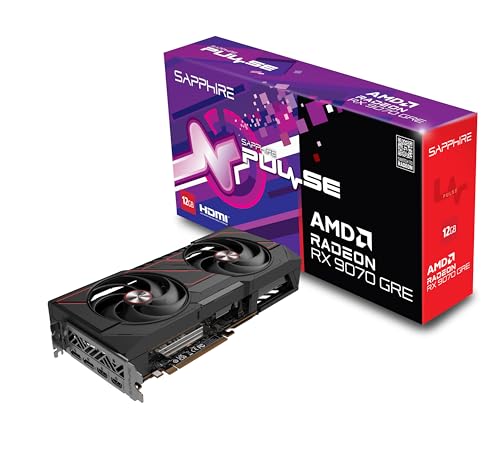
Specs
Chip | Navi 48 (RDNA 4, 4 nm) |
Compute units | 48 (3,072 stream processors) |
Ray accelerators | 48 |
VRAM | 12 GB GDDR6 |
Memory bus | 192-bit |
Memory bandwidth | 432 GB/s |
Infinity Cache | 48 MB |
Boost clock / TBP | Up to 2,790 MHz / 220 W |
Chip
Navi 48 (RDNA 4, 4 nm)
Compute units
48 (3,072 stream processors)
Ray accelerators
48
VRAM
12 GB GDDR6
Memory bus
192-bit
Memory bandwidth
432 GB/s
Infinity Cache
48 MB
Boost clock / TBP
Up to 2,790 MHz / 220 W
What it does well
The GRE clears 1440p high settings in current titles without leaning on upscaling to get there. It carries the higher boost ceiling of the pair, up to 2,790 MHz against the 9070's 2,540 MHz, which is why it stays closer than a 48-against-56 compute-unit count suggests. In CPU-bound and competitive titles the two cards land within single digits of each other.
Feature parity is complete. Same RDNA 4 architecture, same FSR 4, same AMD Fluid Motion Frames, same AV1 encode, same DisplayPort 2.1a outputs. You give up nothing on the software side by taking the cheaper card, which is not true of every in-family step down.
The 220W board power matters more than it reads. Both cards pull the same, so the supply you sized for one works for the other and the airflow plan does not change. If you are weighing this card against Nvidia instead, we ran the GRE against the RTX 5070 separately.
What you give up
Resolution scaling. The deficit grows from roughly 7 percent at 1080p to 15 percent at 1440p in Total War: Warhammer III, and from 5 percent to 20 percent in Final Fantasy XIV: Dawntrail. A 192-bit bus moving 432 GB/s with 48MB of Infinity Cache feeds 48 compute units adequately at 1080p and starts to limit them as pixel count climbs.
Ray-tracing headroom is the harder loss, and one case makes it concrete. Indiana Jones and the Great Circle gates path tracing behind 16GB of VRAM on AMD hardware. The GRE does not get a worse path-traced frame rate in that game. It does not get the option at all. No settings slider recovers 4GB.
Reports on whether 12GB bites today are split, so take this as reported rather than settled. The FPS Review found 12GB was not the limiter in Alan Wake 2 at native resolution or with upscaling, which is a fair read of right now. The honest framing is that 12GB is adequate in 2026 and is the first spec on this card to age. We worked through how much VRAM a 1440p card actually needs in full.
Who it's for
Take the GRE if you run a 1440p 144Hz panel, your library is mostly raster, and ray tracing is something you tried once and switched off. Competitive players who already drop settings for frames are the cleanest fit, because that workload never touches the memory ceiling.
Sapphire Pulse RX 9070 (16 GB)

Specs
Chip | Navi 48 (RDNA 4, 4 nm) |
Compute units | 56 (3,584 stream processors) |
Ray accelerators | 56 |
VRAM | 16 GB GDDR6 |
Memory bus | 256-bit |
Memory bandwidth | 640 GB/s |
Infinity Cache | 64 MB |
Boost clock / TBP | Up to 2,540 MHz / 220 W |
Chip
Navi 48 (RDNA 4, 4 nm)
Compute units
56 (3,584 stream processors)
Ray accelerators
56
VRAM
16 GB GDDR6
Memory bus
256-bit
Memory bandwidth
640 GB/s
Infinity Cache
64 MB
Boost clock / TBP
Up to 2,540 MHz / 220 W
What it does well
The 9070 wins by a wider margin the harder you push it, which runs backwards to how in-family step-ups usually behave. Club386 measured 11 to 16 percent across its averaged suite, 16 to 21 percent in Forza Horizon 6 at its Extreme plus RT preset, and 16 to 18 percent in Assassin's Creed Shadows with global illumination set to Diffuse plus Specular Everywhere. The heavier the scene, the further ahead it gets.
Eight more compute units is the smaller half of the story. The 256-bit bus moving 640 GB/s and 64MB of Infinity Cache are what keep those 56 compute units fed instead of starving them, and bandwidth is what ray tracing leans on hardest. That is the mechanism behind the resolution scaling in the charts above.
Then there is the buffer. 16GB is what makes path tracing available at all in a title that gates it, and it is why a 1440p ultra-RT preset with frame generation stacked on top does not run out of memory mid-session. An average frame rate cannot show you that. It shows up as a setting you can select rather than a number you can read.
What you give up
A lower boost ceiling. At 2,540 MHz the 9070 hands back some of its compute advantage in anything CPU-bound, and the lead compresses to single digits there. Club386 saw 7 to 13 percent in Rainbow Six Siege and 6 to 10 percent in native Cyberpunk 2077, narrowing to 6 or 7 percent once FSR 4 and frame generation were switched on.
You also pay for headroom you might never use. A raster-only 1440p reader who never enables ray tracing is covering the difference for a buffer that sits half empty and a bus that is not the bottleneck in their games. That is the one honest way to overspend on this pair.
It is still a 1440p card. Both of these are, and the 9070 being the stronger one does not promote it. A 4K panel wants a tier up, and we compared the 9070 against the 9070 XT if that is the direction you are heading.
Who it's for
Take the 9070 if you turn ray tracing on in single-player AAA and leave it there, if you expect to keep this card past the next console-driven VRAM step, or if anything path-traced is on your shortlist. It also suits the buyer who has already bought the monitor, and panels that suit this tier is where we covered that end.
Which one should you buy?
Raster-first at 1440p 144Hz. Your library is competitive shooters, older AAA and whatever is on sale, and you run high rather than ultra. The GRE covers that, and the frame-rate difference is not one you will feel. Buy the GRE and put the difference toward a better panel.
Ray tracing on, single-player AAA. You play the path-traced showcase titles and you leave the settings where they are. This is the profile the 16GB buffer exists for, and one of those titles will not let the GRE in at all. Buy the 9070.
Four-year horizon. You replace a GPU when it stops coping, not on a cycle. VRAM is the spec that fails first, and 12GB is already the thin end of current. Buy the 9070 and stop thinking about it.
Competitive high-refresh. CS2, Valorant and Rivals at reduced settings, chasing 1% lows. Both cards are CPU-bound here and the gap collapses to single digits. Buy the GRE. To go cheaper still, we put a tier down against the 5060 Ti 16GB.
You already own a 4K panel. Neither of these is the answer. Both are 1440p cards, and the 9070 being faster does not change the tier it belongs to. Step up a rung instead of choosing between these two.
Bottom line
If your games are raster and your panel is 1440p 144Hz, buy the GRE. If you turn ray tracing on and leave it on, buy the 16GB RX 9070. If you plan to own the card for four years, buy the 9070 regardless of what you play today. The gap between them is the narrowest step in AMD's current stack, and it buys headroom rather than frames. Our broader 1440p GPU picks cover the rest of the tier.
FAQ
Is the RX 9070 GRE good enough for 1440p gaming in 2026?
Yes, for raster. The GRE clears 1440p high settings in current titles without needing upscaling to get there, and in CPU-bound or competitive games it lands within single digits of the 16GB RX 9070. The caveat is ray tracing. Its 12GB buffer and 192-bit bus are what run out first, and the deficit against the 9070 roughly doubles going from 1080p to 1440p. If you play raster at high settings, it is enough card. If you want ray tracing on, step up.
Does 12GB of VRAM hold the RX 9070 GRE back with ray tracing on?
Sometimes, and in one case absolutely. Reviewer coverage is split on whether 12GB limits raster performance today, and The FPS Review found it was not the limiter in Alan Wake 2 at native resolution or with upscaling. Path tracing is different. Indiana Jones and the Great Circle requires at least 16GB on AMD cards before it will enable path tracing, so the GRE is locked out of the mode rather than merely slow in it. That is the clearest single case for the 16GB card.
How much faster is the RX 9070 than the RX 9070 GRE?
Club386 put it at 11 to 16 percent across an averaged suite, and the figure depends heavily on resolution and settings. At 1080p the two are within single digits in several titles. At 1440p the gap roughly doubles: 15 percent in Total War: Warhammer III and 20 percent in Final Fantasy XIV: Dawntrail. Heavy ray-tracing presets push it further, to 16 to 21 percent in Forza Horizon 6 at Extreme plus RT. Expect a bigger gap the harder you push the card.
Should I buy the RX 9070 GRE or stretch to an RX 9070 XT?
If you are already weighing the step up from the GRE, the real question is whether you need more than 1440p. The 9070 XT sits above both cards here and makes sense for a buyer pushing 4K or wanting maximum raster headroom. Across the three, the GRE is the 1440p raster pick, the 9070 is the 1440p ray-tracing pick, and the XT is the one you buy when 1440p is a floor rather than a target. Settle the resolution first, then pick.
What power supply do I need for the RX 9070 GRE or the RX 9070?
The same one. Both cards are rated at 220W total board power, and AMD's recommendation for the 16GB RX 9070 is a 650W supply. A quality 650W unit on a Tier A platform covers either card in a typical single-GPU build, with headroom for a mainstream CPU. Because the two pull identical power, the supply is not part of this decision. If you are already sized for one, you are sized for the other.
Related Articles

RX 9070 vs RX 9070 XT: Which RDNA 4 Card Wins in 2026
RX 9070 vs RX 9070 XT: the AMD-internal RDNA 4 call, decided by your 1440p panel ceiling, ray-tracing tolerance, and the efficiency vs raw-power tradeoff.
May 17, 2026

RX 9070 GRE vs RTX 5070: Which 1440p GPU to Buy in 2026
RX 9070 GRE vs RTX 5070: same 12GB, same nominal price, different street reality. Our 1440p verdict by buyer profile, with ray tracing and FSR 4 weighed in.
Aug 9, 2026

RX 9070 GRE vs RTX 5060 Ti 16GB: 1440p Verdict (2026)
RX 9070 GRE vs RTX 5060 Ti 16GB at 1440p: the GRE takes raster by a clear margin, the 5060 Ti takes over the moment ray tracing goes on. Here is the buy call.
Aug 17, 2026

How Much VRAM Do You Need for Gaming? (2026 Guide)
How much VRAM do you need for gaming in 2026? A per-resolution VRAM tier guide for 1080p, 1440p, and 4K, with GPU picks at every tier from 8GB to 16GB.
Jun 18, 2026

Best Gaming Monitors for the RX 9070 GRE (2026): 5 Picks
The best monitor for an RX 9070 GRE, matched to what 12GB on a 192-bit bus actually feeds: 1440p high refresh, QD-OLED, an ultrawide, and the 4K truth.
Aug 26, 2026