Affiliate Disclosure: As an Amazon Associate we earn from qualifying purchases. Some links may earn us a commission at no cost to you.

Best Gaming Laptops for Ananta (2027): 5 Launch Picks
Ananta launches on January 15, 2027, free to play on PC, PS5 and mobile. NetEase's posted PC specs set a gentle floor and a steep ceiling: a GTX 1060 6 GB and 16 GB of memory to start, an RTX 3080 and 32 GB of memory for the recommended tier, and up to 100 GB of storage.
A gaming laptop clears that floor easily. The recommended tier is the hard part, and it takes an RTX 5070 Ti class GPU at full power plus 32 GB of memory to get close.
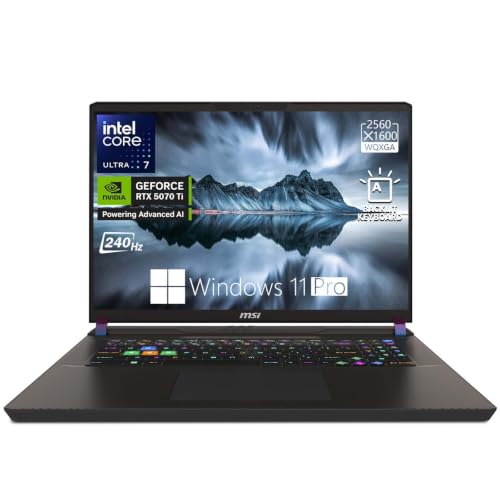
Our top pick: MSI Vector 16 HX AI RTX 5070 Ti
The Vector 16 HX AI pairs a 20-core Core Ultra 7 255HX with an RTX 5070 Ti at 140 W and ships with the 32 GB of memory NetEase recommends, which is the closest match to Ananta's recommended sheet short of an RTX 5080.
Quick picks
Pick | Laptop | Best for | Buy |
|---|---|---|---|
Best Overall | Closest match to the recommended tier | ||
Best Value | 32 GB of memory for less | ||
Best Premium | Clearing the recommended tier with room to spare | ||
Best Budget | 1080p Ananta at the lowest cost | ||
Editor's Pick | OLED and 32 GB in a lighter 15-inch body |
Best Overall
- Laptop
- Best for
Closest match to the recommended tier
Best Value
- Laptop
- Best for
32 GB of memory for less
Best Premium
- Laptop
- Best for
Clearing the recommended tier with room to spare
Best Budget
- Laptop
- Best for
1080p Ananta at the lowest cost
Editor's Pick
- Laptop
- Best for
OLED and 32 GB in a lighter 15-inch body
Specs at a glance
Laptop | GPU | CPU | Display | Memory | Storage |
|---|---|---|---|---|---|
RTX 5070 Ti Laptop, 12 GB, 140 W | Core Ultra 7 255HX, 20 cores | 16in QHD+ 240 Hz | 32 GB DDR5 | 1 TB | |
RTX 5070 Laptop, 8 GB, up to 85 W | Core i7-13620H, 10 cores | 16in WUXGA 165 Hz | 32 GB DDR5 | 1 TB | |
RTX 5080 Laptop, 16 GB, 175 W | Ryzen 9 9955HX3D, 16 cores | 16in 2560 x 1600 OLED 240 Hz | 32 GB DDR5 | 1 TB | |
RTX 5060 Laptop, 8 GB | Ryzen 5 240, 6 cores | 17.3in FHD IPS | 16 GB DDR5 | 512 GB | |
RTX 5060 Laptop, 8 GB | Ryzen 7 250, 8 cores | 15.3in 2560 x 1600 OLED 165 Hz | 32 GB | 1 TB |
- GPU
RTX 5070 Ti Laptop, 12 GB, 140 W
- CPU
Core Ultra 7 255HX, 20 cores
- Display
16in QHD+ 240 Hz
- Memory
32 GB DDR5
- Storage
1 TB
- GPU
RTX 5070 Laptop, 8 GB, up to 85 W
- CPU
Core i7-13620H, 10 cores
- Display
16in WUXGA 165 Hz
- Memory
32 GB DDR5
- Storage
1 TB
- GPU
RTX 5080 Laptop, 16 GB, 175 W
- CPU
Ryzen 9 9955HX3D, 16 cores
- Display
16in 2560 x 1600 OLED 240 Hz
- Memory
32 GB DDR5
- Storage
1 TB
- GPU
RTX 5060 Laptop, 8 GB
- CPU
Ryzen 5 240, 6 cores
- Display
17.3in FHD IPS
- Memory
16 GB DDR5
- Storage
512 GB
- GPU
RTX 5060 Laptop, 8 GB
- CPU
Ryzen 7 250, 8 cores
- Display
15.3in 2560 x 1600 OLED 165 Hz
- Memory
32 GB
- Storage
1 TB
Ananta requirements: minimum, recommended, laptop reality
Tier | CPU | GPU | Memory | Storage | Our picks |
|---|---|---|---|---|---|
Minimum (NetEase) | Core i5-9400F or Ryzen 7 3700X | GTX 1060 6 GB | 16 GB | 40 GB | Every pick clears it |
Recommended (NetEase) | Core i7-12700K or Ryzen 9 9900X | RTX 3080 | 32 GB | 100 GB | Vector 16 HX AI and AORUS Master 16 come closest |
Laptop reading (ours) | 8 or more current cores at full laptop power | RTX 5060 for 1080p high; RTX 5070 Ti or RTX 5080 for the recommended tier | 32 GB if you stream or record | 1 TB if Ananta shares the drive | Gaming A16 and Legion 5a match the memory on a smaller budget |
Minimum (NetEase)
- CPU
Core i5-9400F or Ryzen 7 3700X
- GPU
GTX 1060 6 GB
- Memory
16 GB
- Storage
40 GB
- Our picks
Every pick clears it
Recommended (NetEase)
- CPU
Core i7-12700K or Ryzen 9 9900X
- GPU
RTX 3080
- Memory
32 GB
- Storage
100 GB
- Our picks
Vector 16 HX AI and AORUS Master 16 come closest
Laptop reading (ours)
- CPU
8 or more current cores at full laptop power
- GPU
RTX 5060 for 1080p high; RTX 5070 Ti or RTX 5080 for the recommended tier
- Memory
32 GB if you stream or record
- Storage
1 TB if Ananta shares the drive
- Our picks
Gaming A16 and Legion 5a match the memory on a smaller budget
How we picked: reading Ananta's spec sheet for a laptop
Start with the official numbers. NetEase and developer Naked Rain posted two tiers after Gamescom 2026. The minimum is Windows 10 64-bit, a Core i5-9400F or Ryzen 7 3700X, a GTX 1060 6 GB, 16 GB of memory and 40 GB of storage. The recommended tier jumps to a Core i7-12700K or Ryzen 9 9900X, an RTX 3080, 32 GB of memory and 100 GB of storage. Steam's store page still lists the CPU and GPU lines as to be confirmed, so treat this as the pre-launch sheet, not the final word.
Desktop part names do not map one to one onto laptops. A GTX 1060 is a 2016 card, and every RTX 50 laptop GPU here outruns it comfortably. The RTX 3080 is a different story. At full wattage the RTX 5070 Ti Laptop is the tier that lands in its neighborhood, and the RTX 5080 Laptop clears it. An RTX 5060 or RTX 5070 laptop plays Ananta well at 1080p but sits below the recommended line, so we say so in each pick.
Memory is the filter people skip. NetEase asks for 16 GB at minimum and 32 GB recommended, which is unusually high for a free-to-play game. Three of our five picks ship with 32 GB, and the two that do not get a clear note about it.
Then read the wattage, not the sticker. Two laptops with the same GPU name can run it at very different power limits, and the difference shows up as frame rate in a dense city at night. Where the maker or a reviewer publishes the figure, it is in the specs table. For a wider view of how GPU tiers line up with screens, our GPU and monitor buying guide covers the matching logic.
Last, the mobile question. Ananta also launches on iOS and Android, and plenty of players will start on a phone. A laptop earns its place over the phone version with a bigger screen, sustained frame rates over long sessions, and room for a controller and Discord. If you want the cheapest workable entry instead, our guide to the best gaming laptops under 1000 goes lower than anything here.
Best Overall: MSI Vector 16 HX AI RTX 5070 Ti
Specs
CPU | Intel Core Ultra 7 255HX (20 cores) |
GPU | GeForce RTX 5070 Ti Laptop, 12 GB |
Max graphics power | 140 W (as reviewed) |
Display | 16 in QHD+ (2560 x 1600), 240 Hz |
Memory | 32 GB DDR5 |
Storage | 1 TB SSD |
Wireless | Wi-Fi 7 |
CPU
Intel Core Ultra 7 255HX (20 cores)
GPU
GeForce RTX 5070 Ti Laptop, 12 GB
Max graphics power
140 W (as reviewed)
Display
16 in QHD+ (2560 x 1600), 240 Hz
Memory
32 GB DDR5
Storage
1 TB SSD
Wireless
Wi-Fi 7
What it does well
This is the laptop that comes closest to NetEase's recommended sheet without the RTX 5080 premium. The RTX 5070 Ti runs at 140 W in GameStar's test, the full-power end of the range, and it carries 12 GB of VRAM, which leaves headroom if Ananta's high-texture settings turn out heavier than the spec sheet suggests.
The Core Ultra 7 255HX has 20 cores, more than the 12-core i7-12700K NetEase names, and Notebookcheck's spec listing shows it holding 80 W sustained. Open-world traversal at speed is where a weak CPU shows up first, so that headroom matters. The 32 GB of memory meets the recommended line outright.
The 16-inch QHD+ panel at 240 Hz is sharp enough for Ananta's anime art style and fast enough for driving and combat. Notebookcheck scored the reviewed Vector 16 HX AI at 84 percent.
What you give up
It is a thick, heavy 16-inch machine with a large power brick, and it needs the wall to hold those clocks. Battery play cuts performance hard.
Reports suggest the fans are loud under combined CPU and GPU load, which is what an open-world session looks like. Headphones help. A cooling pad helps more.
Check the listing title before you buy. The unit Notebookcheck reviewed shipped with 16 GB and 512 GB, and the Vector line is sold in several memory and storage builds.
Who it's for
The player who wants Ananta at high settings on a 1440p class screen, plays plugged in at a desk, and would rather pay for the GPU tier NetEase recommends than for a flagship badge.
Best Value: GIGABYTE Gaming A16 RTX 5070

Specs
CPU | Intel Core i7-13620H (10 cores, 16 threads) |
GPU | GeForce RTX 5070 Laptop, 8 GB |
Max graphics power | Up to 85 W (Gigabyte spec) |
Display | 16 in WUXGA (1920 x 1200), 165 Hz |
Memory | 32 GB DDR5 |
Storage | 1 TB SSD |
OS | Windows 11 Home |
CPU
Intel Core i7-13620H (10 cores, 16 threads)
GPU
GeForce RTX 5070 Laptop, 8 GB
Max graphics power
Up to 85 W (Gigabyte spec)
Display
16 in WUXGA (1920 x 1200), 165 Hz
Memory
32 GB DDR5
Storage
1 TB SSD
OS
Windows 11 Home
What it does well
The headline here is memory. Thirty-two gigabytes is NetEase's recommended number, and it usually costs a lot more than this to get it in a gaming laptop. That covers Ananta, Discord, a browser full of guides, and a recording tool without the system paging to disk.
The RTX 5070 is a clear step above the RTX 5060 tier, and a terabyte of storage takes Ananta's 100 GB recommended install without a cleanup first. The 16:10 WUXGA panel at 165 Hz suits 1080p class play, which is where this GPU is happiest.
What you give up
Wattage is the catch. Gigabyte lists the RTX 5070 at up to 85 W, and one spec listing shows 75 W. PC Gamer's review of the Gaming A16 line called the low power limit the main drawback, because the same GPU in a thicker chassis runs faster.
The Core i7-13620H is a Raptor Lake H chip with 10 cores, below the 12-core desktop chip NetEase recommends. Expect it to hold 60 frames at 1080p high rather than chase high refresh rates in busy areas.
Who it's for
The player who keeps a lot open beside the game, plays at 1080p, and wants the recommended memory tier without paying for a top GPU.
Best Premium: GIGABYTE AORUS Master 16 RTX 5080

Specs
CPU | AMD Ryzen 9 9955HX3D (16 cores, 3D V-Cache) |
GPU | GeForce RTX 5080 Laptop, 16 GB |
Max graphics power | 175 W with Dynamic Boost |
Display | 16 in 2560 x 1600 OLED, 240 Hz |
Memory | 32 GB DDR5 |
Storage | 1 TB SSD |
Model | AORUS Master 16 Gen 2 |
CPU
AMD Ryzen 9 9955HX3D (16 cores, 3D V-Cache)
GPU
GeForce RTX 5080 Laptop, 16 GB
Max graphics power
175 W with Dynamic Boost
Display
16 in 2560 x 1600 OLED, 240 Hz
Memory
32 GB DDR5
Storage
1 TB SSD
Model
AORUS Master 16 Gen 2
What it does well
This is the pick that clears Ananta's recommended sheet on every line. The RTX 5080 runs at 175 W with Dynamic Boost on Gigabyte's sheet, the most power any GPU here gets, and its 16 GB of VRAM removes the memory question for high textures at 1440p.
The Ryzen 9 9955HX3D adds a large stacked cache to 16 Zen 5 cores. Open-world games that stream a dense city as you drive through it lean on the CPU, and this is the strongest laptop processor on the list. The 32 GB of memory meets the recommended line.
The 240 Hz OLED panel suits Ananta's bright, saturated look better than any IPS screen here.
What you give up
Price and weight. You are paying for far more GPU than Ananta's spec sheet asks for, so this only makes sense if the laptop also runs heavier games or streams.
The OLED carries its own caveat. Reports suggest long sessions with a fixed HUD are the burn-in scenario people worry about on laptop OLED panels, and Ananta keeps a fixed on-screen HUD up for the whole session.
Fan noise under full load is real, and battery life is about five hours of web use in Notebookcheck's test, far less while gaming.
Who it's for
The player who wants Ananta at its highest settings, also plays other AAA games on the same machine, and does not want to think about requirements again for several years.
Best Budget: Acer Nitro V 17 RTX 5060

Specs
CPU | AMD Ryzen 5 240 (6 cores, 12 threads) |
GPU | GeForce RTX 5060 Laptop, 8 GB |
Display | 17.3 in FHD (1920 x 1080) IPS |
Memory | 16 GB DDR5 |
Storage | 512 GB SSD |
Battery | 76 Wh |
Model | ANV17-41-R8ML |
CPU
AMD Ryzen 5 240 (6 cores, 12 threads)
GPU
GeForce RTX 5060 Laptop, 8 GB
Display
17.3 in FHD (1920 x 1080) IPS
Memory
16 GB DDR5
Storage
512 GB SSD
Battery
76 Wh
Model
ANV17-41-R8ML
What it does well
This is the cheapest laptop here, and it still clears Ananta's minimum sheet with a wide margin. The RTX 5060 is several generations past the GTX 1060 NetEase names, and its 8 GB of VRAM handles 1080p high settings in current open-world games.
The 17.3-inch screen is the largest on the list. For a player coming over from the phone version, that jump in size is the most obvious upgrade, and the full-size keyboard leaves room for a number pad.
What you give up
Sixteen gigabytes is NetEase's minimum, not its recommended number. Ananta plus Discord and a browser will fill it, so plan on closing tabs or adding memory later.
The Ryzen 5 240 has 6 cores, the fewest here, and it will be the first part to limit frame rates in crowded city scenes. The 512 GB drive fits the 100 GB install, but not much else alongside it. Listing details conflict on storage, so plan on 512 GB.
Acer does not publish the RTX 5060 power limit for this build, so expect it to trail the 115 W versions in thicker chassis that our RTX 5060 gaming laptop guide ranks.
Who it's for
The player moving up from mobile who wants Ananta to run well at 1080p on a big screen and does not need the recommended tier.
Editor's Pick: Lenovo Legion 5a RTX 5060 OLED

Specs
CPU | AMD Ryzen 7 250 (8 cores, 16 threads) |
GPU | GeForce RTX 5060 Laptop, 8 GB |
Display | 15.3 in WQXGA (2560 x 1600) OLED, 165 Hz |
Memory | 32 GB |
Storage | 1 TB SSD |
Model year | 2026 |
Color | Eclipse Black |
CPU
AMD Ryzen 7 250 (8 cores, 16 threads)
GPU
GeForce RTX 5060 Laptop, 8 GB
Display
15.3 in WQXGA (2560 x 1600) OLED, 165 Hz
Memory
32 GB
Storage
1 TB SSD
Model year
2026
Color
Eclipse Black
What it does well
This is the Ananta pick for players who care about how the game looks. Ananta's art direction is bright and color-heavy, and a 2560 by 1600 OLED panel at 165 Hz shows it off in a way no IPS screen at this tier can.
It also ships with 32 GB of memory, NetEase's recommended figure, and a terabyte of storage. The 15.3-inch chassis is smaller than every other pick, which makes it the easiest to carry to a friend's place or a couch. Notebookcheck lists the RTX 5060 at 115 W in a reviewed Legion 5a configuration, though Lenovo does not state the figure for this exact build.
What you give up
The RTX 5060 sits below the recommended RTX 3080 line, and the native 2560 by 1600 resolution is more than it can drive at high settings. Plan on running Ananta at a lower render resolution with upscaling.
Lenovo sells the Legion 5a with several CPU and GPU pairings, and one launch report paired the Ryzen 7 250 with an RTX 5050. Check that the listing names the RTX 5060 before you buy. The same OLED burn-in caveat as the AORUS applies to a fixed HUD over long sessions.
Who it's for
The player who wants the best-looking screen for the money, plays at a desk and on the couch, and values 32 GB of memory over a bigger GPU.
Bottom line
If you want the closest match to NetEase's recommended sheet, buy the MSI Vector 16 HX AI RTX 5070 Ti.
If you want 32 GB of memory for less and play at 1080p, buy the GIGABYTE Gaming A16 RTX 5070.
If you want every spec line cleared with years of headroom, buy the GIGABYTE AORUS Master 16 RTX 5080.
If you are moving up from mobile on a tight budget, the Acer Nitro V 17 RTX 5060 runs Ananta well at 1080p.
If the screen matters most, the Lenovo Legion 5a RTX 5060 OLED is the one to look at.
Long sessions on any of these run cooler on one of the best cooling pads for gaming laptops.
FAQ
Can a laptop run Ananta?
Yes. NetEase's posted minimum is a GTX 1060 6 GB, a Core i5-9400F or Ryzen 7 3700X class CPU, 16 GB of memory and 40 GB of storage, and any current RTX 50 gaming laptop clears that. The recommended tier is harder: an RTX 3080, a 12-core class CPU and 32 GB of memory. On a laptop that means an RTX 5070 Ti or RTX 5080 at full power, like our Best Overall and Best Premium picks.
What are the Ananta laptop requirements?
NetEase does not publish a laptop-specific sheet, so read the desktop one. Minimum: Windows 10 64-bit, GTX 1060 6 GB, Core i5-9400F or Ryzen 7 3700X, 16 GB of memory, 40 GB of storage. Recommended: RTX 3080, Core i7-12700K or Ryzen 9 9900X, 32 GB of memory, 100 GB of storage. These were posted after Gamescom 2026 and may change before the January 15 launch.
Is 16 GB of RAM enough for Ananta?
It meets the minimum, but NetEase recommends 32 GB, which is high for a free-to-play game. Sixteen gigabytes runs the game, but Discord, a browser and a recording tool on top will push it. If you stream or keep a lot open, pick a laptop that ships with 32 GB, like the Gaming A16 or Legion 5a, rather than planning an upgrade later.
Is 8 GB of VRAM enough for Ananta?
For 1080p at high settings, it should be. Every pick here has at least 8 GB, well above the GTX 1060's 6 GB minimum. At 1440p with the highest textures, the 12 GB on the RTX 5070 Ti and the 16 GB on the RTX 5080 give more room, which is part of why those two sit closest to the recommended tier.
Should I play Ananta on a laptop or on my phone?
Ananta launches on iOS and Android alongside PC and PS5, so the phone works as a starting point. A gaming laptop earns its place with a far larger screen, higher and steadier frame rates over long sessions, and room for a controller, a headset and Discord. If you already play on mobile and want the cheapest step up, start with the Acer Nitro V 17.
How much storage does Ananta need on PC?
NetEase's posted figures are 40 GB at minimum and 100 GB recommended. Open-world games tend to grow with patches, so plan on the higher number. A 512 GB drive like the Nitro V 17's fits it, but leaves little room for anything else; the 1 TB drives on the other four picks are the safer size.
Related Articles

Best Gaming Laptops for WoW Forever (2026): 5 Launch Picks
The best laptop for WoW Forever pairs raid-ready CPU cores with an 8 GB GPU and 128 GB of free SSD. Five Amazon-sold picks, from an RTX 5050 to an X3D raid rig.
Nov 7, 2026

Best RTX 5060 Gaming Laptops (2026): 115W Picks by Budget
The best RTX 5060 gaming laptop runs the GPU at 115W. Five picks at 100W or more, from a Lenovo LOQ to OLED models, plus the TGP of 15 laptops to check.
Nov 25, 2026

Best Gaming Laptops Under $1,000 (2026): RTX 4050 vs 5050
The best gaming laptops under $1,000 in 2026 run RTX 4050 and 3050 chips: four honest picks, one RTX 5050 stretch, the 8GB RAM fix, and when to wait for a sale.
Oct 24, 2026

Best Cooling Pads for Gaming Laptops (2026 Buyer Guide)
The best cooling pad for gaming laptops hinges on one fork: sealed-chamber turbofans that stop throttling, or quiet open-fan pads. Five picks by size.
Jul 15, 2026

Best Gaming Laptops for Aion 2 (2026): 5 Picks Ranked
The best laptop for Aion 2 beats the RTX 2070 and 16 GB the game asks for at its Low preset. Five picks, from an RTX 5050 budget laptop to an RTX 5080.
Nov 7, 2026