Affiliate Disclosure: As an Amazon Associate we earn from qualifying purchases. Some links may earn us a commission at no cost to you.

Best Gaming Laptop for Gears of War: E-Day (2026): 5 Picks
The best gaming laptop for Gears of War: E-Day is one with a hardware ray tracing GPU running at full wattage, enough VRAM for the settings you want, and room on the SSD for a 115 GB install. Our pick is the Acer Predator Helios Neo 16, with a 140 W RTX 5070 Ti and 12 GB of VRAM driving a 1600p 240 Hz panel.
E-Day's spec sheet names desktop cards, and ray tracing is mandatory at every tier. Below, each laptop is mapped to the official tiers and to the settings it can hold.
Our top pick: Acer Predator Helios Neo 16 RTX 5070 Ti
The Helios Neo 16 runs its RTX 5070 Ti at 140 W with 12 GB of VRAM, which clears the 10 to 11 GB E-Day used at 1440p-class settings in the beta, and pairs it with a 24-core Core Ultra 9 275HX.

Quick picks
Pick | Laptop | E-Day target | Buy |
|---|---|---|---|
Best Overall | 1600p High with DLSS, 60 to 100+ fps | ||
Best Value | 1080p to 1440p Medium-High with DLSS, 60+ fps | ||
Best Premium | 1600p Ultra with DLSS, ray traced presets maxed | ||
Best Budget | 1080p Medium with DLSS, 60 fps | ||
Editor's Pick | 1600p High, steadiest frame times in Horde and versus |
Best Overall
- Laptop
- E-Day target
1600p High with DLSS, 60 to 100+ fps
- Buy
Best Value
- Laptop
- E-Day target
1080p to 1440p Medium-High with DLSS, 60+ fps
- Buy
Best Premium
- Laptop
- E-Day target
1600p Ultra with DLSS, ray traced presets maxed
- Buy
Best Budget
- Laptop
- E-Day target
1080p Medium with DLSS, 60 fps
- Buy
Editor's Pick
- Laptop
- E-Day target
1600p High, steadiest frame times in Horde and versus
- Buy
Specs at a glance
Laptop | GPU and VRAM | Max graphics power | RAM | SSD | Display |
|---|---|---|---|---|---|
GeForce RTX 5070 Ti Laptop, 12 GB GDDR7 | 140 W | 16 GB DDR5 | 1 TB PCIe Gen 4 SSD | 16in WQXGA (2560 x 1600), 240 Hz, G-SYNC | |
GeForce RTX 5070 Laptop, 8 GB GDDR7 | 115 W | 32 GB DDR5 | 1 TB NVMe SSD | 15.6in QHD+, 165 Hz | |
GeForce RTX 5080 Laptop, 16 GB GDDR7 | 175 W | 64 GB DDR5 | 2 TB (2 x 1 TB) NVMe SSD | 16in WQXGA OLED, 240 Hz, 500 nits | |
GeForce RTX 5060 Laptop, 8 GB GDDR7 | Up to 115 W with Dynamic Boost | 16 GB DDR5 | 512 GB PCIe SSD | 15.6in FHD IPS, 144 Hz | |
GeForce RTX 5070 Ti Laptop, 12 GB GDDR7 | 140 W (115 W + 25 W Dynamic Boost) | 32 GB DDR5-5600 | 1 TB PCIe Gen 4 SSD | 16in 2.5K (2560 x 1600), 240 Hz, 3 ms |
- GPU and VRAM
GeForce RTX 5070 Ti Laptop, 12 GB GDDR7
- Max graphics power
140 W
- RAM
16 GB DDR5
- SSD
1 TB PCIe Gen 4 SSD
- Display
16in WQXGA (2560 x 1600), 240 Hz, G-SYNC
- GPU and VRAM
GeForce RTX 5070 Laptop, 8 GB GDDR7
- Max graphics power
115 W
- RAM
32 GB DDR5
- SSD
1 TB NVMe SSD
- Display
15.6in QHD+, 165 Hz
- GPU and VRAM
GeForce RTX 5080 Laptop, 16 GB GDDR7
- Max graphics power
175 W
- RAM
64 GB DDR5
- SSD
2 TB (2 x 1 TB) NVMe SSD
- Display
16in WQXGA OLED, 240 Hz, 500 nits
- GPU and VRAM
GeForce RTX 5060 Laptop, 8 GB GDDR7
- Max graphics power
Up to 115 W with Dynamic Boost
- RAM
16 GB DDR5
- SSD
512 GB PCIe SSD
- Display
15.6in FHD IPS, 144 Hz
- GPU and VRAM
GeForce RTX 5070 Ti Laptop, 12 GB GDDR7
- Max graphics power
140 W (115 W + 25 W Dynamic Boost)
- RAM
32 GB DDR5-5600
- SSD
1 TB PCIe Gen 4 SSD
- Display
16in 2.5K (2560 x 1600), 240 Hz, 3 ms
How we picked a gaming laptop for Gears of War: E-Day
Laptop GPU | VRAM | Where it lands on the official sheet | Realistic E-Day target |
|---|---|---|---|
RTX 5050 Laptop | 8 GB | Minimum row | 1080p Low to Medium, DLSS on |
RTX 5060 Laptop | 8 GB | Recommended GPU name, lower power | 1080p Medium, DLSS on |
RTX 5070 Laptop | 8 GB | Above recommended, same VRAM | 1080p High or 1440p Medium, DLSS on |
RTX 5070 Ti Laptop | 12 GB | Clears the 1440p VRAM use | 1600p High, DLSS on |
RTX 5080 Laptop | 16 GB | Room for the top presets | 1600p Ultra, DLSS on |
RTX 5050 Laptop
- VRAM
8 GB
- Where it lands on the official sheet
Minimum row
- Realistic E-Day target
1080p Low to Medium, DLSS on
RTX 5060 Laptop
- VRAM
8 GB
- Where it lands on the official sheet
Recommended GPU name, lower power
- Realistic E-Day target
1080p Medium, DLSS on
RTX 5070 Laptop
- VRAM
8 GB
- Where it lands on the official sheet
Above recommended, same VRAM
- Realistic E-Day target
1080p High or 1440p Medium, DLSS on
RTX 5070 Ti Laptop
- VRAM
12 GB
- Where it lands on the official sheet
Clears the 1440p VRAM use
- Realistic E-Day target
1600p High, DLSS on
RTX 5080 Laptop
- VRAM
16 GB
- Where it lands on the official sheet
Room for the top presets
- Realistic E-Day target
1600p Ultra, DLSS on
Start with the hard floor. E-Day ray traces its reflections, shadows and global illumination with no fallback path, so a GPU without ray tracing hardware does not launch the game. Every pick here is an RTX 50 laptop, and the table above maps each laptop chip onto the desktop cards The Coalition lists.
Then read the wattage, not the sticker. A laptop RTX 5070 can ship at 85 W in one chassis and 115 W in another, and the lower figure gives up a large share of its performance under sustained load. Every pick runs its graphics chip at or near the top of its power range.
VRAM decides the settings tier. In the multiplayer beta, GameGPU measured roughly 8 to 9 GB of video memory in use at 1080p on the top preset and 10 to 11 GB at 1440p. That puts the 8 GB laptop chips on High at 1080p and makes 12 GB the entry point for 1600p panels. If you are unsure which chip to target, our GPU guide for Gears of War: E-Day covers the desktop side of the same question.
Finally, size memory and storage for what the game uses. The same beta used 18 to 23 GB of system RAM at max settings, so we favored 32 GB where the price allowed, and the install wants an SSD with at least 115 GB free. If a desktop is on the table, our prebuilt picks for E-Day buy more frame rate per dollar.
How we weighed graphics power
Higher sustained wattage means more of the chip's performance survives inside a laptop chassis.
- 175 W
- 140 W
- 140 W
- 115 W
- 115 W
We have no measured E-Day frame rates for RTX 50 laptops from a reviewer we trust, and estimator sites are not data. So instead of inventing a chart, here is the number that separates a fast laptop chip from a slow one with the same name: sustained graphics power.
Read it alongside the VRAM column above. The two RTX 5070 Ti machines share a wattage, so the CPU and memory decide between them; the RTX 5060 and RTX 5070 picks share a wattage too, so the chip tier and the 32 GB decide there.
Best Overall: Acer Predator Helios Neo 16 RTX 5070 Ti
Specs
CPU | Intel Core Ultra 9 275HX (24 cores) |
GPU | GeForce RTX 5070 Ti Laptop, 12 GB GDDR7 |
Max graphics power | 140 W |
Display | 16in WQXGA (2560 x 1600), 240 Hz, G-SYNC |
Memory | 16 GB DDR5 |
Storage | 1 TB PCIe Gen 4 SSD |
Model | PHN16-73-92B8 |
CPU
Intel Core Ultra 9 275HX (24 cores)
GPU
GeForce RTX 5070 Ti Laptop, 12 GB GDDR7
Max graphics power
140 W
Display
16in WQXGA (2560 x 1600), 240 Hz, G-SYNC
Memory
16 GB DDR5
Storage
1 TB PCIe Gen 4 SSD
Model
PHN16-73-92B8
What it does well
The RTX 5070 Ti here runs at 140 W, the top of its range, and carries 12 GB of GDDR7. That is the line that matters in E-Day: the beta used 10 to 11 GB of video memory at 1440p-class settings, which an 8 GB chip cannot hold without dropping texture quality. On the 2560 x 1600 panel with DLSS set to Quality, High settings are the natural home for this machine.
The 24-core Core Ultra 9 275HX keeps up with the busy multiplayer and Horde scenes where E-Day loads up to 16 threads, and the 240 Hz G-SYNC panel smooths out the frame rate swings an Unreal Engine 5 game produces. The 1 TB SSD takes the install with room for a few more games.
What you give up
Memory is the weak spot. The 16 GB meets the recommended row, but the beta used 18 to 23 GB of system RAM at max settings, so expect to lower a setting or two or close background apps. If you play with a browser and Discord open, budget for a memory upgrade.
This PHN16-73-92B8 configuration is the IPS 240 Hz panel, not the OLED some Helios Neo listings carry, and the chassis runs warm and weighs about 2.7 kg. It is a desk laptop that travels, not a carry-everywhere one.
Who it's for
The player who wants E-Day at 1600p High with DLSS and a fast panel, and does not want to pay RTX 5080 money to get there.
Best Value: MSI Katana 15 HX RTX 5070

Specs
CPU | Intel Core i9-14900HX (24 cores) |
GPU | GeForce RTX 5070 Laptop, 8 GB GDDR7 |
Max graphics power | 115 W |
Display | 15.6in QHD+, 165 Hz |
Memory | 32 GB DDR5 |
Storage | 1 TB NVMe SSD |
Model | B14WGK-016US |
CPU
Intel Core i9-14900HX (24 cores)
GPU
GeForce RTX 5070 Laptop, 8 GB GDDR7
Max graphics power
115 W
Display
15.6in QHD+, 165 Hz
Memory
32 GB DDR5
Storage
1 TB NVMe SSD
Model
B14WGK-016US
What it does well
The Katana 15 HX runs its RTX 5070 at 115 W, the full rating for the chip, where some RTX 5070 laptops sit at 85 W. It also ships with 32 GB of DDR5, which covers the 18 to 23 GB the beta used at max settings, and a 1 TB SSD that holds the install without a cleanup pass.
The 24-core Core i9-14900HX is more processor than E-Day needs, which keeps the CPU out of the way in crowded multiplayer fights. The 165 Hz QHD+ panel gives you a sharper image than a 1080p screen, and DLSS Performance at that resolution is a sensible way to hold 60 fps and up.
What you give up
The 8 GB of VRAM is the limit. It matches the desktop RTX 5060 on the recommended row, but the beta used 8 to 9 GB at 1080p on the top preset, so plan on High rather than the maximum texture setting, especially at QHD+.
The Katana's build is plastic and plain, and the 14900HX runs hot under a combined CPU and GPU load, so the fans get loud. A cooling pad helps on long sessions.
Who it's for
The 1080p to 1440p player who wants High settings with DLSS and the 32 GB of RAM E-Day actually uses, without stepping up to a 5070 Ti.
Best Premium: Lenovo Legion Pro 7i Gen 10 RTX 5080

Specs
CPU | Intel Core Ultra 9 275HX (24 cores) |
GPU | GeForce RTX 5080 Laptop, 16 GB GDDR7 |
Max graphics power | 175 W |
Display | 16in WQXGA OLED, 240 Hz, 500 nits |
Memory | 64 GB DDR5 |
Storage | 2 TB (2 x 1 TB) NVMe SSD |
OS | Windows 11 Pro |
CPU
Intel Core Ultra 9 275HX (24 cores)
GPU
GeForce RTX 5080 Laptop, 16 GB GDDR7
Max graphics power
175 W
Display
16in WQXGA OLED, 240 Hz, 500 nits
Memory
64 GB DDR5
Storage
2 TB (2 x 1 TB) NVMe SSD
OS
Windows 11 Pro
What it does well
The RTX 5080 Laptop is the only mobile chip in this lineup with 16 GB of VRAM, and Lenovo runs it at 175 W. That is the headroom E-Day's top presets want, with ray traced reflections and global illumination maxed and DLSS doing the upscaling at 1600p.
The rest of the machine matches. A 24-core Core Ultra 9 275HX, 64 GB of DDR5 and 2 TB of storage across two drives mean you never think about memory or install space. The 240 Hz OLED panel, at 500 nits, is the best way to see the game's lighting on a laptop.
What you give up
Cost, heat and weight. Reviewers recorded the CPU running at 90 to 100 C under load, and gaming battery life lands around 1 to 1.5 hours, so this is a plugged-in machine.
OLED also brings a burn-in caution for games with static HUD elements. Vary what is on screen and let the panel's care features run. For most players the Best Overall delivers most of the experience for a lot less.
Who it's for
The player who wants E-Day at Ultra with the ray traced settings maxed on an OLED panel, and plans to keep the laptop for years.
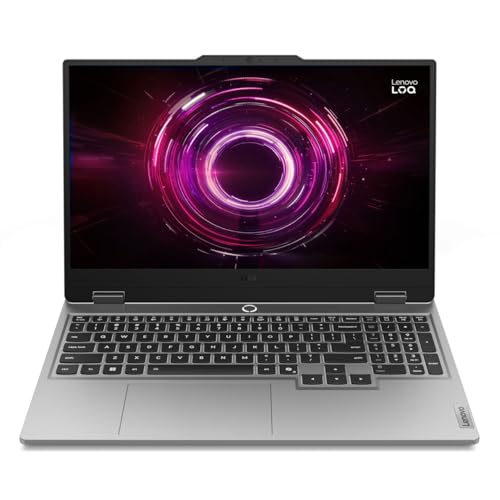
Best Budget: Lenovo LOQ 15 RTX 5060
Specs
CPU | AMD Ryzen 7 250 (8 cores, 16 threads) |
GPU | GeForce RTX 5060 Laptop, 8 GB GDDR7 |
Max graphics power | Up to 115 W with Dynamic Boost |
Display | 15.6in FHD IPS, 144 Hz |
Memory | 16 GB DDR5 |
Storage | 512 GB PCIe SSD |
CPU
AMD Ryzen 7 250 (8 cores, 16 threads)
GPU
GeForce RTX 5060 Laptop, 8 GB GDDR7
Max graphics power
Up to 115 W with Dynamic Boost
Display
15.6in FHD IPS, 144 Hz
Memory
16 GB DDR5
Storage
512 GB PCIe SSD
What it does well
The LOQ 15 runs its RTX 5060 at up to 115 W with Dynamic Boost, the full rating for the chip. The RTX 5060 is the GPU named on E-Day's recommended row, and at full wattage it is the cheapest laptop chip we would buy for this game.
At 1080p on Medium with DLSS on, it holds a playable 60 fps, and the 144 Hz IPS panel matches what this chip can deliver. The 8-core Ryzen 7 250 has enough threads for the campaign and versus modes.
What you give up
The laptop chip carries the desktop card's name but not its power, so treat the recommended tier as a 1080p target here, not 1440p. The 8 GB of VRAM rules out the top texture preset.
The 512 GB SSD is the bigger problem. After Windows, a 115 GB install that early listings put at 130 GB, plus patches, eats a large share of the drive. Plan on adding a second NVMe drive. The 16 GB of RAM is also tight against the 18 to 23 GB the beta used at max settings.
Who it's for
The 1080p player on a tight budget who wants E-Day at Medium with DLSS and will add storage later. Our RTX 5060 laptop guide has more options at this tier.
Editor's Pick: ASUS ROG Strix G16 X3D RTX 5070 Ti

Specs
CPU | AMD Ryzen 9 9955HX3D (16 cores, 3D V-Cache) |
GPU | GeForce RTX 5070 Ti Laptop, 12 GB GDDR7 |
Max graphics power | 140 W (115 W + 25 W Dynamic Boost) |
Display | 16in 2.5K (2560 x 1600), 240 Hz, 3 ms |
Memory | 32 GB DDR5-5600 |
Storage | 1 TB PCIe Gen 4 SSD |
Wireless | Wi-Fi 6E |
CPU
AMD Ryzen 9 9955HX3D (16 cores, 3D V-Cache)
GPU
GeForce RTX 5070 Ti Laptop, 12 GB GDDR7
Max graphics power
140 W (115 W + 25 W Dynamic Boost)
Display
16in 2.5K (2560 x 1600), 240 Hz, 3 ms
Memory
32 GB DDR5-5600
Storage
1 TB PCIe Gen 4 SSD
Wireless
Wi-Fi 6E
What it does well
This Strix G16 pairs the same 140 W, 12 GB RTX 5070 Ti as our top pick with the Ryzen 9 9955HX3D, a 16-core chip with 3D V-Cache, and 32 GB of DDR5. GameGPU saw E-Day load up to 16 threads in the beta, so the extra cores and cache keep frame times steadier in crowded Horde waves and versus matches.
The 32 GB covers the 18 to 23 GB of RAM the game used at max settings, and the 2.5K 240 Hz panel with a 3 ms response is sharp and fast. You get the top pick's settings tier with fewer dips.
What you give up
You pay well above the Best Overall for the same graphics chip, and the gains show up as smoother frame times rather than a higher average. The 12 GB of VRAM is the same ceiling as the top pick, so the top preset at 1600p is still a stretch.
The X3D chip and 5070 Ti together make for a hot, loud machine under load, and the cache advantage matters less in the single-player campaign.
Who it's for
The player who spends most of their time in Horde and ranked versus, wants 32 GB out of the box and values steady frame times over a higher peak.
Bottom line
If you want the best balance for E-Day, buy the Acer Predator Helios Neo 16 RTX 5070 Ti and play at 1600p High with DLSS.
If you want the full 32 GB of RAM for less, buy the MSI Katana 15 HX RTX 5070 and play at High.
If you want Ultra with ray tracing maxed, buy the Lenovo Legion Pro 7i Gen 10 RTX 5080.
If budget comes first, buy the Lenovo LOQ 15 RTX 5060 and add an SSD. If you live in Horde and versus, the ASUS ROG Strix G16 X3D RTX 5070 Ti is the steadier machine. Pairing it with a desktop later? Our CPU picks for E-Day cover that side.
FAQ
Can a gaming laptop run Gears of War: E-Day?
Yes, as long as the graphics chip has hardware ray tracing. E-Day has no non-RT fallback, so any RTX laptop clears the floor and older GTX machines do not launch it. For the recommended 1440p High tier, an RTX 5060 or better at full wattage is the realistic start, with DLSS on. Add 16 GB of RAM as a minimum, 32 GB for comfort, and an SSD with at least 130 GB free to be safe.
Is an RTX 5060 laptop enough for Gears of War: E-Day?
For 1080p at Medium to High with DLSS, yes. The RTX 5060 is the GPU name on the recommended row, but the laptop chip runs at a fraction of the desktop card's power, so treat the recommended tier as a 1080p target on a laptop rather than 1440p. Its 8 GB of VRAM is also below what the top preset used in the beta, so keep textures off the maximum. The Best Budget LOQ 15 runs it at the full 115 W.
Does Gears of War: E-Day need ray tracing on a laptop?
Yes. The Coalition lists a hardware ray tracing capable GPU as a requirement at every tier, because reflections, shadows and global illumination are ray traced with no fallback path. Every RTX 20 series and newer laptop qualifies, as do AMD laptops with RDNA 2 or newer graphics. GTX 16 series and older laptops cannot run the game, whatever their other specs look like.
How much storage does Gears of War: E-Day need on a laptop?
The final requirements call for 115 GB on an SSD, and earlier Steam listings said 130 GB, so plan around the larger number. A hard drive is not supported. On a 512 GB laptop like the Best Budget pick, Windows plus E-Day plus patches eats a large share of the drive, so a 1 TB model or a second NVMe drive is the better long-term buy.
Is 16 GB of RAM enough for Gears of War: E-Day?
It meets the recommended row, but it is tight. GameGPU measured 18 to 23 GB of system memory in use at maximum settings during the multiplayer beta, which spills past 16 GB. On a 16 GB laptop, lower settings a step and close background apps. If you are buying new, 32 GB is the safer spec, which is why the Best Value and Editor's Pick both ship with it.
Can an RTX 5050 laptop run Gears of War: E-Day?
Yes, at the minimum tier. The RTX 5050 is one of the GPUs named on the minimum row, which targets 1080p at 60 fps on Medium with upscaling. Expect to stay at Low to Medium and lean on DLSS. If E-Day is the main game you are buying for, the step up to a full-power RTX 5060 is the better spend, but our RTX 5050 laptop guide covers the floor.
Related Articles

Best GPUs for Gears of War: E-Day (2026): 5 Tiered Picks
The best GPU for Gears of War: E-Day depends on the settings tier you actually want to hold. Five picks from 1080p high up to 4K, plus the 130 GB SSD floor.
Sep 14, 2026

Best Prebuilt PC for Gears of War: E-Day (2026): 5 Picks
The best prebuilt PC for Gears of War: E-Day, matched to its 1080p, 1440p and 4K tiers: 5 ray tracing-ready systems with the memory and SSD space it needs.
Oct 12, 2026

Best CPUs for Gears of War: E-Day (2026): 5 Tiered Picks
The best CPU for Gears of War: E-Day is cheaper than most buyers expect. Five tiered picks mapped to the official 1080p, 1440p and 4K spec targets for 2026.
Sep 20, 2026

Best RTX 5070 Ti Gaming Laptops (2026): TGP-Ranked Picks
The best RTX 5070 Ti gaming laptops of 2026, ranked by the GPU power each chassis sustains. Five picks from 14 to 16 inches, plus the 32GB RAM call to make.
Oct 30, 2026

Best RTX 5060 Gaming Laptops (2026): 5 TGP-Ranked Picks
The best RTX 5060 gaming laptop is the one with the highest TGP. We rank five picks by sustained wattage, from a 115W ASUS TUF F16 down to an 85W Acer Nitro.
Sep 7, 2026