Affiliate Disclosure: As an Amazon Associate we earn from qualifying purchases. Some links may earn us a commission at no cost to you.

Best Laptop for Overwatch 2 (2026): 5 Picks by Refresh Rate
Finding the best laptop for Overwatch 2 comes down to one match: the graphics chip has to keep up with the screen. Overwatch 2 runs on modest hardware, but competitive play lives at 165, 240 or 300 frames per second, and a laptop that cannot feed its own panel wastes the refresh rate you paid for.
So these five gaming laptops are tiered by panel speed, and each GPU is sized to hold that panel at competitive settings. Processor, cooling and memory come next.
Our top pick: ASUS ROG Strix G16 RTX 5060
The Strix G16 pairs Intel's Core Ultra 9 275HX with a 2.5K 240Hz panel and an RTX 5060, the cheapest GPU tier we would trust to push a 240Hz screen in Overwatch 2 at competitive settings.

Quick picks
Pick | Laptop | Refresh target | Buy |
|---|---|---|---|
Best Overall | 240Hz ranked play | ||
Best Value | 165Hz at 1440p, or dock to 240Hz | ||
Best Premium | 300Hz, the laptop ceiling | ||
Best Budget | 165Hz on a fixed budget | ||
Editor's Pick | 240Hz at higher settings |
Best Overall
- Laptop
- Refresh target
240Hz ranked play
Best Value
- Laptop
- Refresh target
165Hz at 1440p, or dock to 240Hz
Best Premium
- Laptop
- Refresh target
300Hz, the laptop ceiling
Best Budget
- Laptop
- Refresh target
165Hz on a fixed budget
Editor's Pick
- Laptop
- Refresh target
240Hz at higher settings
Specs at a glance
Laptop | CPU | GPU | Display | Memory | Storage |
|---|---|---|---|---|---|
Intel Core Ultra 9 275HX (24 cores) | GeForce RTX 5060 Laptop, 8 GB | 16in 2.5K 16:10, 240 Hz, 3 ms | 16 GB DDR5 | 1 TB PCIe SSD | |
Intel Core i7-14650HX (16 cores) | GeForce RTX 5060 Laptop, 8 GB | 15.6in QHD, 165 Hz | 16 GB DDR5 | 1 TB NVMe SSD | |
AMD Ryzen 9 9955HX3D (16 cores, 3D V-Cache) | GeForce RTX 5070 Ti Laptop, 12 GB | 16in 2.5K 16:10, 300 Hz, 3 ms | 32 GB DDR5-5600 | 1 TB PCIe SSD | |
Intel Core i5-13450HX (10 cores) | GeForce RTX 5050 Laptop, 8 GB | 16in FHD+ 16:10, 165 Hz | 16 GB DDR5 | 512 GB PCIe Gen 4 SSD | |
Intel Core Ultra 9 275HX (24 cores) | GeForce RTX 5070 Ti Laptop, 12 GB | 16in WQXGA, 240 Hz, G-Sync | 16 GB DDR5 | 1 TB PCIe Gen 4 SSD |
- CPU
Intel Core Ultra 9 275HX (24 cores)
- GPU
GeForce RTX 5060 Laptop, 8 GB
- Display
16in 2.5K 16:10, 240 Hz, 3 ms
- Memory
16 GB DDR5
- Storage
1 TB PCIe SSD
- CPU
Intel Core i7-14650HX (16 cores)
- GPU
GeForce RTX 5060 Laptop, 8 GB
- Display
15.6in QHD, 165 Hz
- Memory
16 GB DDR5
- Storage
1 TB NVMe SSD
- CPU
AMD Ryzen 9 9955HX3D (16 cores, 3D V-Cache)
- GPU
GeForce RTX 5070 Ti Laptop, 12 GB
- Display
16in 2.5K 16:10, 300 Hz, 3 ms
- Memory
32 GB DDR5-5600
- Storage
1 TB PCIe SSD
- CPU
Intel Core i5-13450HX (10 cores)
- GPU
GeForce RTX 5050 Laptop, 8 GB
- Display
16in FHD+ 16:10, 165 Hz
- Memory
16 GB DDR5
- Storage
512 GB PCIe Gen 4 SSD
- CPU
Intel Core Ultra 9 275HX (24 cores)
- GPU
GeForce RTX 5070 Ti Laptop, 12 GB
- Display
16in WQXGA, 240 Hz, G-Sync
- Memory
16 GB DDR5
- Storage
1 TB PCIe Gen 4 SSD
How we picked the best laptop for Overwatch 2
Target | CPU | GPU | Memory |
|---|---|---|---|
Minimum (Blizzard) | Intel Core i3 / AMD Phenom X3 8650 | GeForce GTX 600 series / Radeon HD 7000 series | 6 GB |
Recommended (Blizzard) | Intel Core i7 / AMD Ryzen 5 | GeForce GTX 1060 / Radeon R9 380 | 8 GB |
1080p, 144+ fps (NVIDIA) | Not stated | GeForce RTX 3060 (desktop) | Not stated |
1080p, 360+ fps (NVIDIA) | Not stated | GeForce RTX 3080 Ti (desktop) | Not stated |
Minimum (Blizzard)
- CPU
Intel Core i3 / AMD Phenom X3 8650
- GPU
GeForce GTX 600 series / Radeon HD 7000 series
- Memory
6 GB
Recommended (Blizzard)
- CPU
Intel Core i7 / AMD Ryzen 5
- GPU
GeForce GTX 1060 / Radeon R9 380
- Memory
8 GB
1080p, 144+ fps (NVIDIA)
- CPU
Not stated
- GPU
GeForce RTX 3060 (desktop)
- Memory
Not stated
1080p, 360+ fps (NVIDIA)
- CPU
Not stated
- GPU
GeForce RTX 3080 Ti (desktop)
- Memory
Not stated
Blizzard's published spec sheet is the easy part. The recommended tier asks for a Core i7 or Ryzen 5, a GTX 1060-class card and 8 GB of memory, plus about 50 GB of storage. Every laptop on this page clears that by a wide margin, so the useful question is how many frames past 144 you want.
NVIDIA's launch guidance answers that, with a catch. It names an RTX 3060 for 144 fps at 1080p and an RTX 3080 Ti for 360 fps, and those are desktop cards. Laptop GPUs run at lower power, so we sized each tier with margin. Overwatch 2 also leans on the graphics chip harder than Valorant does at high frame rates, which is why the RTX 5050 is our floor and the RTX 5060 is where 240Hz starts. Our Valorant laptop picks can stop a GPU tier lower for that reason.
The panel is the second axis, because it caps what you see. A 165Hz screen shows 165 frames no matter how many the laptop renders. We chose two 165Hz machines, two 240Hz machines and the fastest 16-inch panel we found, a 300Hz unit. Our explainer on whether 144Hz is enough or 240Hz is worth it covers where the jump pays off.
The ceiling is high. Blizzard raised the Overwatch 2 frame cap to 600 fps, up from 400 in the original game, so a laptop never hits the limit before its panel does. Overwatch 2 also supports NVIDIA Reflex, which NVIDIA says cuts system latency by up to 60 percent. Turn it on in the video settings on every laptop here.
Then the plumbing. Mobile CPUs and GPUs drop clocks on battery, so every pick assumes the laptop is plugged in with its performance profile set. If you play on a bed or a couch, a cooling pad for a gaming laptop helps hold those clocks through a long session. Where a chassis offers a MUX switch or a dGPU-only mode, enable it: it removes the integrated-graphics hop between the GPU and the panel. The pillar on how to choose a GPU and display explains the full refresh math.
Best Overall: ASUS ROG Strix G16 RTX 5060
Specs
CPU | Intel Core Ultra 9 275HX (24 cores) |
GPU | GeForce RTX 5060 Laptop, 8 GB |
Display | 16in 2.5K 16:10, 240 Hz, 3 ms |
Memory | 16 GB DDR5 |
Storage | 1 TB PCIe SSD |
Wireless | Wi-Fi 7 |
OS | Windows 11 Home |
CPU
Intel Core Ultra 9 275HX (24 cores)
GPU
GeForce RTX 5060 Laptop, 8 GB
Display
16in 2.5K 16:10, 240 Hz, 3 ms
Memory
16 GB DDR5
Storage
1 TB PCIe SSD
Wireless
Wi-Fi 7
OS
Windows 11 Home
What it does well
The balance is the point. The RTX 5060 is enough GPU to push a 240Hz panel in Overwatch 2 once settings sit at competitive levels, and the money that would have gone to a bigger card went to the processor and the screen instead.
That processor is the Core Ultra 9 275HX, the fastest mobile Intel chip in this roundup, with 24 cores. Big team fights load the CPU as well as the GPU, and a fast chip keeps frame times steady when six ultimates land at once. The Strix chassis is large enough to hold those clocks through a full competitive session.
The 16-inch 2.5K panel runs at 240 Hz with a 3 ms response time. At 16:10 you also get a little more vertical room, which helps when tracking a Pharah or an Echo overhead. Our RTX 5060 gaming laptop rankings compare the other chassis built on the same chip.
What you give up
Holding 240 fps at native 2.5K means competitive settings, not High or Ultra. If you want the game to look its best at that frame rate, the Editor's Pick carries the stronger GPU.
Eight gigabytes of VRAM is fine for Overwatch 2 and tight for heavy AAA releases at 2.5K. Sixteen gigabytes of DDR5 is the comfortable floor rather than a generous number once Discord, a browser and a capture tool run beside the game.
Who it's for
The ranked player on a 240Hz target who wants the strongest CPU per dollar in this list and is happy running competitive settings.
Best Value: MSI Katana 15 HX RTX 5060

Specs
CPU | Intel Core i7-14650HX (16 cores) |
GPU | GeForce RTX 5060 Laptop, 8 GB |
Display | 15.6in QHD, 165 Hz |
Memory | 16 GB DDR5 |
Storage | 1 TB NVMe SSD |
Wireless | Wi-Fi 6E |
Model | B14WFK-810US |
CPU
Intel Core i7-14650HX (16 cores)
GPU
GeForce RTX 5060 Laptop, 8 GB
Display
15.6in QHD, 165 Hz
Memory
16 GB DDR5
Storage
1 TB NVMe SSD
Wireless
Wi-Fi 6E
Model
B14WFK-810US
What it does well
The Katana keeps the same RTX 5060 tier as the top pick and asks for less money. Behind it sits a 16-core Core i7-14650HX, an HX-class chip with plenty of speed for Overwatch 2.
The trick is the panel. At 165Hz, the 5060 has frames to spare, so you can raise settings toward High at the QHD native resolution and still fill the screen. Plug it into a 240Hz desk monitor and the same GPU pushes harder at competitive settings. Our 1080p 240Hz monitor picks are the cheap way to get there.
One terabyte of NVMe storage leaves room for Overwatch 2 and a wider library, and Wi-Fi 6E covers the nights you cannot run a cable.
What you give up
The 165Hz panel is the cap. On the built-in screen you will never see more than 165 frames, which is the reason this laptop costs less than the Strix.
The 14650HX is an older Raptor Lake Refresh part, slower than the 275HX in the top pick. The chassis is plain plastic, and buyers have flagged loud fans under sustained load. The listing also does not state whether the laptop has a MUX switch.
Who it's for
The player moving up from a 60Hz or 144Hz machine who wants 1440p detail on the laptop screen, or who already owns a fast desk monitor and wants the GPU to drive it.
Best Premium: ASUS ROG Strix G16 X3D RTX 5070 Ti

Specs
CPU | AMD Ryzen 9 9955HX3D (16 cores, 3D V-Cache) |
GPU | GeForce RTX 5070 Ti Laptop, 12 GB |
Display | 16in 2.5K 16:10, 300 Hz, 3 ms |
Memory | 32 GB DDR5-5600 |
Storage | 1 TB PCIe SSD |
Wireless | Wi-Fi 6E |
Model | G615FR-DB96 |
CPU
AMD Ryzen 9 9955HX3D (16 cores, 3D V-Cache)
GPU
GeForce RTX 5070 Ti Laptop, 12 GB
Display
16in 2.5K 16:10, 300 Hz, 3 ms
Memory
32 GB DDR5-5600
Storage
1 TB PCIe SSD
Wireless
Wi-Fi 6E
Model
G615FR-DB96
What it does well
This is the fastest 16-inch panel we found, at 300 Hz with a 3 ms response time, and the rest of the machine is built to feed it. The RTX 5070 Ti carries 12 GB of VRAM and a large step in shader throughput over the 5060.
The Ryzen 9 9955HX3D adds AMD's 3D V-Cache, the extra on-chip cache that helps games keep their working data close to the cores. Its biggest payoff in shooters shows up at very high frame rates, which is exactly where a 300Hz panel asks a laptop to live. Steadier lows during busy fights are what you feel at that refresh rate. It is the closest a laptop panel gets to the fast desk monitors in our breakdown of the gear Overwatch 2 pros use.
Thirty-two gigabytes of DDR5 means streaming or recording beside the game never squeezes memory.
What you give up
This is the most expensive laptop on the page, by a wide margin. The 5070 Ti is also more GPU than Overwatch 2 needs on its own, so the spend makes most sense if your library includes heavier games.
It is heavy, and the fans are loud in the performance profile you will want for a 300 fps target. The X3D chip's advantage also shrinks at lower refresh targets: on a 165Hz screen, the cache buys you little.
Who it's for
The high-rank player who wants the highest refresh rate a laptop panel offers today and a machine that also handles the rest of a modern library. Our RTX 5070 Ti gaming laptop rankings cover the other chassis on this GPU.
Best Budget: ASUS TUF Gaming F16 RTX 5050
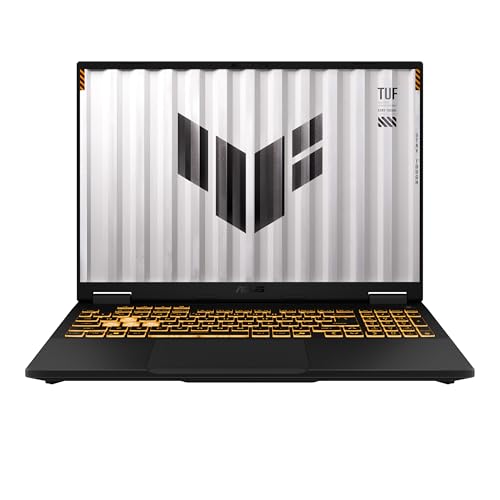
Specs
CPU | Intel Core i5-13450HX (10 cores) |
GPU | GeForce RTX 5050 Laptop, 8 GB |
Display | 16in FHD+ 16:10, 165 Hz |
Memory | 16 GB DDR5 |
Storage | 512 GB PCIe Gen 4 SSD |
CPU
Intel Core i5-13450HX (10 cores)
GPU
GeForce RTX 5050 Laptop, 8 GB
Display
16in FHD+ 16:10, 165 Hz
Memory
16 GB DDR5
Storage
512 GB PCIe Gen 4 SSD
What it does well
The TUF F16 is the cheapest current RTX laptop here, and it still clears Blizzard's recommended spec many times over. The RTX 5050 is a generation newer than anything on that spec sheet, and the Core i5-13450HX is an HX-class chip rather than a thin-and-light part.
The 16-inch FHD+ panel runs at 165 Hz in a 16:10 shape. At 1080p-class resolution and competitive settings, the 5050 is sized for that refresh rate, so the screen and the GPU are matched rather than one holding back the other. DDR5 memory and a PCIe Gen 4 SSD keep load times short.
If your budget sits lower still, our gaming laptops under 1000 list covers the next step down.
What you give up
The 512 GB SSD holds Overwatch 2's roughly 50 GB install with room to spare, but it fills fast with a wider library. Plan on a second drive if the laptop has a free slot, or an external SSD.
The 13450HX has the fewest cores in this roundup, and the 5050 runs out of headroom before 240 fps at higher settings. That is fine on this panel and a real limit if you dock to a faster monitor later.
Who it's for
The newer or casual player on a fixed budget who wants smooth, high-refresh 1080p play and does not plan to chase 240Hz.
Editor's Pick: Acer Predator Helios Neo 16 AI RTX 5070 Ti

Specs
CPU | Intel Core Ultra 9 275HX (24 cores) |
GPU | GeForce RTX 5070 Ti Laptop, 12 GB |
Display | 16in WQXGA, 240 Hz, G-Sync |
Memory | 16 GB DDR5 |
Storage | 1 TB PCIe Gen 4 SSD |
Wireless | Killer Wi-Fi 6E |
Model | PHN16-73-92B8 |
CPU
Intel Core Ultra 9 275HX (24 cores)
GPU
GeForce RTX 5070 Ti Laptop, 12 GB
Display
16in WQXGA, 240 Hz, G-Sync
Memory
16 GB DDR5
Storage
1 TB PCIe Gen 4 SSD
Wireless
Killer Wi-Fi 6E
Model
PHN16-73-92B8
What it does well
The Helios Neo is the answer for the player who wants 240Hz without dropping every setting to Low. It shares the top pick's Core Ultra 9 275HX and 240Hz class of panel, then steps up to an RTX 5070 Ti with 12 GB of VRAM.
That extra GPU headroom lets Overwatch 2 hold high frame rates at higher settings on the WQXGA screen, and it covers heavier games between competitive sessions. G-Sync smooths out the moments when the frame rate dips below the panel's refresh rate.
A 1 TB Gen 4 SSD and Killer Wi-Fi 6E round out a spec sheet with no obvious weak spot for this game.
What you give up
Sixteen gigabytes of memory is light for a laptop at this GPU tier. It works for Overwatch 2, but if you stream or keep many apps open, an upgrade is worth planning.
The chassis is larger and heavier than the Strix, and buyers have flagged loud fans in the Turbo profile. If Overwatch 2 is the only game you play, the top pick does the competitive job for less.
Who it's for
The player who wants a 240Hz panel filled at higher settings, and who plays heavier games outside Overwatch 2.
Bottom line
If you play ranked on a 240Hz target, buy the ASUS ROG Strix G16 RTX 5060. If you want 1440p detail on the laptop screen or plan to dock to a desk monitor, the MSI Katana 15 HX RTX 5060 saves money for the same GPU. If you want the fastest panel a laptop offers, the ASUS ROG Strix G16 X3D RTX 5070 Ti is the 300Hz ceiling. If the budget is fixed, the ASUS TUF Gaming F16 RTX 5050 is the floor we would buy. If you want 240Hz at higher settings and a wider library, take the Acer Predator Helios Neo 16 AI RTX 5070 Ti.
FAQ
Can a laptop run Overwatch 2?
Yes, and most recent gaming laptops run it well. Blizzard's recommended spec asks for a Core i7 or Ryzen 5, a GTX 1060-class GPU and 8 GB of memory, which any current RTX laptop clears. The better question is whether the laptop feeds its own panel. For competitive play, match the GPU to the screen: an RTX 5050 for 165Hz at 1080p, an RTX 5060 for 240Hz at competitive settings, and an RTX 5070 Ti for 240Hz at higher settings or a 300Hz panel. Keep it plugged in while you play.
What laptop specs do you need for Overwatch 2?
For a good competitive experience, look for an HX-class Core i5 or Ryzen 7 or better, 16 GB of memory, an RTX 5050 or faster GPU, an SSD with at least 50 GB free, and a panel at 165Hz or higher. The GPU matters more in Overwatch 2 than in Valorant, so size it to the refresh rate you want. A MUX switch or dGPU-only mode is a useful extra, since it sends frames straight from the GPU to the panel.
Is an RTX 5050 laptop enough for Overwatch 2?
For 1080p on a 165Hz panel at competitive settings, yes. The RTX 5050 is far beyond Blizzard's recommended GTX 1060 and is sized well for a screen like the one on the ASUS TUF Gaming F16. It is not the right chip for a steady 240 fps at higher settings, and it will run short of headroom if you dock to a 240Hz desk monitor. For that target, step up to an RTX 5060.
Is a 240Hz laptop worth it for Overwatch 2?
For ranked players, usually yes. Overwatch 2 rewards tracking fast heroes, and a 240Hz panel shows more frames of that motion than a 144Hz or 165Hz one. The gain only appears if the laptop renders at or near 240 fps, which is why every 240Hz pick here carries an RTX 5060 or faster. Casual players will get most of the benefit from 165Hz and can spend the difference elsewhere.
How much RAM does Overwatch 2 need on a laptop?
Blizzard lists 8 GB as recommended, and 16 GB is the comfortable amount for a gaming laptop today. Sixteen gigabytes leaves room for Discord, a browser and the Battle.net launcher beside the game. Thirty-two gigabytes is worth it if you stream or record while you play, which is one reason the ASUS ROG Strix G16 X3D RTX 5070 Ti ships with 32 GB. Overwatch 2 itself does not need more than 16 GB.
What settings should you use for Overwatch 2 on a laptop?
Start by plugging in and setting the laptop's performance profile, since mobile chips drop clocks on battery. In the game, set the display to your panel's native resolution and refresh rate, turn NVIDIA Reflex on, and lower effects, shadows and model detail until the frame rate sits at or above your refresh rate. Enable the MUX switch or dGPU-only mode if your laptop has one. Competitive players usually trade visual detail for frame rate.
Related Articles

What Gear Do Overwatch 2 Pros Use in 2026? Full Peripheral Breakdown
The Amazon-buyable five-piece kit Overwatch 2 pros run in 2026: mouse, keyboard, monitor, mousepad, and headset, framed by hero-role sensitivity bands.
May 21, 2026

Best Gaming Laptop for Valorant (2026): 5 CPU-First Picks
The best gaming laptop for Valorant is CPU-first. These 5 pair fast HX chips with 144Hz, 240Hz and 300Hz panels, from an RTX 5050 LOQ to a 9955HX3D Strix.
Nov 4, 2026

Best Gaming Laptops for Marvel Rivals (2026): 144Hz to 300Hz
The best gaming laptop for Marvel Rivals matches its GPU to the screen's refresh rate. Five Amazon-sold picks for 144Hz to 300Hz, RTX 5050 to RTX 5080.
Nov 9, 2026

Best RTX 5060 Gaming Laptops (2026): 5 TGP-Ranked Picks
The best RTX 5060 gaming laptop is the one with the highest TGP. We rank five picks by sustained wattage, from a 115W ASUS TUF F16 down to an 85W Acer Nitro.
Sep 7, 2026

Best PCIe 5.0 SSD for Gaming 2026: SN8100, 9100 PRO + 3 More
Best PCIe 5.0 SSD for gaming in 2026: the WD Black SN8100 leads five Gen5 picks, with the real load-time gain over Gen4 and which drives need a heatsink.
Nov 22, 2026