Affiliate Disclosure: As an Amazon Associate we earn from qualifying purchases. Some links may earn us a commission at no cost to you.

Best Gaming Laptops for Rocket League (2026): 144Hz to 300Hz
Rocket League is one of the lightest competitive games on PC, so almost any gaming laptop can run it. The real question is how fast. A laptop that holds frame rate well above 120 FPS on a high refresh panel plays differently from one that dips into double digits when four cars hit the ball at once.
That is why the five picks below are ranked by panel refresh and processor class first, with the graphics chip a distant third. You will find a pick for every refresh target from 144 Hz to 300 Hz, and the trade-off each one makes to get there.
Our top pick: ASUS ROG Strix G16 RTX 5070 300Hz
The ASUS ROG Strix G16 RTX 5070 300Hz pairs a 2.5K 300 Hz panel with a 16-core Ryzen 9 9955HX, the fastest screen and the strongest CPU class on this list in one chassis.

Quick picks
Pick | Laptop | Best for | Buy |
|---|---|---|---|
Best Overall | 300Hz ranked play with an HX CPU | ||
Best Value | 165 Hz ranked at 1080p class | ||
Best Premium | 240 Hz OLED with near-instant pixel response | ||
Best Budget | 144 Hz on the lowest budget | ||
Editor's Pick | OLED picture for casual and couch play |
Best Overall
- Laptop
- Best for
300Hz ranked play with an HX CPU
Best Value
- Laptop
- Best for
165 Hz ranked at 1080p class
Best Premium
- Laptop
- Best for
240 Hz OLED with near-instant pixel response
Best Budget
- Laptop
- Best for
144 Hz on the lowest budget
Editor's Pick
- Laptop
- Best for
OLED picture for casual and couch play
Specs at a glance
Laptop | GPU | CPU | Display | Memory | Storage |
|---|---|---|---|---|---|
RTX 5070 Laptop, 8 GB GDDR7 | AMD Ryzen 9 9955HX (16 cores) | 16-inch 2.5K IPS, 300 Hz, 3 ms | 16 GB DDR5 | 1 TB SSD | |
RTX 5060 Laptop, 8 GB GDDR7 | AMD Ryzen 7 250 (8 cores) | 15.3-inch WUXGA IPS, 165 Hz | 16 GB | 512 GB SSD | |
RTX 5080 Laptop, 16 GB GDDR7 | Intel Core Ultra 9 275HX (24 cores) | 16-inch WQXGA OLED, 240 Hz, 500 nits | 32 GB | 1 TB PCIe Gen 5 SSD | |
RTX 3050 Laptop | Intel Core i5-13420H (8 cores) | 15.6-inch FHD IPS, 144 Hz | 16 GB | 512 GB SSD | |
RTX 5060 Laptop, 8 GB GDDR7 | AMD Ryzen 7 250 (8 cores) | 15.3-inch WQXGA OLED, 165 Hz | 32 GB | 1 TB SSD |
- GPU
RTX 5070 Laptop, 8 GB GDDR7
- CPU
AMD Ryzen 9 9955HX (16 cores)
- Display
16-inch 2.5K IPS, 300 Hz, 3 ms
- Memory
16 GB DDR5
- Storage
1 TB SSD
- GPU
RTX 5060 Laptop, 8 GB GDDR7
- CPU
AMD Ryzen 7 250 (8 cores)
- Display
15.3-inch WUXGA IPS, 165 Hz
- Memory
16 GB
- Storage
512 GB SSD
- GPU
RTX 5080 Laptop, 16 GB GDDR7
- CPU
Intel Core Ultra 9 275HX (24 cores)
- Display
16-inch WQXGA OLED, 240 Hz, 500 nits
- Memory
32 GB
- Storage
1 TB PCIe Gen 5 SSD
- GPU
RTX 3050 Laptop
- CPU
Intel Core i5-13420H (8 cores)
- Display
15.6-inch FHD IPS, 144 Hz
- Memory
16 GB
- Storage
512 GB SSD
- GPU
RTX 5060 Laptop, 8 GB GDDR7
- CPU
AMD Ryzen 7 250 (8 cores)
- Display
15.3-inch WQXGA OLED, 165 Hz
- Memory
32 GB
- Storage
1 TB SSD
How we picked the best laptop for Rocket League
Start with the requirements, because they are low. Epic's help page lists a 2.5 GHz dual-core processor, 4 GB of memory and a GTX 760 class graphics card as the minimum, and a 3.0 GHz quad-core, 8 GB and a GTX 1060 class card as recommended, with 20 GB of storage. macOS is no longer supported, so a MacBook is out. Every laptop on this list clears the recommended spec with a wide margin.
Next, the frame rate floor. Community testers report that Rocket League runs its physics at up to 120 updates per second, and that the physics rate drops with your frame rate when you fall below it. Psyonix has not published that figure itself, but Epic's in-game performance graph shows a Phys Rate line you can watch on your own machine. Our rule: pick a laptop that stays above 120 FPS in a busy match, never just on average.
Then match the panel to your rank. A 144 or 165 Hz screen is plenty for casual and mid-rank play. Players grinding toward the top ranks get a cleaner read on fast aerials and flicks from 240 or 300 Hz, but only if the laptop can feed that many frames. A 300 FPS laptop on a 144 Hz screen throws most of its frames away.
After that, the processor. Rocket League runs on Unreal Engine 3 and leans on a few fast CPU cores, so an HX-class chip holds high frame rates in chaotic plays better than a lower-power H or HS part. The GPU matters least: once you clear an RTX 3050 class card, extra graphics power mostly buys headroom for other games. If you also play other esports titles, the same CPU-first logic runs through our Valorant laptop picks and Counter-Strike 2 laptop picks.
One rule applies to every laptop here: play plugged in, on the Performance power profile. Windows and the laptop's own power software throttle the CPU and GPU on battery, and buyers report heavy frame drops in Rocket League when they forget. Our GPU and display guide explains how wattage and refresh interact if you want the longer version.
Best Overall: ASUS ROG Strix G16 RTX 5070 300Hz
This is the laptop for ranked players who want the fastest screen on the list without giving up a desktop-class processor.
Specs
GPU | RTX 5070 Laptop, 8 GB GDDR7 |
CPU | AMD Ryzen 9 9955HX (16 cores) |
Display | 16-inch 2.5K IPS, 300 Hz, 3 ms |
Memory | 16 GB DDR5 |
Storage | 1 TB SSD |
Panel type | ROG Nebula, 16:10 |
GPU
RTX 5070 Laptop, 8 GB GDDR7
CPU
AMD Ryzen 9 9955HX (16 cores)
Display
16-inch 2.5K IPS, 300 Hz, 3 ms
Memory
16 GB DDR5
Storage
1 TB SSD
Panel type
ROG Nebula, 16:10
What it does well
The headline is the panel. A 2.5K ROG Nebula screen at 300 Hz and 3 ms shows more frames per second than any 240 Hz laptop here, which helps most on fast aerial reads and kickoff challenges where a few milliseconds decide who touches the ball first.
The Ryzen 9 9955HX is the right partner for that screen. Its 16 cores are far more than Rocket League uses, but the high-clocked cores the game does lean on keep frame rate steady when a match gets chaotic, which is exactly where weaker chips dip under the panel's refresh.
The RTX 5070 gives you room to run higher quality settings and still hold the frame rate you need. It also covers the newer, heavier games you will play between Rocket League sessions.
What you give up
This configuration ships with 16 GB of memory. That is enough for Rocket League and Discord, but tight if you stream or keep a browser full of tabs open while you play. Plan on an upgrade if you multitask.
You are also paying for GPU that Rocket League cannot use. If this is your only game, the money is buying panel speed and CPU, not graphics. The listing is sold by a third-party authorized reseller at the time of writing, so check the seller and the exact 300 Hz configuration before you buy.
Who it's for
Ranked players chasing the top ranks who want a 300 Hz screen, and anyone who plays heavier games alongside Rocket League. Pair it with one of our Rocket League controller picks if you play on a pad.
Best Value: Lenovo LOQ 15 RTX 5060
The value pick holds Rocket League above its 165 Hz panel at high settings for a fraction of what the 240 Hz class costs.

Specs
GPU | RTX 5060 Laptop, 8 GB GDDR7 |
CPU | AMD Ryzen 7 250 (8 cores) |
Display | 15.3-inch WUXGA IPS, 165 Hz |
Memory | 16 GB |
Storage | 512 GB SSD |
OS | Windows 11 |
GPU
RTX 5060 Laptop, 8 GB GDDR7
CPU
AMD Ryzen 7 250 (8 cores)
Display
15.3-inch WUXGA IPS, 165 Hz
Memory
16 GB
Storage
512 GB SSD
OS
Windows 11
What it does well
The RTX 5060 and an 8-core Ryzen 7 250 are a comfortable match for Rocket League at this screen's resolution. Expect the game to hit the panel's 165 Hz ceiling with settings turned up, with room left over for busy moments.
The 15.3-inch WUXGA panel uses a 16:10 shape, which adds a little vertical space over a standard 1080p screen. That helps when you are tracking a high ball near the ceiling.
The RTX 5060 is also a real step up for other games. If your library includes heavier titles, it handles them at 1080p class settings where a budget RTX 3050 laptop would struggle.
What you give up
The 165 Hz ceiling is the main limit. Once your mechanics outgrow it, you will want a 240 Hz screen, and that means a different laptop.
The 512 GB SSD fills faster than you expect once Windows, Rocket League and a couple of other games are installed. The Ryzen 7 250 is an HS-class chip rather than HX, so it has less headroom than the processors in the top picks. The chassis is mostly plastic.
Who it's for
Players moving up from console or an old school laptop who want smooth 144 to 165 Hz play without paying for refresh they will not use yet. Our budget gaming laptop roundup has more picks at this tier.
Best Premium: Lenovo Legion Pro 7i RTX 5080 OLED
The premium pick trades the 300 Hz IPS screen for a 240 Hz OLED and adds the strongest GPU and CPU on the list.

Specs
GPU | RTX 5080 Laptop, 16 GB GDDR7 |
Max TGP | 175 W |
CPU | Intel Core Ultra 9 275HX (24 cores) |
Display | 16-inch WQXGA OLED, 240 Hz, 500 nits |
Memory | 32 GB |
Storage | 1 TB PCIe Gen 5 SSD |
GPU
RTX 5080 Laptop, 16 GB GDDR7
Max TGP
175 W
CPU
Intel Core Ultra 9 275HX (24 cores)
Display
16-inch WQXGA OLED, 240 Hz, 500 nits
Memory
32 GB
Storage
1 TB PCIe Gen 5 SSD
What it does well
OLED pixels switch almost instantly, so a 240 Hz OLED looks sharper in motion than an IPS panel at the same refresh. In Rocket League that means less smearing on the ball and on cars crossing the screen, which makes fast reads easier.
The Intel Core Ultra 9 275HX has 24 cores, and the RTX 5080 runs at up to 175 W. Neither one will ever be the bottleneck in Rocket League, and both carry the laptop through demanding games at high settings.
You also get 32 GB of memory and a 1 TB PCIe Gen 5 SSD, so there is nothing to upgrade on day one.
What you give up
This laptop costs far more than Rocket League needs. If the game is all you play, the extra spend buys almost nothing you will see in a match. It is also heavy and gets loud under load.
The panel tops out at 240 Hz, so the Best Overall pick still shows more frames per second. OLED also carries a burn-in risk over years of use, and Rocket League keeps a static boost meter and scoreboard on screen; buyers report that Lenovo's panel care settings help. The listing is sold by a third-party reseller at the time of writing.
Who it's for
Buyers who want one laptop that runs Rocket League at its best and every new release at high settings too. Our OLED gaming laptops page covers more options with this panel type.
Best Budget: HP Victus 15 RTX 3050
Rocket League is light enough that a budget RTX 3050 laptop still clears 144 FPS at 1080p with sensible settings.

Specs
GPU | RTX 3050 Laptop |
CPU | Intel Core i5-13420H (8 cores) |
Display | 15.6-inch FHD IPS, 144 Hz |
Memory | 16 GB |
Storage | 512 GB SSD |
OS | Windows 11 |
GPU
RTX 3050 Laptop
CPU
Intel Core i5-13420H (8 cores)
Display
15.6-inch FHD IPS, 144 Hz
Memory
16 GB
Storage
512 GB SSD
OS
Windows 11
What it does well
The Core i5-13420H and RTX 3050 sit well above Epic's recommended spec, which asks for a quad-core processor, 8 GB of memory and a GTX 1060 class card. With settings set for performance, that is enough to drive the 144 Hz panel at 1080p.
This configuration comes with 16 GB of memory, double the recommended amount, so voice chat and a browser can run alongside the game without trouble.
What you give up
The RTX 3050 is an older card with the least graphics headroom on this list. It is fine for Rocket League and other esports games, but weak for newer AAA releases.
The 144 Hz screen is the ceiling, and budget panels give up color and brightness to hit their cost. The listing is sold by a reseller rather than HP directly, so check the configuration before you order.
Who it's for
Students and new players who mostly play Rocket League and other light esports games. If you also want room for building games, the Minecraft laptop picks cover a similar budget range.
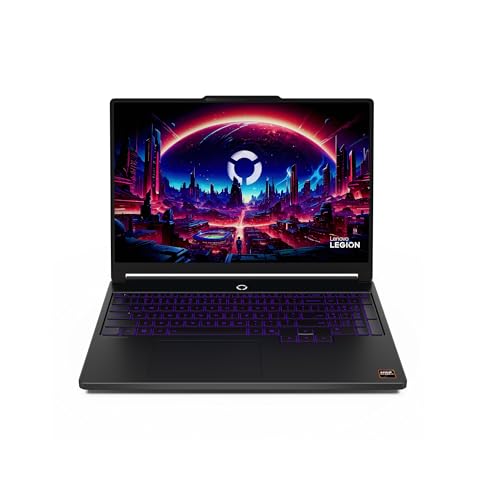
Editor's Pick: Lenovo Legion 5a RTX 5060 OLED
The Editor's Pick puts a 165 Hz OLED in a mid-range laptop and fixes the memory and storage that most laptops at this tier skimp on.
Specs
GPU | RTX 5060 Laptop, 8 GB GDDR7 |
CPU | AMD Ryzen 7 250 (8 cores) |
Display | 15.3-inch WQXGA OLED, 165 Hz |
Memory | 32 GB |
Storage | 1 TB SSD |
OS | Windows 11 |
GPU
RTX 5060 Laptop, 8 GB GDDR7
CPU
AMD Ryzen 7 250 (8 cores)
Display
15.3-inch WQXGA OLED, 165 Hz
Memory
32 GB
Storage
1 TB SSD
OS
Windows 11
What it does well
Rocket League's bright arenas and boost trails look their best on OLED. Deep blacks and fast pixel response make this the nicest picture on the list outside the premium pick.
The RTX 5060 holds the 165 Hz panel at high settings, and the 32 GB of memory plus 1 TB SSD remove the two upgrades most mid-range buyers end up making. This listing is sold by Amazon.com at the time of writing.
What you give up
The 165 Hz ceiling sits below what ranked grinders want, so this is a visuals pick rather than a competitive one. OLED needs the same burn-in care as the premium pick.
The Ryzen 7 250 is an HS-class chip, not HX, so it has less headroom for the most chaotic moments than the CPUs in the top picks.
Who it's for
Casual and split-screen players who care how the game looks as much as how fast it runs. If you also play Fortnite, our Fortnite laptop picks cover the same OLED trade-off.
Bottom line
If you play ranked and want the fastest screen, buy the ASUS ROG Strix G16 RTX 5070 300Hz. If you want smooth 165 Hz play for the least money, buy the Lenovo LOQ 15 RTX 5060. If you want one laptop for Rocket League and every AAA game, buy the Lenovo Legion Pro 7i RTX 5080 OLED. If your budget is tight and Rocket League is your main game, the HP Victus 15 RTX 3050 does the job. If picture quality matters more than raw refresh, buy the Lenovo Legion 5a RTX 5060 OLED.
FAQ
Can a laptop run Rocket League?
Yes. Rocket League has low requirements: Epic lists a 2.5 GHz dual-core processor, 4 GB of memory and a GTX 760 class card as the minimum. Any current gaming laptop with a dedicated graphics chip runs it well. The question is how fast. For smooth play, aim for a laptop that stays above 120 FPS in busy matches and has a 144 Hz or faster screen, like the HP Victus 15 RTX 3050 or anything above it on this list.
What are the Rocket League laptop requirements?
Epic's recommended spec is a 3.0 GHz quad-core processor, 8 GB of memory, a GTX 1060 or RX 470 class graphics card and 20 GB of storage on 64-bit Windows. macOS is not supported, so a MacBook will not run it natively. Those numbers get you playable frame rates; for high refresh play you want more, such as an RTX 3050 or better and an 8-core processor.
Do you need 240Hz for Rocket League?
No. A 144 or 165 Hz screen is plenty for casual and mid-rank play. A 240 or 300 Hz panel helps at high ranks, where fast aerials and flicks reward seeing more frames, but only if the laptop can hold that frame rate. The ASUS ROG Strix G16 RTX 5070 300Hz is our pick if you want the fastest panel, and the Lenovo Legion Pro 7i RTX 5080 OLED if you want 240 Hz on OLED.
What is the best budget laptop for Rocket League?
The HP Victus 15 RTX 3050 is our budget pick. Its Core i5-13420H and RTX 3050 clear Epic's recommended spec with margin and drive its 144 Hz panel at 1080p with performance-leaning settings. If you can stretch further, the Lenovo LOQ 15 RTX 5060 adds a 165 Hz panel and a much stronger graphics chip for other games.
Is a controller or keyboard better for Rocket League on a laptop?
Most Rocket League players use a controller, because analog sticks and triggers suit car control better than keys. A laptop has plenty of USB ports for a wired pad, and a wired connection avoids wireless dropouts. Keyboard and mouse works, but it is the less common choice. Our controller guide covers the pads worth buying.
Why does Rocket League stutter on my gaming laptop?
The most common cause is running on battery or on a quiet power profile, which throttles the CPU and GPU. Plug in, switch to the Performance profile, and make sure the game uses the dedicated graphics chip rather than integrated graphics. Then check Epic's in-game performance graph: community testers report the physics rate drops when frame rate falls below 120, so lower settings until you stay above it.
Related Articles

Best Controller for Rocket League (2026): Top 5 Picks
The best controllers for Rocket League in 2026, from the pro-favorite DualSense Edge to drift-free Hall-effect budget pads. Ranked by what actually matters.
Jul 1, 2026

What Gear Do Rocket League Pros Use? 5 RLCS Picks (2026)
What gear do Rocket League pros use? The controller, monitor, headset and stick kit RLCS pros run, plus their exact camera, sensitivity and deadzone numbers.
Aug 31, 2026

Best Gaming Laptops for Fortnite (2026): 5 Picks by Mode
The best gaming laptop for Fortnite depends on your mode: 240Hz Performance mode or DX12 with Lumen. Five RTX 50 laptops, from an RTX 5050 to an RTX 5080.
Nov 4, 2026

Best Gaming Laptop for Valorant (2026): 5 CPU-First Picks
The best gaming laptop for Valorant is CPU-first. These 5 pair fast HX chips with 144Hz, 240Hz and 300Hz panels, from an RTX 5050 LOQ to a 9955HX3D Strix.
Nov 4, 2026

Best RTX 5060 Gaming Laptops (2026): 5 TGP-Ranked Picks
The best RTX 5060 gaming laptop is the one with the highest TGP. We rank five picks by sustained wattage, from a 115W ASUS TUF F16 down to an 85W Acer Nitro.
Sep 7, 2026