Affiliate Disclosure: As an Amazon Associate we earn from qualifying purchases. Some links may earn us a commission at no cost to you.

Best Laptop for Rust in 2026: 5 Gaming Laptops That Hold Up
Rust runs well on an empty beach. Join a full server, walk into a monument, or load into a raid on a compound with thousands of placed walls and boxes, and the frame rate falls no matter which graphics preset you pick. That drop comes from the processor and memory, not the graphics card.
So we built this list around the CPU and the RAM first. Steam asks for 16 GB, and four of the five picks ship with 32 GB. Every laptop here clears the recommended RTX 3060 by a wide margin, with the VRAM sized to its screen.
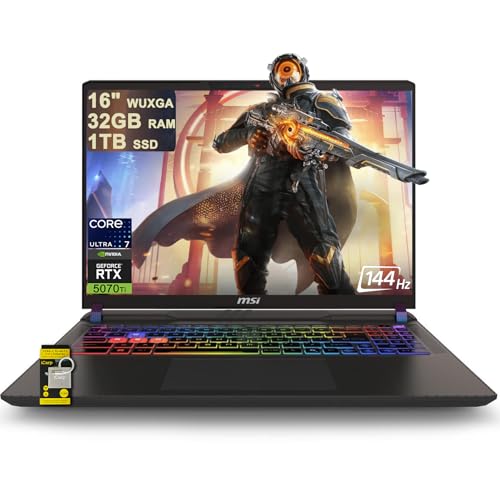
Our top pick: MSI Vector 16 HX AI RTX 5070 Ti
The MSI Vector 16 HX AI RTX 5070 Ti pairs a 20-core Core Ultra 7 255HX with 32 GB of DDR5 and a 12 GB RTX 5070 Ti, the balance of processor, memory and VRAM that holds up on a busy Rust server.
Quick picks
Pick | Laptop | Best for | Buy |
|---|---|---|---|
Best Overall | Busy servers and raids at 1200p | ||
Best Value | 32 GB without paying for an HX CPU | ||
Best Premium | The steadiest floor in big bases | ||
Best Budget | Learning the map on a tight budget | ||
Editor's Pick | Playing while streaming or recording |
Best Overall
- Laptop
- Best for
Busy servers and raids at 1200p
Best Value
- Laptop
- Best for
32 GB without paying for an HX CPU
Best Premium
- Laptop
- Best for
The steadiest floor in big bases
Best Budget
- Laptop
- Best for
Learning the map on a tight budget
Editor's Pick
- Laptop
- Best for
Playing while streaming or recording
Specs at a glance
Laptop | CPU | GPU | Memory | Storage | Display |
|---|---|---|---|---|---|
Intel Core Ultra 7 255HX (20 cores, 20 threads) | GeForce RTX 5070 Ti Laptop, 12 GB GDDR7 | 32 GB DDR5 | 1 TB SSD | 16in WUXGA (1920x1200) IPS, 144 Hz | |
AMD Ryzen 7 260 (8 cores, 16 threads) | GeForce RTX 5070 Laptop, 8 GB GDDR7 | 32 GB DDR5 | 1 TB PCIe Gen 4 SSD | 16in WQXGA (2560x1600), 180 Hz, 100% sRGB | |
AMD Ryzen 9 9955HX3D (16 cores, 32 threads, 3D V-Cache) | GeForce RTX 5080 Laptop, 16 GB GDDR7 | 32 GB | 1 TB SSD | 16in OLED (2560x1600), 240 Hz | |
AMD Ryzen 7 250 (8 cores, 16 threads) | GeForce RTX 5060 Laptop, 8 GB GDDR7 | 16 GB | 512 GB SSD | 15.3in WUXGA (1920x1200) IPS, 165 Hz | |
AMD Ryzen 9 8940HX (16 cores, 32 threads) | GeForce RTX 5070 Ti Laptop, 12 GB GDDR7 | 32 GB | 1 TB SSD | 16in FHD, 165 Hz |
- CPU
Intel Core Ultra 7 255HX (20 cores, 20 threads)
- GPU
GeForce RTX 5070 Ti Laptop, 12 GB GDDR7
- Memory
32 GB DDR5
- Storage
1 TB SSD
- Display
16in WUXGA (1920x1200) IPS, 144 Hz
- CPU
AMD Ryzen 7 260 (8 cores, 16 threads)
- GPU
GeForce RTX 5070 Laptop, 8 GB GDDR7
- Memory
32 GB DDR5
- Storage
1 TB PCIe Gen 4 SSD
- Display
16in WQXGA (2560x1600), 180 Hz, 100% sRGB
- CPU
AMD Ryzen 9 9955HX3D (16 cores, 32 threads, 3D V-Cache)
- GPU
GeForce RTX 5080 Laptop, 16 GB GDDR7
- Memory
32 GB
- Storage
1 TB SSD
- Display
16in OLED (2560x1600), 240 Hz
- CPU
AMD Ryzen 7 250 (8 cores, 16 threads)
- GPU
GeForce RTX 5060 Laptop, 8 GB GDDR7
- Memory
16 GB
- Storage
512 GB SSD
- Display
15.3in WUXGA (1920x1200) IPS, 165 Hz
- CPU
AMD Ryzen 9 8940HX (16 cores, 32 threads)
- GPU
GeForce RTX 5070 Ti Laptop, 12 GB GDDR7
- Memory
32 GB
- Storage
1 TB SSD
- Display
16in FHD, 165 Hz
How we picked: what Rust needs from a laptop
Start with the official numbers. Steam lists a Ryzen 5 1400 or Core i5-6600, 12 GB of RAM and a GTX 1060 as the minimum, and a Ryzen 7 3700X or Core i7-6700K, 16 GB of RAM and an RTX 3060 as the recommended spec, with an SSD required. Those figures describe a playable game on a quiet server. They do not describe a smooth one during a raid.
The processor comes first. Rust is built on Unity and tracks every placed wall, door, box and turret near you. On a busy server and around large bases that load lands on the CPU and its cache, not the GPU, and lowering graphics settings barely moves the floor. That is why the desktop players in our best CPUs for Rust guide lean on AMD's 3D V-Cache chips. On a laptop, that means a fast HX processor or the Ryzen 9 9955HX3D.
Memory is the next spec to check. Sixteen gigabytes meets the recommended spec, but players report Rust using well past 16 GB on populated servers once a wipe is a few days old. We treated 32 GB as the practical target: four picks ship with it, and the budget pick has an upgrade path. For more laptops at that capacity, see our gaming laptops with 32 GB of RAM.
The GPU sets your ceiling on open ground and at higher resolutions. Rust's textures can use a lot of video memory, so we paired 12 GB or more with the 1200p and 1600p panels where we could, and flagged where 8 GB means turning textures down. Our GPU and display guide covers how resolution and refresh rate change that choice.
Last, thermals and power. A laptop that throttles halfway through a long raid loses frames when the fight starts. Play plugged in on the performance profile, and a cooling pad helps on the thinner machines.
Best Overall: MSI Vector 16 HX AI RTX 5070 Ti
Specs
CPU | Intel Core Ultra 7 255HX (20 cores, 20 threads) |
GPU | GeForce RTX 5070 Ti Laptop, 12 GB GDDR7 |
Display | 16in WUXGA (1920x1200) IPS, 144 Hz |
Memory | 32 GB DDR5 |
Storage | 1 TB SSD |
Ports | Thunderbolt 5 |
Wireless | Wi-Fi 6E |
CPU
Intel Core Ultra 7 255HX (20 cores, 20 threads)
GPU
GeForce RTX 5070 Ti Laptop, 12 GB GDDR7
Display
16in WUXGA (1920x1200) IPS, 144 Hz
Memory
32 GB DDR5
Storage
1 TB SSD
Ports
Thunderbolt 5
Wireless
Wi-Fi 6E
What it does well
The Core Ultra 7 255HX is the reason this laptop sits at the top. Its 20 cores and high boost clocks give Rust the per-core speed it leans on when a large base or a monument loads in around you, and the HX power budget keeps those clocks up while plugged in.
It ships with 32 GB of DDR5, double the 16 GB recommended spec. That is the amount most players settle on for full servers, and it leaves room for Discord and a browser map without the game paging to the SSD.
The 12 GB RTX 5070 Ti handles high textures at the native 1920x1200, and the 144 Hz panel suits the frame rates the CPU can hold.
What you give up
There is no 3D V-Cache here, so in the heaviest raid scenes the X3D Legion Pro 7 keeps a steadier floor. The gap is real, but so is the price difference.
The 1920x1200 IPS panel is plain for the money, and the 1 TB SSD fills once the 45 GB install and a few other games land. It also gets loud under sustained load. Reports suggest the CPU-heavy scenes drop hard on battery, so play plugged in on the performance profile.
Who it's for
The Rust main who plays full official or community servers, wants steady frame rates during raids, and wants one laptop that handles it without flagship money. For more machines on this GPU, see our RTX 5070 Ti gaming laptops.
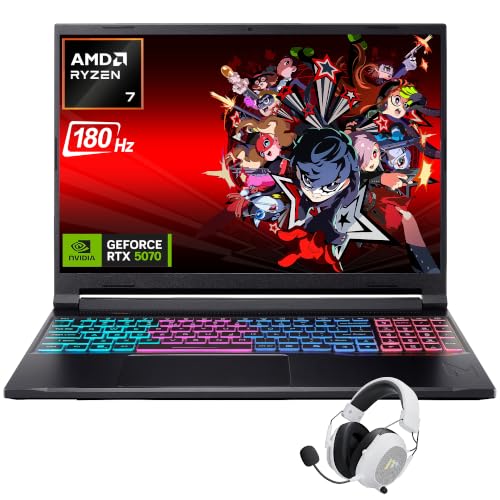
Best Value: Acer Nitro V16 RTX 5070
Specs
CPU | AMD Ryzen 7 260 (8 cores, 16 threads) |
GPU | GeForce RTX 5070 Laptop, 8 GB GDDR7 |
Display | 16in WQXGA (2560x1600), 180 Hz, 100% sRGB |
Memory | 32 GB DDR5 |
Storage | 1 TB PCIe Gen 4 SSD |
Wireless | Wi-Fi 6E, Ethernet |
CPU
AMD Ryzen 7 260 (8 cores, 16 threads)
GPU
GeForce RTX 5070 Laptop, 8 GB GDDR7
Display
16in WQXGA (2560x1600), 180 Hz, 100% sRGB
Memory
32 GB DDR5
Storage
1 TB PCIe Gen 4 SSD
Wireless
Wi-Fi 6E, Ethernet
What it does well
The Nitro V16 gets the most important Rust spec right: 32 GB of DDR5 out of the box. At a lower price than the HX picks, that is the memory headroom a populated server asks for, with nothing to upgrade on day one.
The RTX 5070 clears the recommended RTX 3060 by a wide margin and runs 1080p to 1200p at high settings. The 180 Hz 2560x1600 panel gives you room to grow, and the RJ45 port means a wired connection for raid nights.
What you give up
The Ryzen 7 260 is an 8-core chip, not an HX part. In big bases and around monuments it gives up frames sooner than the HX and X3D picks, and that is the trade for the price.
The RTX 5070 has 8 GB of VRAM. At the native 2560x1600 that means lower texture quality or upscaling, and buyers have flagged that running 1920x1200 is the cleaner fix. The Nitro chassis also runs warm and loud under load.
Who it's for
The player who wants the RAM headroom Rust asks for on busy servers without paying for an HX CPU, and who plays mostly at 1080p to 1200p.
Best Premium: Lenovo Legion Pro 7 RTX 5080 OLED

Specs
CPU | AMD Ryzen 9 9955HX3D (16 cores, 32 threads, 3D V-Cache) |
GPU | GeForce RTX 5080 Laptop, 16 GB GDDR7 |
Display | 16in OLED (2560x1600), 240 Hz |
Memory | 32 GB |
Storage | 1 TB SSD |
CPU
AMD Ryzen 9 9955HX3D (16 cores, 32 threads, 3D V-Cache)
GPU
GeForce RTX 5080 Laptop, 16 GB GDDR7
Display
16in OLED (2560x1600), 240 Hz
Memory
32 GB
Storage
1 TB SSD
What it does well
The Ryzen 9 9955HX3D carries AMD's 3D V-Cache, the stacked L3 cache that keeps more of a dense scene's data next to the cores. In a game where large bases land on the CPU and its cache, it is the closest a laptop gets to the X3D desktop chips Rust players default to.
The 16 GB RTX 5080 drives 2560x1600 at high settings, and the 240 Hz OLED panel shows deep blacks that help at night and in dark interiors. It does all of that in a 16-inch chassis that still fits a backpack.
What you give up
It costs far more than anything else here. Memory is 32 GB, the same as the cheaper picks, so the money goes into the CPU, GPU and screen rather than RAM.
OLED and a static HUD over long sessions is a burn-in risk to manage; reports suggest keeping the panel's pixel-refresh features on. The 1 TB SSD also fills with other games.
Who it's for
The player who wants the steadiest floor in raids a laptop can give, plays at night a lot, and will pay for it. For more options on this GPU, see our RTX 5080 gaming laptops, and for other panels like this one, our OLED gaming laptops.
Best Budget: Lenovo LOQ 15 RTX 5060

Specs
CPU | AMD Ryzen 7 250 (8 cores, 16 threads) |
GPU | GeForce RTX 5060 Laptop, 8 GB GDDR7 |
Display | 15.3in WUXGA (1920x1200) IPS, 165 Hz |
Memory | 16 GB |
Storage | 512 GB SSD |
CPU
AMD Ryzen 7 250 (8 cores, 16 threads)
GPU
GeForce RTX 5060 Laptop, 8 GB GDDR7
Display
15.3in WUXGA (1920x1200) IPS, 165 Hz
Memory
16 GB
Storage
512 GB SSD
What it does well
The LOQ 15 is the cheapest way into Rust on a real gaming laptop. The RTX 5060 clears the recommended RTX 3060, and it runs 1080p at medium to high settings on lighter servers.
The 8-core Ryzen 7 250 matches the core count of the recommended Ryzen 7 3700X, and the 165 Hz 1920x1200 panel suits the frame rates it reaches. It meets the 16 GB recommended memory spec exactly.
What you give up
16 GB meets the spec on paper, but players report Rust using well past that on busy servers, so plan a move to 32 GB. Buyers have flagged that you should confirm the memory is socketed before planning that upgrade.
512 GB of storage leaves little room once the 45 GB install and its updates land. Raids and monuments also run well below the HX picks here, so expect to lower settings when a server fills up.
Who it's for
The new player learning the map on a lower-population server, ready to add RAM once the game sticks. For more laptops at this level, see our gaming laptops under the four-figure mark.
Editor's Pick: ASUS ROG Strix G16 RTX 5070 Ti

Specs
CPU | AMD Ryzen 9 8940HX (16 cores, 32 threads) |
GPU | GeForce RTX 5070 Ti Laptop, 12 GB GDDR7 |
Display | 16in FHD, 165 Hz |
Memory | 32 GB |
Storage | 1 TB SSD |
CPU
AMD Ryzen 9 8940HX (16 cores, 32 threads)
GPU
GeForce RTX 5070 Ti Laptop, 12 GB GDDR7
Display
16in FHD, 165 Hz
Memory
32 GB
Storage
1 TB SSD
What it does well
The Ryzen 9 8940HX has 16 full cores and 32 threads. Rust players rarely run the game alone: voice chat, a browser map, a team overlay and often a stream or recording all run next to it. This chip handles that stack without taking cores from the game.
The 12 GB RTX 5070 Ti is the same GPU as our top pick, with the VRAM for high textures, and 32 GB of RAM covers the game and the apps around it.
What you give up
There is no 3D V-Cache, so the cache-heavy raid scenes still favour the Legion Pro 7. The FHD 165 Hz panel is modest for the money.
This listing is sold by a third-party reseller, so check the warranty and seller terms before buying. It is also heavy and loud under load.
Who it's for
The player who streams or records raids, or keeps a browser map, Discord and a team overlay open while playing.
Bottom line
If you want one laptop that handles busy servers and raids well, buy the MSI Vector 16 HX AI RTX 5070 Ti. If you want 32 GB for less and mostly play at 1080p, buy the Acer Nitro V16 RTX 5070. If you want the steadiest frame rates in big bases, buy the Lenovo Legion Pro 7 RTX 5080 OLED. If you are new and on a tight budget, start with the Lenovo LOQ 15 RTX 5060 and add RAM later. If you stream or record, the ASUS ROG Strix G16 RTX 5070 Ti has the cores for it. Playing another survival shooter too? Our laptops for Escape from Tarkov follow the same CPU and RAM logic.
FAQ
Can a laptop run Rust?
Yes. Any recent gaming laptop with an RTX 5060 or better clears the recommended RTX 3060, and 16 GB of RAM meets the recommended memory spec. What separates laptops is how they handle busy servers and large bases: a fast HX or X3D processor and 32 GB of RAM keep raids playable when the scene fills with placed objects. The MSI Vector 16 HX AI RTX 5070 Ti is our pick for that balance.
What are the Rust laptop requirements?
Steam lists a Ryzen 5 1400 or Core i5-6600, 12 GB of RAM and a GTX 1060 as the minimum, and a Ryzen 7 3700X or Core i7-6700K, 16 GB of RAM and an RTX 3060 as the recommended spec. The install needs 45 GB, and the recommended spec requires an SSD. Every laptop on this list clears the recommended CPU and GPU, and four of the five ship with 32 GB of RAM.
How much RAM do you need for Rust?
The official answer is 12 GB minimum and 16 GB recommended. In practice, players report Rust using well past 16 GB on populated servers, especially a few days into a wipe, so 32 GB is the safer target for a laptop you plan to keep. If you buy a 16 GB model like the Lenovo LOQ 15, confirm the memory is socketed so you can upgrade later.
Is Rust CPU or GPU heavy?
Mostly CPU, once a server is busy. Rust tracks every placed wall, door and box near you, and around large bases and monuments that work falls on the processor and its cache. Lowering graphics settings barely helps in those scenes. The GPU matters more at higher resolutions and on open ground, which is why our picks put the CPU and RAM first and size the GPU to the screen.
Is a budget gaming laptop good enough for Rust?
For learning the game, yes. The Lenovo LOQ 15 RTX 5060 clears the recommended GPU and meets the 16 GB memory spec, so it runs Rust at 1080p on lighter servers. It will drop more frames than the HX picks during raids and on full servers, and 16 GB is the first thing to upgrade. If you plan to play on big community servers, the Acer Nitro V16 with 32 GB is the better floor.
Can you play Rust on a MacBook?
Yes. Rust has a macOS build on Steam, with an Apple M1 and 12 GB of memory as the minimum and an M1 Pro, Max or Ultra with 16 GB recommended. A MacBook runs it, but a Windows gaming laptop gives you far more GPU for the money and matches the platform most servers and tools are built around. No Linux build is listed.
Related Articles

Best CPUs for Rust (2026): 5 Picks for Raids and Big Bases
The best CPU for Rust holds its frame rate around big bases, monuments and online raids. Five picks, from a cheap AM4 drop-in up to the 9800X3D cache leader.
Nov 14, 2026

Best Gaming Laptops With 32GB RAM (2026): 5 TGP Picks
Best gaming laptops with 32GB RAM in 2026, ranked by GPU TGP first. Per-pick memory config (soldered or SO-DIMM) so you know what you can upgrade later.
Aug 9, 2026

Best Laptops for Escape from Tarkov in 2026: 5 Top Picks
The best laptop for Escape from Tarkov needs a fast CPU, at least 32 GB of RAM and a strong GPU. Five picks for Streets, budget raids and 64 GB setups.
Nov 23, 2026

Best RTX 5070 Ti Gaming Laptops (2026): TGP-Ranked Picks
The best RTX 5070 Ti gaming laptops of 2026, ranked by the GPU power each chassis sustains. Five picks from 14 to 16 inches, plus the 32GB RAM call to make.
Oct 30, 2026

Best Gaming Laptops Under $1,000 (2026): RTX 4050 vs 5050
The best gaming laptops under $1,000 in 2026 run RTX 4050 and 3050 chips: four honest picks, one RTX 5050 stretch, the 8GB RAM fix, and when to wait for a sale.
Oct 24, 2026