Affiliate Disclosure: As an Amazon Associate we earn from qualifying purchases. Some links may earn us a commission at no cost to you.

Best RTX 5090 Gaming Laptops (2026): 5 TGP-Checked Picks
An RTX 5090 gaming laptop carries the fastest GPU NVIDIA puts in a notebook, and it is not a desktop RTX 5090. The laptop chip runs at up to 150 watts plus a 25 watt Dynamic Boost, uses the same GB203 silicon as the desktop RTX 5080, and brings 24 GB of GDDR7. How much of that power each chassis sustains decides how fast yours runs.
These five picks are checked for configured GPU power, screen and size, with an honest note on when the RTX 5080 laptop is the smarter buy.
Our top pick: Lenovo Legion Pro 7i Gen 10 RTX 5090
The Legion Pro 7i Gen 10 runs its RTX 5090 at the full 175 watts, pairs it with a 240 Hz OLED and 64 GB of memory, and keeps all of it in a 16-inch chassis.

Quick picks
Laptop | Best for | GPU power | Buy |
|---|---|---|---|
Most buyers | 175 W | ||
Full power for less | 175 W | ||
Desk-bound flagship | 175 W | ||
Cheapest full-power route | 175 W | ||
Carrying it daily | Up to 165 W |
- Best for
Most buyers
- GPU power
175 W
- Buy
- Best for
Full power for less
- GPU power
175 W
- Buy
- Best for
Desk-bound flagship
- GPU power
175 W
- Buy
- Best for
Cheapest full-power route
- GPU power
175 W
- Buy
- Best for
Carrying it daily
- GPU power
Up to 165 W
- Buy
Specs at a glance
Laptop | GPU power | CPU | Display | Memory and storage |
|---|---|---|---|---|
175 W | Core Ultra 9 275HX | 16 in OLED, 240 Hz | 64 GB, 2 TB | |
175 W | Core Ultra 9 275HX | 16 in Mini LED, 240 Hz | 32 GB, 2 TB | |
175 W | Core Ultra 9 290HX | 18 in Mini LED UHD+, 240 Hz | 64 GB, 4 TB | |
175 W | Core Ultra 9 275HX | 16 in OLED, 240 Hz | 32 GB, 2 TB | |
Up to 165 W | Core Ultra 9 386H | 16 in OLED, 240 Hz | 32 GB, 2 TB |
- GPU power
175 W
- CPU
Core Ultra 9 275HX
- Display
16 in OLED, 240 Hz
- Memory and storage
64 GB, 2 TB
- GPU power
175 W
- CPU
Core Ultra 9 275HX
- Display
16 in Mini LED, 240 Hz
- Memory and storage
32 GB, 2 TB
- GPU power
175 W
- CPU
Core Ultra 9 290HX
- Display
18 in Mini LED UHD+, 240 Hz
- Memory and storage
64 GB, 4 TB
- GPU power
175 W
- CPU
Core Ultra 9 275HX
- Display
16 in OLED, 240 Hz
- Memory and storage
32 GB, 2 TB
- GPU power
Up to 165 W
- CPU
Core Ultra 9 386H
- Display
16 in OLED, 240 Hz
- Memory and storage
32 GB, 2 TB
How we picked
Configured GPU power came first. NVIDIA lets each manufacturer set the RTX 5090 Laptop anywhere up to 150 watts plus a 25 watt Dynamic Boost, and a chassis that stops short of 175 watts gives up frames to one that does not. Four of these picks run the full 175 watts; the Razer is the exception, and it is named as one.
The 24 GB of memory came second, because it is the real reason to step up. The RTX 5080 Laptop has 16 GB, and in games Notebookcheck's testing put it only about 10 to 15 percent behind the RTX 5090 Laptop, with the gap widest at 4K. The extra memory matters most at 4K, with heavy texture packs and for local AI models. If none of that is you, read our RTX 5080 vs RTX 5090 breakdown before you pay for the step.
Size came third. A 16-inch chassis fits a bag; an 18-inch one buys fan area and screen, and gives the GPU more room to hold its clocks. Every pick lists its panel and size so you can trade portability against both.
Last, the desktop question. Notebookcheck measured the laptop chip at up to 50 percent slower than the desktop RTX 5090, so if the machine will never leave your desk, an RTX 5090 prebuilt buys far more frames for the same money.
Best Overall: Lenovo Legion Pro 7i Gen 10 RTX 5090
Specs
Display | 16 inch WQXGA OLED, 2560 x 1600, 240 Hz, 500 nits |
GPU | GeForce RTX 5090 Laptop, 24 GB GDDR7 |
GPU power | Up to 175 W with Dynamic Boost |
CPU | Intel Core Ultra 9 275HX, 24 cores |
Memory | 64 GB DDR5 |
Storage | 2 TB NVMe SSD (2 x 1 TB) |
Power adapter | 400 W |
OS | Windows 11 Pro |
Display
16 inch WQXGA OLED, 2560 x 1600, 240 Hz, 500 nits
GPU
GeForce RTX 5090 Laptop, 24 GB GDDR7
GPU power
Up to 175 W with Dynamic Boost
CPU
Intel Core Ultra 9 275HX, 24 cores
Memory
64 GB DDR5
Storage
2 TB NVMe SSD (2 x 1 TB)
Power adapter
400 W
OS
Windows 11 Pro
What it does well
The Legion Pro 7i feeds its RTX 5090 the full 175 watts, 150 watts of base power plus the 25 watt Dynamic Boost, and ships a 400 watt adapter so the GPU and the 24-core Core Ultra 9 275HX are not fighting over one power budget.
The screen is the other half of the case. A 16-inch WQXGA OLED at 240 Hz and 500 nits suits a GPU that drives 2560 by 1600 at high refresh in most games, and OLED response keeps fast motion clean. If the panel matters more to you than the GPU, our OLED gaming laptop picks cover cheaper routes to the same kind of screen.
This listing pairs it with 64 GB of DDR5 and 2 TB across two drives, so nothing needs upgrading on day one.
What you give up
Reports on the Gen 10 Legion Pro 7i note there is no Thunderbolt 5 port, which stands out on a laptop at this tier. If you plan to run fast external storage or a high-bandwidth dock, check that the ports on this configuration cover it before you buy.
The 64 GB, 2 TB configuration sits near the top of the RTX 5090 price range, and a share of that premium buys memory most games will not touch. The 400 watt brick also makes this a laptop you plug in to game, not one you game on battery.
Who it's for
The player who wants one 16-inch machine for high-refresh 1440p-class gaming and creative work, wants the RTX 5090 at full power, and is happy to carry a large adapter. Pair it with one of our monitors for the RTX 5090 when it docks at a desk.
Best Value: ASUS ROG Strix SCAR 16 RTX 5090

Specs
Display | 16 inch 2.5K Mini LED (ROG Nebula HDR), 2560 x 1600, 240 Hz |
GPU | GeForce RTX 5090 Laptop, 24 GB GDDR7 |
GPU power | Up to 175 W with Dynamic Boost |
CPU | Intel Core Ultra 9 275HX |
Memory | 32 GB DDR5 |
Storage | 2 TB PCIe Gen 4 SSD |
Wireless | Wi-Fi 7 |
Weight | About 2.8 kg |
Display
16 inch 2.5K Mini LED (ROG Nebula HDR), 2560 x 1600, 240 Hz
GPU
GeForce RTX 5090 Laptop, 24 GB GDDR7
GPU power
Up to 175 W with Dynamic Boost
CPU
Intel Core Ultra 9 275HX
Memory
32 GB DDR5
Storage
2 TB PCIe Gen 4 SSD
Wireless
Wi-Fi 7
Weight
About 2.8 kg
What it does well
The SCAR 16 gives you the same 175 watt RTX 5090 and the same Core Ultra 9 275HX as the Legion, and it gets there in a lower configuration tier by starting at 32 GB of memory. Notebookcheck called it ASUS' fastest 16-incher and scored it 88.4 percent, which is the reassurance you want before trusting a chassis with this much heat.
The panel is the standout. ROG's Nebula HDR Mini LED runs 2.5K at 240 Hz with real local dimming, so HDR games get bright highlights an OLED at 500 nits cannot match, without OLED's burn-in care.
What you give up
32 GB of DDR5 is plenty for games but tight if you edit large video projects or run local AI models next to a game, so budget for an upgrade if that is you. At about 2.8 kg, it is a 16-inch laptop that still feels like a desktop replacement in a bag.
The SCAR styling is loud, with RGB lighting across the chassis. That is a taste call, but it is not a machine you open quietly in a meeting.
Who it's for
The buyer who wants every watt of the RTX 5090 at a lower tier than the Legion, games mostly at a desk, and values an HDR-capable Mini LED screen over OLED.
Best Premium: MSI Titan 18 HX AI RTX 5090

Specs
Display | 18 inch UHD+ Mini LED, 240 Hz |
GPU | GeForce RTX 5090 Laptop, 24 GB GDDR7 |
GPU power | Up to 175 W |
CPU | Intel Core Ultra 9 290HX |
Memory | 64 GB DDR5 |
Storage | 4 TB NVMe SSD |
Ports | Thunderbolt 5 |
Wireless | Wi-Fi 7 |
Display
18 inch UHD+ Mini LED, 240 Hz
GPU
GeForce RTX 5090 Laptop, 24 GB GDDR7
GPU power
Up to 175 W
CPU
Intel Core Ultra 9 290HX
Memory
64 GB DDR5
Storage
4 TB NVMe SSD
Ports
Thunderbolt 5
Wireless
Wi-Fi 7
What it does well
An 18-inch shell is a thermal advantage before it is anything else: more fan area and more room for heat pipes, so the GPU holds its clocks through a long session instead of trimming them. HotHardware measured the Titan's RTX 5090 staying under 75 degrees C throughout its testing, with GPU results level with other RTX 5090 laptops.
The rest of the spec sheet matches the price. This configuration carries the Core Ultra 9 290HX, 64 GB of DDR5, 4 TB of storage and Thunderbolt 5, and the 18-inch UHD+ Mini LED panel at 240 Hz is the sharpest screen on this list.
What you give up
Reviewers of the Titan 18 flagged loud fans under load, a weak webcam and middling speakers, which are odd misses at the top of the range. Battery life while gaming came in at just over an hour and a half in HotHardware's testing, so treat it as a desktop you can move between rooms.
A large share of the price buys the chassis, the panel and the storage rather than a faster GPU. The RTX 5090 inside runs at the same 175 watt ceiling as the Legion and the SCAR 16, so frame rates land in the same range.
Who it's for
The buyer replacing a desktop with one large, sharp, high-refresh machine, who works on it as well as games, and wants Thunderbolt 5 and 4 TB without opening the chassis.
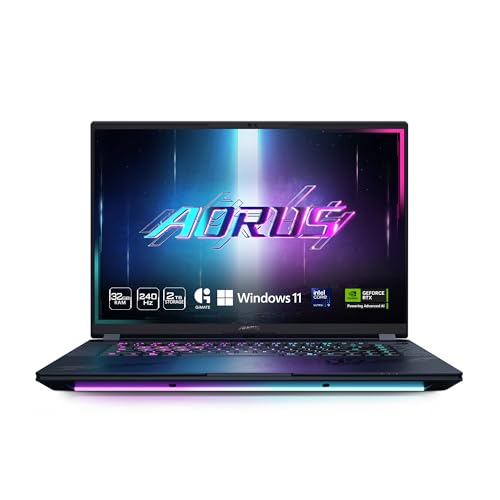
Best Budget: GIGABYTE AORUS MASTER 16 RTX 5090
Specs
Display | 16 inch WQXGA OLED, 2560 x 1600, 240 Hz |
GPU | GeForce RTX 5090 Laptop, 24 GB GDDR7 |
GPU power | Up to 175 W |
CPU | Intel Core Ultra 9 275HX |
Memory | 32 GB DDR5 |
Storage | 2 TB SSD |
OS | Windows 11 Home |
Display
16 inch WQXGA OLED, 2560 x 1600, 240 Hz
GPU
GeForce RTX 5090 Laptop, 24 GB GDDR7
GPU power
Up to 175 W
CPU
Intel Core Ultra 9 275HX
Memory
32 GB DDR5
Storage
2 TB SSD
OS
Windows 11 Home
What it does well
The AORUS MASTER 16 is the cheapest way on this list into a 175 watt RTX 5090, and GIGABYTE does not cut the screen to get there: it ships a 16-inch WQXGA OLED at 240 Hz, the same class of panel as the Legion. Notebookcheck scored it 85.1 percent in its review.
The Core Ultra 9 275HX and 2 TB of storage match the pricier 16-inch picks, so the savings come from the chassis and the memory, not the parts that set frame rates.
What you give up
In Notebookcheck's comparison of RTX 5090 laptops, the MASTER 16 placed seventh, close to the average of every RTX 5090 laptop it had tested rather than near the top. Expect frame rates a step behind the Legion and the SCAR 16 in long sessions.
32 GB of memory is the floor at this tier. If the gap to the next pick up is what stretches your budget, our picks for a tighter laptop budget cover the RTX 5080 tier for far less.
Who it's for
The buyer who wants a full-power RTX 5090 and an OLED for the least money, games at a desk, and accepts mid-pack sustained performance for the saving.
Editor's Pick: Razer Blade 16 (2026) RTX 5090

Specs
Display | 16 inch QHD+ OLED, 240 Hz, 0.2 ms |
GPU | GeForce RTX 5090 Laptop, 24 GB GDDR7 |
GPU power | Up to 165 W (175 W with cooling pad HyperBoost) |
CPU | Intel Core Ultra 9 386H |
Memory | 32 GB DDR5 |
Storage | 2 TB SSD |
Ports | Thunderbolt 5 |
Thickness | About 0.7 inch |
Display
16 inch QHD+ OLED, 240 Hz, 0.2 ms
GPU
GeForce RTX 5090 Laptop, 24 GB GDDR7
GPU power
Up to 165 W (175 W with cooling pad HyperBoost)
CPU
Intel Core Ultra 9 386H
Memory
32 GB DDR5
Storage
2 TB SSD
Ports
Thunderbolt 5
Thickness
About 0.7 inch
What it does well
This is the RTX 5090 laptop you can carry every day. The 2026 Blade 16 is about 0.7 inch thick, wrapped in Razer's aluminum unibody, and it still brings the full 24 GB RTX 5090, Thunderbolt 5 and Wi-Fi 7. The Core Ultra 9 386H is an efficient chip rather than a desktop-class HX part, which suits a laptop that travels.
The 16-inch QHD+ OLED at 240 Hz is one of the best screens on any gaming laptop, and Razer's optional cooling pad unlocks a HyperBoost mode that lifts the GPU to 175 watts when the Blade sits at a desk. Our cooling pad picks explain what a pad can and cannot do for a thin chassis.
What you give up
Sustained GPU power, and that is the headline, not a footnote. Razer rates the RTX 5090 at up to 165 watts, and Notebookcheck tested a configuration capped at 160, so without the pad it runs below the 175 watt picks above. Tom's Guide found it hot and loud under heavy load.
It sits near the top of the price range for the least sustained performance of the five, and 32 GB is the memory in this configuration.
Who it's for
The traveler, student or hybrid worker who needs one machine for work, creative apps and serious gaming, and will trade some sustained frames for a chassis that fits a normal bag.
Bottom line
If you want one machine and one answer, buy the Lenovo Legion Pro 7i Gen 10 RTX 5090. If you want the same full-power GPU at a lower tier and prefer a bright Mini LED panel, buy the ASUS ROG Strix SCAR 16 RTX 5090. If it lives on a desk and you want the biggest, sharpest screen, buy the MSI Titan 18 HX AI RTX 5090. If you want the cheapest full-power route and can accept mid-pack sustained speed, buy the GIGABYTE AORUS MASTER 16 RTX 5090.
If you carry it every day, buy the Razer Blade 16 (2026) RTX 5090 knowing it trades sustained frames for thickness. If you game at 1440p and never touch local AI, the RTX 5080 laptop picks get you most of the way for far less.
FAQ
Is an RTX 5090 laptop worth it over an RTX 5080 laptop?
Only if you will use the extra memory. Notebookcheck's testing put the RTX 5080 Laptop about 10 to 15 percent behind the RTX 5090 Laptop in games, with the gap widest at 4K, while RTX 5090 laptops cost far more. The step earns its price for 4K play, heavy texture packs and local AI models that need 24 GB. For 1440p gaming, an RTX 5080 laptop at full power is the better value.
What TGP should an RTX 5090 laptop have?
Look for 175 watts: 150 watts of base power plus the 25 watt Dynamic Boost. That is the top of NVIDIA's range, and four of the five picks above run it. Thin designs set the chip lower; the Razer Blade 16 (2026) is rated at up to 165 watts, and a lower limit means fewer frames in long sessions. Check the GPU power on the exact configuration, not just the model name.
Is an RTX 5090 laptop as fast as a desktop RTX 5090?
No. The laptop chip uses the same GB203 silicon as the desktop RTX 5080 and runs at a fraction of the desktop card's power, and Notebookcheck measured it at up to 50 percent slower than the desktop RTX 5090. Think of it as desktop RTX 5080 class performance with 24 GB of memory. If portability does not matter, a desktop RTX 5090 is the far faster buy.
Why does the RTX 5090 laptop have 24 GB of VRAM?
The 24 GB of GDDR7 is the main hardware advantage over the RTX 5080 Laptop's 16 GB. It keeps 4K textures and large ray-traced scenes in memory and lets bigger local AI models load on the GPU. In most 1440p games, 16 GB is still enough, which is why the frame-rate gap between the two laptop chips is small outside 4K.
Should I get a 16-inch or 18-inch RTX 5090 laptop?
Get 16 inches if the laptop travels at all. Picks like the Legion Pro 7i and SCAR 16 still run the full 175 watts and fit a large backpack. Get 18 inches if it lives on a desk: the larger chassis has more fan area to hold clocks, and the screen replaces a monitor. The MSI Titan 18 HX AI is the 18-inch pick here.
Can an RTX 5090 laptop run games at 4K?
Yes, with DLSS doing much of the work in the heaviest games. 4K is where the RTX 5090 Laptop's 24 GB and its lead over the RTX 5080 Laptop show most, but it is not a desktop RTX 5090, so expect to use upscaling in demanding ray-traced titles. For native high refresh, a 2560 by 1600 panel at 240 Hz is the better match, which is what most picks ship.
Related Articles

Best RTX 5080 Gaming Laptops (2026): 5 TGP-Ranked Picks
The best RTX 5080 gaming laptops in 2026, ranked by the GPU power each chassis can sustain. Five picks from 16-inch OLED to 18-inch, plus the 5080 Ti myth.
Oct 8, 2026

Best RTX 5090 Prebuilt Gaming PCs 2026: 5 PSU-Checked Picks
The best RTX 5090 prebuilt gaming PCs for 2026, ranked on PSU headroom and cooling. See which ship a 1200W supply, which cut to 1000W, and who each one suits.
Aug 28, 2026

Best OLED Gaming Laptops (2026): 5 Picks by Budget
The best OLED gaming laptop at every budget, from a 15 inch Legion to the 160 W 5090 Blade 16. Five picks ranked on panel spec, wattage and burn in risk.
Sep 9, 2026

Best Gaming Monitors for the RTX 5090 (2026): 5 Picks
The best monitor for an RTX 5090 in 2026: five 4K picks sorted by DisplayPort bandwidth, refresh, and panel, so you know which one the card can really feed.
Aug 3, 2026

Gaming Laptop vs Desktop 2026: Value Math and 4 Picks
Gaming laptop vs desktop in 2026: desktops deliver about 30-40% more frames per dollar, laptops deliver portability. See which fits you, plus 4 picks.
Sep 2, 2026