Affiliate Disclosure: As an Amazon Associate we earn from qualifying purchases. Some links may earn us a commission at no cost to you.

Is 1TB Enough for Gaming, or Do You Need 2TB? (2026)
1TB is enough only if you are disciplined about your library: two or three live-service or competitive titles, installed and uninstalled as your rotation changes. The moment you keep more than four or five modern AAA titles installed at once, a single 1TB drive turns into a monthly game of Tetris.
Call of Duty alone eats well over 100GB. Baldur's Gate 3 is another 120GB or so. Do that math twice and you are out of room before you have touched Windows or anything else on the drive. The safe default for a 2026 build is a 2TB Gen4 NVMe drive. The price gap between 1TB and 2TB has shrunk to nearly nothing, and it buys you years of not thinking about storage again.
At a glance
Tier | Drive | Best for | Buy |
|---|---|---|---|
1TB (budget floor) | A tight rotation of esports or live-service titles | ||
2TB (recommended default) | Anyone who keeps 4+ AAA titles installed at once | ||
4TB (step-up) | Completionists, repeat 1TB upgraders, shared creative drives |
1TB (budget floor)
- Drive
- Best for
A tight rotation of esports or live-service titles
- Buy
2TB (recommended default)
- Drive
- Best for
Anyone who keeps 4+ AAA titles installed at once
- Buy
4TB (step-up)
- Drive
- Best for
Completionists, repeat 1TB upgraders, shared creative drives
- Buy
Is 1TB enough, or do you need 2TB?
The honest answer depends on one variable: how many big games you keep installed at once, not your total library size on Steam. Match your actual habits against the scenarios below.
Your situation | Winner |
|---|---|
You live in two or three competitive or live-service titles and rarely install anything else | |
You keep four to six modern AAA titles installed at a time, or play story games back to back | |
You're on a rotating library and hate uninstalling one game to make room for another | |
You never uninstall anything, or the drive also holds recorded footage or creative work |
You live in two or three competitive or live-service titles and rarely install anything else
- Winner
You keep four to six modern AAA titles installed at a time, or play story games back to back
- Winner
You're on a rotating library and hate uninstalling one game to make room for another
- Winner
You never uninstall anything, or the drive also holds recorded footage or creative work
- Winner
How much space modern games take
Storage math beats guesswork. Here is what a cross section of 2026's biggest PC releases takes on disk, install size only; budget another 10 to 20 percent free space on top for updates and shader caches. A single AAA open-world release can eat an eighth of a 1TB drive by itself. Stack three or four of them and you are negotiating with Windows over what stays installed. If you would rather park older installs than delete them, our best external SSDs for gaming are matched to the USB port your PC actually has.
Base install size on Steam/first-party launchers as of mid-2026; sizes shift with patches and DLC.
- 155 GB
- 128 GB
- 122 GB
- 120 GB
- 110 GB
- 85 GB
- 30 GB
- 23 GB
If storage is just one piece of a bigger parts list, our full guide to picking RAM and storage walks through capacity and speed decisions for the rest of the build.
Recommended: WD Black SN850X 2TB
This is the drive to buy if you are not sure which tier you need. 2TB clears every scenario in the matrix above except the two genuine edge cases below.

Specs
Capacity | 2 TB |
Interface | PCIe Gen4 x4, NVMe 1.4 |
Form factor | M.2 2280 |
Sequential read | Up to 7,300 MB/s |
Sequential write | Up to 6,300 MB/s |
Endurance | 1,200 TBW |
Warranty | 5-year limited |
Capacity
2 TB
Interface
PCIe Gen4 x4, NVMe 1.4
Form factor
M.2 2280
Sequential read
Up to 7,300 MB/s
Sequential write
Up to 6,300 MB/s
Endurance
1,200 TBW
Warranty
5-year limited
What it does well
The SN850X is WD's flagship Gen4 line, and the 2TB capacity point is the volume seller for a reason. Rated sequential reads up to 7,300 MB/s and writes up to 6,300 MB/s put it near the top of the Gen4 tier, well past what any current game needs for load times, but the headroom matters for anything you do outside gaming: bulk file transfers, video export scratch space, or a quick full-drive backup.
The endurance rating, 1,200 TBW, is roughly double what the SN770 1TB offers and gives the drive a long runway even if you install and reinstall large titles repeatedly. Five years of WD's standard warranty backs it, and the controller is WD's own in-house silicon rather than a third-party reference design, which has historically meant steadier firmware support.
At 2TB, this is genuinely enough room for a rotating library of five or six current AAA titles plus your OS, your launchers, and a handful of smaller games, without triage.
What you give up
You are paying for capacity and endurance you may never fully use if your library stays small. If you are strictly a two or three game household, competitive shooters especially, the SN770 1TB gets you to the same practical outcome for less drive.
The SN850X also does not include a heatsink on the base SKU. Most modern motherboards have an M.2 heatsink built into the chipset, so this rarely matters, but check your board before assuming you need to buy one separately.
None of this is a knock on the drive itself. It is simply more drive than a light library needs, and the honest move is naming that instead of upselling everyone to the biggest number.
Who it's for
Anyone building or upgrading a gaming PC in 2026 without a settled answer to how much storage they need. If you play more than three or four current AAA titles across a year, or you are the type who reinstalls a game the moment a friend brings it up, this is the tier that stops that from being a decision you make every month.
Budget step-down: WD Black SN770 1TB
The right call if your library is genuinely small and you know it. Competitive and live-service players who rotate between two or three titles rarely touch the ceiling this drive sets.
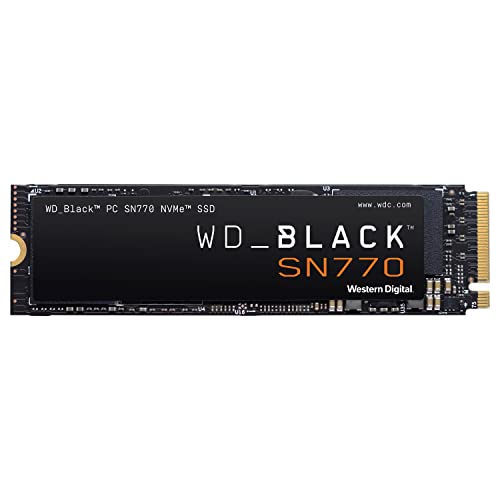
Specs
Capacity | 1 TB |
Interface | PCIe Gen4 x4, NVMe |
Form factor | M.2 2280 |
Sequential read | Up to 5,150 MB/s |
Sequential write | Up to 4,900 MB/s |
Endurance | 600 TBW |
Warranty | 5-year limited |
Capacity
1 TB
Interface
PCIe Gen4 x4, NVMe
Form factor
M.2 2280
Sequential read
Up to 5,150 MB/s
Sequential write
Up to 4,900 MB/s
Endurance
600 TBW
Warranty
5-year limited
What it does well
The SN770 is WD's mainstream Gen4 drive, and the 1TB capacity is priced to be the default pick for anyone building on a budget. Sequential reads up to 5,150 MB/s and writes up to 4,900 MB/s are plenty for game load times, general system responsiveness, and app launches; you will not notice the gap versus the SN850X in day to day use.
It uses the same WD in-house Gen4 controller family as the SN850X, just tuned for the value tier, and carries the same 5-year warranty. For a boot-and-game drive on a build where the GPU or CPU is soaking up most of the budget, this is not the place to spend up.
What you give up
600 TBW of rated endurance is half the SN850X's figure, which matters more in theory than practice for most gamers, but heavy re-installers and creators doing local video work will burn through headroom faster.
The real tradeoff is capacity, not performance. A single 1TB drive holds roughly five to seven current AAA titles at most, fewer if any of them run past 100GB, and you will be uninstalling something almost every time you want to try a new release. Every build we've helped spec with a single 1TB drive comes back within eight months asking how to add storage. That is not a knock on this specific drive, it is a capacity math problem no 1TB SKU escapes. The same arithmetic decides console-shaped boxes, where the capacity is fixed at checkout rather than later: our verdict on whether 512GB is enough for the Steam Machine runs the numbers against Valve's two SKUs.
Who it's for
Buyers with a genuinely small, settled library: two or three live-service or competitive titles and not much else. Also a reasonable secondary or scratch drive in a build that already has a larger primary NVMe for the game library. If you are not sure which camp you are in, the matrix above and the install-size table settle it. If 1TB is the right call for you, our picks for the best 1TB NVMe SSDs for gaming compare five drives by the job each one does.
For a deeper look at this exact capacity tier, our full 2TB NVMe SSD roundup compares several drives at this price point head to head.
Step-up: Samsung 990 Pro 4TB
For buyers who have already lived the 1TB-comes-back-in-eight-months problem once and do not want a second round of it.

Specs
Capacity | 4 TB |
Interface | PCIe Gen4 x4, NVMe 2.0 |
Form factor | M.2 2280 |
Sequential read | Up to 7,450 MB/s |
Sequential write | Up to 6,900 MB/s |
Endurance | 2,400 TBW |
Warranty | 5-year limited |
Capacity
4 TB
Interface
PCIe Gen4 x4, NVMe 2.0
Form factor
M.2 2280
Sequential read
Up to 7,450 MB/s
Sequential write
Up to 6,900 MB/s
Endurance
2,400 TBW
Warranty
5-year limited
What it does well
Samsung's 990 Pro line has been a reference point for Gen4 performance since launch, and the 4TB capacity point inherits the same controller and NAND as the smaller SKUs rather than a cut-down variant. Rated sequential reads up to 7,450 MB/s and writes up to 6,900 MB/s sit at the top of the Gen4 field, and the 2,400 TBW endurance rating gives it double the headroom of the 2TB SN850X.
At 4TB, you are not making install-size decisions anymore. A rotating library of ten or more current AAA titles, plus your full launcher catalog, plus recorded gameplay clips or a video project, fits without triage. It is the drive that turns should I uninstall this into a question you stop asking.
What you give up
Capacity this large costs meaningfully more than the 2TB tier, and most gaming libraries genuinely do not need it. If your honest answer to how many big games you keep installed is four to six, the SN850X 2TB gets you there for less, and here you are paying a premium for headroom you may not use for years.
It is also worth checking your motherboard's M.2 slot power and heatsink clearance at 4TB capacities. Most modern boards handle it fine, but small form factor builds are worth a second look before buying.
Who it's for
Buyers who have already outgrown a smaller drive once, or who know from experience that their install list only grows. Streamers and content creators sharing one drive between games and recorded footage are the other clear use case. If this is your first build, most people are better served starting at 2TB and stepping up later; storage is one of the easier upgrades to make down the line.
Weighing the jump straight to the top tier? our 4TB NVMe SSD picks cover a few more options at this capacity.
Bottom line
If you play two or three competitive or live-service titles and nothing else, buy the WD Black SN770 1TB and put the difference elsewhere in the build.
If you are not sure how many games you will end up keeping installed, or your library already runs four to six AAA titles deep, buy the WD Black SN850X 2TB. It is the tier that answers the question for good.
If you have already lived through the 1TB shuffle once, or you are sharing the drive with recorded footage and creative work, buy the Samsung 990 Pro 4TB.
For most 2026 gaming builds, 2TB is the number that stops storage from being a recurring decision.
FAQ
Is 1TB enough for gaming in 2026?
For a small, settled library, yes. If you play two or three live-service or competitive titles on rotation and rarely keep more installed at once, 1TB covers you comfortably. The trouble starts once you add modern AAA releases: a single open-world title can run past 100GB, and two or three installed at the same time will fill a 1TB drive fast. If your library leans toward AAA single-player games or you like keeping a rotating catalog installed, 2TB is the safer starting point.
How many games can a 1TB SSD hold?
It depends heavily on which games. A 1TB drive comfortably holds five to seven current AAA titles if none of them run past 100GB, but stack a couple of 120GB-plus releases like Baldur's Gate 3 or Call of Duty and that number drops to three or four. Smaller esports and live-service titles are far more forgiving; you can keep eight to ten of those installed at once without denting a 1TB drive.
Is a 2TB SSD overkill for gaming?
Not for most 2026 builds. Modern AAA installs commonly run 100 to 150GB or more, so 2TB is closer to a comfortable working minimum than a premium tier. It is overkill only if your library is genuinely small and settled: two or three competitive titles and not much else. For anyone who keeps more than four or five games installed at a time, 2TB is the tier that stops storage from being a monthly decision.
Should I get 1TB or 2TB for a gaming PC?
Get 2TB unless you know your library is small and staying that way. The price gap between 1TB and 2TB Gen4 drives has narrowed enough that it is rarely worth the tradeoff for most builds. Go with 1TB only if you are confident you will keep two or three titles installed at a time; go with 2TB if there is any real chance your library grows past that, which covers the majority of gaming PC buyers.
Do I need 4TB of storage for gaming?
Most buyers do not need 4TB out of the gate. It makes sense if you have already outgrown a smaller drive once, if you keep ten or more current titles installed simultaneously, or if the drive doubles as storage for recorded gameplay or creative work. For a first build or a typical rotating library of four to six AAA titles, 2TB is the more efficient starting point, with room to add a second drive later if you need it.
Can I use an external SSD instead of upgrading my internal drive?
You can, and it is a reasonable stopgap, but a fast internal NVMe drive is still the better long-term move for game libraries. External SSDs over USB, even fast ones, typically run behind an internal Gen4 NVMe drive on load times and transfer speeds, and adding a second internal M.2 drive is usually straightforward on modern motherboards if your build has an open slot.
Related Articles

How to Choose RAM and Storage
A builder's framework for RAM and storage: match the platform, buy capacity over speed, and put your money in the right SSD tier.
Jun 29, 2026

Best 2TB NVMe SSDs Under $150 (2026): DRAM vs HMB Picks by Use Case
The best 2TB NVMe SSD under $150 isn't one drive. It's five, keyed to use case. DRAM-versus-HMB tradeoffs, PS5 fitment, and an honest answer for each.
May 19, 2026

Best 4TB NVMe SSDs for Gaming (2026): 5 Picks, Gen4 First
The best 4TB NVMe SSDs for gaming in 2026: five picks that hold a full library. Why a fast Gen4 loads games quicker than any Gen5 drive at this capacity.
Aug 20, 2026

Best NVMe SSD for Gaming in 2026: PCIe 4.0 Sweet Spot
The best PCIe 4.0 NVMe SSDs for gaming in 2026, ranked by capacity and budget. Five picks plus why a fast Gen4 drive beats Gen5 for most gaming builds.
Jun 28, 2026

How to Choose an SSD for Gaming in 2026: 4 Picks by Budget
How to choose an SSD for gaming in 2026: why Gen4 loads games as fast as Gen5 for less, when DRAM matters, and 4 drives picked by budget, from 1TB to 2TB.
Oct 23, 2026