Affiliate Disclosure: As an Amazon Associate we earn from qualifying purchases. Some links may earn us a commission at no cost to you.

Best Budget PSUs Under $80 (2026): 5 Cheapest Safe Picks
Every other part in a build fails on its own. A power supply can take the motherboard and the graphics card with it, which is why the cheapest line item on the parts list deserves the most thought.
Eighty dollars sits right at the line where the market starts hiding things. Above it, most units are fine. Below it, wattage labels turn optimistic and protection circuits stop being listed. These five clear the floor, and the tiebreaker throughout is warranty length, because it is the only honest signal a manufacturer hands you at this price.
Our top pick: MSI MAG A650GLS PCIE5
It is the only supply under eighty dollars pairing Gold efficiency with fully modular cabling and a ten-year warranty. Nothing else in the bracket asks its maker to stand behind it for a decade.
Quick picks
Pick | Power supply | Best for | Warranty | Buy |
|---|---|---|---|---|
Best Overall | Build once, forget it | 10 years | ||
Best Value | The default mid-tier build | 5 years | ||
Best Headroom | A GPU upgrade already planned | 3 years | ||
Best Budget | The lowest safe line item | 3 years | ||
Editor's Pick | Native 12V-2x6 on a budget | 5 years |
Best Overall
- Power supply
- Best for
Build once, forget it
- Warranty
10 years
- Buy
Best Value
- Power supply
- Best for
The default mid-tier build
- Warranty
5 years
- Buy
Best Headroom
- Power supply
- Best for
A GPU upgrade already planned
- Warranty
3 years
- Buy
Best Budget
- Power supply
- Best for
The lowest safe line item
- Warranty
3 years
- Buy
Editor's Pick
- Power supply
- Best for
Native 12V-2x6 on a budget
- Warranty
5 years
- Buy
Specs at a glance
Power supply | Wattage | Efficiency | Standard | Cabling | Warranty |
|---|---|---|---|---|---|
650W | 80 PLUS Gold | ATX 3.1, PCIe 5.1 | Fully modular | 10 years | |
650W | 80 PLUS Bronze | ATX 3.1, PCIe 5.0 | Semi-modular | 5 years | |
750W | 80 PLUS Bronze | ATX 3.1, PCIe 5.1 | Non-modular | 3 years | |
650W | 80 PLUS Gold | ATX 3.1 | Non-modular | 3 years | |
650W | 80 PLUS Bronze | ATX 3.1, PCIe 5.1 | Non-modular | 5 years |
- Wattage
650W
- Efficiency
80 PLUS Gold
- Standard
ATX 3.1, PCIe 5.1
- Cabling
Fully modular
- Warranty
10 years
- Wattage
650W
- Efficiency
80 PLUS Bronze
- Standard
ATX 3.1, PCIe 5.0
- Cabling
Semi-modular
- Warranty
5 years
- Wattage
750W
- Efficiency
80 PLUS Bronze
- Standard
ATX 3.1, PCIe 5.1
- Cabling
Non-modular
- Warranty
3 years
- Wattage
650W
- Efficiency
80 PLUS Gold
- Standard
ATX 3.1
- Cabling
Non-modular
- Warranty
3 years
- Wattage
650W
- Efficiency
80 PLUS Bronze
- Standard
ATX 3.1, PCIe 5.1
- Cabling
Non-modular
- Warranty
5 years
The floor a budget PSU has to clear
Start with the number on the box, because it is the specification most likely to be fiction. An unbranded unit labelled 500W frequently delivers closer to 350W sustained, and it delivers that right up until a graphics card transient asks for the rest. Reviewers who have loaded cheap high-wattage supplies report failures under conditions the label claims to cover.
Then look for the protection list. Over-current, over-voltage, over-power, short-circuit, under-voltage and over-temperature should all be printed on the listing. A page that mentions none of them is not being modest. Protections cost components, and the component being skipped decides whether a failure is a dead supply or a dead supply plus a dead motherboard.
Group-regulated designs are the other thing lurking at the bottom of the market. They share one regulation loop across the 12V, 5V and 3.3V rails, so heavy draw on one drags the others out of spec. That was survivable in 2012. A current graphics card spikes hard enough and fast enough that the drift becomes real instability, and the symptom looks like bad memory rather than a bad supply.
ATX 3.1 is the shorthand for all of that being engineered in rather than hoped for. The standard specifies how far above rated wattage a unit must ride out a spike and for how long, which is precisely what a modern card demands. Nothing here is group-regulated, because ATX 3.1 compliance rules it out. Watch the connector wording, though: native 12V-2x6 units and units that merely bundle an adapter are different things, and budget listings blur the two constantly.
How we picked
Nobody publishes ripple, cross-load or hold-up figures for eighty-dollar power supplies. The coverage on this tier is mostly unboxing. So the tiebreaker is warranty length, the one number that costs a manufacturer money to get wrong. A company printing ten years on the box has run the return-rate math. A company printing three has run it too and landed somewhere less confident.
Efficiency tier is a heat decision, not an electricity-bill decision. The annual difference between Bronze and Gold on a gaming machine is too small to choose on. What it changes is how much of the draw becomes waste heat inside a case with two fans and no exhaust plan. Gold runs cooler, the supply fan turns slower, and the machine is quieter for it.
Modularity gets ranked by case rather than by taste. In a large mid-tower with a proper basement, a non-modular unit is twenty minutes of cable tucking and then it is finished. In a cheap compact chassis with a shallow shroud, it decides whether the side panel closes. If the wider power, cooling and case decision is still open, settle the case first and let it choose the cabling.
One name is absent on purpose. Corsair's CX line is the default answer on most budget lists and it is a competent unit at this price. It also sits on a lower manufacturing tier than Corsair's own RMx range, which matters the moment the build stops being a budget build. Down here it is fine; in a machine worth several times this it is the wrong call, and those two statements do not conflict. For the full framework rather than five picks, picking a power supply from scratch covers the ground.
Best Overall: MSI MAG A650GLS PCIE5
Specs
Wattage | 650W |
Efficiency | 80 PLUS Gold |
Standard | ATX 3.1, PCIe 5.1 |
Cabling | Fully modular |
GPU connector | Native 12V-2x6 |
Fan | 120mm low-noise |
Warranty | 10 years |
Wattage
650W
Efficiency
80 PLUS Gold
Standard
ATX 3.1, PCIe 5.1
Cabling
Fully modular
GPU connector
Native 12V-2x6
Fan
120mm low-noise
Warranty
10 years
What it does well
Gold efficiency at 650W is the specification doing the most work, and not for the reason the marketing suggests. Less of the draw becomes waste heat, and waste heat in a budget build has nowhere good to go. A cooler supply keeps its own fan slow, and on a machine where the graphics card is already the loud part, that is audible.
Full modular cabling matters more down here than on a premium build. Expensive cases have deep basements and cable channels; cheap ones have a flat floor and a side panel that bows. Leaving four unused peripheral runs in the box is what lets a compact chassis close cleanly. The native 12V-2x6 cable then removes the adapter question outright, and the ten-year warranty is the longest term here by a factor of two. MSI is not printing that out of generosity; the return-rate math supports it.
What you give up
It spends the whole budget. Nothing is left for a better case fan or a second drive, and on a build where every line item is contested that is a real cost.
650W is also a ceiling. It covers a current mid-tier card comfortably, but it forecloses the upgrade path the 750W pick below keeps open. The compact chassis puts a smaller fan on the same thermal job too, so under sustained load it goes audible earlier than a physically larger unit would.
Who it's for
Someone building once and not opening the case again for years, and anyone dropping in an RTX 5060 Ti or RTX 5070 class card who would rather have a native connector than a pigtail hanging off the back of the card.
Best Value: Thermaltake Smart BM3 650W
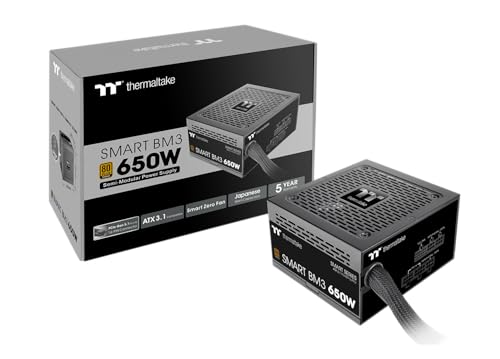
Specs
Wattage | 650W |
Efficiency | 80 PLUS Bronze |
Standard | ATX 3.1, PCIe 5.0 |
Cabling | Semi-modular |
Capacitors | 105C Japanese |
Fan | 120mm |
Warranty | 5 years |
Wattage
650W
Efficiency
80 PLUS Bronze
Standard
ATX 3.1, PCIe 5.0
Cabling
Semi-modular
Capacitors
105C Japanese
Fan
120mm
Warranty
5 years
What it does well
The capacitor specification is the tell. 105C Japanese capacitors separate a unit built to survive four summers in a warm case from one built to survive a review. Capacitor quality is where budget supplies quietly economise, because nobody checks and the failure surfaces years later as random restarts that get blamed on the memory.
ATX 3.1 support means the transient behavior is engineered in rather than hoped for, and semi-modular cabling drops every peripheral run you are not using. Five years of coverage puts it above the ASRock pair. Worth naming the confusion directly, too: Thermaltake's entry-level Smart line has a poor reputation and deserves it, and the BM3 shares the family name and very little else.
What you give up
Bronze rather than Gold, so more waste heat and a fan that ramps sooner under sustained load. In a well-ventilated case that is a non-issue. In a cramped one it is the difference between hearing the supply and not.
Semi-modular still leaves the 24-pin and the EPS cable permanently attached, so the tidiness gain is partial. The GPU path is PCIe 5.0 rather than 5.1, which is a specification detail rather than a practical limit today.
Who it's for
The default buyer. Someone assembling a 1080p or 1440p gaming machine who wants the current standard and a warranty worth having, without handing the whole budget to the least interesting part in the case.
Best Headroom: ASRock PRO-750B

Specs
Wattage | 750W |
Efficiency | 80 PLUS Bronze |
Standard | ATX 3.1, PCIe 5.1 |
GPU power budget | 450W on the 12V-2x6 path |
Cabling | Non-modular |
Fan | 120mm |
Protections | OCP, OVP, OPP, SCP, UVP, OTP |
Warranty | 3 years |
Wattage
750W
Efficiency
80 PLUS Bronze
Standard
ATX 3.1, PCIe 5.1
GPU power budget
450W on the 12V-2x6 path
Cabling
Non-modular
Fan
120mm
Protections
OCP, OVP, OPP, SCP, UVP, OTP
Warranty
3 years
What it does well
The extra hundred watts is the cheapest future-proofing in this bracket, and it costs almost nothing over the least expensive 650W unit here. A 450W budget on the 12V-2x6 path covers every card short of the top two tiers, so this supply survives a graphics card upgrade instead of becoming the reason you cannot do one. Wattage questions get asked backwards constantly: the honest version is not what the current build draws but what the next one will. If that is the open call, whether 650W covers an RTX 5070 works through the arithmetic.
The protection set is printed on the listing rather than implied, which sounds minor and is not. Plenty of units at this price simply do not say, and a page that does not say usually has something to not say.
What you give up
Three years of warranty is the shortest term here, and on a part chosen by warranty length that is the entire argument against it. ASRock is also new to power supplies, so there is no multi-year field record on this platform. The specification sheet reads well; the track record does not exist to read.
Non-modular means every cable ships attached, including the ones a budget build will never touch. Bronze efficiency at 750W in a small case is also a heat conversation, because a larger unit at a lower duty cycle still dumps more absolute watts into the chassis than a Gold unit doing the same job.
Who it's for
Anyone whose graphics card plan is not finished. If the build starts on a mid-tier card and the intent is to step up within a couple of years, buying the wattage now is cheaper than buying the supply twice.
Best Budget: ASRock PRO-650G

Specs
Wattage | 650W |
Efficiency | 80 PLUS Gold |
Standard | ATX 3.1 |
Cabling | Non-modular |
Fan | 120mm |
Protections | Full protection circuit |
Warranty | 3 years |
Wattage
650W
Efficiency
80 PLUS Gold
Standard
ATX 3.1
Cabling
Non-modular
Fan
120mm
Protections
Full protection circuit
Warranty
3 years
What it does well
Gold certification this far down the price ladder is unusual enough to be the reason this unit is here at all. Efficiency turns into less heat and a slower fan rather than a bigger number on a box, and getting it at the bottom of the bracket is a good trade.
ATX 3.1 support means the transient headroom is engineered in, so it is not a bare-minimum unit wearing a Gold sticker. It also leaves real money for the rest of the build, which is the point of shopping this tier rather than the one above it.
What you give up
Three-year warranty, the shortest here alongside its 750W sibling, and the same absence of a field record. Two of the five picks are ASRock PRO units, and that is worth saying plainly rather than letting the specification sheets carry them unchallenged.
Non-modular cabling in a cheap case with a shallow shroud is a real build annoyance. There is no native 12V-2x6 cable either, so a current card needs the bundled adapter, and adapters are the connector-seating failure point buyers have flagged repeatedly on modern cards.
Who it's for
The buyer who has already settled the graphics card and does not intend to change it, and who needs this line item as small as it can go without dropping under the floor.
Editor's Pick: MSI MAG A650BN PCIE5 III

Specs
Wattage | 650W |
Efficiency | 80 PLUS Bronze |
Standard | ATX 3.1, PCIe 5.1 |
GPU connectors | Dual 12V-2x6 |
Cabling | Non-modular |
Capacitors | Server-grade |
Regulation | Semi-digital |
Warranty | 5 years |
Wattage
650W
Efficiency
80 PLUS Bronze
Standard
ATX 3.1, PCIe 5.1
GPU connectors
Dual 12V-2x6
Cabling
Non-modular
Capacitors
Server-grade
Regulation
Semi-digital
Warranty
5 years
What it does well
Two native 12V-2x6 cables normally starts a tier up, and it settles the adapter question for any current card without argument. If anxiety about modern connectors is what brought you here, this is the cheapest way to make it go away.
Semi-digital regulation is a design decision rather than a sticker, and it shows up as tighter voltage behavior when a card spikes hard. Paired with five years of coverage, it lands level with the Thermaltake and ahead of both ASRock units on the tiebreaker that matters most here.
What you give up
Non-modular, so the second 12V-2x6 cable you almost certainly will not use is permanently attached and has to be tucked somewhere. In a compact case it is the most annoying cable in the box.
Bronze efficiency, and 650W is a hard ceiling on what those two connectors can feed together. The dual-cable specification is about connector flexibility, not about running two demanding cards. One more trap: the PCIE5 III revision is a different unit from the older A650BN listing that shares most of the name, and buyers land on the wrong one regularly, so check the revision string before ordering.
Who it's for
Someone pairing a current-generation card who wants the native connector without paying the top pick's premium, and who cares more about what plugs in than about how the back of the case looks.
Bottom line
If you want to buy once and stop thinking about it, take the MSI MAG A650GLS PCIE5. If you want most of that for meaningfully less, the Thermaltake Smart BM3 650W is the sensible default. If a graphics card upgrade is already on the calendar, the ASRock PRO-750B and its extra hundred watts is the cheaper path. If the line item simply has to be as small as possible, the ASRock PRO-650G is the floor and it is still Gold. And if a current card with a native connector is the reason you are here, the MSI MAG A650BN PCIE5 III ships two of them.
Already running a supply you are happy with? Graphics cards that drop into an older supply is the other half of this question.
FAQ
Is a cheap power supply safe?
A cheap supply from a brand with a warranty department and a printed protection list is safe. One from an unbranded seller with neither is what shows up in failure stories. The dividing line is not price on its own, it is whether the unit states what it protects against and whether anyone is on the hook when it fails. Every pick here clears both tests, and the cheapest of them is still Gold rated.
How many watts do I need for a budget gaming PC?
For a mid-tier card and a mainstream processor, 650W is comfortable and leaves room for the spikes a modern card produces. Drop to 550W only if the graphics card is genuinely entry level and will stay that way. Step up to 750W if the card will change within a couple of years, because buying the headroom once costs less than buying the supply twice.
Is 80 PLUS Bronze good enough, or should I pay for Gold?
Bronze is good enough. The reason to pay for Gold is not the power bill, it is heat and noise. A Gold unit turns less of the draw into waste heat, so its own fan runs slower and the machine is quieter under sustained load. In a well-ventilated chassis the difference is small; in a cramped budget case with limited exhaust it is noticeable.
Do I need an ATX 3.1 power supply for a new GPU?
You do not strictly need one, but you want one. ATX 3.1 specifies how far above rated wattage a supply must ride out a transient spike, which is exactly what current graphics cards produce. An older supply can work and can also trip its own protection under a spike it was never built for. Watch the wording, though: plenty of listings claim ATX 3.1 readiness while shipping a 12VHPWR adapter rather than a native 12V-2x6 cable.
Is a non-modular power supply a problem in a small case?
It can be. A non-modular unit ships every cable permanently attached, including peripheral runs a budget build will never use, and those have to live somewhere. In a full-size mid-tower with a proper basement there is room to tuck them. In a compact chassis with a shallow shroud, the excess cabling is what stops the side panel closing flat. Decide the case first, then let it pick the cabling.
How long should a budget power supply last?
Treat the warranty as the manufacturer's own estimate, because that is what it is. A three-year term signals a company expecting the unit to be replaced with the build; a ten-year term signals one that has run the failure math and is comfortable. In practice a decent supply outlives two graphics cards, which is why the longer term is usually the cheapest insurance in the parts list.
Related Articles

Best ATX 3.1 Power Supplies (2026): 5 Native 12V-2x6 Picks
Five ATX 3.1 power supplies with native 12V-2x6 connectors, Cybenetics Gold through Platinum, all 850W, plus how to spot an ATX 3.0 unit sold with an adapter.
Aug 14, 2026

How to Choose a Power Supply for Your Gaming PC (2026)
How to choose a power supply for a gaming PC: size it to your GPU's transient spikes, pick the right 80 Plus tier, get ATX 3.1, and buy a trusted OEM brand.
Jul 19, 2026

Is 650W Enough for an RTX 5070, or Do You Need 750W? (2026)
Is a 650W PSU enough for an RTX 5070? Yes on a quality ATX 3.1 unit with a mainstream CPU. Here is the headroom math, the connector trap, and the picks.
Aug 14, 2026

Best Gaming Laptops for WoW Forever (2026): 5 Picks
WoW Forever needs an 8 GB DX12 GPU and 128 GB of free SSD space. These five gaming laptops clear that bar, from an RTX 5050 budget pick to an RTX 5080 raid rig.
Sep 28, 2026

Will an RTX 5090 Fit in a Corsair 4000D? Yes (2026)
Will an RTX 5090 fit in a Corsair 4000D? Yes in all three cases, but the 360mm Airflow only clears cards under 360mm and wants an angled 12V-2x6 cable.
Sep 29, 2026