Affiliate Disclosure: As an Amazon Associate we earn from qualifying purchases. Some links may earn us a commission at no cost to you.

Best Gaming Laptops for Subnautica 2 (2026): 5 Picks
Subnautica 2 is a co-op survival game that a lot of people picked up through Game Pass or a friend's invite rather than as hardcore PC players. If you do not own a gaming PC, a gaming laptop is the simplest way in, and the game's spec sheet is steeper than its relaxed pace suggests.
The Steam page asks for a GTX 1660 and 12 GB of memory at minimum, and an RTX 3070 with 16 GB for the recommended tier. It is also in Early Access, so those numbers can change. Every pick below clears the minimum with room, and most clear the recommended tier.
Our top pick: GIGABYTE Gaming A16 RTX 5070
The Gaming A16 pairs an RTX 5070 with 32 GB of memory and a 1 TB SSD, which covers the recommended GPU tier and leaves headroom for hosting a four-player session with voice chat running.

Quick picks
Pick | Laptop | Best for | Buy |
|---|---|---|---|
Best Overall | High settings and four-player co-op | ||
Best Value | Medium to High with DLSS, 32 GB included | ||
Best Premium | Max settings on an OLED built for dark water | ||
Best Budget | The lowest-cost laptop that clears the minimum with room | ||
Editor's Pick | Carrying co-op sessions to a friend's place |
Best Overall
- Laptop
- Best for
High settings and four-player co-op
- Buy
Best Value
- Laptop
- Best for
Medium to High with DLSS, 32 GB included
- Buy
Best Premium
- Laptop
- Best for
Max settings on an OLED built for dark water
- Buy
Best Budget
- Laptop
- Best for
The lowest-cost laptop that clears the minimum with room
- Buy
Editor's Pick
- Laptop
- Best for
Carrying co-op sessions to a friend's place
- Buy
Specs at a glance
Laptop | GPU | CPU | Display | Memory | Storage |
|---|---|---|---|---|---|
RTX 5070, 8 GB | Core i7-13620H, 10 cores | 16 in WUXGA 165 Hz | 32 GB DDR5 | 1 TB | |
RTX 5060, 8 GB | Ryzen 7 260, 8 cores | 16 in WUXGA 180 Hz | 32 GB DDR5 | 1 TB | |
RTX 5080, 16 GB | Ryzen 9 9955HX3D, 16 cores | 16 in 2560 x 1600 OLED 240 Hz | 32 GB DDR5 | 1 TB | |
RTX 5050, 8 GB | Core i5-13450HX, 10 cores | 16 in FHD+ 165 Hz | 16 GB DDR5 | 512 GB | |
RTX 5070, 8 GB | Ryzen AI 7 350, 8 cores | 16 in 2560 x 1600 165 Hz | 32 GB DDR5 | 1 TB |
- GPU
RTX 5070, 8 GB
- CPU
Core i7-13620H, 10 cores
- Display
16 in WUXGA 165 Hz
- Memory
32 GB DDR5
- Storage
1 TB
- GPU
RTX 5060, 8 GB
- CPU
Ryzen 7 260, 8 cores
- Display
16 in WUXGA 180 Hz
- Memory
32 GB DDR5
- Storage
1 TB
- GPU
RTX 5080, 16 GB
- CPU
Ryzen 9 9955HX3D, 16 cores
- Display
16 in 2560 x 1600 OLED 240 Hz
- Memory
32 GB DDR5
- Storage
1 TB
- GPU
RTX 5050, 8 GB
- CPU
Core i5-13450HX, 10 cores
- Display
16 in FHD+ 165 Hz
- Memory
16 GB DDR5
- Storage
512 GB
- GPU
RTX 5070, 8 GB
- CPU
Ryzen AI 7 350, 8 cores
- Display
16 in 2560 x 1600 165 Hz
- Memory
32 GB DDR5
- Storage
1 TB
How we picked: reading the Subnautica 2 spec sheet
Start with the spec sheet on the Subnautica 2 Steam page. The minimum tier is a GeForce GTX 1660 6 GB or Radeon RX 5500 XT, an Intel Core i5-8400 or Ryzen 5 2600, 12 GB of memory and 50 GB of storage on Windows 10 or 11. The recommended tier jumps to an RTX 3070 8 GB or RX 6700 XT, a Core i7-13700 or Ryzen 7 7700X, 16 GB of memory and Windows 11. Those are desktop parts, so we matched each line to laptop hardware that lands at or above it.
Memory is the first filter, and it catches more laptops than you would think. Twelve gigabytes is the minimum, which rules out the entry configurations that ship with 8 GB. Sixteen is the real floor, and 32 GB is what we would buy if you plan to host co-op with Discord or a browser open, which is why four of the five picks carry it.
The GPU decides your settings. Subnautica 2 runs on Unreal Engine 5, and its water, light and fog are where frame rate goes. An RTX 5070 laptop GPU is the closest match to the recommended RTX 3070, an RTX 5060 sits between the two tiers, and an RTX 5050 clears the minimum with margin. Every pick is an RTX card, which matters because DLSS support is NVIDIA-only at Early Access launch. Laptop GPUs also run at different power limits, so read the wattage before you buy; our GPU and display guide explains how.
Then plan for change. Unknown Worlds says Early Access should last two to three years, with more biomes, creatures and story on the roadmap, and the requirements can move with them. The 50 GB install is small today, but buying a step above the recommended tier is the cheapest insurance against a heavier 1.0.
Finally, we only picked listings sold by Amazon.com. Several popular gaming laptops have drifted to third-party sellers at inflated prices, and an Amazon-sold listing is the simpler return if a unit arrives with coil whine or a dim panel.
Best Overall: GIGABYTE Gaming A16 RTX 5070
Specs
CPU | Intel Core i7-13620H (10 cores, 16 threads) |
GPU | GeForce RTX 5070 Laptop, 8 GB |
Display | 16 in WUXGA (1920 x 1200), 165 Hz |
Memory | 32 GB DDR5 |
Storage | 1 TB SSD |
OS | Windows 11 Home |
Color | Black Steel |
CPU
Intel Core i7-13620H (10 cores, 16 threads)
GPU
GeForce RTX 5070 Laptop, 8 GB
Display
16 in WUXGA (1920 x 1200), 165 Hz
Memory
32 GB DDR5
Storage
1 TB SSD
OS
Windows 11 Home
Color
Black Steel
What it does well
The RTX 5070 is the closest laptop match to Subnautica 2's recommended RTX 3070, so High settings at the panel's 1920 x 1200 resolution are a realistic target, with DLSS available when a dense kelp forest or a busy base starts to drag. That is the difference between murky water and the glowing reefs the trailers sold you on.
Thirty-two gigabytes of DDR5 is double the recommended amount. The host in a co-op session carries the whole world plus voice chat, a browser full of crafting recipes and whatever else is open, and this laptop never has to think about memory. The 1 TB SSD holds the install and every Early Access update for years.
What you give up
The Core i7-13620H is a 10-core H-series chip, a step below the desktop Core i7-13700 the recommended tier names. In an exploration game that leans on the GPU it rarely shows, but it is the first part of this laptop you would upgrade if you could.
GIGABYTE's Gaming line is plainly built, with a plastic lid and a thin speaker pair. Buyers have flagged that the fans are loud in the performance profile, so a headset is the better way to hear a Leviathan coming.
Who it's for
The player who wants one laptop that runs Subnautica 2 at High, hosts friends for co-op, and stays comfortable through the rest of Early Access.
Best Value: Acer Nitro V 16S RTX 5060

Specs
CPU | AMD Ryzen 7 260 (8 cores, 16 threads) |
GPU | GeForce RTX 5060 Laptop, 8 GB |
Display | 16 in WUXGA (1920 x 1200) IPS, 180 Hz |
Memory | 32 GB DDR5 |
Storage | 1 TB PCIe Gen 4 SSD |
Wireless | Wi-Fi 6 |
Model | ANV16S-41-R2AJ |
CPU
AMD Ryzen 7 260 (8 cores, 16 threads)
GPU
GeForce RTX 5060 Laptop, 8 GB
Display
16 in WUXGA (1920 x 1200) IPS, 180 Hz
Memory
32 GB DDR5
Storage
1 TB PCIe Gen 4 SSD
Wireless
Wi-Fi 6
Model
ANV16S-41-R2AJ
What it does well
This is the least expensive Amazon-sold laptop we found with 32 GB of memory and a 1 TB SSD, and both matter more here than a faster CPU. The RTX 5060 with 8 GB sits between the minimum and recommended GPU tiers, so Medium to High at 1920 x 1200 with DLSS on is a comfortable target.
The 180 Hz WUXGA panel and Ryzen 7 260 round out a configuration with no obvious weak spot. If you are cross-shopping, our RTX 5060 laptop roundup ranks the rest of the field by power limit.
What you give up
The RTX 5060 is a notch below the recommended RTX 3070, so expect to drop shadows and volumetric fog a step in the densest biomes rather than running everything at High.
Nitro builds are plastic and the speakers are thin. The panel is an IPS screen rather than OLED, so the deep, dark water looks grey rather than black.
Who it's for
The Game Pass player who wants Subnautica 2 to look good, wants room to host co-op, and does not want to pay for the RTX 5070 tier.
Best Premium: GIGABYTE AORUS Master 16 RTX 5080

Specs
CPU | AMD Ryzen 9 9955HX3D (16 cores, 3D V-Cache) |
GPU | GeForce RTX 5080 Laptop, 16 GB |
Display | 16 in 2560 x 1600 OLED, 240 Hz |
Memory | 32 GB DDR5 |
Storage | 1 TB SSD |
OS | Windows 11 Home |
Model | AORUS Master 16 Gen 2 |
CPU
AMD Ryzen 9 9955HX3D (16 cores, 3D V-Cache)
GPU
GeForce RTX 5080 Laptop, 16 GB
Display
16 in 2560 x 1600 OLED, 240 Hz
Memory
32 GB DDR5
Storage
1 TB SSD
OS
Windows 11 Home
Model
AORUS Master 16 Gen 2
What it does well
The 2560 x 1600 OLED at 240 Hz is the reason this one is here. Subnautica 2 spends most of its time in dark water lit by bioluminescence, and an OLED panel shows true black around those points of light, where an IPS panel washes them in grey.
The RTX 5080 with 16 GB clears the recommended tier by a wide margin, so you can run high settings at the panel's native resolution and keep headroom for whatever the full release adds. The Ryzen 9 9955HX3D is the one laptop CPU here that outruns the recommended desktop chip, and 32 GB of memory covers hosting.
What you give up
This is a lot of laptop for one cozy survival game. It makes sense only if you also play demanding AAA games, or you want this to be your only computer for years.
OLED panels carry a burn-in caveat. Reports suggest long sessions with a fixed interface are the riskiest pattern, so let the panel's pixel refresh run and hide the taskbar.
Who it's for
The player who wants the ocean to look its best at full resolution and treats the laptop as a desktop replacement. For more options at this tier, see our RTX 5080 laptop guide or our OLED gaming laptop picks.
Best Budget: ASUS TUF Gaming F16 RTX 5050
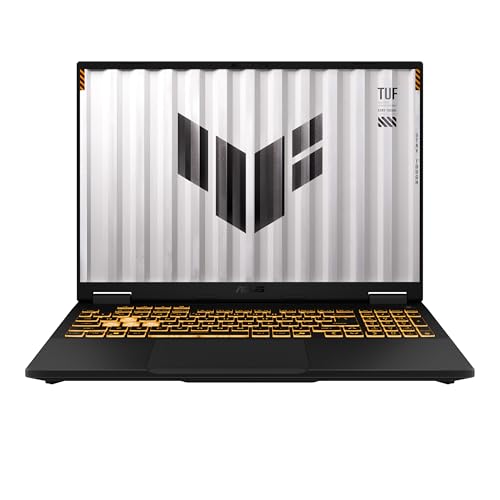
Specs
CPU | Intel Core i5-13450HX (10 cores, 16 threads) |
GPU | GeForce RTX 5050 Laptop, 8 GB |
Display | 16 in FHD+ (1920 x 1200), 165 Hz, 16:10 |
Memory | 16 GB DDR5 |
Storage | 512 GB PCIe Gen 4 SSD |
Wireless | Wi-Fi 6E |
CPU
Intel Core i5-13450HX (10 cores, 16 threads)
GPU
GeForce RTX 5050 Laptop, 8 GB
Display
16 in FHD+ (1920 x 1200), 165 Hz, 16:10
Memory
16 GB DDR5
Storage
512 GB PCIe Gen 4 SSD
Wireless
Wi-Fi 6E
What it does well
The TUF F16 is the lowest-cost Amazon-sold laptop we found that clears Subnautica 2's minimum with room to spare. The RTX 5050 with 8 GB is well ahead of the GTX 1660 6 GB the minimum names, and 16 GB of memory is above the 12 GB floor rather than sitting on it.
The 16:10 FHD+ panel at 165 Hz and the 10-core Core i5-13450HX are solid for the tier. Our RTX 5050 laptop guide compares it with other RTX 5050 machines if you want to shop around.
What you give up
Expect Medium settings at 1080p with DLSS rather than High, because the RTX 5050 sits below the recommended RTX 3070. Sixteen gigabytes is the recommended amount, not extra, so close the browser before you host co-op.
The 512 GB SSD holds the 50 GB install easily today, but Windows and a couple of other games will fill it. Watch out for cheaper Nitro V listings with 8 GB of memory: they fall under the 12 GB minimum outright.
Who it's for
The player new to PC gaming who wants Subnautica 2 to run properly at 1080p and wants the lowest price on this list. If that is still too much, our gaming laptops under 1000 guide covers cheaper machines, most of which only just meet the minimum.
Editor's Pick: GIGABYTE AERO X16 RTX 5070

Specs
CPU | AMD Ryzen AI 7 350 (8 cores, 16 threads) |
GPU | GeForce RTX 5070 Laptop, 8 GB |
Display | 16 in WQXGA (2560 x 1600), 165 Hz |
Memory | 32 GB DDR5 |
Storage | 1 TB SSD |
OS | Windows 11 Home, Copilot+ PC |
Color | Lunar White |
CPU
AMD Ryzen AI 7 350 (8 cores, 16 threads)
GPU
GeForce RTX 5070 Laptop, 8 GB
Display
16 in WQXGA (2560 x 1600), 165 Hz
Memory
32 GB DDR5
Storage
1 TB SSD
OS
Windows 11 Home, Copilot+ PC
Color
Lunar White
What it does well
The AERO X16 is the laptop to carry to a friend's place for a co-op night. It is far thinner than a typical gaming laptop, and it still packs an RTX 5070, 32 GB of memory and a 1 TB SSD, which is the same recommended-tier GPU as our overall pick.
The 2560 x 1600 panel is sharper than the 1920 x 1200 screens on the other mid-tier picks, which helps when you are reading the scanner or the crafting menu. Use DLSS at native resolution to keep frame rate up.
What you give up
Thin laptops run their GPUs at lower power limits than thick ones, and reports suggest the AERO's RTX 5070 lands a step behind the Gaming A16's under sustained load. You pay for portability with frame rate.
The Ryzen AI 7 350 is an 8-core chip, well short of the recommended desktop CPU, and the Lunar White finish shows dirt on a coffee table. A padded gaming laptop backpack is worth it if this travels.
Who it's for
The player who games on the couch, at a desk and at friends' places, and wants one light laptop that still clears the recommended GPU tier.
Bottom line
If you want High settings and room to host co-op, buy the GIGABYTE Gaming A16. If you want 32 GB of memory for less, buy the Acer Nitro V 16S. If you want the ocean on an OLED at full settings, buy the GIGABYTE AORUS Master 16. If you want the lowest-cost laptop that clears the minimum with room, buy the ASUS TUF Gaming F16. If you will carry it to co-op nights, buy the GIGABYTE AERO X16. Still deciding between a laptop and a tower? Our gaming laptop vs desktop guide runs the numbers, and a laptop cooling pad keeps long dives from heat-soaking the chassis.
FAQ
Can a laptop run Subnautica 2?
Yes. Any gaming laptop with an RTX 5050 or better and at least 16 GB of memory clears Subnautica 2's minimum spec, which lists a GTX 1660 6 GB and 12 GB of memory. For High settings, aim for an RTX 5070 laptop, the closest match to the recommended RTX 3070. The common trap is memory: entry laptops with 8 GB fall below the minimum.
What are the Subnautica 2 laptop requirements?
The Steam page lists the same requirements for every PC. Minimum is a GTX 1660 6 GB or RX 5500 XT, a Core i5-8400 or Ryzen 5 2600, 12 GB of memory and 50 GB of storage on Windows 10 or 11. Recommended is an RTX 3070 8 GB or RX 6700 XT, a Core i7-13700 or Ryzen 7 7700X, 16 GB and Windows 11. The game is in Early Access, so these can change.
What is the best budget laptop for Subnautica 2?
The ASUS TUF Gaming F16 with an RTX 5050 is our budget pick. It is the lowest-cost Amazon-sold laptop we found that clears the minimum with margin, with 16 GB of memory and a 10-core Core i5-13450HX. Expect Medium settings at 1080p with DLSS on. Skip cheaper listings with 8 GB of memory, which fall under the 12 GB minimum.
Is Subnautica 2 on Game Pass for PC?
Yes. Subnautica 2 launched in Early Access on Steam and on Xbox and PC Game Pass, so a Windows gaming laptop can play it through the Xbox app as well as through Steam. The hardware requirements are the same either way, and every pick on this list runs Windows 11.
Will Subnautica 2's requirements change during Early Access?
They can. Unknown Worlds expects Early Access to last two to three years and plans more biomes, creatures and story before 1.0, and requirements often move as content and engine features land. Buying at or above the recommended tier, with an RTX 5070 and 32 GB of memory, is the safest way to stay ahead of a heavier full release.
Can you play Subnautica 2 co-op on a laptop?
Yes. Subnautica 2 supports online co-op for up to four players, and a laptop can host or join like any PC. The host carries the session, so 32 GB of memory and a wired connection help if you plan to run games for friends. Four of the five picks here ship with 32 GB for that reason.
Related Articles

Best Gaming Laptops for Aion 2 (2026): 5 Picks Ranked
The best laptop for Aion 2 beats the RTX 2070 and 16 GB the game asks for at its Low preset. Five picks, from an RTX 5050 budget laptop to an RTX 5080.
Nov 7, 2026

Best RTX 5070 Gaming Laptops (2026): TGP-Ranked Picks
The best RTX 5070 gaming laptops in 2026, ranked by the TGP each chassis actually sustains. Five picks from budget to 18-inch, plus the 8GB VRAM catch.
Jul 21, 2026

Best RTX 5060 Gaming Laptops (2026): 5 TGP-Ranked Picks
The best RTX 5060 gaming laptop is the one with the highest TGP. We rank five picks by sustained wattage, from a 115W ASUS TUF F16 down to an 85W Acer Nitro.
Sep 7, 2026

Best Gaming Laptops With 32GB RAM (2026): 5 TGP Picks
Best gaming laptops with 32GB RAM in 2026, ranked by GPU TGP first. Per-pick memory config (soldered or SO-DIMM) so you know what you can upgrade later.
Aug 9, 2026

Gaming Laptop vs Desktop 2026: Value Math and 4 Picks
Gaming laptop vs desktop in 2026: desktops deliver about 30-40% more frames per dollar, laptops deliver portability. See which fits you, plus 4 picks.
Sep 2, 2026