Affiliate Disclosure: As an Amazon Associate we earn from qualifying purchases. Some links may earn us a commission at no cost to you.

Best Prebuilt Gaming PC Under $600: 5 Picks for 2026
A prebuilt gaming PC under 600 dollars is not a bargain. It is a compromise you agree to on purpose. At this budget the graphics card is almost always two or three generations old, the power supply is rarely named, and the drive holds about three modern games before it fills.
That still buys a real 1080p machine if you pick correctly. Below are five prebuilt gaming PCs under 600 dollars worth owning, what each one gives up, and the exact point where another two hundred dollars stops being an upsell and starts being a different computer.
Our top pick: STGAubron Core i7 RTX 3050
It is the only build in this bracket that pairs a current-generation RTX card with 16GB of RAM, so DLSS upscaling and the NVIDIA encoder come along instead of being the thing you gave up.

Quick picks
Pick | PC | Best for | Buy |
|---|---|---|---|
Best Overall | Mixed library at 1080p | ||
Best Value | Esports on a 1080p panel | ||
Best Premium | Texture-heavy single-player | ||
Best Budget | A first PC with a monitor still to buy | ||
Editor's Pick | Planning a GPU swap |
Best Overall
- PC
- Best for
Mixed library at 1080p
- Buy
Best Value
- PC
- Best for
Esports on a 1080p panel
- Buy
Best Premium
- PC
- Best for
Texture-heavy single-player
- Buy
Best Budget
- PC
- Best for
A first PC with a monitor still to buy
- Buy
Editor's Pick
- PC
- Best for
Planning a GPU swap
- Buy
Specs at a glance
PC | CPU | GPU | RAM | Storage |
|---|---|---|---|---|
Intel Core i7 | RTX 3050 6GB | 16GB DDR4 | 512GB NVMe | |
Intel Core i7 | GTX 1660 Ti 6GB | 16GB DDR4 | 512GB SSD | |
Not stated | RX 590 8GB | 16GB DDR4 | 512GB SSD | |
Core i7 6th Gen | GTX 1050 Ti 4GB | 16GB DDR4 | 512GB SSD | |
Ryzen 5 5500 | RX 580 8GB | 16GB DDR4 | 512GB SSD |
- CPU
Intel Core i7
- GPU
RTX 3050 6GB
- RAM
16GB DDR4
- Storage
512GB NVMe
- CPU
Intel Core i7
- GPU
GTX 1660 Ti 6GB
- RAM
16GB DDR4
- Storage
512GB SSD
- CPU
Not stated
- GPU
RX 590 8GB
- RAM
16GB DDR4
- Storage
512GB SSD
- CPU
Core i7 6th Gen
- GPU
GTX 1050 Ti 4GB
- RAM
16GB DDR4
- Storage
512GB SSD
- CPU
Ryzen 5 5500
- GPU
RX 580 8GB
- RAM
16GB DDR4
- Storage
512GB SSD
How we picked these prebuilt gaming PCs under 600 dollars
The graphics card decides the machine, so it got locked first and everything else flexed around it. That order matters more here than anywhere else on the ladder, because the gap between the strongest and weakest GPU in this bracket is wider than the gap between the CPUs, the RAM or the cases. The long version of that argument lives in our guide to matching a GPU to the monitor you already own.
Then the VRAM floor. Our stated minimum for 1080p is 8GB, and modern titles at 1080p ultra routinely sit at nine or ten. Two of the five picks clear that bar. Two sit at 6GB. One sits at 4GB. None of that makes the smaller cards unusable. It decides which setting drops first, and the answer is always textures.
Power supplies are where this tier fails hardest. Most listings name the CPU, the GPU, the RAM and the drive, then go quiet about the one part that can take everything else with it. Where a listing states a wattage and an OEM, that counted in the pick's favour. Where it does not, the section says so. Our position on what a power supply has to do has not moved.
RAM was the easy filter: 16GB or nothing. Every pick here clears it, and an 8GB machine at this money is one you will be fixing in month two. Storage was harder. All five ship a 512GB drive. A single current AAA install can run past a hundred gigabytes, so the honest advice is to budget for a second drive before you budget for a bigger card.
Upgrade path got weighted last, but it broke a tie. A standard ATX case with a standard power supply can take a modern graphics card in two years. An OEM tower with a proprietary board and a proprietary supply usually cannot. That one difference is why a machine with older silicon sits in the Editor's Pick slot instead of at the bottom of the list.
Here is the threshold, stated plainly. If your budget can reach eight hundred dollars, it should. That step buys a current-generation card with 8GB of VRAM instead of six-year-old silicon, a named power supply, and a terabyte of storage. It is the difference between medium settings now and medium settings in 2028. Our prebuilt picks in the 800-dollar tier show where that money goes. If the budget genuinely will not stretch, the five below are the honest options.
Best Overall: STGAubron Core i7 RTX 3050
Specs
CPU | Intel Core i7 (8th Gen class) |
GPU | NVIDIA RTX 3050 6GB GDDR6 |
RAM | 16GB DDR4 |
Storage | 512GB NVMe SSD |
Networking | Wi-Fi plus Ethernet |
OS | Windows 11 |
Chassis | Mid-tower ATX |
CPU
Intel Core i7 (8th Gen class)
GPU
NVIDIA RTX 3050 6GB GDDR6
RAM
16GB DDR4
Storage
512GB NVMe SSD
Networking
Wi-Fi plus Ethernet
OS
Windows 11
Chassis
Mid-tower ATX
What it does well
The RTX 3050 is the only current-generation card in this roundup, and that changes what the machine can do rather than just how fast it does it. DLSS Super Resolution is available in most of the titles a budget buyer will play, and rendering at a lower internal resolution is how a card this size holds 60 fps in a modern release. The hardware encoder handles Discord streaming and OBS capture without borrowing frames from the processor.
Sixteen gigabytes of RAM and an NVMe drive round it out, which sounds unremarkable until you compare it against the rest of the bracket. Plenty of machines at this money still ship 8GB and a SATA drive. This one does not, and the chassis is a standard ATX mid-tower, so nothing about it blocks a bigger card later.
What you give up
Six gigabytes of VRAM sits under the 1080p floor, and it shows up as a texture ceiling rather than a frame-rate cliff. In heavy titles you run high textures instead of ultra, and in a couple of recent releases you run medium. Frame generation is an Ada feature, so this card does not get it.
The listing describes the processor by tier rather than by model number, which makes it hard to know exactly which Core i7 is in the box. Buyers have flagged the same pattern across several sellers in this bracket. Ask before ordering if the exact part matters to you.
Who it's for
The buyer with a mixed library and a 1080p 60 or 75Hz panel who wants the NVIDIA feature set rather than the last few frames of raster for the money.
Best Value: STGAubron Core i7 GTX 1660 Ti

Specs
CPU | Intel Core i7 |
GPU | NVIDIA GTX 1660 Ti 6GB GDDR6 |
RAM | 16GB DDR4 |
Storage | 512GB SSD |
Networking | Wi-Fi |
OS | Windows 11 |
CPU
Intel Core i7
GPU
NVIDIA GTX 1660 Ti 6GB GDDR6
RAM
16GB DDR4
Storage
512GB SSD
Networking
Wi-Fi
OS
Windows 11
What it does well
Strip the RTX branding off the top pick and you land here: a tier lower on price, with raster performance that trails by a handful of frames. In esports titles on a 1080p panel that gap is invisible. Counter-Strike, Valorant, Rocket League and Overwatch all run well past the refresh rate of any monitor a buyer at this budget is likely to already own.
The Turing encoder is the same generation as the one in the top pick, so streaming and clip capture behave identically. RAM and storage match too. The entire difference between these two machines is one GPU tier and one feature set.
What you give up
The GTX 16-series has no tensor cores, which means no DLSS at any quality level. In an older title that costs nothing. In a 2026 release where the RTX card is upscaling to hold 60 fps, it costs you the settings you would otherwise have kept. There is no ray tracing hardware either, though at this performance level that is academic.
The same seller lists a near-identical build with a GTX 1660 Super within a few dollars of this one, and the two pages read almost the same. Confirm which card is in the listing in front of you before you order.
Who it's for
The esports-first buyer on a 1080p high-refresh panel who would rather keep the difference than pay for upscaling they will never switch on.
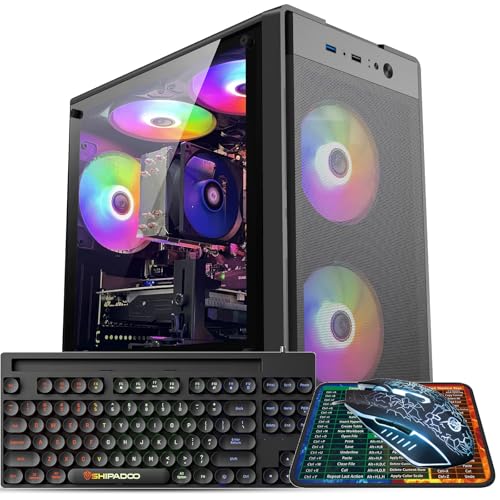
Best Premium: Kroteaup RX 590 8GB Prebuilt
Specs
GPU | AMD Radeon RX 590 8GB |
RAM | 16GB DDR4 |
Storage | 512GB SSD |
OS | Windows 11 |
Chassis | ATX mid-tower |
Cooling | Air |
GPU
AMD Radeon RX 590 8GB
RAM
16GB DDR4
Storage
512GB SSD
OS
Windows 11
Chassis
ATX mid-tower
Cooling
Air
What it does well
This is the only machine on the list that clears the 8GB VRAM floor with room to spare, and at 1080p the frame buffer is what decides whether textures stay on high. Raster performance sits in GTX 1660 territory, so it is not slower than the Turing picks in any way you would notice from the chair.
Sixteen gigabytes of system RAM, a 512GB SSD and a standard ATX shell put it on the same footing as the rest of the list for everything that is not the graphics card. Nothing here is exotic, which is a virtue at this price.
What you give up
Polaris launched in 2018 and the RX 590 was already the refresh of a refresh. It draws far more power than any other card here for the same performance, which means more heat and more noise in a chassis that was not built for either. Driver attention for the architecture is winding down, and upscaling support stops at the earlier FSR revisions.
The listing names the GPU, the RAM and the drive, then stops. No CPU model, no power-supply wattage, no OEM. Reports on machines assembled this way suggest the unnamed parts are where the cost came out. Treat the supply as the first thing to replace if you plan to keep this box for years.
Who it's for
The buyer playing texture-heavy single-player games at 1080p who would rather have frame-buffer headroom than a feature list.
Best Budget: Dell RGB Gaming Tower (Renewed)

Specs
CPU | Intel Core i7 6th Gen |
GPU | NVIDIA GTX 1050 Ti 4GB |
RAM | 16GB DDR4 |
Storage | 512GB SSD |
Condition | Amazon Renewed |
Networking | Wi-Fi |
OS | Windows 11 Pro |
CPU
Intel Core i7 6th Gen
GPU
NVIDIA GTX 1050 Ti 4GB
RAM
16GB DDR4
Storage
512GB SSD
Condition
Amazon Renewed
Networking
Wi-Fi
OS
Windows 11 Pro
What it does well
It is the cheapest way onto this list that still gives you 16GB of RAM and an SSD, and the savings are large enough to matter. Most people shopping at this budget also need a monitor, and this is the only pick that leaves real room for a decent one. That trade is usually the right one, because the display is the part you actually stare at.
A Dell OEM chassis and power supply are known quantities in a tier full of unbranded units. The GTX 1050 Ti holds well over 100 fps in the esports titles most first-time buyers start with. Our prebuilt picks sized for a dorm desk cover the same shape of buyer if this listing sells out.
What you give up
Four gigabytes of VRAM is genuinely limiting in 2026, not merely below preference. Several current titles will not run cleanly at their lowest texture setting, and the ones that do will look it. The Skylake-era Core i7 is fine for esports and out of its depth in anything CPU-heavy.
Renewed means the Amazon Renewed guarantee rather than a manufacturer warranty, which is a real difference once you are past the first few months. Dell OEM towers also use proprietary board and power-supply form factors, so the usual advice about dropping a bigger card in later mostly does not apply.
Who it's for
A first gaming PC for someone playing esports titles whose budget still has to cover a screen.
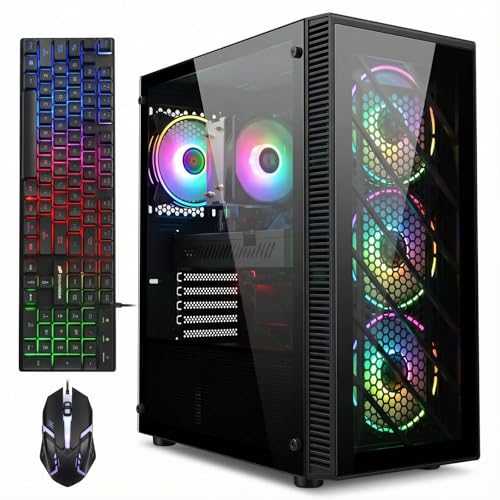
Editor's Pick: STGAubron Ryzen 5 5500 RX 580
Specs
CPU | AMD Ryzen 5 5500 (6 cores, 12 threads) |
Platform | AM4 |
GPU | AMD Radeon RX 580 8GB |
RAM | 16GB DDR4 |
Storage | 512GB SSD |
OS | Windows 11 |
CPU
AMD Ryzen 5 5500 (6 cores, 12 threads)
Platform
AM4
GPU
AMD Radeon RX 580 8GB
RAM
16GB DDR4
Storage
512GB SSD
OS
Windows 11
What it does well
Every other pick here is a terminal machine. This one is not. AM4 gets no new processors, but it has a deep back catalogue, and a Ryzen 5 5500 can be swapped for a 5700X3D on the same board without touching anything else. That is a meaningful second life for a machine bought at this price.
Standard ATX parts throughout mean the graphics card is an ordinary upgrade rather than a project, and the RX 580 clears the 8GB VRAM floor while you wait. If upgrade headroom is the deciding factor, our roundup of prebuilts built to be upgraded goes deeper on what to check before you buy.
What you give up
The Ryzen 5 5500 is the weakest chip in its family for a reason. It carries half the L3 cache of a 5600 and connects over PCIe 3.0, which costs a few frames today and more once a modern card goes in. The RX 580 is also a step behind the RX 590 in the Best Premium slot.
The listing does not state power-supply wattage or OEM, which is the wrong gap on the one machine most likely to receive a card that draws more power. Budget for a supply swap alongside the GPU rather than after it.
Who it's for
The buyer who knows they will put a real graphics card in this chassis within a year or two and wants the rest of the machine ready for it.
Bottom line
If you want the widest capability for the money, buy the STGAubron Core i7 RTX 3050. If you only play esports, buy the STGAubron Core i7 GTX 1660 Ti and keep the difference. If textures matter more than features, buy the Kroteaup RX 590 8GB Prebuilt.
If you also need a monitor, buy the Dell RGB Gaming Tower (Renewed) and put the rest into the panel. If you plan to upgrade, buy the STGAubron Ryzen 5 5500 RX 580. And if the budget can stretch at all, the prebuilt picks in the 800-dollar tier are a different class of machine rather than a nicer version of these. The wider prebuilt roundup covers everything above that.
FAQ
Is a prebuilt gaming PC under 600 dollars actually worth it?
Yes, if you go in knowing what you are buying. This budget gets you 1080p gaming at roughly 60 fps in current AAA titles on medium settings, and far higher in esports. What it does not get you is a current-generation graphics card, a named power supply, or storage you will not outgrow. If your target is Valorant, Fortnite, Counter-Strike or Rocket League on a 1080p panel, the tier does its job. If your library is new single-player releases, save for the next rung instead.
What frame rates should you expect from a 600-dollar prebuilt?
Plan on 1080p and nothing above it. Esports titles run well past 144 fps on every pick here, which is more than the monitors most buyers at this budget own. Modern AAA games are the harder question: expect medium settings and something near 60 fps on the RTX 3050 and RX 590 machines, and lower settings on the GTX 1050 Ti tower. Ray tracing is off the table at this tier regardless of which card is in the box.
Should you buy a cheap prebuilt or build your own PC at this budget?
Building wins on parts and loses on risk. At this budget the money you save by assembling it yourself is real but modest, and it comes with no single warranty to call when something fails. A prebuilt gives you one number to ring and one box to return. Build it yourself if you already know how, want to choose the power supply, or plan to upgrade continuously. Buy the prebuilt if this is your first machine or you need it working this week.
Can you upgrade a budget prebuilt gaming PC later?
Sometimes. The test is whether the case, motherboard and power supply are standard parts. Three of the picks here use ordinary ATX components, so a bigger graphics card is a normal afternoon. The renewed Dell tower uses a proprietary board and supply, which closes off most of that. Whatever you buy, add storage first. A 512GB drive holds about three current games, and it is the upgrade every buyer at this budget comes back for.
Is 16GB of RAM and a 512GB SSD enough for gaming?
Sixteen gigabytes of RAM is enough and will stay enough for the life of these machines. The 512GB drive is not. One current AAA install can run past a hundred gigabytes, so after Windows you have room for three games and little else. A second drive is cheap and it is the first thing to add. Do not let a listing that ships 8GB of RAM tempt you at this price, because that is the one you will be fixing in month two.
Are renewed gaming desktops safe to buy?
They are reasonable if you understand the terms. Amazon Renewed listings are inspected and carry their own guarantee, which is not the same as a manufacturer warranty and typically runs a much shorter window. The parts inside are used, so fans and drives already have hours on them. Buy renewed when the savings buy something you need more, such as a monitor. Avoid it when you were counting on multi-year coverage, because that is exactly what you are trading away.
Related Articles

Best Prebuilt Gaming PCs Under $800 (2026): 1080p Picks
The best prebuilt gaming PCs under $800 in 2026, ranked. Every tower at this budget ships an RTX 3050, and which of the two RTX 3050s decides everything.
Jul 12, 2026

Best Prebuilt Gaming PCs (2026): 5 Picks, Warranty First
The best prebuilt gaming PCs in 2026: 5 picks from a 1080p budget box up to a 4K rig, judged on warranty and RMA support first, then build quality and VRAM.
Aug 18, 2026

Best Upgradeable Prebuilt Gaming PCs (2026): 5 Picks
Five upgradeable prebuilt gaming PCs for 2026, each scored on power supply headroom, motherboard form factor, free RAM and M.2 slots, and GPU clearance.
Aug 14, 2026

5 Best Prebuilt Gaming PCs for College Dorms (2026)
Best prebuilt gaming PCs for college students in 2026: 5 dorm-ready towers picked for footprint, noise, dorm Wi-Fi, and the specs that hold up for four years.
Aug 30, 2026

Best Prebuilt Gaming PCs Truly Under $1,000 (2026): 5 Picks
The best prebuilt gaming PCs genuinely under $1,000 in 2026: five RTX towers ranked on sustained 1080p frame rates, PSU headroom, and airflow quality.
Sep 20, 2026