Affiliate Disclosure: As an Amazon Associate we earn from qualifying purchases. Some links may earn us a commission at no cost to you.

Skytech vs iBUYPOWER vs CyberPowerPC: Best Prebuilt 2026
Skytech, iBUYPOWER, and CyberPowerPC sell machines at the same prices, on the same storefront, with the same headline graphics card. The parts you cannot see are where they separate. Skytech is the brand to buy once your budget reaches its Gold-rated, DDR5-6000 tier, because it is the only one of the three that writes down the power supply and the memory speed.
Below that tier the advantage flips. CyberPowerPC hands you 32GB of memory and a 2TB drive at the 1440p band. iBUYPOWER is the cheapest way into a current RTX 5060 and carries the longest labor coverage. Here is the verdict by scenario, then one buildable pick per budget band.
At a glance
Brand | Representative pick | What the listing puts in writing | Warranty as published | Where to buy |
|---|---|---|---|---|
Skytech Gaming | PSU wattage and 80 Plus tier, memory speed, cooler size, storage generation | 1 year parts and labor | ||
iBUYPOWER | CPU, GPU, memory capacity, SKU code. PSU and cooler not named | 3 years labor, 1 year parts | ||
CyberPowerPC | CPU, GPU, memory capacity, storage capacity. PSU, cooler and memory speed not named | 1 year parts |
Skytech Gaming
- Representative pick
- What the listing puts in writing
PSU wattage and 80 Plus tier, memory speed, cooler size, storage generation
- Warranty as published
1 year parts and labor
- Where to buy
iBUYPOWER
- Representative pick
- What the listing puts in writing
CPU, GPU, memory capacity, SKU code. PSU and cooler not named
- Warranty as published
3 years labor, 1 year parts
- Where to buy
CyberPowerPC
- Representative pick
- What the listing puts in writing
CPU, GPU, memory capacity, storage capacity. PSU, cooler and memory speed not named
- Warranty as published
1 year parts
- Where to buy
Verdict by scenario
Your situation | Which brand wins | Why | Get it |
|---|---|---|---|
Esports at 1080p on the tightest budget | iBUYPOWER | Cheapest current-generation RTX 5060, peripherals in the box | |
Mixed 1440p library, want storage headroom | CyberPowerPC | 32GB of memory and a 2TB drive together at this band | |
1440p ultra or 4K with upscaling | Skytech | 16GB of VRAM, a 9800X3D, and 850W of Gold-rated power behind it | |
You want the PSU and cooler named before you buy | Skytech | The only listing of the three that publishes them | |
Longest labor coverage matters most | iBUYPOWER | Three years of labor, the longest of the three |
Esports at 1080p on the tightest budget
- Which brand wins
iBUYPOWER
- Why
Cheapest current-generation RTX 5060, peripherals in the box
- Get it
Mixed 1440p library, want storage headroom
- Which brand wins
CyberPowerPC
- Why
32GB of memory and a 2TB drive together at this band
- Get it
1440p ultra or 4K with upscaling
- Which brand wins
Skytech
- Why
16GB of VRAM, a 9800X3D, and 850W of Gold-rated power behind it
- Get it
You want the PSU and cooler named before you buy
- Which brand wins
Skytech
- Why
The only listing of the three that publishes them
- Get it
Longest labor coverage matters most
- Which brand wins
iBUYPOWER
- Why
Three years of labor, the longest of the three
- Get it
How we judged Skytech, iBUYPOWER, and CyberPowerPC
We start where the money is quietest. The power supply is the one part that can take every other part in the case with it when it fails, and it is the first line item a prebuilt shaves. Of the three brands, only Skytech publishes wattage and efficiency tier on the listing itself. iBUYPOWER and CyberPowerPC list the processor, the graphics card, the memory, and then stop. That is not proof of a bad unit. It is a refusal to let you check, and on a machine you plan to keep for four years that matters.
Next is the pair buyers get squeezed on. 16GB and a single 1TB drive is the standard prebuilt floor, and it is the configuration that comes back inside a year. Call of Duty alone runs past 200GB. Four or five modern installs and the drive is full. A 2TB drive costs the builder very little and saves the buyer the whole uninstall-and-reinstall cycle. Memory speed is the other quiet one: on AM5, DDR5-6000 is the floor rather than the ceiling, and a slower kit gives up real frames in CPU-bound titles. Skytech states the speed. The other two state capacity only.
Then the cooler. Skytech's high-end configurations lean on 360mm liquid loops, which look excellent and hide a wear part. A pump has a service life, and buyers have flagged year-four pump failures on prebuilt loops. A good tower air cooler would be the lower-risk choice on a machine meant to last, though none of the three offers that configuration at the top of the stack. Case airflow is the spec nobody benchmarks and everybody feels. A restricted front panel quietly throttles the graphics card you paid for.
Warranty terms are the last axis, and they do not line up the way the pricing does. iBUYPOWER publishes the longest labor coverage of the three at three years, with one year on parts. Skytech's published terms run one year on parts and labor. CyberPowerPC's published terms cover parts for one year, and its return authorizations expire fifteen days after they are issued, so a slow shipper can lose the claim. Read the current terms on each brand's support page before you buy. These are the published positions, not a guarantee of how a specific claim goes.
Finally, what the graphics tier buys. Tom's Hardware measured the RTX 5050 at a 67.5 fps average with 49 fps 1% lows across a twelve-game suite at 1080p ultra, which is a 1080p card and nothing more. The RTX 5070 Ti at the top of this comparison averaged 100.3 fps with 75 fps 1% lows at 1440p ultra. The RTX 5060 in the middle sits between them and is happiest at 1080p, with 1440p reachable if you accept texture concessions on an 8GB pool. If you are matching a machine to a panel rather than to a budget, our guide on matching the GPU to the panel walks the same decision from the display side, and our prebuilt gaming PC picks cover the wider field.
Best entry-level pick: iBUYPOWER Element SE (RTX 5060)
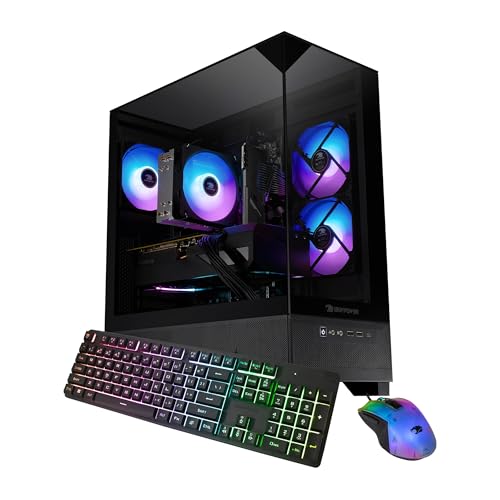
Specs
CPU | Intel Core i5-14400F |
GPU | NVIDIA RTX 5060 8GB |
Memory | 16GB |
Storage | 1TB NVMe SSD |
PSU | Not published on the listing |
Included | Gamer keyboard and mouse |
OS | Windows 11 Home |
Model code | ESI5N5605 |
CPU
Intel Core i5-14400F
GPU
NVIDIA RTX 5060 8GB
Memory
16GB
Storage
1TB NVMe SSD
PSU
Not published on the listing
Included
Gamer keyboard and mouse
OS
Windows 11 Home
Model code
ESI5N5605
What it does well
An RTX 5060 is the right card for a 1080p high-refresh panel, and this is the cheapest way onto one among the three brands. The Core i5-14400F is sized to feed that graphics card and no further, which is the correct call. Paying up for a faster processor here buys frames the card cannot deliver anyway.
The keyboard and mouse in the box are not a throwaway. A first desktop purchase usually comes with a second and third order attached, and removing those is worth more to a first-time buyer than a spec bump would be.
The warranty is the quiet argument for this machine. iBUYPOWER's published labor coverage runs three years, the longest of the three brands here. On an entry machine, where the parts are cheaper than the technician's time, labor coverage is the term that protects you. Our prebuilts in the mid-budget band cover the tier immediately above this one if the budget stretches.
What you give up
16GB of memory and a single 1TB drive are both sitting on the floor. Four or five modern installs and you are living in the uninstall-and-reinstall loop, which is exactly the pattern that sends prebuilt buyers hunting for a second drive eight months in.
The listing does not name the power supply. Not the brand, not the wattage, not the efficiency rating. That is the one component whose failure can take the graphics card and the board with it, and it is the one you cannot inspect before the box arrives.
An 8GB frame buffer also caps the runway. This is a 1080p machine, and it stays a 1080p machine even if you later hang a 1440p panel off it.
Who it's for
A first-time buyer on a 1080p high-refresh panel who wants the machine to arrive complete and does not plan to chase resolution for the next couple of years. If that is you, the long labor coverage and the low entry price are the right pair of trade-offs.
Best 1440p all-rounder: CyberPowerPC Gamer Xtreme GXi2000CSTV3
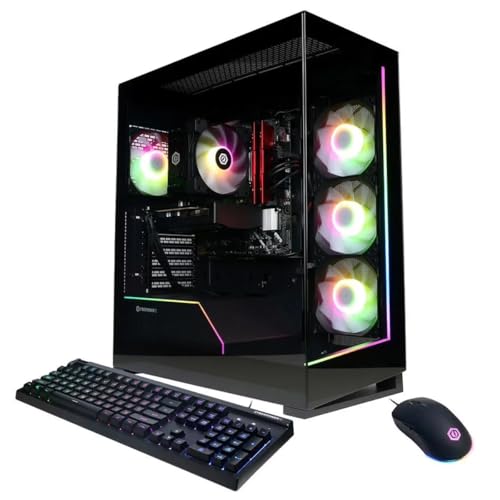
Specs
CPU | Intel Core Ultra 5 225F, up to 4.90 GHz |
GPU | NVIDIA GeForce RTX 5060 |
Memory | 32GB DDR5 |
Storage | 2TB NVMe SSD |
PSU | Not published on the listing |
Included | RGB keyboard and mouse |
OS | Windows 11 Home |
Model code | GXi2000CSTV3 |
CPU
Intel Core Ultra 5 225F, up to 4.90 GHz
GPU
NVIDIA GeForce RTX 5060
Memory
32GB DDR5
Storage
2TB NVMe SSD
PSU
Not published on the listing
Included
RGB keyboard and mouse
OS
Windows 11 Home
Model code
GXi2000CSTV3
What it does well
The 2TB drive is the reason this one is here. It is the single spec that stops a prebuilt coming back within the year, and CyberPowerPC is the only one of the three pairing it with 32GB of memory at this band.
32GB matters more than the spec sheet suggests. A game, a browser with thirty tabs, Discord, and a capture overlay is the real workload, and 16GB machines start swapping under it while the frame counter still looks fine.
The Core Ultra 5 225F is a competent partner for an RTX 5060 rather than a bottleneck, which keeps the graphics card as the thing you replace in three years instead of the whole platform. The wider 1440p prebuilt field has more options if this configuration sells out.
What you give up
It is still an RTX 5060 with an 8GB frame buffer. At 1440p that means turning textures down in the heaviest current titles rather than running everything at ultra, and the memory pool is the part that ages first.
The listing publishes nothing about the power supply or the cooler, and it does not state the memory speed either, so the DDR5 could sit at the slow end. Capacity is printed. Quality is not.
Reports suggest CyberPowerPC's standard parts coverage is the shortest of the three at one year, and its return authorizations expire fifteen days after they are issued. If a claim comes up, that clock runs whether or not your shipping label does.
Who it's for
The buyer with a 1440p panel and a large, mixed library who does not want to think about storage for a couple of years. If your install list is the constraint rather than your frame rate, this is the machine.
Best high-end pick: Skytech King 95 (RTX 5070 Ti)

Specs
CPU | AMD Ryzen 7 9800X3D |
GPU | NVIDIA RTX 5070 Ti 16GB |
Memory | 32GB DDR5-6000 |
Storage | 2TB Gen4 NVMe SSD |
PSU | 850W 80 Plus Gold |
Cooling | 360mm ARGB AIO |
Networking | Wi-Fi |
OS | Windows 11 |
CPU
AMD Ryzen 7 9800X3D
GPU
NVIDIA RTX 5070 Ti 16GB
Memory
32GB DDR5-6000
Storage
2TB Gen4 NVMe SSD
PSU
850W 80 Plus Gold
Cooling
360mm ARGB AIO
Networking
Wi-Fi
OS
Windows 11
What it does well
Every spec that decides how long this machine lasts is written on the listing. 850W at 80 Plus Gold gives the RTX 5070 Ti genuine transient headroom rather than the bare minimum, and it leaves room for a heavier card later.
The memory is DDR5-6000, the speed AM5 wants running one-to-one with the fabric. Prebuilts usually ship a slower kit quietly and pocket the difference. This one does not, and in CPU-bound titles that is worth more than a tier of processor.
16GB of VRAM clears the 1440p floor with room for 4K plus upscaling, and the Ryzen 7 9800X3D keeps 1% lows steady in the simulation and strategy titles where the average frame rate hides the problem. Tom's Hardware measured this graphics card at a 100.3 fps average with 75 fps 1% lows at 1440p ultra. RTX 5070 class prebuilts cover the rest of this bracket.
What you give up
A 360mm liquid loop is a pump you did not ask for. Pumps are wear parts, and buyers have flagged year-four failures on prebuilt loops, at which point warm coolant sits directly above a graphics card worth several times the cooler. A good tower air cooler would be the lower-risk choice on a machine meant to last past year three, and Skytech does not offer that configuration here.
This is also the most expensive machine of the three by a wide margin. The 9800X3D is more processor than an RTX 5070 Ti can stretch at 4K. At that resolution the graphics card is the ceiling and the chip is coasting.
Who it's for
The buyer on a 1440p high-refresh or 4K panel who wants the parts list legible before handing over the money, and who is comfortable owning a pump. If the budget reaches this tier, this is the brand argument paying off.
Bottom line
If you are on a 1080p high-refresh panel and want the cheapest honest entry, buy the iBUYPOWER Element SE and accept the storage ceiling. If you have a 1440p panel and a large library, buy the CyberPowerPC Gamer Xtreme for the 32GB and 2TB pairing. If the budget reaches the top tier, buy the Skytech King 95, because it is the only one of the three that tells you what is in the power supply. Whichever badge you pick, read the current warranty terms on that brand's own support page before you order. The brand that shows you the parts list is the brand that expects the machine to outlive the warranty.
FAQ
Is Skytech a good brand for gaming PCs?
Skytech is the most transparent of the three brands here, and transparency is the useful signal. Its listings name the power supply wattage and efficiency tier, the memory speed, and the cooler size, which lets you judge the machine before it arrives instead of after. That is not a promise of flawless assembly, and its published warranty runs one year on parts and labor rather than the longer labor term iBUYPOWER offers. If your budget reaches the tier where Skytech ships a Gold-rated unit and DDR5-6000, it is the safest of the three.
Is iBUYPOWER better than CyberPowerPC?
They win on different axes. iBUYPOWER publishes the longer labor coverage, three years against CyberPowerPC's one year on parts, and it tends to be cheaper at the entry tier. CyberPowerPC counters with configuration: at the 1440p band it is the one shipping 32GB of memory and a 2TB drive where iBUYPOWER ships 16GB and 1TB. Neither names the power supply. Buying at the bottom, take iBUYPOWER. Buying in the middle and short on storage, take CyberPowerPC.
Which prebuilt brand has the best warranty?
On published terms, iBUYPOWER has the longest labor coverage of the three at three years, with one year on parts. Skytech publishes one year on parts and labor. CyberPowerPC publishes one year on parts, and its return authorizations expire fifteen days after they are issued, which is a short window if you ship slowly. Terms change, so check the current policy on each brand's support page before ordering rather than trusting a comparison table, including this one.
Can you upgrade a Skytech, iBUYPOWER, or CyberPowerPC prebuilt?
All three use standard ATX parts, so the graphics card, the memory, and the drives are all replaceable. The constraint is the power supply, which is the part none of these brands publishes at the entry and middle tiers, and which decides whether a bigger card will run at all. Case airflow is the second constraint, because a restricted front panel throttles whatever you drop in. Prebuilts that take upgrades cleanly narrows the field to machines built for it.
Do these prebuilt brands use good power supplies?
Only Skytech tells you. Its higher-tier listings name the wattage and the 80 Plus efficiency rating. iBUYPOWER and CyberPowerPC list the processor, the graphics card, and the memory, then go quiet. An unnamed unit is not automatically a bad unit, but the power supply is the single component whose failure can take the graphics card and the motherboard with it, so a brand that hides it is asking for trust it has not earned. If the listing does not name it, budget for replacing it.
Should I buy a prebuilt or build my own gaming PC?
Build it yourself if you want to choose the power supply, the cooler, and the case airflow, because those are exactly the three parts prebuilt brands economise on and mostly decline to publish. Buy a prebuilt if you want a single warranty covering the whole machine, want it working the day it lands, or cannot source a graphics card at a sane price on its own. The gap has narrowed at the entry tier, where a prebuilt often lands close to parts cost with an operating system included.
Related Articles

Best Prebuilt Gaming PCs (2026): 5 Picks, Warranty First
The best prebuilt gaming PCs in 2026: 5 picks from a 1080p budget box up to a 4K rig, judged on warranty and RMA support first, then build quality and VRAM.
Aug 18, 2026

Best Prebuilt Gaming PCs Under $1,200 (2026): 5 Picks
The best prebuilt gaming PC under $1,200 in 2026: five picks judged on the 8GB VRAM ceiling, PSU headroom, and whether the socket survives an upgrade.
Jul 20, 2026

Best Prebuilt Gaming PCs Under $2,000 in 2026
The five best prebuilt gaming PCs under $2,000 in 2026, all running RTX 5070 + DLSS 4. Tested picks from Skytech, Alienware, and iBUYPOWER with real buyer context.
May 27, 2026

Best RTX 5070 Prebuilt Gaming PCs 2026: 5 PSU-Checked Picks
The best RTX 5070 prebuilt gaming PCs for 2026: 5 picks graded on CPU pairing, PSU headroom and cooling for 1440p, plus when a 5070 Ti earns the jump.
Sep 3, 2026

Best Upgradeable Prebuilt Gaming PCs (2026): 5 Picks
Five upgradeable prebuilt gaming PCs for 2026, each scored on power supply headroom, motherboard form factor, free RAM and M.2 slots, and GPU clearance.
Aug 14, 2026