Affiliate Disclosure: As an Amazon Associate we earn from qualifying purchases. Some links may earn us a commission at no cost to you.

Is a Prebuilt Cheaper Than Building a PC? 2026 Math
Yes, below the mid tiers. A system integrator buying DDR5 and NAND on contract now assembles a finished gaming PC for less than the same parts cost you at retail, and the gap is widest between the entry and mid tiers. Above the enthusiast tier the integrator premium comes back, and building wins again.
Memory is the whole story. The crossover moves as spot pricing moves, so this article runs the math bucket by bucket, names the claw-backs that make a headline saving partly illusory, and picks the machine worth buying at each tier.
At a glance
What you are comparing | Prebuilt | Build it yourself |
|---|---|---|
Entry cost below the mid tiers | Lower, contract pricing absorbs the memory spike | Higher, retail memory and NAND land in full |
Cost above the crossover | The integrator premium reappears | Lower, if you can source memory |
Memory configuration | Often one stick; capacity stated, configuration not | Chosen by you, two sticks by default |
Power supply | Frequently unnamed on the listing | Named model, chosen efficiency class |
Storage | Cache-less drives are common at entry tiers | Chosen by you |
Warranty | One number to call for the whole machine | Per part, per vendor |
Time to first boot | Same day | A weekend, plus a BIOS update |
Entry cost below the mid tiers
- Prebuilt
Lower, contract pricing absorbs the memory spike
- Build it yourself
Higher, retail memory and NAND land in full
Cost above the crossover
- Prebuilt
The integrator premium reappears
- Build it yourself
Lower, if you can source memory
Memory configuration
- Prebuilt
Often one stick; capacity stated, configuration not
- Build it yourself
Chosen by you, two sticks by default
Power supply
- Prebuilt
Frequently unnamed on the listing
- Build it yourself
Named model, chosen efficiency class
Storage
- Prebuilt
Cache-less drives are common at entry tiers
- Build it yourself
Chosen by you
Warranty
- Prebuilt
One number to call for the whole machine
- Build it yourself
Per part, per vendor
Time to first boot
- Prebuilt
Same day
- Build it yourself
A weekend, plus a BIOS update
Where each one wins
Scenario | Cheaper route | Winner |
|---|---|---|
Entry tier, first gaming PC | Prebuilt, clearly | |
Mid tier, 1440p at 100fps and up | Prebuilt, widest gap | |
1440p high refresh on the fastest gaming CPU | Roughly even | |
4K on a top-tier card | Building, if you can source memory | |
You already own a case, supply, and drives | Building, decisively |
Entry tier, first gaming PC
- Cheaper route
Prebuilt, clearly
- Winner
Mid tier, 1440p at 100fps and up
- Cheaper route
Prebuilt, widest gap
- Winner
1440p high refresh on the fastest gaming CPU
- Cheaper route
Roughly even
- Winner
4K on a top-tier card
- Cheaper route
Building, if you can source memory
- Winner
You already own a case, supply, and drives
- Cheaper route
Building, decisively
- Winner
Benchmarks
Average frames per second for the two mid-tier cards in this article, tested on the same rig.
- 74 FPS
- 57 FPS
One reviewer tested both mid-tier cards on the same rig in the same title, which is the only comparison in this article worth putting in a chart. Cross-rig numbers were left out rather than padded in. The gap tracks the price difference closely enough that neither card is the wrong answer. What separates them is whether the extra VRAM or the extra frames matters more to you.
Why the math flipped
Three companies make the world's DRAM, and through 2025 and 2026 all three moved wafer capacity toward high-bandwidth memory for AI datacentres. Consumer DDR5 got the leftovers. A 32GB kit that sat near the bottom of a parts list in mid-2025 is now one of the two or three most expensive lines on it.
System integrators buy memory and NAND on contract, months ahead, at volumes a retail buyer cannot reach. They also hold inventory bought before the spike. Both effects insulate their bill of materials from the number you see on a product page today, which is how a finished machine can undercut its own parts list. That insulation is not permanent, and analysts put meaningful relief no earlier than late 2027, so when to buy memory is a live question rather than a settled one.
The crossover sits where the memory line stops dominating the budget. At the entry and mid tiers, memory and storage are a large fraction of the machine, so contract pricing wins outright. Once the graphics card becomes the dominant cost, the integrator's margin is a bigger number than the memory saving, and a parts list closes the gap. That boundary moves with spot pricing, which is why this article carries a date. The same crossover decides a sealed console against a parts list, which is the comparison we run in steam machine vs building your own pc.
The claw-backs a headline saving hides
A prebuilt's sticker price is honest. Its spec sheet often is not, and the substitutions that repay the discount are the same three every time. The first is memory configuration. Listings state capacity and stay quiet about how many sticks deliver it, and a single 16GB module on a dual-channel platform gives up bandwidth the whole machine depends on. Buyers have flagged this repeatedly on entry-tier systems. Prebuilts that state the full memory spec are the ones worth shortlisting.
The second is the power supply. Plenty of listings name a wattage and nothing else. No model, no efficiency class, no ATX revision. Under an entry card that is survivable. Under anything from the RTX 5070 up it is the line that should decide the pick, because a supply is the one component whose failure takes other parts with it.
The third is storage. A drive without a cache reads fine in a spec table and stutters under sustained writes. None of the three is a reason to avoid prebuilts. They are a reason to read past the headline number, and to prefer prebuilts with a real upgrade path so the substitutions you inherit are ones you can replace.
Best overall: Skytech Nebula RTX 5060 Ti 16GB

Specs
CPU | Ryzen 5 5500 |
GPU | RTX 5060 Ti 16GB |
Memory | 16GB DDR5 |
Storage | 1TB NVMe SSD |
Target | 1440p, 100fps and up |
OS | Windows 11 Home |
CPU
Ryzen 5 5500
GPU
RTX 5060 Ti 16GB
Memory
16GB DDR5
Storage
1TB NVMe SSD
Target
1440p, 100fps and up
OS
Windows 11 Home
What it does well
Sixteen gigabytes of VRAM is the specification that decides how long a mid-tier card stays useful, and this is currently the cheapest complete machine that carries it. At 1440p the card holds current AAA titles at native resolution without leaning on upscaling to reach a playable number. That is the difference between a card that ages quietly and one that starts making excuses in its second year.
The rest of the machine is conventional, which is the point. Standard ATX chassis, standard cooling, standard board layout. Nothing here is proprietary, so the graphics card, the drive, and the memory are all replaceable by someone with a screwdriver and an afternoon. The tier below this one is where integrators start reaching for parts you cannot swap.
Against a parts list at the same budget, this is where the gap is widest. The mid-tier roundup covers the direct alternatives at this ceiling.
What you give up
The Ryzen 5 5500 is the compromise. It is a Zen 3 part on a socket AMD has finished with, and its PCIe 3.0 link is a real constraint on a card of this class. In CPU-bound titles at 1440p you will find the ceiling before the graphics card does.
Memory is the second compromise and the more expensive one. Sixteen gigabytes is the floor in 2026 rather than headroom, and topping it up costs a meaningful fraction of what the machine cost in the first place. Confirm the configuration before you buy: capacity delivered on one stick behaves differently from the same capacity on two.
Who it's for
The 1440p buyer who wants the money to have gone into the graphics card, and who is not planning to open the case for two years.
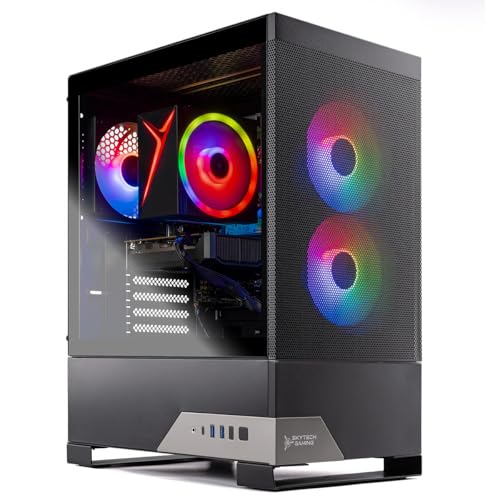
Best budget: Skytech Nebula 2 RTX 3050
Specs
CPU | Ryzen 5 5500 |
GPU | RTX 3050 |
Memory | 16GB |
Storage | 1TB SSD |
Target | 1080p high refresh |
OS | Windows 11 Home |
CPU
Ryzen 5 5500
GPU
RTX 3050
Memory
16GB
Storage
1TB SSD
Target
1080p high refresh
OS
Windows 11 Home
What it does well
This is the bucket where the inversion is easiest to see. At the entry tier, memory and storage make up most of the parts budget, so a retail parts list struggles to reach the price of admission at all. A finished machine with an operating system, a warranty, and peripherals in the box arrives under it.
Everything about the build is unremarkable in the way an entry machine should be. Conventional case, conventional airflow, and a drive that will hold a handful of large games before you start deleting things. The entry-tier roundup has the direct competition.
What you give up
The RTX 3050 is an entry card and it does not hide the fact. Esports titles run at high refresh. Modern AAA titles want 1080p with settings dialled back, and there is no version of this machine that becomes a 1440p machine.
The socket is the other limit. There is no CPU worth upgrading to inside this platform, so the eventual upgrade is a new machine rather than a new chip. Buyers have also flagged single-stick memory on systems at this tier, which is worth confirming before you order.
Who it's for
A first gaming PC, where the honest alternative is not building. It is waiting for prices that analysts do not expect to ease before late 2027.
Best for 1440p high refresh: iBUYPOWER Element 9800X3D RTX 5070

Specs
CPU | Ryzen 7 9800X3D |
GPU | RTX 5070 12GB |
Memory | 32GB DDR5 |
Storage | 2TB NVMe SSD |
Socket | AM5 |
OS | Windows 11 Home |
CPU
Ryzen 7 9800X3D
GPU
RTX 5070 12GB
Memory
32GB DDR5
Storage
2TB NVMe SSD
Socket
AM5
OS
Windows 11 Home
What it does well
This is the crossover, and it is the clearest single demonstration of why the math flipped. A Ryzen 7 9800X3D, 32GB of DDR5, and two terabytes of NAND are three of the most expensive lines a builder can put on a parts list in 2026, and all three are lines contract pricing protects. Priced at retail, they are most of the machine before the graphics card is even chosen.
The 9800X3D is the reason to look at this tier at all. It is the fastest gaming CPU you can buy, it sits on a live AM5 socket, and it arrives with 32GB already fitted rather than as a line you have to fund yourself. For a 1440p high-refresh buyer, the CPU is doing the work the refresh rate demands.
Warranty terms vary between integrators more than the spec sheets do. How the integrators compare on warranty is worth reading before committing at this price.
What you give up
Twelve gigabytes of VRAM on the RTX 5070 is the weak line, and it will be the first thing that dates this machine. At 1440p it is adequate today. At the settings a 9800X3D encourages you to use, the margin is thinner than the CPU pairing suggests.
The listing also does not publish a power supply model. On a card of this class that omission carries more weight than it does two tiers down, and reports suggest supplies vary widely between integrators at this price point. Ask before you order, or budget for a replacement.
Who it's for
The 1440p high-refresh buyer who wants the fastest gaming CPU without paying retail for a memory kit to feed it.
Best for 4K: Skytech Azure 3 RTX 5080

Specs
CPU | Ryzen 7 9800X3D |
GPU | RTX 5080 16GB |
Memory | 32GB DDR5-6000 |
Storage | 2TB NVMe SSD |
PSU | 850W Gold, ATX 3.0 |
Cooling | 360mm ARGB AIO |
CPU
Ryzen 7 9800X3D
GPU
RTX 5080 16GB
Memory
32GB DDR5-6000
Storage
2TB NVMe SSD
PSU
850W Gold, ATX 3.0
Cooling
360mm ARGB AIO
What it does well
Above the crossover a parts list closes the gap and then keeps going, so the honest framing for this bucket is different. You are not buying this machine because it is cheaper. You are buying it because it publishes the two specifications that usually go unstated, and because somebody else does the assembly.
The listing names an 850W Gold supply built to the ATX 3.0 standard and a 360mm closed-loop cooler. That is exactly the due diligence a careful builder performs by hand, done in advance. Sixteen gigabytes of VRAM behind a 9800X3D makes it a genuine 4K machine rather than a 4K badge, and the memory arrives at DDR5-6000 with the speed stated rather than implied.
What you give up
Price is what you give up. This is the tier where the memory saving stops covering the integrator's margin, so a builder who can source a kit lands the same specification for less. If the parts list is something you enjoy, this is the bucket to build rather than buy.
The closed loop is the other consideration. Every pump has a service life, and failures in the fourth year are reported often enough across the category that a cooler sitting directly above a graphics card of this value is worth planning around.
Who it's for
The 4K buyer who has already priced the parts, seen the gap, and decided that assembly and a single warranty number are worth the difference.
Best for builders: Corsair Vengeance RS 32GB DDR5-6000

Specs
Capacity | 32GB (2 x 16GB) |
Speed | Up to 6000 MT/s |
Form factor | DDR5 DIMM |
Platform | AMD and Intel |
Configuration | Dual-channel pair |
Profiles | EXPO and XMP |
Capacity
32GB (2 x 16GB)
Speed
Up to 6000 MT/s
Form factor
DDR5 DIMM
Platform
AMD and Intel
Configuration
Dual-channel pair
Profiles
EXPO and XMP
What it does well
The build side of this comparison is not one product. It is one line item that moves the entire answer, which makes this the pick for readers who are building anyway. Memory is the variable that flipped the math, and a 32GB DDR5-6000 pair is the configuration every recommendation in this article assumes.
Two sticks matter more than the capacity number. A dual-channel pair is what the platform expects, and it is exactly the configuration entry-tier prebuilts quietly decline to supply. The kit carries both EXPO and XMP profiles, so it survives a move between platforms, which is worth something when the socket you buy on today may not be the socket you upgrade on. The build decision framework covers where memory sits in the order of operations.
What you give up
Cost, and there is no way around it. This single line is now a large fraction of what a mid-tier machine costs in total, which is the entire reason the buy column is winning below the crossover. A builder pricing a full parts list in 2026 absorbs that number at retail while an integrator does not.
Four sticks are also not the answer to wanting more. Four-DIMM configurations drop achievable speed on AM5, so the upgrade from here is a larger pair rather than a second kit alongside this one.
Who it's for
The builder who already owns a case, a supply, and drives, and needs only the parts the crunch repriced.
Bottom line
If you are buying at the entry tier, buy the Skytech Nebula 2 RTX 3050 and stop pricing parts. If you want 1440p and want the graphics card to be where the money went, buy the Skytech Nebula RTX 5060 Ti 16GB. If you want the fastest gaming CPU, the iBUYPOWER Element 9800X3D RTX 5070 is the tier where the two routes meet.
If you are going to 4K, price the parts first, then decide whether the Skytech Azure 3 RTX 5080 is worth handing off the assembly. And if you already own a case, a supply, and drives, build, and put the Corsair Vengeance RS 32GB DDR5-6000 in it. Our prebuilt picks overall go deeper on each tier.
FAQ
Is it cheaper to build a PC in 2026?
Not at the entry and mid tiers, and that is a reversal of how it worked for two decades. The memory and storage lines a builder buys at retail are the same lines system integrators buy on contract, and below the enthusiast tier those lines are a large fraction of the machine. Above that point, where the graphics card dominates the budget, building is cheaper again. The honest answer depends on the tier you are shopping.
Why did building a PC get more expensive than buying one?
Memory. Samsung, SK Hynix, and Micron moved wafer capacity toward high-bandwidth memory for AI datacentres, and consumer DDR5 supply went with it. Retail buyers pay the resulting spot price in full. System integrators buy months ahead on contract and hold inventory purchased before the spike, so their bill of materials moved far less. That difference is now large enough to swallow the assembly margin that used to make prebuilts the expensive option.
Do prebuilt gaming PCs still ship with cheap parts?
Some do, and the substitutions are predictable: capacity delivered on one memory stick instead of two, an unnamed power supply, and a drive without a cache. None of the three shows up as a missing item on a spec sheet, which is what makes them easy to miss. Read the memory configuration and the supply model before you read the price. A listing that names both is telling you something about how the rest of the machine was specified.
Will PC part prices come back down?
Not soon on memory. The capacity that shifted to high-bandwidth memory for AI datacentres is not returning quickly, and analyst consensus puts meaningful relief no earlier than late 2027. Graphics cards and motherboards are a separate market and move on their own cycle. If you need a machine this year, waiting is a bet on a timeline nobody in the supply chain is currently underwriting.
Can you upgrade a prebuilt gaming PC?
Usually, and the constraint is the platform rather than the label on the box. A system built on standard ATX parts with a named chipset and a live socket upgrades exactly like a machine you assembled yourself. The ones that fight back are name-brand systems with proprietary board dimensions, non-standard supply connectors, or a chassis that will not take a longer card. Check the socket and the case clearance before you check the warranty terms.
Is a prebuilt worth it for a first build?
In 2026, yes, for most first-time buyers. A first build is where the assembly risk, the BIOS update, and the memory profile that will not train are most likely to cost you a weekend. It is also currently the tier where the price advantage runs the wrong way for building. Buy the machine, learn the platform by upgrading it later, and put the money the crunch saved you into a better graphics card.
Related Articles

Best Prebuilt Gaming PCs (2026): 5 Picks, Warranty First
The best prebuilt gaming PCs in 2026: 5 picks from a 1080p budget box up to a 4K rig, judged on warranty and RMA support first, then build quality and VRAM.
Aug 18, 2026

5 Best Prebuilt Gaming PCs Under $1500 (2026): 8GB vs 16GB
The best prebuilt gaming PC under $1500 in 2026: five RTX 5060 Ti rigs ranked for 1080p and 1440p, and the 8GB vs 16GB VRAM call that decides your buy.
Aug 2, 2026

Best Upgradeable Prebuilt Gaming PCs (2026): 5 Picks
Five upgradeable prebuilt gaming PCs for 2026, each scored on power supply headroom, motherboard form factor, free RAM and M.2 slots, and GPU clearance.
Aug 14, 2026

Should You Buy RAM Now, or Wait Out the 2026 Crisis?
Should you buy RAM now or wait out the 2026 memory crisis? A clear buy-or-wait call by your situation, plus the exact 32GB and 64GB kits worth owning today.
Jul 23, 2026

Skytech vs iBUYPOWER vs CyberPowerPC: Best Prebuilt 2026
Skytech vs iBUYPOWER vs CyberPowerPC: which prebuilt brand to trust. We compare PSUs, RAM, storage and warranty terms, then pick one build per budget.
Aug 25, 2026