Affiliate Disclosure: As an Amazon Associate we earn from qualifying purchases. Some links may earn us a commission at no cost to you.

RX 580 to RX 9060 XT: Is the Upgrade Worth It? (2026)
Yes. Upgrading from the RX 580 to the RX 9060 XT is worth it in 2026, and it is not a close call. Your card runs on a driver branch that stopped getting new-game work in late 2023, it cannot launch games that require ray tracing hardware, and in modern titles a 16 GB 9060 XT runs well over twice as fast.
The condition is memory. Buy the 16 GB version, never the 8 GB card that shares its name. Then spend ten minutes on the rest of a 2017-era build: the power supply, the PCIe 3.0 slot and the CPU decide how much of that upgrade you keep.
At a glance
Option | What it is | Verdict for an RX 580 owner | Buy |
|---|---|---|---|
16 GB RDNA 4, full x16 link | The upgrade to make | ||
16 GB Blackwell, DLSS 4, NVENC | Pick it for streaming or CUDA work | ||
750 W ATX 3.1, fully modular | Replace an old or unbranded PSU with it |
- What it is
16 GB RDNA 4, full x16 link
- Verdict for an RX 580 owner
The upgrade to make
- Buy
- What it is
16 GB Blackwell, DLSS 4, NVENC
- Verdict for an RX 580 owner
Pick it for streaming or CUDA work
- Buy
- What it is
750 W ATX 3.1, fully modular
- Verdict for an RX 580 owner
Replace an old or unbranded PSU with it
- Buy
Where each option wins
Your situation | Verdict | Winner |
|---|---|---|
1080p gaming, keeping the PC three years or more | Upgrade to the 16 GB 9060 XT | |
You stream, edit video or run CUDA apps | Go cross-brand | |
PSU is past warranty, unbranded or under 500 W | Replace it with the GPU | |
Tempted by the cheaper 8 GB 9060 XT or RTX 5060 | Do not. Same 8 GB ceiling you have now | |
PCIe 3.0 board you plan to keep | Favor the full x16 card |
1080p gaming, keeping the PC three years or more
- Verdict
Upgrade to the 16 GB 9060 XT
- Winner
You stream, edit video or run CUDA apps
- Verdict
Go cross-brand
- Winner
PSU is past warranty, unbranded or under 500 W
- Verdict
Replace it with the GPU
- Winner
Tempted by the cheaper 8 GB 9060 XT or RTX 5060
- Verdict
Do not. Same 8 GB ceiling you have now
- Winner
PCIe 3.0 board you plan to keep
- Verdict
Favor the full x16 card
- Winner
Verdict: is the RX 580 to RX 9060 XT upgrade worth it?
Raw speed is the easy part. No major outlet benchmarks these two cards side by side anymore, so anchor on the RX 580's launch rival. In GamersNexus testing of Final Fantasy XIV at 1440p, the 9060 XT ran 158% faster than the GTX 1060 6GB, the card the RX 580 traded blows with for years, and that is one of AMD's weaker games. Treat "more than double" as the floor, not the ceiling.
The feature gap matters more than the frame counter. Polaris has no ray tracing hardware, and Doom: The Dark Ages and Indiana Jones and the Great Circle both require it even at minimum settings. More games will follow that path. The 9060 XT runs them, and it supports FSR 4, which RDNA 4 handles natively and Polaris never will.
Then there is software support. In late 2023 AMD split Polaris and Vega onto a separate maintenance driver branch: security fixes and occasional repairs, no optimizations for new releases. Your card still works, but every new game launches without anyone tuning for it.
Power barely moves. The RX 580 is rated at 185 W and the reference 16 GB 9060 XT at 160 W, so a healthy power supply that ran your old card can run this one. The catch is the word healthy, which the platform section below covers.
Specs at a glance
Spec | RX 580 (yours) | ||
|---|---|---|---|
Architecture | Polaris (2017) | RDNA 4 | Blackwell |
VRAM | 8 GB GDDR5 | 16 GB GDDR6 | 16 GB GDDR7 |
Memory bus | 256-bit | 128-bit | 128-bit |
Hardware ray tracing | No | Yes | Yes |
Upscaling | FSR 1 to 3 | FSR 4 | DLSS 4 |
Board power | 185 W | 160 W (reference) | 180 W (reference) |
PCIe link | 3.0 x16 | 5.0 x16 | 5.0 x8 |
Driver branch | Maintenance only | Current | Current |
Architecture
- RX 580 (yours)
Polaris (2017)
- ASUS Dual RX 9060 XT 16GB
RDNA 4
- ASUS Dual RTX 5060 Ti 16GB OC
Blackwell
VRAM
- RX 580 (yours)
8 GB GDDR5
- ASUS Dual RX 9060 XT 16GB
16 GB GDDR6
- ASUS Dual RTX 5060 Ti 16GB OC
16 GB GDDR7
Memory bus
- RX 580 (yours)
256-bit
- ASUS Dual RX 9060 XT 16GB
128-bit
- ASUS Dual RTX 5060 Ti 16GB OC
128-bit
Hardware ray tracing
- RX 580 (yours)
No
- ASUS Dual RX 9060 XT 16GB
Yes
- ASUS Dual RTX 5060 Ti 16GB OC
Yes
Upscaling
- RX 580 (yours)
FSR 1 to 3
- ASUS Dual RX 9060 XT 16GB
FSR 4
- ASUS Dual RTX 5060 Ti 16GB OC
DLSS 4
Board power
- RX 580 (yours)
185 W
- ASUS Dual RX 9060 XT 16GB
160 W (reference)
- ASUS Dual RTX 5060 Ti 16GB OC
180 W (reference)
PCIe link
- RX 580 (yours)
3.0 x16
- ASUS Dual RX 9060 XT 16GB
5.0 x16
- ASUS Dual RTX 5060 Ti 16GB OC
5.0 x8
Driver branch
- RX 580 (yours)
Maintenance only
- ASUS Dual RX 9060 XT 16GB
Current
- ASUS Dual RTX 5060 Ti 16GB OC
Current
Benchmarks
The GTX 1060 6GB stands in for the RX 580, its launch-era rival. Its value is derived from the 158% gap GamersNexus reported.
- 104 FPS
- 85 FPS
- 33 FPS
- 109 FPS
- 100 FPS
- 81 FPS
- 71 FPS
- 82 FPS
- 77 FPS
How we'd check an RX 580 build before upgrading
Power supply. An RX 580 build is usually five to nine years old, and so is its PSU. Wattage on the label matters less than age, brand and warranty. A quality 550 W unit still under warranty can run either card. A no-name unit from 2017 is the one part that can take the new GPU down with it. See our PSU picks for a 650 W or 550 W budget if you are not sure.
PCIe 3.0. Most RX 580 systems sit on PCIe 3.0 boards. The 9060 XT uses a full x16 link, so dropping to 3.0 costs it little. The RTX 5060 Ti uses x8, which becomes PCIe 3.0 x8 on an older board; reports suggest 16 GB keeps that loss small, but the 9060 XT is the safer fit if the board stays.
CPU floor. A four-core i5 from the Skylake or Kaby Lake era, or a first-generation Ryzen, will cap frame rates at 1080p with either card. Smart Access Memory also needs a Ryzen 3000 or Intel 10th-gen and newer platform. If your CPU is that old, read whether to upgrade the GPU or CPU first before buying.
Skip the Arc B580 here. It looks like the budget answer, but it leans on Resizable BAR and buyers have flagged heavy CPU overhead on older processors, which is exactly the platform an RX 580 sits in.
The upgrade to make: ASUS Dual RX 9060 XT 16GB

Specs
Chip | Radeon RX 9060 XT (Navi 44, RDNA 4) |
VRAM | 16 GB GDDR6, 128-bit |
Compute units | 32 CU / 2,048 stream processors |
Boost clock | Up to 3,130 MHz (reference) |
Board power | 160 W (reference) |
Interface | PCIe 5.0 x16 |
Cooling | Dual axial fans, 0dB idle, 2.5-slot |
Chip
Radeon RX 9060 XT (Navi 44, RDNA 4)
VRAM
16 GB GDDR6, 128-bit
Compute units
32 CU / 2,048 stream processors
Boost clock
Up to 3,130 MHz (reference)
Board power
160 W (reference)
Interface
PCIe 5.0 x16
Cooling
Dual axial fans, 0dB idle, 2.5-slot
What it does well
It fixes every reason the RX 580 is aging out at once. Twice the VRAM means texture settings stop being a negotiation in 2025 and 2026 releases. Hardware ray tracing means the RT-required games simply launch. FSR 4 gives you upscaling that holds up at Quality mode instead of the softer FSR versions Polaris is stuck with.
It also slots into an old build without drama. Reference board power is lower than your RX 580's, it uses a full x16 link that shrugs off a PCIe 3.0 slot, and ASUS's Dual cooler stops its fans at idle. The current driver branch means new games get tuning on day one.
What you give up
The RTX 5060 Ti 16GB is a little faster in most raster games. GamersNexus measured an 8.8% gap in Cyberpunk 2077 at 1080p Ultra and 14% in Black Myth: Wukong at 1080p High. Ray tracing is also stronger on the Nvidia side, and there is no DLSS or CUDA here.
The Dual is ASUS's entry cooler tier, below its Prime and TUF models, so buyers who want the quietest card under load should look higher in the stack. The 128-bit bus also means 1440p ultra in the heaviest games will lean on FSR 4.
Who it's for
The RX 580 owner gaming at 1080p, or stepping to entry 1440p, on a six-core or newer CPU, who wants four or more years out of this slot. Check that the listing says 16 GB before you check out.
The cross-brand alternative: ASUS Dual RTX 5060 Ti 16GB OC

Specs
Chip | GeForce RTX 5060 Ti (GB206, Blackwell) |
VRAM | 16 GB GDDR7, 128-bit |
CUDA cores | 4,608 |
Boost clock | 2,572 MHz reference, factory OC |
Board power | 180 W (reference) |
Interface | PCIe 5.0 x8 |
Cooling | Dual axial fans, 0dB idle, dual BIOS |
Chip
GeForce RTX 5060 Ti (GB206, Blackwell)
VRAM
16 GB GDDR7, 128-bit
CUDA cores
4,608
Boost clock
2,572 MHz reference, factory OC
Board power
180 W (reference)
Interface
PCIe 5.0 x8
Cooling
Dual axial fans, 0dB idle, dual BIOS
What it does well
Raster speed edges ahead of the 9060 XT in most of the GamersNexus suite, and in Final Fantasy XIV at 1440p the gap opens to 104 fps against 85. Ray tracing is stronger, and DLSS 4's transformer upscaler is the best image-quality lever at this tier.
The bigger reason is software. NVENC is the encoder to have if you stream to Twitch or YouTube, and anything built on CUDA, from Blender to local AI tools, runs best here. The 16 GB pool keeps it clear of the memory wall your RX 580 is hitting.
What you give up
It usually costs more than the 9060 XT for a single-digit raster lead, so compare both live prices before deciding. Board power is a little higher at 180 W reference.
The x8 link is the old-platform catch. On a PCIe 3.0 board it runs at 3.0 x8, a quarter of its native bandwidth. With 16 GB the hit is usually small, but it is a real difference against the 9060 XT's full x16 link.
Who it's for
RX 580 owners who stream, edit or tinker with CUDA apps, or who play a short list of DLSS-heavy games. If none of that applies, the 9060 XT is the better buy.
Budget for this too: Seasonic Focus GX-750
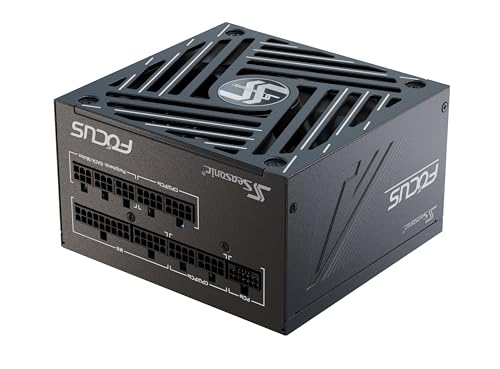
Specs
Wattage | 750 W |
Standard | ATX 3.1, PCIe 5.1 |
Efficiency | 80 Plus Gold, Cybenetics Platinum |
Modularity | Fully modular |
GPU connectors | Native 12V-2x6 plus PCIe 8-pin |
Warranty | 10 years |
Wattage
750 W
Standard
ATX 3.1, PCIe 5.1
Efficiency
80 Plus Gold, Cybenetics Platinum
Modularity
Fully modular
GPU connectors
Native 12V-2x6 plus PCIe 8-pin
Warranty
10 years
What it does well
Seasonic builds its own units, and the Focus GX line is one we would sign off on in a client build. It covers either GPU with room for a CPU and platform upgrade later, and the 10-year warranty resets the clock on the part most likely to fail in a 2017 build.
Fully modular cabling also makes the swap easier in an older case, where routing space is usually tight.
What you give up
No new frames. This is insurance, not performance, and 750 W is more than a 160 W card needs. If your current unit is a known brand, 550 W or more, and still under warranty, keep it and put the money toward the GPU.
Who it's for
RX 580 owners whose power supply is unbranded, past its warranty, or under 500 W.
Bottom line
If you game at 1080p and want this PC to last, buy the ASUS Dual RX 9060 XT 16GB. If you stream, edit or use CUDA apps, buy the ASUS Dual RTX 5060 Ti 16GB OC. If your power supply is old or unbranded, add the Seasonic Focus GX-750 to the same order. Do not buy any 8 GB card, the 9060 XT 8GB and RTX 5060 included, to replace an 8 GB RX 580. For more tier options, see our best budget GPUs under 500.
Next step
Pick the next move that matches your verdict:
- Buying the 9060 XT? Pair it with a display that uses the extra frames: best monitors for the RX 9060 XT.
- Keeping your current PSU? Check what it can safely run first: best GPU for a 650W or 550W PSU.
- Platform too old to save? Start fresh with a complete parts list: the best 1000 USD gaming PC.
FAQ
Is the RX 9060 XT a good upgrade from an RX 580?
Yes, as long as you buy the 16 GB version. It runs well over twice as fast in modern games, adds the hardware ray tracing that games like Doom: The Dark Ages require, and supports FSR 4. Board power is similar to your RX 580, so most healthy power supplies can run it. It is the most direct upgrade in AMD's current lineup for an RX 580 owner.
Is the RX 580 still good in 2026?
It still plays older and lighter games at 1080p, usually at low to medium settings. But it cannot launch titles that require ray tracing hardware, its drivers have been in maintenance mode since late 2023, and 8 GB of VRAM is a hard ceiling in new releases. It is a card to replace when your budget allows, not one to build around.
Should I get the 8GB or 16GB RX 9060 XT?
Get the 16 GB card. The 8 GB model has the same name and similar speed, but it repeats the exact memory ceiling you are leaving behind with the RX 580. In VRAM-heavy games an 8 GB card stutters rather than just losing frames. For a card you plan to keep several years, 16 GB is the only version worth buying. Our 8GB VRAM verdict covers the details.
Do I need a new power supply to upgrade from an RX 580?
Usually not for wattage. The reference 16 GB 9060 XT is rated at 160 W, below the RX 580's 185 W, so a quality 500 W to 550 W unit is enough. Replace the PSU if it is unbranded, past its warranty, or older than your RX 580 build itself. Check that it has the 8-pin PCIe connector your chosen card needs.
Will the RX 9060 XT work in a PCIe 3.0 motherboard?
Yes. PCIe is backward compatible, and the 9060 XT uses a full x16 link, so running it at PCIe 3.0 x16 costs little performance. Cards with an x8 link, like the RTX 5060 Ti, lose more bandwidth on PCIe 3.0. If you plan to keep an older board, the full x16 card is the safer choice.
Is the RTX 5060 a good upgrade from the RX 580?
It is faster, but it is an 8 GB card, so it keeps the memory limit that is already retiring your RX 580. For an RX 580 owner, the 16 GB RX 9060 XT is the better buy, and the RTX 5060 Ti 16GB is the Nvidia choice if you need DLSS, NVENC or CUDA. Our RTX 5060 vs RX 9060 XT comparison breaks down the gap.
Related Articles

RTX 5060 vs RX 9060 XT (2026): 8GB vs 16GB Decides It
RTX 5060 vs RX 9060 XT: the 8GB card is the trap. AMD wins 1080p frames and 16GB of VRAM, NVIDIA wins DLSS 4 and ray tracing. Here is which one to buy.
Sep 8, 2026

RX 6600 XT to RX 9060 XT: Is the Upgrade Worth It? (2026)
RX 6600 XT to RX 9060 XT: the upgrade is worth it, but only the 16GB SKU. Here is the real gen-over-gen gain, the 8GB trap, and exactly when to hold instead.
Sep 11, 2026

Best Monitors for the RX 9060 XT (2026): 5 Picks by Tier
Five monitors matched to the RX 9060 XT 16GB by refresh tier, from 1440p 180Hz IPS up to 240Hz QD-OLED, plus the real 1440p frame ceiling the card hits.
Aug 18, 2026

Is 8GB VRAM Enough for Gaming in 2026, or Do You Need 16GB?
Is 8GB VRAM enough for gaming in 2026? It holds at 1080p, cracks at 1440p, and fails at 4K. Here is when 8GB works, when you need 16GB, and what to buy.
Jul 23, 2026

RX 5700 XT to RX 9070 XT: Is the Upgrade Worth It? (2026)
Is the RX 5700 XT to RX 9070 XT upgrade worth it? Yes: close to triple the 1440p frame rate, ray tracing and FSR 4, plus the power supply check to run first.
Oct 27, 2026