Affiliate Disclosure: As an Amazon Associate we earn from qualifying purchases. Some links may earn us a commission at no cost to you.

Will a 5700X3D Work on a B450 Motherboard? (BIOS, 2026)
Yes. A B450 board will run a Ryzen 7 5700X3D as long as its BIOS carries AMD's AGESA 1.2.0.7 microcode or later. That firmware is what pushed Ryzen 5000 and the 3D V-Cache parts down onto 400-series chipsets, and nearly every B450 board sold has a version of it available.
The catch is how you get there. Updating a BIOS normally needs a CPU the board already recognizes, and the chip in your socket may be the one that update drops. Below is the minimum version per vendor, how to flash with no CPU at all, and what to buy when your board cannot.
At a glance
Part | What it is | Why it is here | Buy |
|---|---|---|---|
8C/16T, 96 MB L3, 105 W, AM4 | The upgrade itself. Needs AGESA 1.2.0.7 or later | ||
B550, ATX, USB BIOS Flashback | Flashes itself with no CPU installed | ||
B550, micro-ATX, Q-Flash Plus | Cheapest board with a CPU-less flash | ||
2 x 16 GB, CL18, XMP 2.0 | Falls back cleanly to the chip's rated 3200 |
- What it is
8C/16T, 96 MB L3, 105 W, AM4
- Why it is here
The upgrade itself. Needs AGESA 1.2.0.7 or later
- Buy
- What it is
B550, ATX, USB BIOS Flashback
- Why it is here
Flashes itself with no CPU installed
- Buy
- What it is
B550, micro-ATX, Q-Flash Plus
- Why it is here
Cheapest board with a CPU-less flash
- Buy
- What it is
2 x 16 GB, CL18, XMP 2.0
- Why it is here
Falls back cleanly to the chip's rated 3200
- Buy
Most readers only need the first row. The boards are here for the case where a B450 has no way to update itself, and the memory kit is for anyone still on 16 GB with the case open anyway. The next table decides which applies to you.
Where each B450 owner lands
Your situation | What to do | Buy |
|---|---|---|
Board already on a BIOS with AGESA 1.2.0.7 or later | Drop the chip in. Nothing else needed | |
Board has USB BIOS Flashback, Q-Flash Plus, or a Flash BIOS Button | Flash from a USB stick first, then swap | |
No flash button, but you can borrow a Ryzen 1000 to 3000 chip | Flash with the borrowed chip, then swap | |
No flash button and no spare CPU | Buy a B550 board that flashes itself | |
Same, on the tightest possible budget | Same fix, cheaper board |
Board already on a BIOS with AGESA 1.2.0.7 or later
- What to do
Drop the chip in. Nothing else needed
- Buy
Board has USB BIOS Flashback, Q-Flash Plus, or a Flash BIOS Button
- What to do
Flash from a USB stick first, then swap
- Buy
No flash button, but you can borrow a Ryzen 1000 to 3000 chip
- What to do
Flash with the borrowed chip, then swap
- Buy
No flash button and no spare CPU
- What to do
Buy a B550 board that flashes itself
- Buy
Same, on the tightest possible budget
- What to do
Same fix, cheaper board
- Buy
The deciding question is not the chipset. It is whether your specific board can write a new BIOS with no working CPU in the socket. Vendors give that feature three different names and put it on roughly half the B450 lineup, which is why the answer swings so hard board to board.
How the BIOS gate actually works
AGESA is the microcode layer AMD ships to board partners, and 1.2.0.7 is the release that carried Zen 3 and the 3D V-Cache parts back onto 300 and 400-series chipsets. BIOSTAR rolled it across its B450, A520 and A320 lines; every other vendor followed on its own schedule. If your board's firmware predates that release, the 5700X3D will not POST. You get a black screen, a CPU debug light, and nothing that tells you why.
That is where the trap sits. A BIOS update normally runs from inside the BIOS, which means the board has to boot, which means a CPU it already recognizes has to be in the socket. Coming from a Ryzen 1600 or 2600, that still works: flash first, swap second. If the board arrived secondhand with no CPU, or the only chip you own is the 5700X3D still in its box, the board has to flash itself. ASUS calls that USB BIOS Flashback, Gigabyte calls it Q-Flash Plus, MSI calls it a Flash BIOS Button. Same mechanism: a USB stick, a power supply, one button, no processor.
There is a cost to the update that no download page mentions. Most B450 boards shipped a 16 MB BIOS chip, and Zen 3 microcode does not fit alongside everything already in there, so vendors dropped Zen and Zen+ support from the same firmware to make room. Reports from buyers are consistent: flash for a 5000-series chip and the Ryzen 1600 you pulled out may refuse to POST if you put it back. Treat the update as one-way. MSI's MAX line and the ASUS boards carrying a II suffix use larger chips and keep both generations, which is why the not-POSTing threads are full of non-MAX boards. AM5 owners hit a milder version of the same gate.
Minimum BIOS version by vendor
Vendor | Example B450 boards | Minimum BIOS | Flash with no CPU |
|---|---|---|---|
ASUS | TUF Gaming B450-Plus II, TUF B450M-Plus II | 3802 | USB BIOS Flashback on select SKUs |
MSI | B450 Gaming Plus MAX | 7B86vHK | Flash BIOS Button on MAX boards |
MSI | B450 Tomahawk (non-MAX) | 7C02v1J5 | None |
Gigabyte | B450M DS3H, B450 Aorus M | F64 and later | Q-Flash Plus on select SKUs |
ASRock | B450M Pro4, B450 Steel Legend | Any AGESA 1.2.0.7 build | BIOS Flashback on select SKUs |
BIOSTAR | B450 series | AGESA 1.2.0.7 rollout build | Check the board manual |
ASUS
- Example B450 boards
TUF Gaming B450-Plus II, TUF B450M-Plus II
- Minimum BIOS
3802
- Flash with no CPU
USB BIOS Flashback on select SKUs
MSI
- Example B450 boards
B450 Gaming Plus MAX
- Minimum BIOS
7B86vHK
- Flash with no CPU
Flash BIOS Button on MAX boards
MSI
- Example B450 boards
B450 Tomahawk (non-MAX)
- Minimum BIOS
7C02v1J5
- Flash with no CPU
None
Gigabyte
- Example B450 boards
B450M DS3H, B450 Aorus M
- Minimum BIOS
F64 and later
- Flash with no CPU
Q-Flash Plus on select SKUs
ASRock
- Example B450 boards
B450M Pro4, B450 Steel Legend
- Minimum BIOS
Any AGESA 1.2.0.7 build
- Flash with no CPU
BIOS Flashback on select SKUs
BIOSTAR
- Example B450 boards
B450 series
- Minimum BIOS
AGESA 1.2.0.7 rollout build
- Flash with no CPU
Check the board manual
Two rules before you download anything. Read the revision off the board itself rather than the product name in your order history: the silkscreen near the DIMM slots is what identifies it, and a Tomahawk and a Tomahawk MAX are different boards with different firmware trees. Then take the version number from the vendor's own CPU support page for that exact model. Forum threads are where wrong version numbers live. The A620 side of this question follows the same pattern on AM5.
Benchmarks
Average frame rate in a CPU-bound Starfield run, showing what the 3D V-Cache buys over the Zen 2 chip many B450 owners are replacing.
- 121 FPS
- 84 FPS
That gap is the cache, not the clocks. The 5700X3D boosts lower than the 3700X it replaces and still lands well ahead once the engine is the bottleneck instead of the graphics card. In titles already GPU-limited at your resolution, the average barely moves and the 1% lows tighten instead. Whether the jump is worth it coming from a Ryzen 5 3600 is its own question.
The chip: AMD Ryzen 7 5700X3D
This is the part everything else in the article exists to enable.
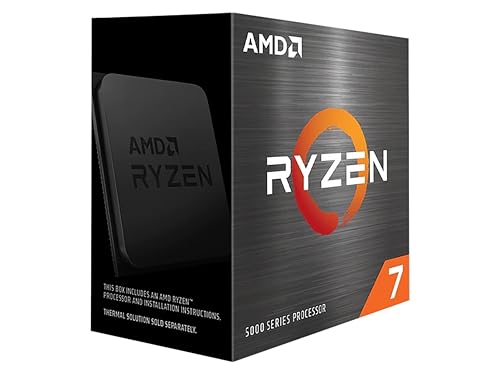
Specs
Cores / threads | 8 / 16 |
Base / boost clock | 3.0 GHz / 4.1 GHz |
L3 cache | 96 MB (3D V-Cache) |
TDP | 105 W |
Socket | AM4 (Zen 3) |
Memory support | DDR4, rated to 3200 |
Minimum microcode | AGESA 1.2.0.7 |
Multiplier | Locked |
Cores / threads
8 / 16
Base / boost clock
3.0 GHz / 4.1 GHz
L3 cache
96 MB (3D V-Cache)
TDP
105 W
Socket
AM4 (Zen 3)
Memory support
DDR4, rated to 3200
Minimum microcode
AGESA 1.2.0.7
Multiplier
Locked
What it does well
Ninety-six megabytes of L3 is the whole pitch. In engines that thrash cache, meaning sim racing, flight sim, 4X and city builders, MMO raid content and factory games at scale, that cache does more for frame pacing than any clock increase available on this socket. Same board, same graphics card, different experience.
It is also an easy install. Eight Zen 3 cores at 105 W stay inside the thermal budget of coolers people already own, and a locked multiplier means there is nothing to tune.
What you give up
Base clock sits at 3.0 GHz, low enough that lightly threaded work with no cache sensitivity trails a plain 5700X. A machine that lives in single-threaded productivity rather than games wants a different chip.
The bigger caveat is the board underneath. Socket compatibility is not the same thing as build-ready. At 105 W this pulls meaningfully more than the 65 W parts most cheap B450 boards were sold alongside, and thin bare VRM heatsinks are being asked to do more than they were designed for. This is also the end of the road on AM4.
Who it's for
The B450 owner on a Ryzen 1600, 2600, 3600 or 3700X whose graphics card is still fine and whose 1% lows are not. If the complaint is stutter in a large strategy save or a busy raid rather than raw average frame rate, this is the fix.
The escape hatch: ASUS TUF Gaming B550-Plus WiFi II
The board you buy when your B450 cannot update itself and you have nothing to flash it with.

Specs
Chipset | AMD B550 |
Form factor | ATX |
Memory | 4 x DDR4 DIMM |
Storage | PCIe 4.0 M.2 plus PCIe 3.0 M.2 |
Networking | 2.5 Gb Ethernet, Wi-Fi 6 |
BIOS flashing | USB BIOS Flashback (no CPU) |
Graphics slot | PCIe 4.0 x16 |
Chipset
AMD B550
Form factor
ATX
Memory
4 x DDR4 DIMM
Storage
PCIe 4.0 M.2 plus PCIe 3.0 M.2
Networking
2.5 Gb Ethernet, Wi-Fi 6
BIOS flashing
USB BIOS Flashback (no CPU)
Graphics slot
PCIe 4.0 x16
What it does well
USB BIOS Flashback is normally a footnote, a feature you use once at build time and never think about again. On this specific problem it is the whole decision. Connect the power supply, put the firmware file on a USB stick, press the button. No processor, no memory, no graphics card, and the chicken-and-egg problem stops existing.
Past that it is a straightforward ATX B550: PCIe 4.0 on the graphics slot and the primary M.2, a VRM stack sized for 105 W Zen 3 without complaint, 2.5 Gb Ethernet and Wi-Fi 6. Nothing here is exciting, which on a motherboard is the point.
What you give up
It is a second purchase stacked on top of the processor, which is exactly what the reader arriving at this question was trying to avoid. If your B450 has a flash button, do not buy this.
A board swap also means a Windows reactivation prompt and a fresh chipset driver pass, and pulling the machine apart rather than lifting one cooler. Budget an evening.
Who it's for
The reader whose B450 has no flash button, no borrowable Ryzen 1000 to 3000 chip, and no interest in mailing a board to a shop to be flashed.
The budget escape hatch: Gigabyte B550M DS3H AC R2
The same fix for less money, with the corners you would expect at that price.

Specs
Chipset | AMD B550 |
Form factor | Micro-ATX |
VRM | 5+3 power phase |
Memory | 4 x DDR4 DIMM |
Storage | 2 x M.2 (one PCIe 4.0) |
Networking | Gigabit Ethernet, Wi-Fi 5 |
BIOS flashing | Q-Flash Plus (no CPU) |
Chipset
AMD B550
Form factor
Micro-ATX
VRM
5+3 power phase
Memory
4 x DDR4 DIMM
Storage
2 x M.2 (one PCIe 4.0)
Networking
Gigabit Ethernet, Wi-Fi 5
BIOS flashing
Q-Flash Plus (no CPU)
What it does well
Q-Flash Plus is Gigabyte's name for the same CPU-less flash and works the same way: power supply connected, firmware on a USB stick, one button. The R2 revision is recent enough that Ryzen 5000 support is already in the shipping firmware, so most buyers never need to use it.
Micro-ATX drops straight into the mounting holes a B450 mATX board was already using, which makes this the least disruptive swap on the list.
What you give up
A 5 plus 3 phase VRM is the floor rather than a comfortable margin for a 105 W chip in a warm case. It will run, and it will run hotter than the TUF board under sustained all-core load. One intake fan behind a tempered glass panel is the case where you spend up instead.
Wi-Fi 5 and Gigabit Ethernet are both a step behind, and micro-ATX costs expansion slots an ATX owner notices the first time they add a capture card.
Who it's for
The reader whose goal is spending as little as possible to get the chip running, on a machine that games and does not render. Buy the R2 revision specifically; older DS3H AC boards shipped on older firmware.
The memory: Corsair Vengeance LPX 32GB DDR4-3600
Optional, and worth reading before you decide it is optional.
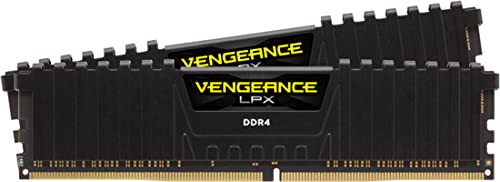
Specs
Capacity | 32 GB (2 x 16 GB) |
Speed | DDR4-3600 |
Timings | CL18-22-22-42 |
Voltage | 1.35 V |
Profile | XMP 2.0 |
Height | 34 mm (low profile) |
Configuration | Dual channel, 2 DIMMs |
Capacity
32 GB (2 x 16 GB)
Speed
DDR4-3600
Timings
CL18-22-22-42
Voltage
1.35 V
Profile
XMP 2.0
Height
34 mm (low profile)
Configuration
Dual channel, 2 DIMMs
What it does well
Two DIMMs rather than four is the configuration AM4 memory controllers train most reliably, and that matters here. The 5700X3D is officially rated to DDR4-3200, and buyers moving onto it report DOCP and XMP profiles at 3600 refusing to train on boards that held them fine with the old chip. A 3600 kit that drops to 3200 without argument is the safe shape.
The low-profile height clears tower coolers, so nothing has to come off to fit it.
What you give up
CL18 is a loose timing set. On a processor with 96 MB of cache most of that latency never reaches the game, so the practical loss is small, but tighter kits exist and this is not one of them.
The real cost is the market. DDR4 pricing this year is the worst part of any AM4 upgrade, and the memory can end up costing more than the processor did. If your current 16 GB kit is not actually running out, skip this and revisit later. Our DDR4 buying guide covers where the market currently sits.
Who it's for
The reader still on 16 GB who is already inside the case for the processor swap. Already on 32 GB? Leave it alone and put the money toward a graphics card.
Bottom line
If your B450 already runs a BIOS with AGESA 1.2.0.7 or later, buy the AMD Ryzen 7 5700X3D and nothing else. If the board has a flash button, flash it first, then buy the same chip. If it has no flash button but you can borrow an older Ryzen, same answer again. If neither is true, add the ASUS TUF Gaming B550-Plus WiFi II and treat it as the price of admission. And if you are weighing all of this against leaving AM4 entirely, AM5 against LGA 1851 is the socket comparison, while choosing a CPU and motherboard together covers the pairing rules.
FAQ
Will a Ryzen 7 5700X3D work on a B450 motherboard?
Yes, on any B450 board whose BIOS carries AMD's AGESA 1.2.0.7 microcode or later. Every major vendor shipped that firmware for its B450 lineup, though the exact version number differs per model. The chipset is never the limit; the firmware on your particular board is. Check the vendor's CPU support page for your exact model and revision first.
Do I have to update the BIOS before installing a 5700X3D?
Only if the board is on older firmware, which most are unless someone updated them after 2022. A board on old firmware simply refuses to POST with the new chip installed. The safe order is always: check the current version, update if needed, then swap the processor. Doing it the other way leaves you with a dead machine and no way to fix it in place.
How do I update a B450 BIOS without a compatible CPU?
Use the board's CPU-less flash feature if it has one. ASUS calls it USB BIOS Flashback, Gigabyte calls it Q-Flash Plus, MSI calls it a Flash BIOS Button. Connect the power supply, put the renamed firmware file on a FAT32 USB stick, plug it into the marked port, press the button. No processor, memory or graphics card needed. Without one of those features, your options are borrowing an older Ryzen chip or buying a board that can flash itself.
Will my old Ryzen 1000 or 2000 CPU still work after the BIOS update?
Possibly not, and you should plan as though it will not. Most B450 boards shipped a 16 MB BIOS chip that cannot hold Zen 3 microcode alongside everything else, so vendors dropped first and second-generation Ryzen support to make room. Boards with larger chips, including MSI's MAX line and the ASUS II refreshes, keep both. Treat the flash as one-way.
Why won't my RAM run at 3600 after upgrading to the 5700X3D?
The 5700X3D is officially rated to DDR4-3200, and its memory controller is less willing to hold an aggressive profile than the chip you removed. Set the speed to 3200 manually, confirm the system is stable, then step back up if you want to. Giving up 400 MT/s costs very little on a processor carrying 96 MB of cache, so this is not worth fighting.
Is a B550 board worth buying instead of flashing my B450?
Only when flashing is not available to you. If your B450 can take the update, the money is better spent elsewhere: the practical difference for a gaming machine is PCIe 4.0 storage you probably will not notice. With no flash button and no compatible chip to boot with, a B550 board is the cheapest working path.
Related Articles

Ryzen 5 3600 to 5700X3D: Is the Upgrade Worth It? (2026)
Is the Ryzen 5 3600 to 5700X3D upgrade worth it? For most AM4 gamers in 2026, yes. Here is the real fps gain, the B450 BIOS gate, and when to skip the swap.
Aug 7, 2026

Will a 9850X3D Work on a B650 Board? (BIOS Guide 2026)
Will a 9850X3D work on a B650 board? Yes, once the firmware is current. Here is the minimum BIOS by vendor, the Flashback fork, and which board to buy.
Aug 5, 2026

Will a 9800X3D Work on an A620 Motherboard? (2026)
A 9800X3D pulls 162W peak; A620 is rated for 88W. Here is which A620 motherboards actually clear it, the BIOS version you need, and when a B650 board wins.
Aug 8, 2026

Best DDR4 RAM for Gaming 2026: AM4 & LGA 1700 Survival Guide
The best DDR4 RAM for gaming in 2026: picks for AM4 Ryzen 5000 and LGA 1700 Intel. DDR4-3600 CL16 vs CL18 explained, plus the AM4 Infinity Fabric sweet spot.
May 31, 2026

How to Choose a CPU and Motherboard
The buyer's framework for picking a CPU and motherboard pair: use case first, socket second, chip tier third, then the board class that matches.
May 17, 2026