Affiliate Disclosure: As an Amazon Associate we earn from qualifying purchases. Some links may earn us a commission at no cost to you.

Best CPU for Total War: Warhammer III (2026): 5 Picks
Total War: Warhammer III leans on your CPU in two places, and neither is the built-in benchmark average. The first is a large battle at Ultra unit size, where thousands of models and their pathing run through the CPU and the 1% lows sag when two full stacks collide. The second is the late-game end turn, when dozens of AI factions take their moves while you wait.
So the ranking below is about headroom in those two moments. Five picks, ordered by how far each one carries a big campaign before the CPU becomes the thing you notice.
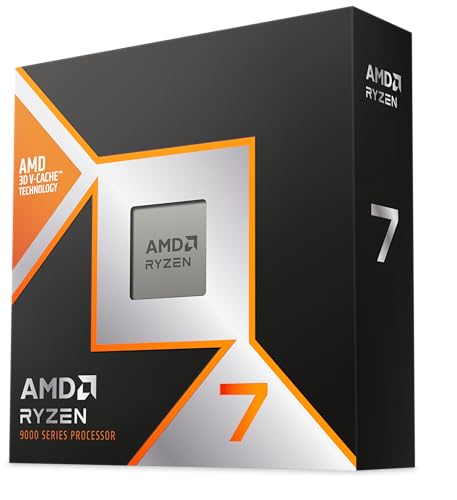
Our top pick: AMD Ryzen 7 9800X3D
The Ryzen 7 9800X3D pairs 96 MB of L3 cache with a 5.2 GHz boost, so it covers both jobs this game hands the CPU: large battle simulation and fast single-thread work during end turns.
Quick picks
Pick | CPU | Cores / threads | Best for | Buy |
|---|---|---|---|---|
Best Overall | 8 / 16 | Ultra unit sizes and long campaigns on one chip | ||
Best Value | 8 / 16 | Nearly all of the top pick for less | ||
Best Premium | 16 / 32 | Players who also mod, stream or render | ||
Best Budget | 6 / 12 | Default unit sizes and an AM5 upgrade path | ||
Editor's Pick | 20 / 20 | Intel builds that also do heavy multithreaded work |
Best Overall
- CPU
- Cores / threads
8 / 16
- Best for
Ultra unit sizes and long campaigns on one chip
Best Value
- CPU
- Cores / threads
8 / 16
- Best for
Nearly all of the top pick for less
Best Premium
- CPU
- Cores / threads
16 / 32
- Best for
Players who also mod, stream or render
Best Budget
- CPU
- Cores / threads
6 / 12
- Best for
Default unit sizes and an AM5 upgrade path
Editor's Pick
- CPU
- Cores / threads
20 / 20
- Best for
Intel builds that also do heavy multithreaded work
Specs at a glance
CPU | Cores / threads | Boost clock | L3 cache | TDP | Socket |
|---|---|---|---|---|---|
8 / 16 | 5.2 GHz | 96 MB | 120 W | AM5 | |
8 / 16 | 5.0 GHz | 96 MB | 120 W | AM5 | |
16 / 32 | 5.7 GHz | 128 MB | 170 W | AM5 | |
6 / 12 | 5.4 GHz | 32 MB | 65 W | AM5 | |
20 / 20 | 5.5 GHz | 30 MB | 125 W | LGA 1851 |
- Cores / threads
8 / 16
- Boost clock
5.2 GHz
- L3 cache
96 MB
- TDP
120 W
- Socket
AM5
- Cores / threads
8 / 16
- Boost clock
5.0 GHz
- L3 cache
96 MB
- TDP
120 W
- Socket
AM5
- Cores / threads
16 / 32
- Boost clock
5.7 GHz
- L3 cache
128 MB
- TDP
170 W
- Socket
AM5
- Cores / threads
6 / 12
- Boost clock
5.4 GHz
- L3 cache
32 MB
- TDP
65 W
- Socket
AM5
- Cores / threads
20 / 20
- Boost clock
5.5 GHz
- L3 cache
30 MB
- TDP
125 W
- Socket
LGA 1851
Where each CPU runs out of headroom in Total War: Warhammer III
CPU | Large battles (Ultra units) | Late-game end turns | Platform note |
|---|---|---|---|
Holds steady in full-stack fights | Among the fastest | AM5, drop-in on updated boards | |
Within a few percent of the top pick | Slightly slower than the 9800X3D | AM5, the same boards | |
Matches the 9800X3D when scheduling is right | Fast | Needs the AMD chipset driver for core parking | |
Fine at default unit sizes, dips at Ultra | Noticeably longer in late campaigns | AM5, room to drop in an X3D later | |
Close to AMD's 8-core chips | Fast | LGA 1851; Intel APO can help 1% lows |
- Large battles (Ultra units)
Holds steady in full-stack fights
- Late-game end turns
Among the fastest
- Platform note
AM5, drop-in on updated boards
- Large battles (Ultra units)
Within a few percent of the top pick
- Late-game end turns
Slightly slower than the 9800X3D
- Platform note
AM5, the same boards
- Large battles (Ultra units)
Matches the 9800X3D when scheduling is right
- Late-game end turns
Fast
- Platform note
Needs the AMD chipset driver for core parking
- Large battles (Ultra units)
Fine at default unit sizes, dips at Ultra
- Late-game end turns
Noticeably longer in late campaigns
- Platform note
AM5, room to drop in an X3D later
- Large battles (Ultra units)
Close to AMD's 8-core chips
- Late-game end turns
Fast
- Platform note
LGA 1851; Intel APO can help 1% lows
How we picked
We started from what reviewers have measured in this game. TechSpot's 45-game comparison, run at 1080p on an RTX 4090, found the Ryzen 7 9800X3D only 2 to 3 percent ahead of the Ryzen 7 7800X3D in Warhammer III, one of the smallest gaps in its whole test suite. The same outlet found the 9800X3D and Intel's Core Ultra 9 285K close to identical here. That tells you this game is less cache-hungry than a city builder, and that the gap between a good CPU and a great one is narrow.
Narrow does not mean zero. Built-in benchmarks run a scripted fight, and the moments players complain about are messier: a 20-unit stack against a 20-unit stack at Ultra unit size, or a turn-120 campaign where every faction is at war. Those are where 1% lows and end-turn waits stretch, and where cache and clock speed both show up. If you want to see whether your current chip or your graphics card is the limit, run your parts through our bottleneck calculator first.
Then we checked the platform. Four picks sit on AM5, which matters for a game Creative Assembly keeps patching and a CPU you might want to swap in three years. One pick is Intel, because the Core Ultra 7 265K is a real option for players who also do heavy multithreaded work. For the wider logic behind sizing a CPU against your graphics card, our guide to choosing a CPU and motherboard walks through it, and our X3D explainer covers when the extra cache earns its keep.
Core count got the least weight. The campaign AI does spread across threads, but player reports and testing both point to eight fast cores as the point where more cores stop shortening end turns. If you are weighing more cores against faster cores in general, how many CPU cores you need goes deeper.
Best Overall: AMD Ryzen 7 9800X3D
Specs
Cores / threads | 8 / 16 |
Boost clock | 5.2 GHz |
L3 cache | 96 MB (3D V-Cache) |
TDP | 120 W |
Socket | AM5 |
Memory | DDR5, AMD EXPO |
Unlocked | Yes |
Cores / threads
8 / 16
Boost clock
5.2 GHz
L3 cache
96 MB (3D V-Cache)
TDP
120 W
Socket
AM5
Memory
DDR5, AMD EXPO
Unlocked
Yes
What it does well
The 9800X3D is the chip that never makes you think about the CPU in this game. Its 96 MB of L3 keeps unit and pathing data close to the cores during big battles, and its 5.2 GHz boost is higher than the 7800X3D's, which helps in the stretches where a single thread does most of the work. That combination is why it leads, even if the margin in a scripted benchmark is small.
AMD moved the cache die underneath the cores on this generation, so the chip runs cooler at the same load and holds its clocks more easily. It is also unlocked, which earlier X3D parts were not. You do not need to touch that to get the result, but it is there.
It is also the safe pick for the rest of your library. If Warhammer III sits next to Cities: Skylines II or a Paradox game in your rotation, the cache advantage grows a lot in those titles.
What you give up
The lead over the 7800X3D in this specific game is small. TechSpot measured 2 to 3 percent, so if Warhammer III is the only reason you are upgrading and you already own a 7800X3D, keep it. The upgrade buys you almost nothing here.
Eight cores is also the ceiling. If you render, compile or stream alongside your campaigns, the 16-core 9950X3D or the 20-core 265K will finish that other work faster.
Who it's for
Anyone building a new AM5 system who plays at Ultra unit sizes, runs long campaigns past turn 100, or wants one CPU that holds up across strategy and simulation games for years.
Best Value: AMD Ryzen 7 7800X3D

Specs
Cores / threads | 8 / 16 |
Boost clock | 5.0 GHz |
L3 cache | 96 MB (3D V-Cache) |
TDP | 120 W |
Socket | AM5 |
Memory | DDR5, AMD EXPO |
Cores / threads
8 / 16
Boost clock
5.0 GHz
L3 cache
96 MB (3D V-Cache)
TDP
120 W
Socket
AM5
Memory
DDR5, AMD EXPO
What it does well
The 7800X3D has the same 96 MB of L3 and the same eight cores as the top pick, and in this game it lands within a few percent of it. For a strategy player that is the definition of value: almost all of the battle smoothness and end-turn speed, on the same AM5 boards, for less money.
It also runs cool and draws little power for what it delivers, so a mid-range air cooler handles it comfortably. Our 7800X3D versus 9800X3D comparison covers the gap across a wider set of games if you want to see where the newer chip pulls ahead.
What you give up
Its boost clock tops out at 5.0 GHz, and the cache sits on top of the cores, which caps how hard it can run. In the late-game end turns that lean on one fast thread, the 9800X3D finishes a little sooner.
It is locked for manual overclocking, and stock on Amazon has been tighter as AMD shifts production to newer parts. If the price gap to the 9800X3D narrows, buy the newer chip.
Who it's for
Players who want X3D cache for big battles without paying for the newest generation, and anyone pairing a mid-range graphics card at 1440p, where the GPU sets the frame rate more often than the CPU.
Best Premium: AMD Ryzen 9 9950X3D

Specs
Cores / threads | 16 / 32 |
Boost clock | 5.7 GHz |
L3 cache | 128 MB (V-Cache on one CCD) |
TDP | 170 W |
Socket | AM5 |
Memory | DDR5, AMD EXPO |
Cores / threads
16 / 32
Boost clock
5.7 GHz
L3 cache
128 MB (V-Cache on one CCD)
TDP
170 W
Socket
AM5
Memory
DDR5, AMD EXPO
What it does well
The 9950X3D gives you 16 cores and 128 MB of L3, with the extra cache on one of its two core complexes. For gaming it behaves like a 9800X3D with a higher 5.7 GHz boost ceiling. For everything else, it behaves like a 16-core workstation chip.
That second half is the reason to buy it. Warhammer III players who build mod packs, record and edit battle footage, or stream their campaigns get a CPU that handles the game and the side work without one slowing the other.
What you give up
Only one of the two core complexes has the stacked cache, so Windows has to keep the game on the right cores. Reports suggest results vary if the AMD chipset driver is missing or Game Bar is disabled, since those handle the core parking. Install both before you judge its numbers.
For Warhammer III alone it is no faster than the 9800X3D, and it draws more power and needs a stronger cooler. You are paying for the work you do outside the game.
Who it's for
Strategy players whose PC is also a workstation: modders, video editors and streamers who want one chip for both jobs. If gaming is all you do, buy the top pick instead. Our 9900X3D versus 9950X3D breakdown helps if you are torn between the two 9000-series X3D Ryzen 9 chips.
Best Budget: AMD Ryzen 5 9600X

Specs
Cores / threads | 6 / 12 |
Boost clock | 5.4 GHz |
L3 cache | 32 MB |
TDP | 65 W |
Socket | AM5 |
Memory | DDR5, AMD EXPO |
Cores / threads
6 / 12
Boost clock
5.4 GHz
L3 cache
32 MB
TDP
65 W
Socket
AM5
Memory
DDR5, AMD EXPO
What it does well
The 9600X is the least you should spend for a current platform. Six Zen 5 cores at up to 5.4 GHz handle default unit sizes and early to mid campaigns well, and its 65 W rating means a basic cooler and an entry B650 board are enough.
Its biggest strength is the socket. You get AM5 today and a straight drop-in path to an X3D chip later, without changing the board or the memory.
What you give up
With 32 MB of L3 and six cores, it is the pick that shows the CPU limit first. Expect lower 1% lows in full-stack Ultra battles and longer waits on late-game end turns than any X3D chip on this list.
Ryzen 9000 chips need a BIOS update on older B650 and X670 boards before they post, so check the board's BIOS version or buy one that supports flashing without a CPU installed.
Who it's for
Players on a tighter budget who run default unit sizes, or anyone building now with a plan to swap in an X3D chip once prices fall.
Editor's Pick: Intel Core Ultra 7 265K

Specs
Cores / threads | 20 / 20 (8 P-cores + 12 E-cores) |
Boost clock | 5.5 GHz |
L3 cache | 30 MB |
Base power | 125 W |
Socket | LGA 1851 |
Memory | DDR5-6400 |
Cores / threads
20 / 20 (8 P-cores + 12 E-cores)
Boost clock
5.5 GHz
L3 cache
30 MB
Base power
125 W
Socket
LGA 1851
Memory
DDR5-6400
What it does well
The Core Ultra 7 265K is the Intel answer for players who do more than game. Its 20 cores, split into 8 performance cores and 12 efficient cores, chew through multithreaded work, and its 5.5 GHz boost keeps it competitive in the single-thread stretches of an end turn.
Reports also suggest Intel's Application Optimization tool (APO) lifts 1% lows in Warhammer III on Core Ultra 200S chips, which targets the exact stutter players notice in large battles. Our 265K versus 9800X3D comparison lays out how the two trade blows across a wider game set.
What you give up
It has 30 MB of L3 and no stacked cache, so across a broad library it trails AMD's X3D chips in games that reward cache. In Warhammer III the gap is small, elsewhere it can be wide.
APO is not automatic. It needs Intel's APO app and a supported motherboard driver, and the benefit is reported rather than independently confirmed for this chip. The Amazon listing has also been sold by third-party sellers rather than Amazon directly, so check the seller before you buy.
Who it's for
Builders who prefer an Intel platform, or who split their time between strategy games and heavy multithreaded work like code compiles or video exports.
Bottom line
If you want the CPU to disappear in Warhammer III at Ultra unit sizes, buy the AMD Ryzen 7 9800X3D.
If you want nearly the same result for less, buy the AMD Ryzen 7 7800X3D.
If your PC doubles as a workstation for mods, video or streaming, buy the AMD Ryzen 9 9950X3D.
If you play default unit sizes on a budget and plan to upgrade later, buy the AMD Ryzen 5 9600X.
If you want Intel and heavy multithreaded headroom, buy the Intel Core Ultra 7 265K.
FAQ
Does the X3D cache help in Total War: Warhammer III?
Some, but less than in a city builder. TechSpot measured the 9800X3D only 2 to 3 percent ahead of the 7800X3D and close to Intel's Core Ultra 9 285K in this game at 1080p. Where cache helps most is the messy part: full-stack battles at Ultra unit size, where 1% lows sag. An X3D chip is still the best buy, but a fast non-X3D chip is not far behind.
Is Warhammer III CPU or GPU bound?
Both, depending on the moment. At 1440p and 4K with high settings, the graphics card usually sets the frame rate in battles. At 1080p, at Ultra unit size, or on the campaign map with many factions, the CPU takes over. End turns are almost entirely CPU work. Run your parts through a bottleneck check if you are unsure which one is holding you back.
How many CPU cores do you need for Warhammer III?
Six fast cores run the game well at default settings. Eight is the sweet spot for Ultra unit sizes and long campaigns, which is why the top two picks are 8-core X3D chips. Beyond eight, extra cores do little for the game itself. Buy 16 or 20 cores only if you also mod, stream or render on the same PC.
Which CPU shortens end turn times in Warhammer III?
A CPU with high single-thread speed and plenty of cache, which is why the Ryzen 7 9800X3D leads. Before you upgrade, make sure the game is patched: Creative Assembly said update 9.0 cut campaign end-turn times by up to 30 percent, which is more than most CPU upgrades deliver. Late-game turns with many wars active will always take longer.
Is the Ryzen 5 9600X enough for Warhammer III?
Yes for default unit sizes and early to mid campaigns. It starts to show its limit in large Ultra battles and in late-game end turns, where its six cores and 32 MB of L3 fall behind the X3D chips. Its real advantage is AM5, so you can drop in an X3D chip later without a new board.
Related Articles

Best CPU for Cities: Skylines II (2026): 5 Picks by Tier
The best CPU for Cities: Skylines II is the one that holds full simulation speed as your city grows. Five picks ranked by the city size each sustains.
Sep 18, 2026

Best CPU for Hearts of Iron IV (2026): 5 Picks by Tier
The best CPU for Hearts of Iron IV keeps late-game days ticking at speed 5. Five picks ranked by Paradox simulation speed, from a Ryzen 5 to the 9950X3D.
Nov 18, 2026

Best CPU for Anno 117: Pax Romana (2026): 5 Late-Game Picks
The best CPU for Anno 117: Pax Romana keeps a late-game province smooth. Five picks ranked on endgame save benchmarks, from X3D chips to a budget six-core.
Nov 18, 2026

Do You Need an X3D CPU for Gaming? 2026 Buyer's Verdict
Do you need an X3D CPU for gaming? For most builds at 1440p and 4K, no. Here is the resolution, GPU, and library test that decides, plus three AM5 picks.
Aug 13, 2026

How Many CPU Cores Do You Need for Gaming? 6 vs 8 (2026)
How many CPU cores do you need for gaming in 2026? Eight for most builds, six on a budget, 12 to 16 only if you stream or render. One Ryzen pick per lane.
Nov 15, 2026