Affiliate Disclosure: As an Amazon Associate we earn from qualifying purchases. Some links may earn us a commission at no cost to you.

Best Laptops for Old School RuneScape (2026): 117 HD Picks
The best laptop for Old School RuneScape is not the one with the biggest GPU. Vanilla OSRS runs on almost anything Jagex still supports: its Steam listing recommends a Core i3-6100 or any Ryzen chip, 8 GB of memory and a GeForce GTX 600 class card.
The real load comes from RuneLite. Its GPU plugin and the 117 HD plugin bring shadows, lighting and a long draw distance, and those need a real graphics chip. We ranked five Amazon-sold laptops for that, plus alt clients and long skilling sessions.
Our top pick: ASUS TUF Gaming F16 RTX 5050
The TUF Gaming F16 pairs an RTX 5050 at up to 115 W with a 16:10 165 Hz screen, so 117 HD runs on high and the extra vertical room fits the RuneLite sidebar without squeezing the game view.

Quick picks
Pick | Laptop | Best for | Buy |
|---|---|---|---|
Best Overall | 117 HD on high, plus every other game you own | ||
Best Value | 117 HD on a real GPU for the least Amazon-sold money | ||
Best Premium | 117 HD at 2560 x 1600 with a long draw distance | ||
Best Budget | Vanilla OSRS and RuneLite on the smallest budget | ||
Editor's Pick | Alts, 117 HD and long sessions away from the desk |
Best Overall
- Laptop
- Best for
117 HD on high, plus every other game you own
Best Value
- Laptop
- Best for
117 HD on a real GPU for the least Amazon-sold money
Best Premium
- Laptop
- Best for
117 HD at 2560 x 1600 with a long draw distance
Best Budget
- Laptop
- Best for
Vanilla OSRS and RuneLite on the smallest budget
Editor's Pick
- Laptop
- Best for
Alts, 117 HD and long sessions away from the desk
Specs at a glance
Laptop | Graphics | CPU | Display | Memory | Battery play |
|---|---|---|---|---|---|
RTX 5050, 8 GB, 115 W | i5-13450HX, 10 cores | 16 in 1920 x 1200, 165 Hz | 16 GB DDR5 | Plugged in | |
RTX 4050, 6 GB | Ryzen 5 7533HS, 6 cores | 16 in 1920 x 1200, 165 Hz | 16 GB DDR5, upgradeable | Plugged in | |
RTX 5060, 8 GB, 80 W | Core 7 240H, 10 cores | 16 in 2560 x 1600, 120 Hz | 16 GB DDR5 | Good for its class | |
Radeon integrated | Ryzen 7 7730U, 8 cores | 15.6 in 1920 x 1080 | 16 GB DDR4 | Best of the five for skilling | |
Radeon 8060S integrated | Ryzen AI Max+ 392, 12 cores | 14 in 2560 x 1600, 165 Hz | 32 GB LPDDR5X, soldered | Strongest unplugged |
- Graphics
RTX 5050, 8 GB, 115 W
- CPU
i5-13450HX, 10 cores
- Display
16 in 1920 x 1200, 165 Hz
- Memory
16 GB DDR5
- Battery play
Plugged in
- Graphics
RTX 4050, 6 GB
- CPU
Ryzen 5 7533HS, 6 cores
- Display
16 in 1920 x 1200, 165 Hz
- Memory
16 GB DDR5, upgradeable
- Battery play
Plugged in
- Graphics
RTX 5060, 8 GB, 80 W
- CPU
Core 7 240H, 10 cores
- Display
16 in 2560 x 1600, 120 Hz
- Memory
16 GB DDR5
- Battery play
Good for its class
- Graphics
Radeon integrated
- CPU
Ryzen 7 7730U, 8 cores
- Display
15.6 in 1920 x 1080
- Memory
16 GB DDR4
- Battery play
Best of the five for skilling
- Graphics
Radeon 8060S integrated
- CPU
Ryzen AI Max+ 392, 12 cores
- Display
14 in 2560 x 1600, 165 Hz
- Memory
32 GB LPDDR5X, soldered
- Battery play
Strongest unplugged
How we picked the best laptop for Old School RuneScape
Tier | CPU | Graphics | Memory | Our picks |
|---|---|---|---|---|
Jagex recommended (Steam) | Core i3-6100 or any Ryzen | GTX 600 series, UHD 610 or R7 260 | 8 GB | Every pick clears it |
RuneLite GPU plugin | Any of the above | OpenGL 4.3 and 2 GB of video memory | 8 GB | Every pick clears it |
117 HD on high (our tier) | 6 or more current cores | RTX 4050 or better, or Radeon 8060S | 16 GB, 32 GB for alts | TUF Gaming F16, Eagle 16, Alienware 16 Aurora, TUF Gaming A14 |
Jagex recommended (Steam)
- CPU
Core i3-6100 or any Ryzen
- Graphics
GTX 600 series, UHD 610 or R7 260
- Memory
8 GB
- Our picks
Every pick clears it
RuneLite GPU plugin
- CPU
Any of the above
- Graphics
OpenGL 4.3 and 2 GB of video memory
- Memory
8 GB
- Our picks
Every pick clears it
117 HD on high (our tier)
- CPU
6 or more current cores
- Graphics
RTX 4050 or better, or Radeon 8060S
- Memory
16 GB, 32 GB for alts
- Our picks
TUF Gaming F16, Eagle 16, Alienware 16 Aurora, TUF Gaming A14
Start with the floor, because it is low. Jagex's Steam listing asks for Windows 10, a Core i3-6100 or any Ryzen processor, 8 GB of memory and 2 GB of storage. Any laptop sold new this year clears that, including a basic one with integrated graphics. If vanilla OSRS in fixed mode is all you play, you can stop at our Best Budget pick.
Then decide on 117 HD. RuneLite's GPU plugin needs OpenGL 4.3 and 2 GB of video memory, and 117 HD builds a full lighting and shadow pass on top of that. Community setup guides suggest the low preset for integrated graphics and medium for entry-level discrete cards. We treated an RTX 4050 class GPU, or AMD's Radeon 8060S, as the line for high settings with a long draw distance, which is where four of the five picks sit.
Next, count your clients. Each RuneLite instance runs its own Java process with its own plugins, so two or three alts open at once add up faster than the game's own footprint suggests. Sixteen gigabytes covers a main plus a browser full of wiki tabs; 32 GB is the comfortable number for alts. One pick ships with 32 GB, and the Eagle 16 has two memory slots if you want to add it later.
Screen and battery matter more here than in most games. A 16:10 panel gives the RuneLite sidebar and chatbox more room, and OSRS sessions run long, so we noted which picks hold up unplugged for AFK skilling on the couch. For a desk setup, a cooling pad for a gaming laptop keeps the fans down through a long grind.
Finally, the seller. Every listing here is sold by Amazon.com itself. Third-party sellers list several of these same laptops far above Amazon's own price, so check the seller line before you buy. If you want a cheaper discrete-GPU shortlist, our guide to the best gaming laptops under 1000 sorts that tier by sustained GPU power.
Best Overall: ASUS TUF Gaming F16 RTX 5050
Specs
CPU | Intel Core i5-13450HX (10 cores, 16 threads) |
GPU | GeForce RTX 5050 Laptop, 8 GB GDDR7 |
Max graphics power | 115 W (100 W + 15 W Dynamic Boost) |
Display | 16 in FHD+ (1920 x 1200), 165 Hz, 16:10 |
Memory | 16 GB DDR5 |
Storage | 512 GB PCIe Gen 4 SSD |
Weight | About 2.2 kg |
CPU
Intel Core i5-13450HX (10 cores, 16 threads)
GPU
GeForce RTX 5050 Laptop, 8 GB GDDR7
Max graphics power
115 W (100 W + 15 W Dynamic Boost)
Display
16 in FHD+ (1920 x 1200), 165 Hz, 16:10
Memory
16 GB DDR5
Storage
512 GB PCIe Gen 4 SSD
Weight
About 2.2 kg
What it does well
The RTX 5050 runs at 115 W on ASUS's spec sheet (100 W plus 15 W of Dynamic Boost), the full-power end of the range. For 117 HD that means the high preset with shadows and a long draw distance, with headroom left over for a second client.
The 16 in 1920 by 1200 panel is the quiet win. OSRS with RuneLite is a sidebar game: loot trackers, quest helpers and the GE panel all live on the right edge, and the extra height of a 16:10 screen means resizable mode still shows a big play area. The i5-13450HX has ten cores, so a second client and a Discord call sit beside it without trouble.
It is also the most flexible machine here. Eight gigabytes of GDDR7 and full GPU power run the rest of your library too, which our guide to Minecraft gaming laptops shows on a much heavier shader workload.
What you give up
Battery life is the trade. A 115 W GPU and an HX processor want the wall, so expect short unplugged sessions with 117 HD running. For AFK skilling from the couch, the TUF Gaming A14 lasts longer.
Sixteen gigabytes is fine for one client and a browser. If you run two alts plus 117 HD, plan on a memory upgrade. The 512 GB drive is plenty for OSRS itself, which needs about 2 GB, but small for a full Steam library.
Who it's for
The player who wants 117 HD on high, plays at a desk most nights, and wants one laptop that also handles heavier games. If you play World of Warcraft as well, our WoW Forever laptop picks apply the same sidebar-friendly screen logic to a CPU-heavy MMO.
Best Value: GIGABYTE Eagle 16 RTX 4050

Specs
CPU | AMD Ryzen 5 7533HS (6 cores, 12 threads) |
GPU | GeForce RTX 4050 Laptop, 6 GB GDDR6 |
Display | 16 in WUXGA (1920 x 1200), 165 Hz, 100% sRGB |
Memory | 16 GB DDR5, two SO-DIMM slots |
Storage | 512 GB PCIe Gen 4 SSD, second M.2 slot |
Battery | 61 Wh |
Weight | About 2.2 kg |
CPU
AMD Ryzen 5 7533HS (6 cores, 12 threads)
GPU
GeForce RTX 4050 Laptop, 6 GB GDDR6
Display
16 in WUXGA (1920 x 1200), 165 Hz, 100% sRGB
Memory
16 GB DDR5, two SO-DIMM slots
Storage
512 GB PCIe Gen 4 SSD, second M.2 slot
Battery
61 Wh
Weight
About 2.2 kg
What it does well
This is the cheapest Amazon-sold laptop we found with a discrete NVIDIA GPU, and the RTX 4050 is all 117 HD needs to look the way the screenshots do. Six gigabytes of video memory covers the plugin's high preset at 1920 by 1200 with room to spare.
GIGABYTE gives it the same 16:10 165 Hz panel shape as our top pick, rated at 100% sRGB, so the sidebar fits and the colors hold up. Two SO-DIMM slots and a second M.2 slot make it the easiest pick to grow: add a second memory stick when you start running alts.
What you give up
The Ryzen 5 7533HS has six cores, the fewest of the discrete-GPU picks. One client plus 117 HD is easy; three clients plus a stream will feel it first.
The 61 Wh battery is middling, and like any discrete-GPU laptop it pulls hard on battery when 117 HD is running. Make sure RuneLite runs on the NVIDIA chip and not the integrated one (see the FAQ), or you will see integrated-graphics frame rates on a GPU you paid for.
Who it's for
The main-account player who wants 117 HD on a real GPU for the least money, and who is happy to add memory later.
Best Premium: Alienware 16 Aurora RTX 5060

Specs
CPU | Intel Core 7 240H (10 cores, 16 threads) |
GPU | GeForce RTX 5060 Laptop, 8 GB GDDR7 |
Max graphics power | 80 W (as reviewed) |
Display | 16 in 2560 x 1600, 120 Hz, 16:10 |
Memory | 16 GB DDR5 |
Storage | 1 TB SSD |
CPU
Intel Core 7 240H (10 cores, 16 threads)
GPU
GeForce RTX 5060 Laptop, 8 GB GDDR7
Max graphics power
80 W (as reviewed)
Display
16 in 2560 x 1600, 120 Hz, 16:10
Memory
16 GB DDR5
Storage
1 TB SSD
What it does well
The 2560 by 1600 panel is the reason this one is the premium pick. 117 HD at a long draw distance on a sharp 16 in screen is the best this game looks on a laptop, and the extra pixels make small RuneLite overlays and chat text easier to read.
Tom's Hardware's review was titled for its endurance, and that fits OSRS. A modest GPU power limit is part of why it lasts, and a terabyte drive holds the rest of your games.
What you give up
Tom's Hardware and Notebookcheck both measured its RTX 5060 at 80 W, well below the 115 W versions in other chassis. For 117 HD that is fine; for heavier games it puts this machine behind its badge.
The panel runs at 120 Hz, below the 165 Hz screens on our top two picks. OSRS runs on a 0.6 second game tick, so you will notice the difference in camera movement more than in gameplay. Sixteen gigabytes of memory is the same limit as the cheaper picks.
Who it's for
The player who cares most about how Gielinor looks, wants a sharp screen for long sessions, and does not need full GPU power for other games.
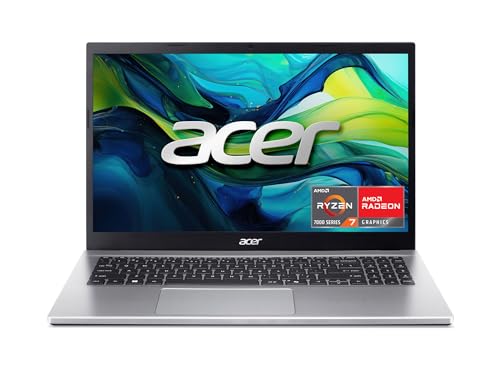
Best Budget: Acer Aspire Go 15 Ryzen 7
Specs
CPU | AMD Ryzen 7 7730U (8 cores, 16 threads) |
Graphics | AMD Radeon integrated, no discrete GPU |
Display | 15.6 in FHD (1920 x 1080) IPS |
Memory | 16 GB DDR4 |
Storage | 512 GB PCIe Gen 4 SSD |
Wireless | Wi-Fi 6 |
CPU
AMD Ryzen 7 7730U (8 cores, 16 threads)
Graphics
AMD Radeon integrated, no discrete GPU
Display
15.6 in FHD (1920 x 1080) IPS
Memory
16 GB DDR4
Storage
512 GB PCIe Gen 4 SSD
Wireless
Wi-Fi 6
What it does well
Vanilla OSRS and RuneLite with the standard GPU plugin run comfortably on the Ryzen 7 7730U's integrated Radeon graphics. Eight cores and 16 GB of memory leave room for a second client and the wiki, which is more than the game will ever ask for.
With no discrete GPU to feed, this is the lightest power draw of the five, which suits AFK skilling and bank-standing on battery. A 512 GB Gen 4 drive and Wi-Fi 6 round out a machine that also does schoolwork and streaming without complaint.
What you give up
117 HD is the catch. Expect the low preset with a short draw distance on integrated graphics, and buyers have reported the plugin running far smoother on a discrete card. If HD is the reason you are shopping, skip to the Eagle 16.
The 15.6 in 1920 by 1080 IPS panel is a standard office screen, not a high-refresh gaming one, and the 16 GB is DDR4. Neither matters much for OSRS, but this laptop will not grow into heavier games.
Who it's for
The player who runs vanilla or lightly modded OSRS, wants a cheap second machine for skilling, or is buying for a student who plays after homework.
Editor's Pick: ASUS TUF Gaming A14 Ryzen AI Max+ 392

Specs
CPU | AMD Ryzen AI Max+ 392 (12 cores) |
Graphics | Radeon 8060S integrated, no discrete GPU |
Display | 14 in WQXGA (2560 x 1600), 165 Hz, 16:10 |
Memory | 32 GB LPDDR5X, soldered |
Storage | 1 TB PCIe Gen 4 SSD |
Battery | 73 Wh |
Weight | About 1.5 kg |
CPU
AMD Ryzen AI Max+ 392 (12 cores)
Graphics
Radeon 8060S integrated, no discrete GPU
Display
14 in WQXGA (2560 x 1600), 165 Hz, 16:10
Memory
32 GB LPDDR5X, soldered
Storage
1 TB PCIe Gen 4 SSD
Battery
73 Wh
Weight
About 1.5 kg
What it does well
This is our alt-account pick. Thirty-two gigabytes of LPDDR5X leaves room for three RuneLite clients, 117 HD and a browser, and the twelve-core Ryzen AI Max+ 392 has the threads to keep them all responsive.
The Radeon 8060S is one of the strongest integrated GPUs you can buy, and reviews put it near RTX 4060 class in rasterized games, so 117 HD on high does not need a discrete card here. At about 1.5 kg with a 73 Wh battery, it is also the pick that runs longest when you take a skilling session to the couch or the train.
The 14 in 2560 by 1600 165 Hz panel is sharp enough that resizable mode with the sidebar open still shows plenty of the game. For more small machines in this class, see our 14-inch gaming laptop picks.
What you give up
The memory is soldered at 32 GB and cannot be upgraded, which is fine here because 32 GB is already the comfortable number. Storage is the only part you can swap.
It is the most expensive laptop on this list by a wide margin, and a 14 in screen is smaller than the 16 in picks. If you play at a desk and never run alts, the TUF Gaming F16 gets you the same 117 HD result for less.
Who it's for
The player running a main plus alts, or anyone who wants 117 HD on a laptop they can carry and use unplugged for a long session.
Bottom line
If you want 117 HD on high and a laptop that runs everything else too, buy the ASUS TUF Gaming F16 RTX 5050.
If you want a real GPU for 117 HD for less, buy the GIGABYTE Eagle 16 RTX 4050 and add memory later.
If the look of the game matters most, buy the Alienware 16 Aurora RTX 5060 for its 2560 by 1600 screen.
If you play vanilla OSRS or need a cheap skilling machine, buy the Acer Aspire Go 15 Ryzen 7.
If you run alts or play away from a desk, buy the ASUS TUF Gaming A14 Ryzen AI Max+ 392. Pair any of them with a proper MMO mouse with extra buttons and the trackpad stops being a problem.
FAQ
Can a laptop run Old School RuneScape?
Yes, almost any current Windows laptop or Apple Silicon MacBook can. Jagex's Steam listing recommends a Core i3-6100 or any Ryzen processor, 8 GB of memory and GeForce GTX 600 class graphics, which every laptop sold new this year beats. The question is whether you want RuneLite's 117 HD plugin. For that, a discrete GPU like the RTX 4050 in our Best Value pick, or the Radeon 8060S in our Editor's Pick, is what keeps it smooth on high settings.
Do you need a graphics card for OSRS 117 HD?
Not to run it, but you want one to run it well. RuneLite's GPU plugin needs OpenGL 4.3 and 2 GB of video memory, which integrated graphics meet. Community guides suggest the low preset on integrated chips and medium on entry-level discrete cards. For the high preset with a long draw distance, we would buy an RTX 4050 or better, which is why four of our five picks clear that line. The Acer Aspire Go 15 is the exception and is priced for vanilla play.
What are the Old School RuneScape laptop requirements?
Jagex's Steam listing asks for Windows 10 or newer, with an Intel Core i3-6100 or any AMD Ryzen processor, 8 GB of memory, GeForce GTX 600 series or Intel UHD 610 or Radeon R7 260 graphics, and 2 GB of storage. On macOS it recommends Big Sur or later on an M1 chip. Those numbers cover the official client. RuneLite plugins and 117 HD raise the graphics bar, so treat 16 GB of memory and a discrete GPU as the practical target.
How much RAM do you need to run multiple OSRS clients?
Sixteen gigabytes covers one RuneLite client, a browser full of wiki tabs and Discord. Each extra client runs its own Java process with its own plugins, so two or three alts plus 117 HD is where 16 GB starts to feel tight. For that, 32 GB is the comfortable number. The ASUS TUF Gaming A14 ships with 32 GB soldered, and the GIGABYTE Eagle 16 has two memory slots so you can add a stick later.
Can a MacBook run Old School RuneScape?
Yes. Jagex supports macOS Big Sur or later and recommends an M1 chip, and RuneLite runs on Apple Silicon too. A MacBook Air is a quiet, long-lasting skilling machine. The trade is that the rest of your PC game library mostly will not run on it, and none of our Amazon-sold picks is a Mac for that reason. If OSRS is the only game you play and you already own a recent MacBook, you do not need a new laptop.
Should you use RuneLite or the official client on a laptop?
Most players use RuneLite, which the Jagex Launcher offers as a client option, because the GPU plugin, 117 HD and the sidebar plugins all live there. On a laptop with NVIDIA graphics, set the OpenGL rendering GPU to your NVIDIA chip for RuneLite in the NVIDIA Control Panel, as the RuneLite GPU FAQ describes. Otherwise it can run on integrated graphics and you will see far lower frame rates than the GPU you bought should give you.
Related Articles

Best Gaming Laptops for WoW Forever (2026): 5 Launch Picks
The best laptop for WoW Forever pairs raid-ready CPU cores with an 8 GB GPU and 128 GB of free SSD. Five Amazon-sold picks, from an RTX 5050 to an X3D raid rig.
Nov 7, 2026

Best Gaming Laptops Under $1,000 (2026): RTX 4050 vs 5050
The best gaming laptops under $1,000 in 2026 run RTX 4050 and 3050 chips: four honest picks, one RTX 5050 stretch, the 8GB RAM fix, and when to wait for a sale.
Oct 24, 2026

Best Gaming Laptops for Minecraft (2026): 5 Shader Picks
The best laptop for Minecraft depends on shaders and mods. Five gaming laptops on Amazon, from a vanilla-ready RTX 3050 to an RTX 5070 for ultra shader packs.
Nov 11, 2026

Best MMO Mouse 2026: 5 MOBA and Raid Picks by Button Count
The best MMO mouse picks for 2026, ranked by button count: 12-button grids for raid hotbars, six-button MOBA layouts, and what each one costs you in grams.
Aug 18, 2026

Best RTX 5050 Gaming Laptops (2026): 5 TGP-Ranked Picks
The best RTX 5050 gaming laptop runs its GPU at 115W. We rank five picks by configured TGP, from the ASUS TUF Gaming F16 down to a 75W Acer Nitro V 15.
Nov 2, 2026