Affiliate Disclosure: As an Amazon Associate we earn from qualifying purchases. Some links may earn us a commission at no cost to you.

Best Gaming Laptops for The Sims 4 (2026): 5 Picks for CC
The Sims 4 will run on almost any laptop sold today. EA's recommended sheet still asks for a four-core Core i5 or Ryzen 5, 8 GB of memory and a GTX 650 class GPU, a bar every gaming laptop on Amazon clears without trying.
What the sheet leaves out is the way people play: every expansion installed, a Mods folder with thousands of CC files, and a save that has run for six generations. That load lands on the CPU, the memory and the SSD, so those three decide every pick below.
Our top pick: Acer Nitro V 16S RTX 5060
The Nitro V 16S is the cheapest Amazon-sold laptop here with 32 GB of memory and a 1 TB drive, the two specs a heavily modded Sims 4 install leans on hardest, plus an RTX 5060 that never becomes the bottleneck.

Quick picks
Pick | Laptop | Best for | Buy |
|---|---|---|---|
Best Overall | Big CC libraries and every pack installed | ||
Best Value | Smooth play with a moderate mod folder | ||
Best Premium | Huge saves plus the rest of your Steam library | ||
Best Budget | The base game and a few packs on a tight budget | ||
Editor's Pick | Build mode on a sharp OLED, in a laptop that does not look like a gaming laptop |
Best Overall
- Laptop
- Best for
Big CC libraries and every pack installed
- Buy
Best Value
- Laptop
- Best for
Smooth play with a moderate mod folder
- Buy
Best Premium
- Laptop
- Best for
Huge saves plus the rest of your Steam library
- Buy
Best Budget
- Laptop
- Best for
The base game and a few packs on a tight budget
- Buy
Editor's Pick
- Laptop
- Best for
Build mode on a sharp OLED, in a laptop that does not look like a gaming laptop
- Buy
Specs at a glance
Laptop | GPU | CPU | Display | Memory | Storage |
|---|---|---|---|---|---|
RTX 5060 Laptop, 8 GB, 85 W | Ryzen 7 260, 8 cores | 16in WUXGA 180 Hz | 32 GB DDR5 | 1 TB | |
RTX 5050 Laptop, 8 GB, 115 W | Core i5-13450HX, 10 cores | 16in FHD+ 165 Hz | 16 GB DDR5 | 512 GB | |
RTX 5070 Laptop, 8 GB, up to 115 W | Ryzen 9 9955HX, 16 cores | 16in FHD+ 165 Hz | 16 GB DDR5 | 1 TB | |
RTX 3050 Laptop, 4 GB, 75 W | Ryzen 5 7535HS, 6 cores | 15.6in FHD 144 Hz | 16 GB DDR5 | 512 GB | |
RTX 5050 Laptop, 8 GB | Ryzen AI 7 350, 8 cores | 16in 2.8K OLED 120 Hz | 16 GB LPDDR5 | 1 TB |
- GPU
RTX 5060 Laptop, 8 GB, 85 W
- CPU
Ryzen 7 260, 8 cores
- Display
16in WUXGA 180 Hz
- Memory
32 GB DDR5
- Storage
1 TB
- GPU
RTX 5050 Laptop, 8 GB, 115 W
- CPU
Core i5-13450HX, 10 cores
- Display
16in FHD+ 165 Hz
- Memory
16 GB DDR5
- Storage
512 GB
- GPU
RTX 5070 Laptop, 8 GB, up to 115 W
- CPU
Ryzen 9 9955HX, 16 cores
- Display
16in FHD+ 165 Hz
- Memory
16 GB DDR5
- Storage
1 TB
- GPU
RTX 3050 Laptop, 4 GB, 75 W
- CPU
Ryzen 5 7535HS, 6 cores
- Display
15.6in FHD 144 Hz
- Memory
16 GB DDR5
- Storage
512 GB
- GPU
RTX 5050 Laptop, 8 GB
- CPU
Ryzen AI 7 350, 8 cores
- Display
16in 2.8K OLED 120 Hz
- Memory
16 GB LPDDR5
- Storage
1 TB
The Sims 4 requirements: EA minimum, recommended, and our CC-ready tier
Tier | CPU | GPU | Memory | Storage | Our picks |
|---|---|---|---|---|---|
Minimum (EA) | Core i3-3220 or Ryzen 3 1200 | GeForce 6600 or Intel GMA X4500, 128 MB VRAM | 4 GB | 25 GB free plus 1 GB for CC and saves | Every pick clears it |
Recommended (EA) | Core i5 (4 cores) or Ryzen 5 | GTX 650 or Radeon HD 7750, 1 GB VRAM | 8 GB | 50 GB free plus 1 GB for CC and saves | Every pick clears it |
CC-ready (our tier) | 6 or more current cores with a high boost clock | Any current RTX laptop GPU | 16 GB, 32 GB for a large Mods folder | 1 TB SSD | Nitro V 16S, Strix G16, IdeaPad Pro 5 |
Minimum (EA)
- CPU
Core i3-3220 or Ryzen 3 1200
- GPU
GeForce 6600 or Intel GMA X4500, 128 MB VRAM
- Memory
4 GB
- Storage
25 GB free plus 1 GB for CC and saves
- Our picks
Every pick clears it
Recommended (EA)
- CPU
Core i5 (4 cores) or Ryzen 5
- GPU
GTX 650 or Radeon HD 7750, 1 GB VRAM
- Memory
8 GB
- Storage
50 GB free plus 1 GB for CC and saves
- Our picks
Every pick clears it
CC-ready (our tier)
- CPU
6 or more current cores with a high boost clock
- GPU
Any current RTX laptop GPU
- Memory
16 GB, 32 GB for a large Mods folder
- Storage
1 TB SSD
- Our picks
Nitro V 16S, Strix G16, IdeaPad Pro 5
How we picked
EA's published numbers are the place to start, and they are modest. The minimum is a dual-core Core i3-3220 or a Ryzen 3 1200, 4 GB of memory and 25 GB of free space. The recommended tier moves to a four-core Core i5 or Ryzen 5, 8 GB of memory, a GTX 650 class card and 50 GB free. EA also builds a Laptop Mode into the game options for machines at or near the minimum, which says a lot about how light the base game is.
So we mostly ignored the GPU badge. Every laptop here carries a current RTX chip, and even the RTX 3050 in the budget pick is many times the recommended card. Graphics power is not where a Sims 4 laptop runs out of road, which is why none of these picks chases an RTX 5080. If you want the resolution side of that argument, our guide on how to choose a GPU and a matching display covers it.
We weighted the processor instead. The simulation leans heavily on a single CPU thread, so big lots, busy community lots and long-running saves slow down on any laptop, and a bigger GPU does not fix it. A high per-core boost clock is the spec that keeps a late-game save moving, and it is why the premium pick carries a 16-core Ryzen 9 rather than a bigger graphics chip.
Then memory and storage, the two specs that track how much you mod. Large CC libraries lengthen load times and raise memory use, so 16 GB is the comfortable floor and 32 GB helps once the Mods folder runs to thousands of files. A 512 GB drive fills fast once Windows, every pack and a CC library share it, so three of the five picks ship with a terabyte. If memory is the spec you care about most, our list of gaming laptops with 32GB of RAM goes deeper.
Finally, the seller. Four of the five listings are sold and shipped by Amazon.com. The IdeaPad Pro 5 is the exception: its listing comes from a third-party seller, which we flag in its section.
Best Overall: Acer Nitro V 16S RTX 5060
Specs
CPU | AMD Ryzen 7 260 (8 cores, 16 threads) |
GPU | GeForce RTX 5060 Laptop, 8 GB |
Max graphics power | 85 W (as reviewed) |
Display | 16 in WUXGA (1920 x 1200) IPS, 180 Hz |
Memory | 32 GB DDR5 |
Storage | 1 TB PCIe Gen 4 SSD |
Model | ANV16S-41-R2AJ |
CPU
AMD Ryzen 7 260 (8 cores, 16 threads)
GPU
GeForce RTX 5060 Laptop, 8 GB
Max graphics power
85 W (as reviewed)
Display
16 in WUXGA (1920 x 1200) IPS, 180 Hz
Memory
32 GB DDR5
Storage
1 TB PCIe Gen 4 SSD
Model
ANV16S-41-R2AJ
What it does well
Thirty-two gigabytes of memory is the standout at this tier. The Sims 4 itself is happy on far less, but a Mods folder with thousands of CC files, a browser full of build references and a recording tool add up fast, and this is the cheapest Amazon-sold laptop here that never makes you close anything.
A 1 TB drive holds every pack and a large CC library with room to spare, and the 16-inch 180 Hz WUXGA panel is a 16:10 screen, so build mode gets extra vertical room for the catalog. The Ryzen 7 260 is an eight-core Zen 4 chip with plenty of per-core speed for the simulation.
What you give up
Wattage is the catch. Tom's Hardware's review unit ran its RTX 5060 at 85 W, below thicker RTX 5060 laptops with the same badge. For The Sims 4 that changes nothing; for heavier games on the same machine it shows.
It is a 16-inch gaming chassis, with the weight, the charger and the fan noise that come with it. If you mostly play on the sofa, the IdeaPad Pro 5 further down this page is the friendlier shape.
Who it's for
The player with every expansion, a big Mods folder and a long-running legacy save, who wants a laptop that never asks them to choose between CC and frame rate. If you also play heavier games, our list of RTX 5060 gaming laptops ranks this chip by wattage.
Best Value: ASUS TUF Gaming F16 RTX 5050
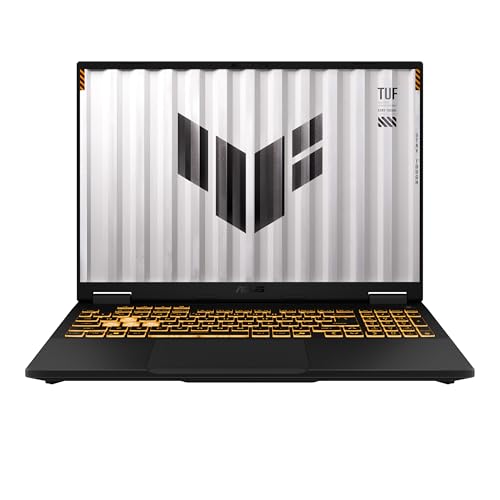
Specs
CPU | Intel Core i5-13450HX (10 cores, 16 threads) |
GPU | GeForce RTX 5050 Laptop, 8 GB GDDR7 |
Max graphics power | 115 W (100 W + 15 W Dynamic Boost) |
Display | 16 in FHD+ (1920 x 1200), 165 Hz, 16:10 |
Memory | 16 GB DDR5 |
Storage | 512 GB PCIe Gen 4 SSD |
Wireless | Wi-Fi 6E |
CPU
Intel Core i5-13450HX (10 cores, 16 threads)
GPU
GeForce RTX 5050 Laptop, 8 GB GDDR7
Max graphics power
115 W (100 W + 15 W Dynamic Boost)
Display
16 in FHD+ (1920 x 1200), 165 Hz, 16:10
Memory
16 GB DDR5
Storage
512 GB PCIe Gen 4 SSD
Wireless
Wi-Fi 6E
What it does well
The RTX 5050 here runs at the full 115 W (100 W plus 15 W of Dynamic Boost) on ASUS's spec sheet, the top of that chip's power range. That is far more GPU than The Sims 4 needs, and it leaves headroom for the rest of a Steam library.
The Core i5-13450HX is a 10-core HX chip with a 4.6 GHz boost, which handles busy lots well, and the 16-inch 165 Hz FHD+ panel is 16:10 like the Nitro. Wi-Fi 6E is a small bonus if your router supports it.
What you give up
Storage is the trade. A 512 GB drive holds the game and every pack, but a large CC library on top of Windows and a couple of other games will fill it, and you will end up managing folders.
Sixteen gigabytes of memory is fine for a moderate Mods folder and tight for a huge one. Budget for a second SSD or a memory upgrade if your CC habit grows.
Who it's for
The player who mods moderately, wants a modern GPU for other games too, and would rather spend the difference on packs than on specs the Sims will never use.
Best Premium: ASUS ROG Strix G16 RTX 5070

Specs
CPU | AMD Ryzen 9 9955HX (16 cores, 32 threads) |
GPU | GeForce RTX 5070 Laptop, 8 GB |
Max graphics power | Up to 115 W with Dynamic Boost |
Display | 16 in FHD+ (1920 x 1200), 165 Hz, 16:10 |
Memory | 16 GB DDR5-5600 |
Storage | 1 TB PCIe Gen 4 SSD |
Model | G614FP-OS94 |
CPU
AMD Ryzen 9 9955HX (16 cores, 32 threads)
GPU
GeForce RTX 5070 Laptop, 8 GB
Max graphics power
Up to 115 W with Dynamic Boost
Display
16 in FHD+ (1920 x 1200), 165 Hz, 16:10
Memory
16 GB DDR5-5600
Storage
1 TB PCIe Gen 4 SSD
Model
G614FP-OS94
What it does well
The Ryzen 9 9955HX is the reason this one is here. Sixteen Zen 5 cores with a boost past 5 GHz is the fastest per-core CPU on this page, and per-core speed is what holds a large, long-running save together when the simulation is tracking a full neighborhood.
The RTX 5070 runs at up to 115 W with Dynamic Boost on ASUS's sheet, so anything else you install runs well too. A 1 TB drive takes every pack and a big CC library without a cleanup session first.
What you give up
Sixteen gigabytes of memory is the comfortable floor, not the comfortable ceiling, once a very large Mods folder loads. A 32 GB upgrade is worth budgeting if you run thousands of CC files.
Most of the GPU goes unused in The Sims 4, so you are paying for headroom in other games. The panel is FHD+ at 1920 by 1200, and Strix cooling is tuned for clocks rather than quiet, so expect audible fans through a long build session.
Who it's for
The player whose Sims save is huge and whose library includes heavier games, who wants the fastest CPU here and plays plugged in most of the time.
Best Budget: ASUS TUF Gaming A15 RTX 3050

Specs
CPU | AMD Ryzen 5 7535HS (6 cores, 12 threads) |
GPU | GeForce RTX 3050 Laptop, 4 GB GDDR6 |
Max graphics power | 60 W (75 W with Dynamic Boost) |
Display | 15.6 in FHD (1920 x 1080), 144 Hz |
Memory | 16 GB DDR5 |
Storage | 512 GB PCIe Gen 4 SSD |
Model | FA506NC-DS53 |
CPU
AMD Ryzen 5 7535HS (6 cores, 12 threads)
GPU
GeForce RTX 3050 Laptop, 4 GB GDDR6
Max graphics power
60 W (75 W with Dynamic Boost)
Display
15.6 in FHD (1920 x 1080), 144 Hz
Memory
16 GB DDR5
Storage
512 GB PCIe Gen 4 SSD
Model
FA506NC-DS53
What it does well
This is the cheapest Amazon-sold laptop we would point at The Sims 4. The RTX 3050 runs at 60 W, or 75 W with Dynamic Boost, per ASUS, which is many times EA's recommended GTX 650, and the 15.6-inch 144 Hz panel is a sensible match for what it sustains at 1080p.
It also ships with 16 GB of DDR5 and an SSD, so it already sits above EA's recommended tier on memory and storage speed. The Ryzen 5 7535HS is a six-core Zen 3+ chip with a 4.55 GHz boost, enough for the base game and a handful of packs.
What you give up
The 4 GB of VRAM and the six cores are the ceiling. A heavily modded save with high-resolution CC will run slower here than on the eight- and sixteen-core picks, and other modern games will need low settings.
A 512 GB drive fills fast once Windows, every pack and a CC library share it. If you buy every expansion, plan for an external or second SSD. Budget chassis also run warm in long sessions, and a cooling pad for a gaming laptop helps.
Who it's for
The returning player or student who wants The Sims 4 with a few packs and a modest CC folder at 1080p, and no other heavy games on the list.
Editor's Pick: Lenovo IdeaPad Pro 5 16 OLED RTX 5050

Specs
CPU | AMD Ryzen AI 7 350 (8 cores, 16 threads) |
GPU | GeForce RTX 5050 Laptop, 8 GB |
Display | 16 in 2.8K (2880 x 1800) OLED, 120 Hz |
Memory | 16 GB LPDDR5 (soldered) |
Storage | 1 TB SSD |
Weight | About 3.8 lb (1.72 kg) |
Ports | USB4 |
CPU
AMD Ryzen AI 7 350 (8 cores, 16 threads)
GPU
GeForce RTX 5050 Laptop, 8 GB
Display
16 in 2.8K (2880 x 1800) OLED, 120 Hz
Memory
16 GB LPDDR5 (soldered)
Storage
1 TB SSD
Weight
About 3.8 lb (1.72 kg)
Ports
USB4
What it does well
The Sims 4 is a game people play for hours in build mode, and this is the only pick with an OLED panel. The 16-inch 2880 by 1800 screen at 120 Hz makes the catalog, the color swatches and CC detail look sharp in a way the FHD gaming panels above do not.
It also looks like a work laptop. At about 3.8 lb it is lighter than the gaming chassis here, it carries a 1 TB drive and USB4, and the RTX 5050 inside is still far beyond what the game asks for. Notebookcheck puts the RTX 5050 near the last-generation RTX 4060 laptop GPU.
What you give up
The Amazon listing is sold by a third-party seller, not Amazon.com, so returns go through that seller and the price moves more than the others. The 16 GB of memory is soldered, so there is no upgrade path for a huge Mods folder.
Lenovo does not publish the RTX 5050's wattage in this chassis, and a thin creator laptop will not sustain the clocks of the TUF F16. For The Sims 4 that is irrelevant; for heavier games it is the trade for the slimmer shape. Reports suggest OLED panels can show burn-in from static interface elements over very long sessions, so vary what sits on screen.
Who it's for
The player who wants one good-looking laptop for school or work and the Sims in the evening, cares about the screen more than the frame counter, and mods moderately. For more panels like this, see our list of OLED gaming laptops.
Bottom line
If you run a big Mods folder and every pack, buy the Nitro V 16S. If you mod moderately and want a modern GPU for other games, buy the TUF F16. If your save is huge and you play heavier games too, the Strix G16 has the fastest CPU here. If the budget is tight and 1080p is fine, the TUF A15 is the honest answer, and if the screen matters most, the IdeaPad Pro 5 is the one we would buy. Still deciding on the shape? Our value math on gaming laptop versus desktop is the argument to read first, and our list of the best gaming laptops for WoW Forever covers a second evergreen favorite.
FAQ
Can a cheap laptop run The Sims 4?
Yes. EA's minimum is a dual-core Core i3 with 4 GB of memory and 25 GB of free space, and the recommended tier is a four-core Core i5 or Ryzen 5 with 8 GB. Most laptops sold today clear that, and EA's Laptop Mode helps machines near the floor. What a cheap laptop struggles with is a big CC library, so aim for 16 GB of memory and an SSD. The TUF A15 is our budget pick for that reason.
How much RAM do I need for The Sims 4 with mods and CC?
For the base game and a few packs, 8 GB meets EA's recommended tier and 16 GB is comfortable. Large CC libraries raise memory use and lengthen load times, so 16 GB is the floor we would buy at, and 32 GB helps once the Mods folder runs to thousands of files. The Nitro V 16S is the pick here that ships with 32 GB.
How much storage do The Sims 4 and all its packs need?
EA lists 50 GB of free space on its recommended tier, plus at least 1 GB for custom content and saves. Every expansion, game pack and kit adds more, and a large CC library can add tens of gigabytes on top. Pack sizes change with each release, so we treat a 1 TB SSD as the safe size for a player who buys everything. Three of our five picks ship with a terabyte.
Do I need a gaming laptop for The Sims 4, or will integrated graphics work?
You do not strictly need one. The recommended GPU is a GTX 650 class card, and current integrated graphics run the base game. A gaming laptop still helps in two ways: it pairs a faster CPU with more memory and storage, and its dedicated GPU keeps high settings and high-resolution CC smooth. Even the RTX 3050 in our budget pick is many times the recommended card.
Why does The Sims 4 lag on a good laptop?
Usually it is the CPU, not the GPU. The simulation leans heavily on one processor thread, so large lots, busy community lots and long-running saves slow down on any laptop. Thousands of CC files and script mods add load time and memory use on top. A laptop with a high per-core boost clock and 16 GB or more of memory handles it best, which is why the Strix G16 carries a Ryzen 9.
Is a 512 GB SSD enough for The Sims 4?
For the base game and a handful of packs, yes. A 512 GB drive gets tight once Windows, every expansion and a large CC library share it, especially if you also install other games. If you buy every pack, choose a 1 TB laptop or plan for a second SSD. The TUF F16 and TUF A15 ship with 512 GB, so factor that in.
Related Articles

Best Gaming Laptops for WoW Forever (2026): 5 Launch Picks
The best laptop for WoW Forever pairs raid-ready CPU cores with an 8 GB GPU and 128 GB of free SSD. Five Amazon-sold picks, from an RTX 5050 to an X3D raid rig.
Nov 7, 2026

Best Laptops for Football Manager 27 (2026): 5 Picks
The best laptop for Football Manager 27 leads with CPU speed and RAM, not the GPU. Five picks for big databases, the 3D match engine, and Mac players.
Nov 4, 2026

Best Gaming Laptops Under $1,000 (2026): RTX 4050 vs 5050
The best gaming laptops under $1,000 in 2026 run RTX 4050 and 3050 chips: four honest picks, one RTX 5050 stretch, the 8GB RAM fix, and when to wait for a sale.
Oct 24, 2026

Best RTX 5050 Gaming Laptops (2026): 5 TGP-Ranked Picks
The best RTX 5050 gaming laptop runs its GPU at 115W. We rank five picks by configured TGP, from the ASUS TUF Gaming F16 down to a 75W Acer Nitro V 15.
Nov 2, 2026

Gaming Laptop vs Desktop 2026: Value Math and 4 Picks
Gaming laptop vs desktop in 2026: desktops deliver about 30-40% more frames per dollar, laptops deliver portability. See which fits you, plus 4 picks.
Sep 2, 2026