Affiliate Disclosure: As an Amazon Associate we earn from qualifying purchases. Some links may earn us a commission at no cost to you.

Is 550W Enough for an RTX 5060 Ti? The Real Math (2026)
Yes, for most builds. An RTX 5060 Ti pulls 180W and spikes to about 210W, so a full system built around a six or eight core AMD chip peaks somewhere between 325W and 400W. On a quality 550W unit that is 59% to 73% load, which is the efficiency sweet spot rather than the danger zone.
The answer flips on one thing: a 250W-class Intel K chip. Pair a 14700K or 14900K with the same card and peak system draw lands near 490W, which is 89% of a 550W unit and exactly where transients bite. And if you are buying a supply rather than reusing one, buy 650W regardless. Here is the arithmetic.
At a glance
Power supply | Wattage | Standard | Best for | Buy |
|---|---|---|---|---|
650W | ATX 3.1, PCIe 5.1 | Closing the question at any CPU tier | ||
650W | ATX 3.1, PCIe 5.1 | The cheapest unit still worth signing off on | ||
750W | ATX 3.1, PCIe 5.1 | A GPU upgrade you have already committed to |
- Wattage
650W
- Standard
ATX 3.1, PCIe 5.1
- Best for
Closing the question at any CPU tier
- Buy
- Wattage
650W
- Standard
ATX 3.1, PCIe 5.1
- Best for
The cheapest unit still worth signing off on
- Buy
- Wattage
750W
- Standard
ATX 3.1, PCIe 5.1
- Best for
A GPU upgrade you have already committed to
- Buy
Is 550W enough for your CPU?
Your CPU | Peak system draw | Load on 550W | Verdict | What to buy |
|---|---|---|---|---|
Ryzen 5 7600 or 9600X class | Around 325W | 59% | Yes, comfortably | |
Ryzen 7 9800X3D class | Around 400W | 73% | Yes, with less room than you want | |
Core i5-14600K class | Around 415W | 76% | Yes, but the step up earns its keep | |
Core i7-14700K or i9-14900K | Around 490W | 89% | No, move to 650W or more |
Ryzen 5 7600 or 9600X class
- Peak system draw
Around 325W
- Load on 550W
59%
- Verdict
Yes, comfortably
- What to buy
Ryzen 7 9800X3D class
- Peak system draw
Around 400W
- Load on 550W
73%
- Verdict
Yes, with less room than you want
- What to buy
Core i5-14600K class
- Peak system draw
Around 415W
- Load on 550W
76%
- Verdict
Yes, but the step up earns its keep
- What to buy
Core i7-14700K or i9-14900K
- Peak system draw
Around 490W
- Load on 550W
89%
- Verdict
No, move to 650W or more
- What to buy
The wattage math
GPU at its 180W cap, CPU at its package power ceiling, plus roughly 55W for board, memory, two NVMe drives and fans.
- Ryzen 5 7600 class325 watts
- Ryzen 7 9800X3D class400 watts
- Core i5-14600K class415 watts
- Core i7-14700K / i9-14900K class490 watts
Start with the card. NVIDIA rates the RTX 5060 Ti at 180W total graphics power, delivered through a single 8-pin plus the PCIe slot. TechPowerUp's sampling puts real gaming draw at 155W to 165W in raster workloads, with the card reaching its 180W ceiling only once ray tracing is on, and its high-rate capture caught transient peaks near 210W. That 30W gap above the sustained cap is what every wattage argument is really about, and it is the number ATX 3.1 exists to handle. The general version of this exercise is how PSU wattage gets sized for any build.
Now add the CPU, because this is where builds separate. A Ryzen 5 7600 tops out near 88W of package power. A 9800X3D runs to a 162W PPT ceiling. A Core i5-14600K turbos to roughly 181W, and a 14900K is rated for 253W. Motherboard, memory, two NVMe drives and a handful of fans add about 55W. Your chip choice therefore swings the total by more than 160W, which is why the CPU you pair with a 5060 Ti decides this question and the graphics card does not.
Put the two together and a 5060 Ti build lands between 325W and 490W at peak. A 550W unit sits in its most efficient load band across the first three rows and gets uncomfortable only in the fourth. So why does NVIDIA ask for 600W? Because a minimum system power figure has to cover the worst pairing anyone might build, and a 14900K next to a 5060 Ti is that pairing. Read it as insurance sized for the outlier, then check your own parts list. The closest AMD card runs the same shape of calculation at a lower total. We found that 500W is enough for an RX 9060 XT with a 65W-class chip, and the step-up case starts in the same place.
When 550W is genuinely not enough
Three conditions flip the answer. The first is a 250W-class Intel K chip. A 14700K or 14900K under a heavy all-core load, next to a 5060 Ti spending its transient budget, pushes a 550W unit to roughly 89% of rated output. That is not an instant shutdown. It is the band where a marginal unit's ripple climbs and its fan gets loud, with nothing spare for a warm room in August.
The second is a graphics card upgrade you have genuinely committed to. A 5070 Ti or 5080 lands in the 300W class, which puts the same system past 550W even with the mainstream CPU that cleared it before. Sizing the supply for the card you plan to buy is the cheapest upgrade insurance there is. We ran the same question one GPU tier up and the arithmetic lands differently.
The third is the unit itself. Wattage is a label, not a guarantee. I will not put my name on a build running a CX-tier or unknown-brand supply whatever the sticker claims, because the PSU is the one part that can take every other part in the case with it when it fails. Tier A OEM, Cybenetics Gold or better, sized off transient behaviour rather than TDP. Seasonic builds in house; Super Flower, CWT, FSP and Great Wall build for the brands worth owning. Corsair's CX, CV and VS lines, Aresgame, Apevia and Segotep are not on that list at any wattage. Our guide to judging a supply beyond its wattage label covers the rest.
One market fact sits underneath all three. Search Amazon for a Gold-rated 550W ATX 3.1 unit in 2026 and almost nothing comes back; the good platforms start at 650W now. Own a Gold 550W supply from a trusted OEM already? Keep it and build. Shopping today? The decision was made for you, and the units worth buying for a 5060 Ti all sit a tier above.
The 650W that ends the question: Seasonic CORE GX-650
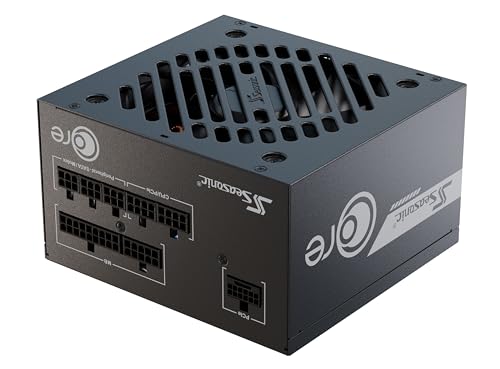
Specs
Wattage | 650W |
Efficiency | 80 Plus Gold |
Standard | ATX 3.1, PCIe 5.1 |
12V-2x6 | Native, plus a 2x 8-pin adapter |
Modularity | Fully modular |
Fan | 120mm hydro dynamic bearing |
Depth | 140mm |
Warranty | 7 years |
Wattage
650W
Efficiency
80 Plus Gold
Standard
ATX 3.1, PCIe 5.1
12V-2x6
Native, plus a 2x 8-pin adapter
Modularity
Fully modular
Fan
120mm hydro dynamic bearing
Depth
140mm
Warranty
7 years
What it does well
Seasonic builds its own platforms, so the OEM question answers itself. That matters more here than in almost any other component category, because a brand name on a PSU box tells you nothing about who assembled what is inside it.
It clears every row of the table above, including the 14900K case that breaks 550W. The native 12V-2x6 cable removes the adapter chain if your next card uses the newer connector, the same reason we favour native 12V-2x6 units. The 140mm depth pays off in compact ATX cases, where a 160mm unit fouls the front intake fan.
Noise is a non-issue. At the half load a 5060 Ti build imposes, the 120mm hydro dynamic bearing fan and Seasonic's control curve keep the unit close to inaudible.
What you give up
Seven years of warranty against ten from both other picks, for units that cost about the same. Seasonic's coverage is real and these platforms rarely need it, but three years is three years.
You are also buying a ceiling you will not reach. Half the capacity sits unused for the life of a 325W build. That is fine as insurance and it keeps the fan quiet, but it is not free, and if a 300W-class card is genuinely coming then 650W is the wrong ceiling anyway.
Who it's for
The builder speccing a 5060 Ti system from scratch who wants the power question closed permanently and does not plan a graphics card tier jump inside this build's life.
The value 650W: MSI MAG A650GLS
Specs
Wattage | 650W |
Efficiency | 80 Plus Gold |
Standard | ATX 3.1, PCIe 5.1 |
12V-2x6 | Native, dual-color cable |
Modularity | Fully modular |
Form factor | Compact ATX |
Warranty | 10 years |
Wattage
650W
Efficiency
80 Plus Gold
Standard
ATX 3.1, PCIe 5.1
12V-2x6
Native, dual-color cable
Modularity
Fully modular
Form factor
Compact ATX
Warranty
10 years
What it does well
Same 650W ceiling and the same ATX 3.1 compliance as the Seasonic, with three more years of warranty. A ten-year term is the clearest signal a manufacturer can send about its own platform.
The dual-color 12V-2x6 cable is the detail worth noticing. The connector shows a different colour band when it is not fully seated, which is precisely the failure mode that melted 12VHPWR plugs on the 40-series. A visual cue beats a spec sheet promise about contact resistance.
What you give up
MSI does not build its own platforms. The OEM behind a given MAG revision can change between production runs in a way Seasonic's in-house units cannot, so the brand-tier reasoning does not transfer cleanly.
Independent coverage of the GLS revision is thinner than for the older A650GL it replaces, so there is less published ripple and transient data to lean on. Buyers have flagged that the two model names sit close enough on a listing page to be mixed up, and the older GL is an ATX 3.0 unit without the native 12V-2x6 cable. Check the letters before you check out.
Who it's for
The budget-conscious builder who wants the 650W answer without paying the in-house-OEM premium, and who values a longer warranty over a deeper review record. If your budget is tighter still, we keep a list of cheaper units that are still safe.
Step up if a GPU upgrade is coming: be quiet! Pure Power 13 M 750W

Specs
Wattage | 750W |
Efficiency | 80 Plus Gold, Cybenetics Gold |
Standard | ATX 3.1, PCIe 5.1 |
12V-2x6 | Native, rated 600W |
Modularity | Fully modular |
Fan | Semi-passive 120mm |
Rail | Single 12V |
Warranty | 10 years |
Wattage
750W
Efficiency
80 Plus Gold, Cybenetics Gold
Standard
ATX 3.1, PCIe 5.1
12V-2x6
Native, rated 600W
Modularity
Fully modular
Fan
Semi-passive 120mm
Rail
Single 12V
Warranty
10 years
What it does well
This unit carries a Cybenetics Gold rating alongside the 80 Plus badge. Cybenetics measures noise and load regulation across the whole curve rather than efficiency at three points, so it tells you something the sticker does not.
The semi-passive fan stays off entirely at the roughly 22% load a 5060 Ti build imposes, so this is silent in the machine it will live in rather than only on a test bench. A single 12V rail also removes the per-rail over-current guessing that trips people on multi-rail designs.
On headroom, 750W with a native 600W 12V-2x6 cable covers everything up to a 5080-class card. That is two graphics card generations of runway from a 5060 Ti starting point.
What you give up
You are buying 750W to run a 400W system, capacity you pay for today and use only if the upgrade happens. Builders who say they will swap the graphics card in two years mostly do not.
If the 5060 Ti is the card for the life of this build, this is overspend and the 650W picks above are the honest answer. Buy headroom only when you can name the card you are buying it for.
Who it's for
The builder treating the 5060 Ti as a stopgap with a specific next card already picked out, and anyone who wants a supply that never spins its fan during normal gaming. If you are still working out how the supply, cooler and case decisions interact, start with our power, cooling and case guide.
Bottom line
If you are running a Ryzen 5, a Ryzen 7, or any non-K Intel chip, your 550W unit is enough and the money belongs somewhere else in the build. If you are running a 14700K or 14900K, move to 650W before you close the case. If you are buying new, the Seasonic CORE GX-650 closes the question at every CPU tier for close to nothing over a 550W unit. If a 5070 Ti or 5080 is already on your list, skip straight to the be quiet! Pure Power 13 M 750W. And if the supply in your case is bronze, unbranded, or older than you can remember, replace it whatever the wattage label says. If the card in question is last generation instead, the same 550W math for an RTX 4070 Super reaches the same verdict with a tighter margin.
FAQ
Does the RTX 5060 Ti need a 650W power supply?
Not strictly. The card pulls 180W with transient peaks near 210W, and a full system built around a mainstream six or eight core CPU peaks between 325W and 400W, which a quality 550W unit handles at 59% to 73% load. The 650W recommendation exists because it covers every CPU pairing including the 253W Intel parts, and because the good ATX 3.1 platforms now start at 650W anyway.
What PSU wattage does NVIDIA officially recommend for the RTX 5060 Ti?
NVIDIA lists 600W as the minimum system power requirement on its own specifications page, identical for the 8GB and 16GB versions. That number is a margin sized for the heaviest CPU someone might pair with the card, not a measured floor, and a 5060 Ti system with a Ryzen 5 or Ryzen 7 does not come close to it under load. Treat it as insurance, then check your own CPU against the table above.
Will a 550W PSU crash or shut down with an RTX 5060 Ti?
On a mainstream build, no. Shutdowns happen when combined transient spikes trip a supply's over-current or over-power protection, which needs the system already running near its rated output. A 5060 Ti with a Ryzen 5 or Ryzen 7 sits well under that. The risk case is a 14700K or 14900K, where peak draw reaches roughly 89% of a 550W unit. Unit quality matters more than the last 50W of rating.
Does the RTX 5060 Ti need an ATX 3.1 PSU or a 12V-2x6 connector?
No. Most RTX 5060 Ti cards use a single 8-pin PCIe connector, which any standard supply provides. ATX 3.1 matters for two other reasons: it defines how a unit must tolerate transient spikes, the exact behaviour that decides whether 550W clears this build, and a native 12V-2x6 cable means no adapter chain when you move to a card using the newer connector. Buy it for the next card, not this one.
Do the 8GB and 16GB RTX 5060 Ti draw different power?
No. Both share the same 180W total graphics power rating and the same 600W minimum system power figure on NVIDIA's specification page. The extra memory on the 16GB card does not move board power in any way that changes a PSU decision. The two differ on VRAM capacity and on 1440p behaviour with heavy textures, which is a graphics card choice rather than a power supply one.
Can I reuse an old 550W PSU from a previous build with an RTX 5060 Ti?
Usually yes, after two checks. Age first: electrolytic capacitors degrade, and a unit past seven or eight years of daily use no longer delivers its rated output cleanly. Tier second: a Gold-rated 550W supply from Seasonic, Super Flower, CWT or FSP is fine for this card, while a bronze budget unit from an unknown OEM is a risk whatever the wattage says. If either check fails, the replacement starts at 650W now anyway.
Related Articles

Best PSU for RTX 5060 Ti: 650W Sweet Spot, 5 Picks (2026)
The best PSU for an RTX 5060 Ti is a 650W ATX 3.1 unit, not the 850W you were sold. Five vetted picks for budget, quiet, SFF, and upgrade-path builds.
Sep 19, 2026

Is 650W Enough for an RTX 5070, or Do You Need 750W? (2026)
Is a 650W PSU enough for an RTX 5070? Yes on a quality ATX 3.1 unit with a mainstream CPU. Here is the headroom math, the connector trap, and the picks.
Aug 14, 2026

Best ATX 3.1 Power Supplies (2026): 5 Native 12V-2x6 Picks
Five ATX 3.1 power supplies with native 12V-2x6 connectors, Cybenetics Gold through Platinum, all 850W, plus how to spot an ATX 3.0 unit sold with an adapter.
Aug 14, 2026

Best CPUs for the RTX 5060 Ti (2026): 5 Tiered Picks
The best CPUs for the RTX 5060 Ti keep its PCIe 5.0 x8 link fed. Five picks by tier, each matched to the board generation that this card genuinely needs.
Aug 21, 2026

RTX 5060 Ti for 1440p: Enough, or Step Up to 5070? (2026)
The RTX 5060 Ti 16GB clears 1440p high refresh in most games, but ray tracing and heavier titles shift the math fast. Here's when to step up to a 5070.
Jul 25, 2026